How to Add Products to Shopify Automatically (Free n8n Template)

Last tested on n8n 2.45, November 2026.
Adding new products to Shopify by hand works when you launch ten items a month, not when a wholesaler sends an updated price list every morning or you want to test products from AliExpress alongside your regular stock. Shopify’s built-in CSV import caps files at 15 MB and can’t be cancelled once it starts, while import apps still leave you fixing keyword-stuffed titles and missing shipping margins by hand: even Importify’s own guide has you edit the title, description, vendor and tags before each push.
By the end of this guide, you’ll have an n8n workflow that brings wholesaler price lists (and, if you want them, AliExpress products) into one table, finds what’s new, writes clean copy, prices from cost plus shipping plus tax, and lets you approve drafts in Slack.
What you’ll build
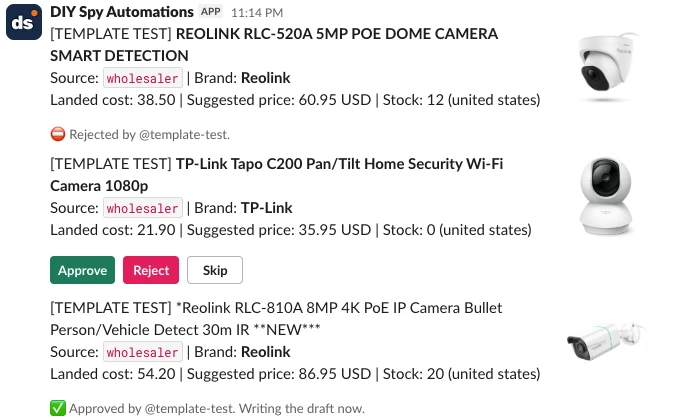
When a new product lands in your staging table, the workflow checks that you don’t already sell it and posts a Slack card showing the photo, source, landed cost (cost plus shipping), suggested retail price, stock count, and ships-from country. On a store I run, a product goes from that first tap in Slack to a complete Shopify draft in about 8 seconds. I put the approvals in Slack because that’s where I already am during the day, and a yes or no takes one tap.
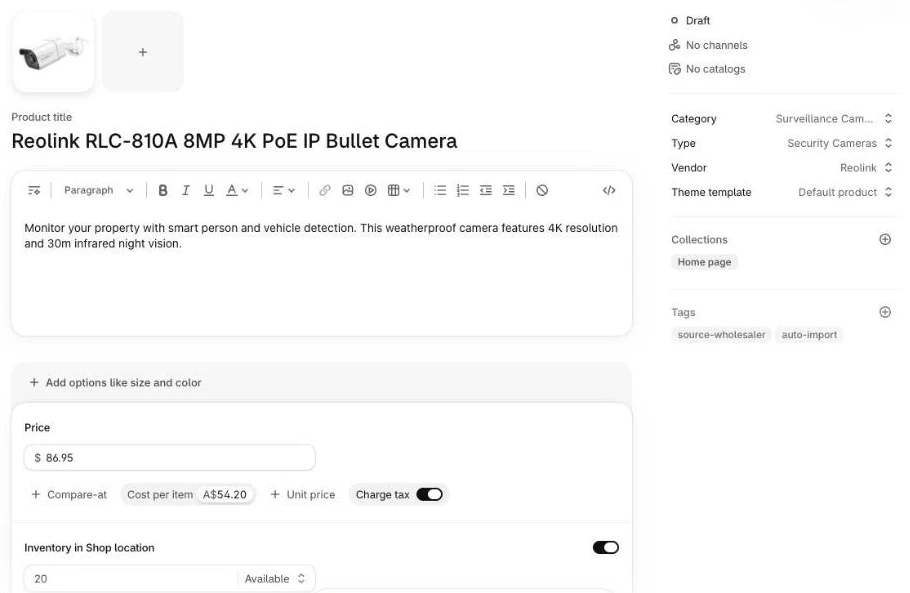
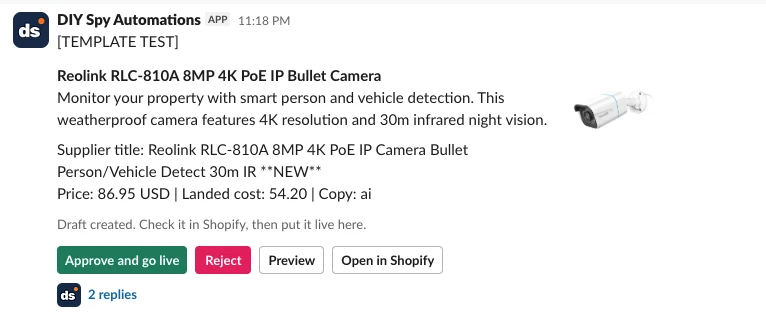
Once the draft is created, the workflow posts a second Slack card with the cleaned-up title and description next to the supplier’s original, plus a preview link. You can tweak the draft in Shopify if needed, then tap Approve and go live in Slack to put it live.
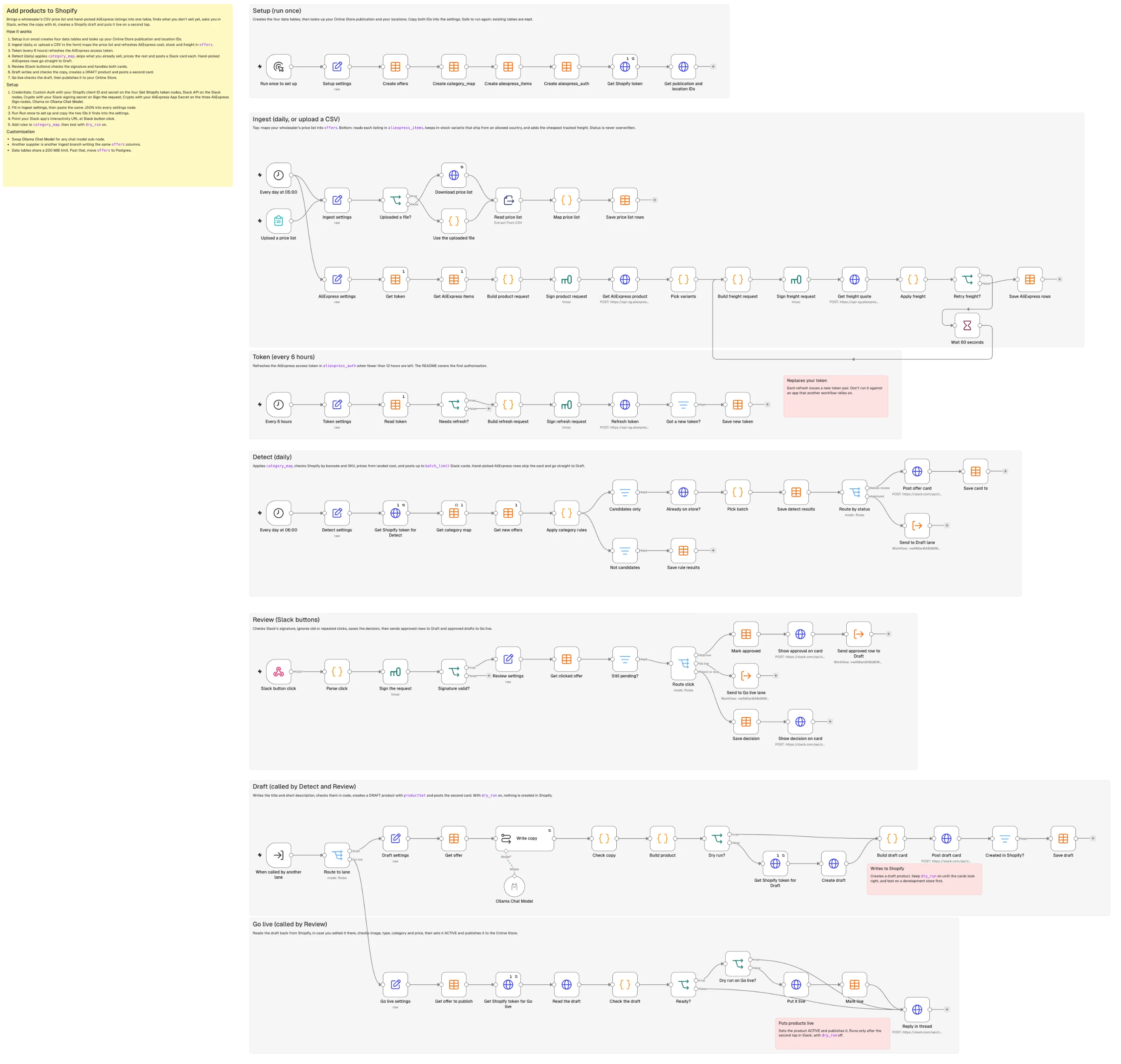
The workflow lives on one n8n canvas split into seven lanes: Setup, Ingest, Token, Detect, Review, Draft, and Go live.
What you need
- n8n with Data Tables enabled: the free self-hosted Community Edition (recommended) or n8n Cloud.
- A Shopify app (client ID and secret) with
read_products,write_products,read_inventory,write_inventory,read_publications,write_publications, andread_locationsscopes. - A Slack app with Interactivity enabled and
chat:writescope. - An AI model via n8n’s Chat Model sub-node (Ollama Cloud by default, swappable).
- Your wholesaler’s price list (CSV).
- Optional, for AliExpress: a free AliExpress Open Platform app with dropshipping API access. Skip it if you only import from a price list.
How it works
- Setup (Manual Trigger): Creates the
offers,category_map,aliexpress_itemsandaliexpress_authData Tables and fetches your Shopify publication and location IDs. - Ingest (Schedule / Form Trigger): One branch maps your wholesaler’s CSV price list, and an optional second branch fetches your chosen AliExpress products and freight rates.
- Token (Schedule Trigger, AliExpress only): Refreshes your AliExpress access token in its one-row Data Table.
- Detect (Schedule Trigger): Maps categories, marks excluded items
blockedwith a reason, checks Shopify for duplicates, and posts new wholesaler items to Slack (AliExpress items skip this card by default). - Review (Webhook): Checks that each button click really came from Slack, handles clicks from both Slack cards, and routes approved items to Draft or Go live.
- Draft (When Executed by Another Workflow): Writes and checks the title and description with AI, creates a
DRAFTproduct viaproductSet, and posts the second Slack card. - Go live (When Executed by Another Workflow): Checks the draft for an image, a price above landed cost plus tax, a type, and a category, then publishes it to your Online Store.
Step 1: Create the tables and settings
Add a Manual Trigger connected to four Data table nodes (Table -> Create) to store state in n8n Data Tables (which share a 200 MiB instance limit by default):
| Table | Columns |
|---|---|
offers | String: source, source_sku, item_id, sku_id, mpn, gtin, brand, title, description, category_raw, product_type, shopify_category_id, ships_from, image_url, raw, freight_method, block_reason, status, reviewed_by, product_id, card_ts, card_nonce, draft_card_tsNumber: cost, shipping_cost, rrp, stock, delivery_days, est_price |
category_map | String: source, match_field, pattern, product_type, shopify_category_id, action, reason |
aliexpress_items | String: item_id, sku_id (a blank sku_id means every variant) |
aliexpress_auth | String: app_key, access_token, refresh_token, access_expires_at, refresh_expires_at (one row) |
Add a Set node named after its lane (Ingest settings, Detect settings and so on) at the start of each lane:
{
  "store_domain": "your-store.myshopify.com",
  "currency": "USD",
  "prices_include_tax": false,
  "tax_rate": 0,
  "markup": 1.6,
  "min_margin": 0.15,
  "round_to": 0.95,
  "ship_to_country": "US",
  "ships_from_allowed": ["china", "china mainland", "united states"],
  "max_delivery_days": 20,
  "batch_limit": 15,
  "aliexpress_pre_approved": true,
  "slack_channel": "C0123456789",
  "location_id": "gid://shopify/Location/...",
  "online_store_publication_id": "gid://shopify/Publication/...",
  "default_vendor": "Your Store",
  "dry_run": true,
  "source_name": "wholesaler",
  "price_list_url": "https://example.com/price-list.csv",
  "columns": {
    "source_sku": "Stock Code", "brand": "Manufacturer", "mpn": "Part No", "gtin": "EAN",
    "title": "Description", "description": "Long Description", "category": "Category",
    "cost": "Dealer Ex Tax", "rrp": "RRP", "stock": "Stock", "image": "Image URL"
  },
  "cost_includes_tax": false,
  "shipping_per_unit": 0,
  "ships_from": "united states"
}
Add an HTTP Request node in Setup calling https://YOUR_STORE.myshopify.com/admin/api/2026-10/graphql.json with the token from a Get Shopify token node (the repo’s SETUP.md covers it) to look up your Online Store publicationId and primary locationId, then copy both into the settings:
query SetupIds {
  publications(first: 20) { nodes { id catalog { title } } }
  locations(first: 10) { nodes { id name } }
}
Step 2: Bring in a wholesaler’s products
In the Ingest lane, add a Schedule Trigger with an HTTP Request (Response Format: File) and Extract From File (CSV), or a Form Trigger with Extract From File if your wholesaler emails the list. Both triggers run Ingest settings first, and because a Set node drops files, an If node sends uploads through a one-line Code node that takes the file straight from the form. Wholesaler files often give stock as "20+" and prices as formatted text such as "1.234,50". Add a Code node named Map price list to normalise each row (here mapping a Reolink RLC-810A PoE camera), reading the column names from a columns setting:
// One price list row -> one offer row. Column names come from settings.
const s = $('Ingest settings').first().json;
const c = s.columns; // {"source_sku":"Stock Code","brand":"Manufacturer","mpn":"Part No", ...}
const text = v => (v ?? '').toString().trim();
const num = v => {
  let t = text(v).replace(/[^0-9.,\-]/g, '');
  if (/,\d{1,2}$/.test(t)) t = t.replace(/\./g, '').replace(',', '.'); // "1.234,50" -> 1234.50
  else t = t.replace(/,/g, '');                                       // "1,234.50" -> 1234.50
  const n = parseFloat(t); return Number.isFinite(n) ? n : null;
};
const qty = v => { const n = parseInt(text(v).replace(/[^0-9]/g, ''), 10); return Number.isFinite(n) ? n : 0; }; // "20+" -> 20, "CALL" -> 0

return $input.all().map(({ json: r }) => {
  let cost = num(r[c.cost]);
  if (cost !== null && s.cost_includes_tax) cost = +(cost / (1 + s.tax_rate)).toFixed(2);
  return { json: {
    source: s.source_name, source_sku: text(r[c.source_sku]),
    mpn: text(r[c.mpn]), gtin: text(r[c.gtin]).replace(/\D/g, ''),
    brand: text(r[c.brand]), title: text(r[c.title]), description: text(r[c.description]).slice(0, 1500),
    category_raw: text(r[c.category]), cost, shipping_cost: s.shipping_per_unit || 0,
    rrp: num(r[c.rrp]), stock: qty(r[c.stock]), image_url: text(r[c.image]),
    ships_from: s.ships_from, raw: JSON.stringify(r).slice(0, 2000),
  } };
}).filter(i => i.json.source_sku && i.json.cost !== null);
Connect a Data table Upsert node (Save price list rows) on offers matching source and source_sku, and leave status out of the mapping so updates keep the existing status of rows you’ve already reviewed.
Step 3: Bring in AliExpress products (optional)
This step and the Token lane are only for AliExpress. If you only import from a wholesaler’s price list, skip to Step 4: with no rows in aliexpress_items and aliexpress_auth, the AliExpress branch and the Token lane stop at their first read and do nothing.
Paste the AliExpress product IDs you want to import (such as the listing for a 70mai Dash Cam A510) into the aliexpress_items Data Table (add a sku_id to import just one variant), and read them with a Data table Get node alongside a second Get node named Get token for the row in aliexpress_auth.
Every AliExpress Open Platform call requires an HMAC-SHA256 signature over sorted parameter names and values. Add a Code node to build the string to sign for aliexpress.ds.product.get:
// Parameters and string to sign for aliexpress.ds.product.get
const s = $('AliExpress settings').first().json;
const auth = $('Get token').first().json; // the one row in aliexpress_auth
const ids = [...new Set($input.all().map(i => String(i.json.item_id)))]; // one call per listing
return ids.map(item_id => {
  const params = {
    method: 'aliexpress.ds.product.get',
    app_key: auth.app_key,
    access_token: auth.access_token,
    timestamp: String(Date.now()),
    sign_method: 'sha256',
    product_id: item_id,
    ship_to_country: s.ship_to_country,
    target_currency: s.currency,
    target_language: 'en_US',
  };
  const toSign = Object.keys(params).sort().map(k => k + params[k]).join('');
  return { json: { item_id, params, toSign } };
});
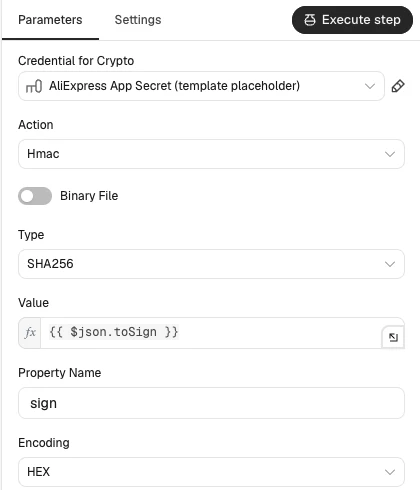
Sign toSign with an n8n Crypto node:
| Setting | Value |
|---|---|
| Action | Hmac |
| Type | SHA256 |
| Value | {{ $json.toSign }} |
| Property Name | sign |
| Encoding | HEX |
| Credential | Crypto, with Hmac Secret = your AliExpress App Secret |
Then send the request to https://api-sg.aliexpress.com/sync with an HTTP Request node (POST, Send Query Parameters using JSON, batching 5 items a second), because /sync reads its parameters from the query string:
{{ JSON.stringify({ ...$json.params, sign: $json.sign.toUpperCase() }) }}A separate Token lane keeps your token fresh in aliexpress_auth: a Schedule Trigger every six hours, an If node that continues when fewer than 12 hours are left, and the same Code, Crypto and HTTP Request pattern. Token refresh is a system call, so the API path goes in front of the string to sign and the request goes to /rest:
// Token refresh is a system call: the API path goes in front of the string to sign
const a = $('Read token').first().json;
const params = { app_key: a.app_key, refresh_token: a.refresh_token, timestamp: String(Date.now()), sign_method: 'sha256' };
const toSign = '/auth/token/refresh' + Object.keys(params).sort().map(k => k + params[k]).join('');
// POST https://api-sg.aliexpress.com/rest/auth/token/refresh
return [{ json: { params, toSign } }];
Save the new tokens with a Data table Update node. The README covers the first authorisation.
Next, add a Code node named Pick variants that inspects ae_item_sku_info_dtos and maps one offer per variant that’s in stock, ships from a country in ships_from_allowed and matches the sku_id you gave, if any, because ships-from is often a variant with its own price and stock:
const s = $('AliExpress settings').first().json;
const allowed = s.ships_from_allowed;
const wanted = $('Get AliExpress items').all().map(i => i.json); // a blank sku_id means every variant
const countryRx = /^(china( mainland)?|united (kingdom|states)|australia|spain|france|germany|poland|italy|czech republic|turkey|brazil|russian federation|saudi arabia)$/i;
const out = [];
for (const { json } of $input.all()) {
  const r = json.aliexpress_ds_product_get_response?.result;
  if (!r?.ae_item_base_info_dto) continue; // API error such as SHIP_TO_COUNTRY_PROHIBITED: the rows keep their last values
  const item = String(r.ae_item_base_info_dto.product_id);
  const skus = wanted.filter(w => String(w.item_id) === item).map(w => String(w.sku_id || ''));
  const brandProp = (r.ae_item_properties?.ae_item_property || []).find(p => /^brand/i.test(p.attr_name));
  const brand = /^(none|no brand|oem|other|unbranded)$/i.test(brandProp?.attr_value || 'none') ? '' : brandProp.attr_value;
  const images = (r.ae_multimedia_info_dto?.image_urls || '').split(';').filter(Boolean);
  for (const sku of r.ae_item_sku_info_dtos?.ae_item_sku_info_d_t_o || []) {
    const props = (sku.ae_sku_property_dtos?.ae_sku_property_d_t_o || []).map(p => p.property_value_definition_name || p.sku_property_value);
    const shipsFrom = props.find(p => countryRx.test(p)) || '';
    if (shipsFrom && !allowed.includes(shipsFrom.toLowerCase())) continue;
    if (Number(sku.sku_available_stock) <= 0) continue;
    if (!skus.includes('') && !skus.includes(String(sku.sku_id))) continue;
    const variant = props.filter(p => p !== shipsFrom).join(' / ');
    out.push({ json: {
      source: 'aliexpress', source_sku: `${item}-${sku.sku_id}`, item_id: item, sku_id: String(sku.sku_id),
      brand, gtin: (sku.ean_code || '').replace(/\D/g, ''), mpn: '',
      title: [r.ae_item_base_info_dto.subject, variant].filter(Boolean).join(' | '),
      category_raw: String(r.ae_item_base_info_dto.category_id),
      cost: Number(sku.offer_sale_price || sku.sku_price), stock: Number(sku.sku_available_stock),
      ships_from: shipsFrom || r.ae_store_info?.store_country_code || '',
      image_url: (sku.ae_sku_property_dtos?.ae_sku_property_d_t_o || []).find(p => p.sku_image)?.sku_image || images[0] || '',
      block_reason: sku.currency_code === s.currency ? '' : `priced in ${sku.currency_code}`,
    } });
  }
}
return out;
Call aliexpress.ds.freight.query using the same Crypto signing flow with queryDeliveryReq:
queryDeliveryReq: JSON.stringify({ quantity: 1, shipToCountry: s.ship_to_country, productId: row.item_id,
  selectedSkuId: row.sku_id, language: 'en_US', locale: 'en_US', currency: s.currency })
Note that shipping_fee_cent returns currency units (the freight docs pair "172.71" with “US $172.71”), and local-warehouse variants sometimes return DELIVERY_NOT_AVAILABLE_TO_YOUR_ADDRESS. Handle both in a Code node named Apply freight before upserting to offers: it keeps the cheapest tracked method within max_delivery_days, blocks the row instead of pricing shipping at zero when there’s no quote, and flags DELIVERY_RATE_LIMIT_FOR_SINGLE_PRODUCT for one retry through a 60-second Wait node:
// shipping_fee_cent is in currency units, not cents ("172.71" = US $172.71)
const s = $('AliExpress settings').first().json;
const sent = $('Sign freight request').all(0, $runIndex); // this run's requests, in the same order as the replies
return $input.all().map(({ json }, i) => {
  const { params, toSign, sign, retry_freight, ...offer } = sent[i].json;
  const res = json.aliexpress_ds_freight_query_response?.result;
  if (res?.msg === 'DELIVERY_RATE_LIMIT_FOR_SINGLE_PRODUCT' && $runIndex === 0) return { json: { ...offer, retry_freight: true } };
  if (String(res?.success) !== 'true') return { json: { ...offer, shipping_cost: null,
    block_reason: offer.block_reason || `no freight quote: ${res?.msg || json.error_response?.msg || 'request failed'}` } };
  const best = (res.delivery_options?.delivery_option_d_t_o || [])
    .filter(o => String(o.tracking) === 'true' && Number(o.max_delivery_days) <= s.max_delivery_days)
    .map(o => ({ ...o, fee: String(o.free_shipping) === 'true' ? 0 : Number(o.shipping_fee_cent) }))
    .sort((a, b) => a.fee - b.fee || a.max_delivery_days - b.max_delivery_days)[0];
  if (!best) return { json: { ...offer, shipping_cost: null, block_reason: offer.block_reason || `no tracked shipping within ${s.max_delivery_days} days` } };
  return { json: { ...offer, shipping_cost: best.fee, freight_method: best.company, delivery_days: Number(best.max_delivery_days) } };
});
Step 4: Decide what belongs in your store
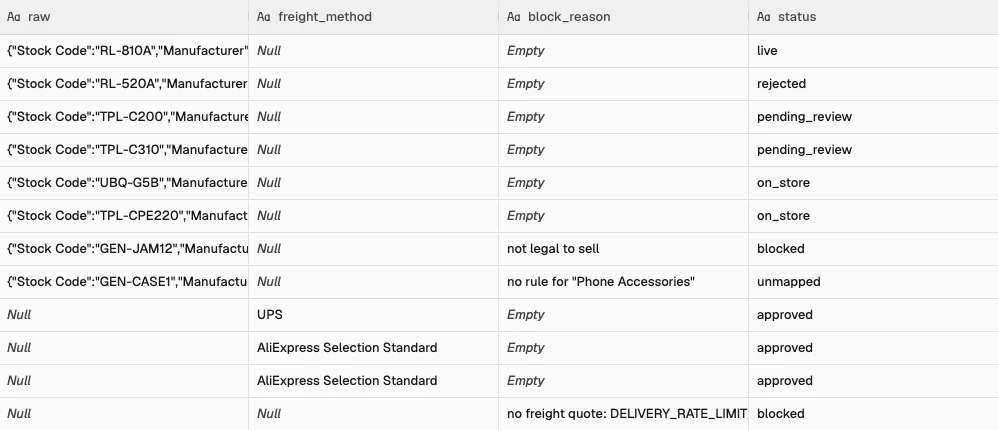
In the Detect lane, load rows with an empty status from offers (Get new offers) alongside category_map (Get category map). Never delete excluded products, or tomorrow’s import will recreate them as new. Mark them blocked with a reason in a Code node:
// Title rules beat category rules. Nothing is dropped: every row leaves with a status.
const rules = $('Get category map').all().map(i => i.json).filter(r => r.pattern)
  .sort((a, b) => (a.match_field === 'title' ? 0 : 1) - (b.match_field === 'title' ? 0 : 1));
return $('Get new offers').all().map(({ json: o }) => {
  const rule = rules.find(r => r.source === o.source &&
    (r.match_field === 'title' ? new RegExp(r.pattern, 'i').test(o.title) : r.pattern === o.category_raw));
  if (o.block_reason) return { json: { ...o, status: 'blocked' } };
  if (!rule) return { json: { ...o, status: 'unmapped', block_reason: `no rule for "${o.category_raw}"` } };
  if (rule.action === 'block') return { json: { ...o, status: 'blocked', block_reason: rule.reason } };
  return { json: { ...o, status: 'candidate', product_type: rule.product_type, shopify_category_id: rule.shopify_category_id } };
});
A few rules cover the running example:
| source | match_field | pattern | product_type | shopify_category_id | action | reason |
|---|---|---|---|---|---|---|
| wholesaler | category | IP Cameras | Security Cameras | co-2-5 | include | |
| wholesaler | title | \bjammer\b | block | not legal to sell | ||
| aliexpress | category | your AliExpress category ID | Dash Cams | co-2-7-6 | include |
Step 5: Find what’s new and approve in Slack
Keep the candidate rows with a Filter node named Candidates only, then query Shopify per candidate using an HTTP Request node (2026-10):
query AlreadySold($q: String!) {
  productVariants(first: 5, query: $q) {
    nodes { id sku product { id title status } }
  }
}
Pass the query filter:
Variables: {{ { q: [ $json.gtin && 'barcode:' + $json.gtin, $json.mpn && 'sku:"' + $json.mpn + '"', 'sku:"' + $json.source_sku + '"' ].filter(Boolean).join(' OR ') } }}Then deduplicate in a Code node named Pick batch: mark matches on_store, keep the cheaper landed offer (cost + shipping_cost) when two sources share a barcode, calculate the price from landed cost plus tax (the AliExpress API does not calculate sales tax), and slice to batch_limit. With aliexpress_pre_approved on, AliExpress rows become approved because you chose them by hand:
const s = $('Detect settings').first().json;
const taxFactor = s.prices_include_tax ? 1 + s.tax_rate : 1;
const out = [], byGtin = new Map();
$input.all().forEach((res, i) => {
  const o = { ...$('Candidates only').itemMatching(i).json, status: '' };
  const hit = res.json.data?.productVariants?.nodes?.[0];
  if (hit) return out.push({ ...o, status: 'on_store', product_id: hit.product.id });
  if (o.shipping_cost == null || o.shipping_cost === '') return out.push({ ...o, status: 'blocked', block_reason: o.block_reason || 'no shipping cost' });
  const landed = o.cost + o.shipping_cost;
  const floor = landed * (1 + s.min_margin) * taxFactor;
  let price = landed * s.markup * taxFactor;
  if (o.rrp && o.rrp >= floor) price = Math.min(price, o.rrp); // don't price above the brand's RRP
  o.est_price = Math.ceil(price - s.round_to) + s.round_to;    // 54.20 -> 54.95
  o.landed = landed;
  const prev = o.gtin && byGtin.get(o.gtin);                   // same barcode from two sources
  if (prev && prev.landed <= landed) return out.push({ ...o, status: 'duplicate' });
  if (prev) prev.status = 'duplicate';
  if (o.gtin) byGtin.set(o.gtin, o);
  out.push(o);
});
out.filter(o => !o.status).sort((a, b) => (b.stock > 0) - (a.stock > 0)).slice(0, s.batch_limit).forEach(o => {
  if (o.source === 'aliexpress' && s.aliexpress_pre_approved) o.status = 'approved';
  else { o.status = 'pending_review'; o.card_nonce = Math.random().toString(36).slice(2, 10); }
});
return out.map(json => ({ json }));
Rows with status: 'approved' go straight to the Draft lane; rows with status: 'pending_review' post a card to Slack (chat.postMessage). Each button carries the row ID and a card_nonce, so an older card for the same row is ignored. The body is built with JSON.stringify, so quotes in a supplier title can’t break it, and the image is left out when a row has none:
={{ JSON.stringify({
  channel: $('Detect settings').first().json.slack_channel,
  text: 'New product candidate: ' + $json.title,
  unfurl_links: false,
  blocks: [
    {
      type: 'section',
      text: { type: 'mrkdwn', text: '*' + $json.title.replace(/\*/g, '') + '*\nSource: `' + $json.source + '` | Brand: *' + ($json.brand || 'unknown') + '*\n'
        + 'Landed cost: ' + ($json.cost + $json.shipping_cost).toFixed(2) + ' | Suggested price: ' + $json.est_price.toFixed(2) + ' ' + $('Detect settings').first().json.currency
        + ' | Stock: ' + $json.stock + ' (' + $json.ships_from + ')' },
      ...(/^https:\/\//.test($json.image_url) ? { accessory: { type: 'image', image_url: $json.image_url, alt_text: $json.title.slice(0, 100) } } : {})
    },
    {
      type: 'actions',
      elements: [
        { type: 'button', text: { type: 'plain_text', text: 'Approve' }, style: 'primary', action_id: 'product_approve', value: $json.id + ':' + $json.card_nonce },
        { type: 'button', text: { type: 'plain_text', text: 'Reject' }, style: 'danger', action_id: 'product_reject', value: $json.id + ':' + $json.card_nonce },
        { type: 'button', text: { type: 'plain_text', text: 'Skip' }, action_id: 'product_skip', value: $json.id + ':' + $json.card_nonce }
      ]
    }
  ]
}) }}
Step 6: Catch the button clicks
In the Review lane, add a Webhook node set to Respond: Immediately to meet Slack’s 3-second response window:
| Setting | Value |
|---|---|
| HTTP Method | POST |
| Path | product-review |
| Respond | Immediately |
| Options > Raw Body | On |
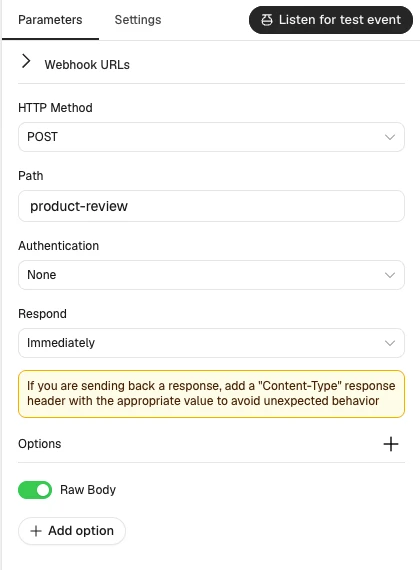
Because anyone holding the webhook URL could post an approval, add a Code node that reads the raw body and rejects requests older than 300 seconds, then a Crypto node (Hmac, SHA256, HEX, Property Name sig, with your Slack signing secret) that signs $json.base:
const raw = (await this.helpers.getBinaryDataBuffer(0, 'data')).toString('utf8');
const h = $input.first().json.headers;
if (Math.abs(Date.now() / 1000 - Number(h['x-slack-request-timestamp'])) > 300) throw new Error('Stale request');
const field = raw.split('&').find(kv => kv.startsWith('payload=')) || ''; // no URLSearchParams in the Code node
const p = JSON.parse(decodeURIComponent(field.slice(8).replace(/\+/g, ' ')));
const a = p.actions[0];
const [row_id, nonce] = String(a.value).split(':');
return [{ json: { base: `v0:${h['x-slack-request-timestamp']}:${raw}`, expected: h['x-slack-signature'],
  action: a.action_id, row_id, nonce, user: p.user.username, channel: p.channel.id, ts: p.message.ts,
  blocks: (p.message.blocks || []).filter(b => b.type !== 'actions') } }];
Continue only when 'v0=' + $json.sig matches $json.expected. Check in offers that the row is still pending and the nonce matches, so clicking an old card twice does nothing, then route with a Switch node on action_id. Approve runs an Execute Sub-workflow node with Workflow ID {{ $workflow.id }} and a lane field, which a When Executed by Another Workflow trigger and a second Switch send to Draft or Go live, so the workflow still works after import.
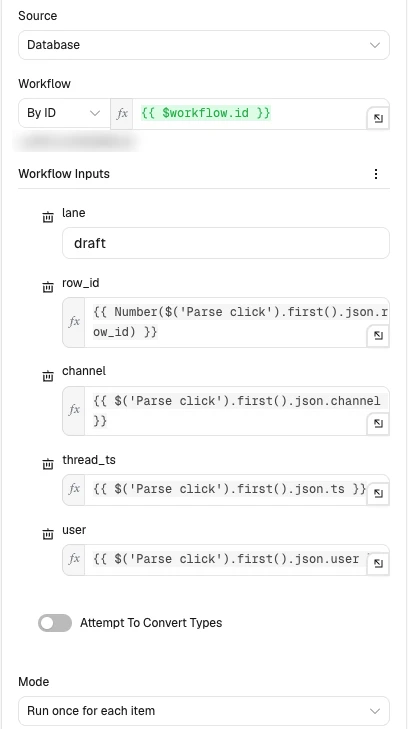
Step 7: Write the copy and create the draft
In the Draft lane, connect the When Executed by Another Workflow trigger to a Data table Get node named Get offer and a Basic LLM Chain node with an Ollama Chat Model sub-node (Base URL https://ollama.com, temperature 0.3). The user message strips curly braces, which the prompt template reads as variables:
Raw title: {{ $json.title.replace(/[{}]/g, '') }}
Brand: {{ $json.brand || 'unknown' }}
MPN: {{ $json.mpn || 'none' }}
Category: {{ $json.product_type }}
Supplier description: {{ ($json.description || 'none').replace(/[{}]/g, '') }}
The system message:
You write product titles and short descriptions for an online store. You get the supplier's data for one product. Reply with exactly two lines and nothing else:
Title: the product title
Short description: the short description

Title rules:
- Brand first, then the model number exactly as supplied, then the key spec, then what the product is.
- If the brand is unknown, start with the model or product type.
- Never infer a brand from an AliExpress seller name.
- 70 characters or fewer.
- Only facts in the supplier data. Never add a spec, model number or feature.
- Ignore keyword lists and marketing phrases in the raw title.
- No supplier codes, prices, stock words, sales words, emojis or quote marks.

Short description rules:
- One or two sentences, 20 to 45 words, plain text.
- What it does for the buyer, then one concrete spec from the data.
- Only facts from the supplier data.
Next, add a Code node named Check copy that matches model numbers as whole words, because a substring check would find “SDCS” inside “SDCS3” and pass a different product’s model number:
const o = $('Get offer').first().json;
const out = String($json.text || '');
let title = (out.match(/^\s*title\s*:\s*(.+)$/im) || [])[1]?.trim() || '';
let desc = (out.match(/short description\s*:\s*([\s\S]+)/i) || [])[1]?.trim() || '';
const words = s => String(s).toUpperCase().replace(/[^A-Z0-9]+/g, ' ').trim().split(' ');
const source = new Set(words([o.title, o.brand, o.mpn, o.description].join(' ')));
// every token with a digit must exist in the source, whole: "SDCS/256GB" fails against "SDCS3/256GB"
const invented = title.split(/\s+/).filter(t => /\d/.test(t)).filter(t => !words(t).every(w => source.has(w)));
let reason = !title ? 'no title' : title.length > 80 ? 'too long' : invented.length ? 'not in source: ' + invented.join(', ') : null;
if (reason) title = [o.brand, o.title.split(' | ')[0]].filter(Boolean).join(' ').replace(/\s+/g, ' ').slice(0, 70);
if (desc.length < 40 || desc.length > 400 || /<[a-z]/i.test(desc)) desc = '';
return [{ json: { title, short_description: desc, title_source: reason ? 'fallback' : 'ai', title_reject_reason: reason } }];
Then add a Code node to build the productSet input. The barcode goes on because GTINs help listings surface in Google, and the sourcing metafields let a later sync find the product:
const o = $('Get offer').first().json, c = $('Check copy').first().json, s = $('Draft settings').first().json;
const esc = t => String(t).replace(/&/g, '&').replace(/</g, '<').replace(/>/g, '>');
const variant = {
optionValues: [{ optionName: 'Title', name: 'Default Title' }],
sku: o.mpn || o.source_sku,
price: o.est_price.toFixed(2),
inventoryItem: { cost: (o.cost + (o.shipping_cost || 0)).toFixed(2), tracked: true },
inventoryQuantities: [{ locationId: s.location_id, name: 'available', quantity: o.stock }],
};
if (o.gtin) variant.barcodes = [{ value: o.gtin }];
return [{ json: { input: {
title: c.title,
descriptionHtml: c.short_description ? `<p>${esc(c.short_description)}</p>` : '',
vendor: o.brand || s.default_vendor,
productType: o.product_type,
...(o.shopify_category_id ? { category: `gid://shopify/TaxonomyCategory/${o.shopify_category_id}` } : {}),
status: 'DRAFT',
tags: ['auto-import', `source-${o.source}`],
productOptions: [{ name: 'Title', values: [{ name: 'Default Title' }] }],
variants: [variant],
files: o.image_url ? [{ originalSource: o.image_url, contentType: 'IMAGE', alt: c.title }] : [],
metafields: [
{ namespace: 'sourcing', key: 'source', type: 'single_line_text_field', value: o.source },
{ namespace: 'sourcing', key: 'source_sku', type: 'single_line_text_field', value: o.source_sku },
],
} } }];Call productSet (2026-10) in an HTTP Request node and post the second Slack card with the draft copy, a preview link, and Approve and go live and Reject buttons. While dry_run is on, an If node skips productSet and the card says nothing was created. If the request times out, run the Step 5 lookup on the SKU before retrying, because Shopify may have created the product anyway:
mutation CreateDraft($input: ProductSetInput!) {
  productSet(synchronous: true, input: $input) {
    product { id legacyResourceId status onlineStorePreviewUrl }
    userErrors { field message code }
  }
}
Step 8: Check the draft and put it live
In the Go live lane, read the draft back from Shopify first in case you edited it in the Shopify admin:
query DraftCheck($id: ID!) {
  product(id: $id) {
    id title status productType category { id }
    media(first: 10) { nodes { mediaContentType status } }
    variants(first: 1) { nodes { price inventoryItem { unitCost { amount } } } }
  }
}
Check in a Code node that the draft has an image Shopify actually fetched, a productType, a category, and a price above landed cost plus tax. Read each image’s status rather than mediaCount, because a supplier image Shopify couldn’t download still counts as one:
const p = $json.data.product, s = $('Go live settings').first().json;
const v = p.variants.nodes[0] || {};
const price = Number(v.price), landed = Number(v.inventoryItem?.unitCost?.amount || 0);
const floor = landed * (s.prices_include_tax ? 1 + s.tax_rate : 1);
// mediaCount counts images Shopify failed to fetch, so check each image's status
const images = p.media.nodes.filter(m => m.mediaContentType === 'IMAGE');
const missing = [];
if (!images.some(m => m.status === 'READY')) missing.push(images.some(m => m.status === 'FAILED') ? 'a working image (Shopify could not fetch the supplier image)' : 'an image');
if (!p.productType) missing.push('a product type');
if (!p.category) missing.push('a category');
if (!(landed > 0 && price > floor)) missing.push(`a price above ${floor.toFixed(2)}`);
return [{ json: { id: p.id, ready: missing.length === 0, missing } }];
If any check fails, reply in the Slack thread listing what’s missing; otherwise, with dry_run off, call productUpdate and publishablePublish:
mutation GoLive($id: ID!, $publications: [PublicationInput!]!) {
  productUpdate(product: { id: $id, status: ACTIVE }) {
    product { id status handle onlineStoreUrl }
    userErrors { field message }
  }
  publishablePublish(id: $id, input: $publications) {
    userErrors { field message }
  }
}
Variables: {{ { id: $json.id, publications: [{ publicationId: $('Go live settings').first().json.online_store_publication_id }] } }}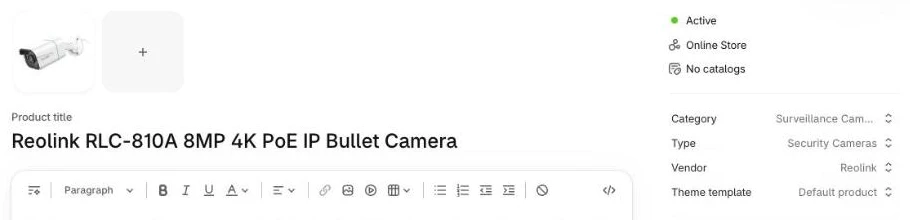
What it costs
All prices below were checked November 2026:
| Component | Unit price | 500 products/mo | 2,000 products/mo | 10,000 products/mo |
|---|---|---|---|---|
| n8n | $0 self-hosted, or n8n Cloud Starter €20/mo (2,500 executions) and Pro €50/mo (10,000) | $0 or €20/mo | $0 or €50/mo (Pro) | $0 self-hosted, or a Cloud tier above Pro |
Ollama Cloud (gemma4) | $0.14/1M in, $0.40/1M out (~$0.0003/product) | $0.15/mo | $0.60/mo | $3.00/mo |
| AliExpress Open Platform | Free dropshipping API | $0 | $0 | $0 |
| DSers, for comparison (AliExpress only) | Basic free up to 3,000 products; Advanced $19.90/mo up to 20,000; Pro $49.90/mo | $0 to $19.90/mo | $19.90/mo | $19.90 to $49.90/mo |
I’d self-host n8n: the Community Edition is free and has no execution limits, so the model is the only running cost. Because the AI model only runs on products that pass category rules, deduplication, and Slack approval, rejected items cost zero tokens. For a store that only sells AliExpress products, DSers is the cheaper option; the workflow earns its place once a wholesaler’s price list is involved or you want the copy checked before it goes live.
Common mistakes
Rules that silently drop products
Discarding rejected rows on an If node’s false branch gives you no audit trail and re-runs them tomorrow. Write excluded items to offers with status: 'blocked' and a block_reason.
Duplicates when there’s no barcode match
Wholesalers and AliExpress sellers often omit barcodes, even though GTINs help listings surface in Google Shopping. Always fall back from barcode to SKU and MPN (RLC-810A).
Pricing from cost without shipping and tax
Pricing off unit cost alone loses money when shipping on a cheap AliExpress item costs as much as the item, or your store displays tax-inclusive prices. Base your margin formula on cost + shipping_cost plus tax.
Picking an overseas AliExpress variant when a local one exists
AliExpress listings often bundle China and local warehouses as separate SKUs. Set ships_from_allowed for your market and keep sku_id on every row.
Copying AliExpress titles and images as they are
Keyword-stuffed titles hurt trust, which is why even Importify’s guide has you edit titles before publishing. Let the LLM clean the copy and check the image on the Slack card.
Stock given as “20+” text
Passing "20+" or "In Stock" to Shopify fails integer validation. Strip non-digits in your mapping Code node.
Importing everything at once
Flooding Slack with 2,000 products stalls review. Cap batch_limit at 10 to 25 items per run.
AI copy going live unread
Models occasionally misread an accessory as the main camera. Creating a DRAFT first and requiring a second tap prevents live mistakes.
Not keeping the source SKU or AliExpress ID
If you discard the supplier’s ID, future stock syncs can’t match the product. Save it in the sourcing.source and sourcing.source_sku metafields.
Forgetting write_publications
Without this scope everything works until go-live, when publishablePublish fails. Add it when you create the custom app.
Letting the AliExpress token lapse in test status
While your app is in test status, refresh tokens lasted 48 hours in testing and refreshing didn’t extend them, so re-authorise every two days until the app is approved.
Make it your own
PDF price lists and messy spreadsheets
When a supplier sends messy spreadsheets or PDFs, use an AI node once per supplier to map the column headers to JSON, then let a deterministic Code node parse and check every row.
Other dropship platforms, reviews, and variant grouping
Any other source with an API can be another Ingest branch writing the same offers columns. To group colour or storage SKUs into one multi-variant Shopify product, collect rows by item_id and send several variants in one productSet, and you can add a review app such as Judge.me in the Go live lane.
When Data Tables aren’t enough
n8n Data Tables share a 200 MiB instance limit, and past it inserts and updates fail. At 2 to 4 KB per offers row, 2,000 products is under 10 MB, but two wholesalers with 25,000 lines each would get close. Self-hosters can raise it with N8N_DATA_TABLES_MAX_SIZE_BYTES; beyond that, swap the Data table nodes for n8n’s Postgres node on Supabase’s free plan, which includes a 500 MB database.
Frequently asked questions
Can I add products to Shopify without an app?
Yes. Shopify’s Admin GraphQL API lets you create and publish products directly using productSet and publishablePublish from n8n with a free custom app token.
How do I import products from AliExpress to Shopify?
Create a free app on the AliExpress Open Platform and call aliexpress.ds.product.get and aliexpress.ds.freight.query from n8n. The workflow pulls the variant cost and shipping fee, rewrites the copy with AI, and creates a Shopify draft.
How do I stop duplicate products?
Store all sources in one offers table and match against Shopify’s productVariants query by barcode first, then SKU, then MPN. When two sources carry the same item, keep the lower landed cost.
Can it keep stock and prices up to date too?
Partly. The Ingest lane refreshes cost, shipping and stock in offers every day, and because Step 7 stores the sourcing metafields on every product, a separate scheduled sync (not in this template) can match those rows to your live variants and update them.
Next steps
Import the template into n8n, run the Setup lane once, and test the workflow with dry_run: true on two products before enabling the daily schedule.