How to Automate Ecommerce Category Page SEO (Free n8n Template)

Last tested on n8n 2.45.7, November 2026.
Category pages are where your store catches the broad, high-volume searches, the queries Ahrefs calls “The Fat Head” and “The Chunky Middle”, yet most of them sit half-finished as your catalogue grows. Writing intros in a spreadsheet or paying an SEO app a monthly fee leaves you with generic keyword-stuffed paragraphs, broken internal links, and out-of-stock products sitting on row one while new subcategories go completely unlinked.
By the end of this guide, you’ll have a five-lane n8n workflow that writes grounded category intros and meta tags from each collection’s live products, injects verified internal links in code, pushes sold-out items to the end daily, and runs a weekly orphan link audit with Slack approvals.
What you’ll build
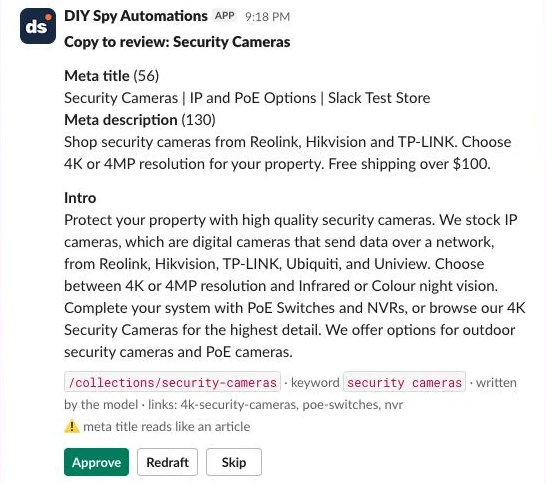
When a category page lacks copy or needs a refresh after a new subcategory is added, the workflow inspects its live products and navigation tree, drafts the intro and meta tags, adds HTML links to related categories, and posts a review card to Slack. Approving the card publishes the HTML description and SEO metadata straight to your store and saves the approved copy as a few-shot example for similar categories.
Alongside copy and links, the daily sort lane keeps your product grids clean without manual merchandising, and the weekly audit lane catches collections that nothing links to. On a store I run, the first sort set 63 collections to Manual and made 4,486 moves in about four minutes.
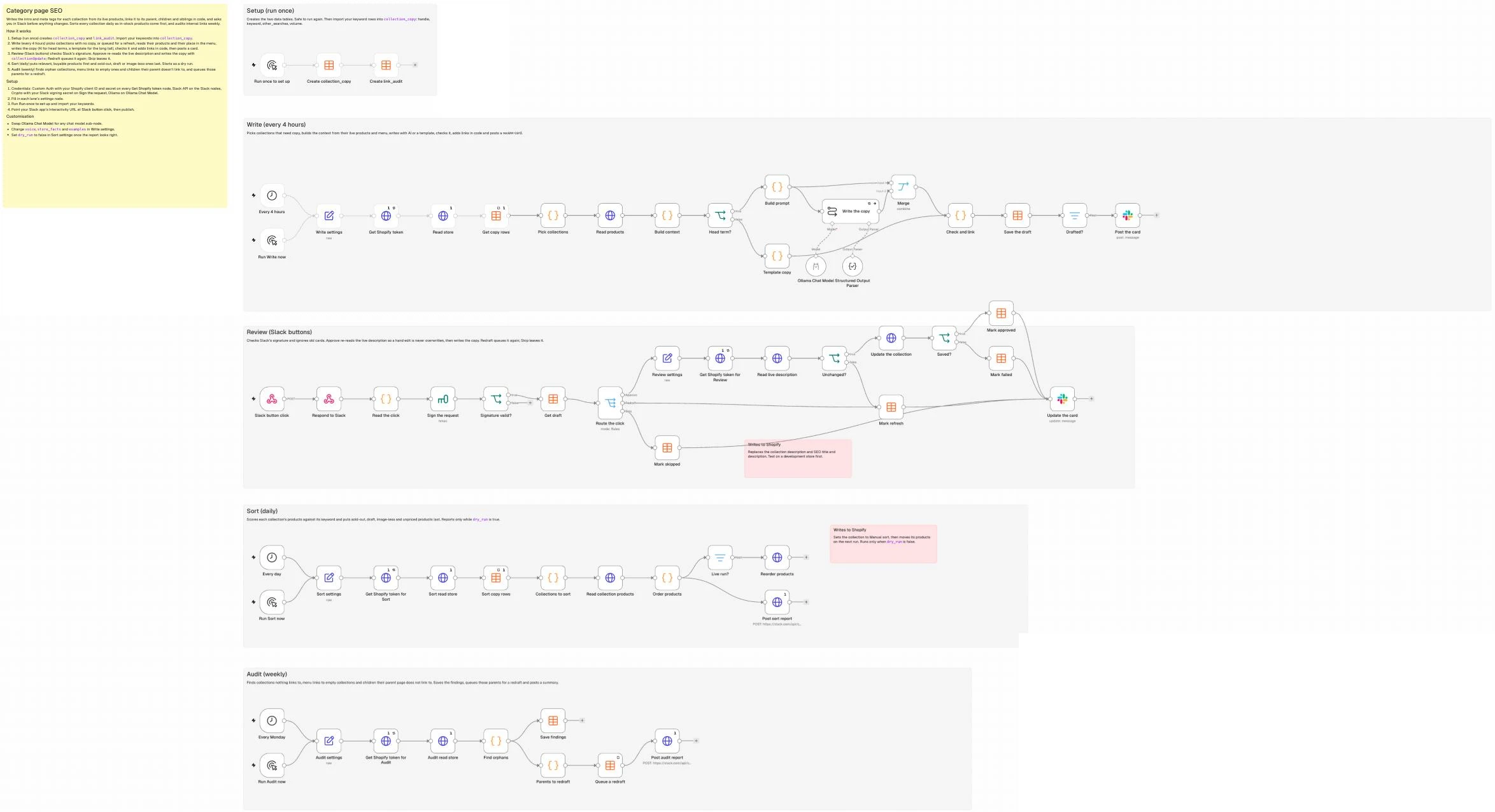
Everything runs on one n8n canvas across five lanes: Setup, Write, Review, Sort, and Audit.
What you need
- n8n (self-hosted Community Edition or n8n Cloud) with Data Tables enabled. Tested on n8n 2.45.7.
- A Shopify app (client ID and secret) with
read_products,write_products, andread_online_store_navigationscopes on Admin GraphQL API2026-10(or REST/GraphQL credentials if you adapt it for WooCommerce or BigCommerce). - A Slack app with Interactivity enabled,
chat:writepermissions for your review channel, and its signing secret saved in an n8n Crypto credential. - An AI model via n8n’s Chat Model sub-node (defaults to
gemma4on Ollama Cloud). - Optional: search volumes for your collections, from any keyword tool.
How it works
- Setup (Manual Trigger): Creates the
collection_copyandlink_auditData Tables, where you import your keyword priorities. - Write (Schedule Trigger): Picks high-volume categories missing copy, pulls their live products and menu neighbours, writes the intro and meta tags with AI (or a simple template for long-tail pages), injects
<a href>links in code, and posts a Slack approval card. - Review (Webhook): Verifies the click came from Slack, re-reads the live description in case someone edited it, updates the category description and SEO fields via
collectionUpdatewhen approved, and saves the row as an approved example. - Sort (Schedule Trigger, daily): Scores products by keyword relevance and stock, sets sort order to
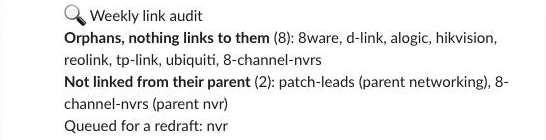
MANUAL, and on the next run callscollectionReorderProductsso sold-out items sort last. It starts on a dry run that only reports. - Audit (Schedule Trigger, weekly): Scans menus and descriptions for orphan categories and menu links to empty collections, immediately queues parent pages missing child links for a redraft, and reports to Slack.
What a good category page has
Every category page needs the same core elements whether you run Shopify, WooCommerce, or BigCommerce. Separate the jobs you set once in your theme from the jobs that drift as stock and categories change:
| Element | Who does it | What it needs |
|---|---|---|
| Title tag and meta description | The template does this | Matched to the main and secondary keywords (nvr, network video recorder, poe nvr), checked in code so meta titles stay under 60 characters |
| H1 | Set once in your theme | The theme prints the collection title, so name collections the way people search |
| Short intro copy above the grid | The template does this | A 55-to-75-word paragraph under the H1 describing the range from live brands and specs without pushing products below the fold |
| Contextual internal links | The template does this | Standard <a href> links to parent, child, and sibling categories so Google understands your site structure |
| Product sort order | The template does this | Relevant, in-stock products first and sold-out or unbuyable items last |
| Weekly orphan and child-link audit | The template does this | Finds published categories unlinked from both menus and body copy |
Breadcrumbs and BreadcrumbList schema | Set once in your theme | Visible breadcrumbs with Google’s breadcrumb structured data |
| Crawlable pagination | Set once in your theme | <a href="?page=2"> links with self-referencing canonicals per Google’s pagination docs, never canonicalising page 2 to page 1 |
| Faceted navigation and indexing | Set once in your theme | Follow Google’s faceted navigation guidance by blocking low-value filter parameters in robots.txt or applying noindex |
| Structured data | Set once in your theme | Keep Product offer and review markup on product pages rather than category grids per Google’s product snippet docs |
| Image alt text and page speed | Set once in your theme | Lazy-load thumbnails below row one and default alt text to {{ product.title }} |
| Buyer guides below the grid | Optional extra | A short comparison guide below the products for technical categories (see “Make it your own”) |
Step 1: Create the tables and settings
In the Setup lane, add a Manual Trigger connected to two Data table nodes set to Table -> Create (Reuse Existing Tables enabled):
collection_copy
  handle (String)            title (String)             keyword (String)
  other_searches (String)    volume (Number)            gid (String)
  parent_handle (String)     status (String)            intro (String)
  body_html (String)         meta_title (String)        meta_description (String)
  flags (String)             reviewed_by (String)       live_html (String)

link_audit
  run_date (Date)   handle (String)   issue (String)   parent_handle (String)
Merging your keyword list, drafts, and approved copy into a single collection_copy table means the Review lane can look up pending drafts by handle and the Write lane can use rows where status = 'approved' as few-shot examples. Import your search volumes as rows with handle, keyword, other_searches (comma-separated) and volume. Collections made by the shopify-collections-seo template don’t need a row, because it saves each one’s keyword and volume on the collection as seo.target_keyword and seo.keyword_volume metafields.
In the Write lane, add a Schedule Trigger (every four hours) connected to an Edit Fields (Set) node named Write settings in JSON mode. The examples carry your voice until you’ve approved real intros, and skip_handles keeps out the frontpage (Home page) collection every Shopify store has:
{
  "store_domain": "your-store.myshopify.com",
  "store_name": "Your Store",
  "tree_menu": "main-menu",
  "max_per_run": 5,
  "ai_min_volume": 100,
  "rewrite_existing": false,
  "skip_handles": [
    "frontpage"
  ],
  "intro_words": [
    55,
    75
  ],
  "max_links": 6,
  "model": "gemma4:31b",
  "slack_channel": "#review-copy",
  "keyword_namespace": "seo",
  "spec_keys": [
    "custom.channels",
    "custom.storage_bays"
  ],
  "spec_labels": {
    "custom.channels": "Channels",
    "custom.storage_bays": "Drive bays"
  },
  "voice": "Plain, practical and specific. Contractions are fine. Explain a technical term the first time it appears.",
  "store_facts": "Free shipping over $100. 30-day returns.",
  "examples": [
    {
      "title": "Bulk Cable",
      "intro": "Cut your own cable from the box and every camera gets exactly the length it needs, with no joins in the roof and no spare loops in the ceiling. Run it from the switch to each spot along the eaves, finish the ends with plugs or wall sockets, and test every run before the cornice goes back on."
    }
  ]
}
Step 2: Pick which pages to write first
New Shopify apps don’t show a permanent token, so a Get Shopify token HTTP Request node first swaps your app’s client ID and secret for a 24-hour token (client credentials grant, set up in the repo’s SETUP.md). Connect an HTTP Request node named Read store (POST to https://{{ $json.store_domain }}/admin/api/2026-10/graphql.json, with the token in an X-Shopify-Access-Token header, Execute Once on) that reads your published collections, their rules and keyword metafields, your navigation menus and your vendors from Shopify’s Admin GraphQL API (2026-10). Reading the menus query gives you the parent, child, and sibling hierarchy without maintaining a separate category tree spreadsheet:
={{ JSON.stringify({ query: `query Store($after: String, $ns: String!) {
  collections(first: 100, after: $after, query: "published_status:published") {
    pageInfo { hasNextPage endCursor }
    nodes { id handle title descriptionHtml sortOrder productsCount { count }
      ruleSet { appliedDisjunctively rules { column relation condition } }
      keyword: metafield(namespace: $ns, key: "target_keyword") { value }
      volume: metafield(namespace: $ns, key: "keyword_volume") { value } }
  }
  menus(first: 25) {
    nodes { handle items { title resourceId url
      items { title resourceId url items { title resourceId url } } } }
  }
  productVendors(first: 250) { nodes }
}`, variables: { after: null, ns: $('Write settings').first().json.keyword_namespace } }) }}
Turn on Pagination (Update a Parameter in Each Request, Body, Name variables, Value {{ { after: $response.body.data.collections.pageInfo.endCursor, ns: $('Write settings').first().json.keyword_namespace } }}, Complete When {{ !$response.body.data.collections.pageInfo.hasNextPage }}), so stores with more than 100 collections are read in full.
Add a Data table Get node named Get copy rows (Return All, Execute Once, Always Output Data on), then join the collections against collection_copy in a Code node named Pick collections, keeping collections with an empty descriptionHtml (or status of refresh, or failed from a draft that didn’t parse), sorted by volume descending and capped at max_per_run (5). Collections under ai_min_volume (100) get a simple template, while head and mid-tail pages like /collections/nvr (keyword: "nvr", other_searches: "network video recorder, poe nvr") go to the model. Collections that aren’t in the menu, such as an attribute collection whose rules are “type is NVRs and channels is 8”, sit under the collection whose only rule is that type:
const cols = $('Read store').all().flatMap(i => i.json.data.collections.nodes);
const menus = $('Read store').first().json.data.menus.nodes;
const handleById = Object.fromEntries(cols.map(c => [c.id, c.handle]));
const handleOf = it => handleById[it.resourceId] || (it.url || '').match(/\/collections\/([^/?#]+)/)?.[1];
const s = $('Write settings').first().json;
const rows = Object.fromEntries($('Get copy rows').all().filter(i => i.json.handle).map(i => [i.json.handle, i.json]));
const titleOf = Object.fromEntries(cols.map(c => [c.handle, c.title]));

// Parent, children and siblings come from how the main menu is nested...
const parent = {}, kids = {};
const adopt = (h, up) => { if (h && up && h !== up && !parent[h]) { parent[h] = up; (kids[up] = kids[up] || []).push(h); } };
const walk = (items, up) => {
  for (const it of items || []) {
    const h = handleOf(it);
    adopt(h, up);
    walk(it.items, h && h !== up ? h : up);
  }
};
walk(menus.find(m => m.handle === s.tree_menu)?.items, null);
// ...and, for collections not in the menu, from their rules: "type is X and ..." sits under the collection whose only rule is "type is X".
const typePage = Object.fromEntries(cols.filter(c => c.ruleSet?.rules.length === 1 && c.ruleSet.rules[0].column === 'TYPE')
  .map(c => [c.ruleSet.rules[0].condition.toLowerCase(), c.handle]));
for (const c of cols) if (!parent[c.handle] && c.ruleSet && !c.ruleSet.appliedDisjunctively && c.ruleSet.rules.length > 1) {
  const t = c.ruleSet.rules.find(r => r.column === 'TYPE' && r.relation === 'EQUALS');
  if (t) adopt(c.handle, typePage[t.condition.toLowerCase()]);
}

const ref = h => (h && titleOf[h]) ? { handle: h, title: titleOf[h] } : null;
const empty = html => !(html || '').replace(/<[^>]+>/g, '').trim();
const vol = (c, r) => Number(r.volume || c.volume?.value || 0);

return cols
  .map(c => ({ c, r: rows[c.handle] || {} }))
  .filter(({ c, r }) => !s.skip_handles.includes(c.handle))
  .filter(({ c, r }) => ['refresh', 'failed'].includes(r.status) || (!r.status && (s.rewrite_existing || empty(c.descriptionHtml))))
  .sort((a, b) => (b.r.status === 'refresh') - (a.r.status === 'refresh') || vol(b.c, b.r) - vol(a.c, a.r))   // refreshes first, then by volume
  .slice(0, s.max_per_run)
  .map(({ c, r }) => ({ json: {
    gid: c.id, handle: c.handle, title: c.title,
    keyword: r.keyword || c.keyword?.value || c.title.toLowerCase(), other_searches: r.other_searches || '', volume: vol(c, r),
    use_ai: vol(c, r) >= s.ai_min_volume, live_html: c.descriptionHtml,
    parent: ref(parent[c.handle]),
    children: (kids[c.handle] || []).map(ref).filter(Boolean),
    siblings: (kids[parent[c.handle]] || []).filter(h => h !== c.handle).map(ref).filter(Boolean),
    vendors_all: $('Read store').first().json.data.productVendors.nodes,
  } }));
Step 3: Give the model the collection’s own products
Prompting from the keyword "nvr" alone produces generic filler. Pull each collection’s products with an HTTP Request node named Read products, which runs once per collection:
={{ JSON.stringify({ query: `query($id: ID!, $keys: [String!]) { collection(id: $id) { products(first: 100) { nodes {
    title vendor status totalInventory tracksInventory
    options { name values }
    metafields(first: 20, keys: $keys) { nodes { namespace key value } } } } } }`, variables: { id: $json.gid, keys: $('Write settings').first().json.spec_keys } }) }}
Connect a Code node named Build context that extracts the live brands, the specs at least two in-stock products share, sample product titles, and the parent, child, and sibling collections from Step 2. When you ask for metafields by keys, Shopify returns each key as namespace.key (custom.channels), which is how spec_labels is keyed:
const s = $('Write settings').first().json;
const picks = $('Pick collections').all().map(i => i.json);
const tally = xs => Object.entries(xs.reduce((m, x) => (m[x] = (m[x] || 0) + 1, m), {})).sort((a, b) => b[1] - a[1]);

return $input.all().map((it, i) => {
  const c = picks[i];
  const all = it.json.data?.collection?.products?.nodes || [];
  const live = all.filter(p => p.status === 'ACTIVE' && (!p.tracksInventory || p.totalInventory > 0));
  const specs = tally(live.flatMap(p => [
    ...p.metafields.nodes.map(m => `${s.spec_labels[m.key] || m.key}: ${m.value}`),   // with keys:, Shopify returns key as namespace.key
    ...p.options.filter(o => o.name !== 'Title').map(o => `${o.name}: ${o.values.join(' / ')}`),
  ])).filter(([, n]) => n >= 2).slice(0, 12).map(([spec, n]) => `${spec} (${n} products)`);
  return { json: { ...c, live: live.length, specs,
    brands: tally(live.map(p => p.vendor).filter(Boolean)).slice(0, 6).map(([v]) => v),
    products: live.slice(0, 8).map(p => p.title),
    family: [...c.children, ...(c.parent ? [c.parent] : []), ...c.siblings] } };
});
Passing the product titles (TP-LINK VIGI NVR1004H-4P, Hikvision DS-7608NXI-K1/8P, Reolink RLN8-410 and so on) shows the model the range while the prompt forbids naming individual model codes or sizes. Finish the step with an If node named Head term? on {{ $json.use_ai }}.
Step 4: Write it with approved examples
Better retrieved examples fix repetitive AI copy much faster than adding more banned phrases. On the true branch of Head term?, add a Code node named Build prompt that takes approved intros from the rows Get copy rows already read, prefers ones from the same parent, and falls back to your settings examples:
const s = $('Write settings').first().json;
const approved = $('Get copy rows').all().map(i => i.json).filter(r => r.status === 'approved' && r.intro);
const list = xs => xs.length ? xs.join(', ') : '(none)';

return $input.all().map(({ json: c }) => {
  const others = approved.filter(r => r.handle !== c.handle);
  const ex = [...others.filter(r => r.parent_handle && r.parent_handle === c.parent?.handle),
              ...others.filter(r => !r.parent_handle || r.parent_handle !== c.parent?.handle)].slice(0, 3);
  const examples = (ex.length ? ex : s.examples).map(e => `${e.title || e.handle}: ${e.intro}`).join('\n\n');
  const system = `You write category page copy for ${s.store_name}, an online store.
${s.voice}
- Describe the range. Never name a product model, model number or size.
- Open with what the buyer gets from this range. Never open with a definition.
- Name only brands from BRANDS and specs from COMMON SPECS.
- Never write a URL or a link.
- No em dashes.
- Shipping, returns and payment claims come only from STORE FACTS: ${s.store_facts}

EXAMPLE INTROS, for voice only. Never copy their sentences, brands or specs.
${examples}`;
  const prompt = `COLLECTION: ${c.title}
Target keyword: ${c.keyword}
Other searches: ${c.other_searches || '(none)'}
Parent: ${c.parent?.title || '(top level)'}
Children: ${list(c.children.map(k => k.title))}
Siblings: ${list(c.siblings.map(k => k.title))}
Live products: ${c.live}
BRANDS: ${list(c.brands)}
COMMON SPECS:
${c.specs.join('\n') || '(none)'}
PRODUCTS:
${c.products.join('\n') || '(none yet)'}

Write:
- intro: one paragraph, ${s.intro_words[0]} to ${s.intro_words[1]} words. Target keyword in the first or second sentence. Name children and siblings by their exact titles where it reads naturally.
- meta_title: 20 to 48 characters. The keyword as a plural category in Title Case, then an optional modifier from this context. No store name.
- meta_description: 130 to 155 characters. Start with Shop, Buy or Compare. End with one store fact.

Reply with only this JSON object: {"intro": "...", "meta_title": "...", "meta_description": "..."}`;
  return { json: { ...c, system, prompt } };
});
Add a Basic LLM Chain node named Write the copy (Prompt: Define below, {{ $json.prompt }}; System message {{ $json.system }}; Retry On Fail on; On Error: Continue) with an Ollama Chat Model sub-node (gemma4:31b, temperature 0.5). The prompt ends by asking for a JSON object with intro, meta_title and meta_description, and there’s deliberately no Structured Output Parser: in testing, gemma4 on Ollama Cloud wrapped its JSON in a code fence and left a trailing comma after the last field, even with the node’s Output Format set to JSON, and a parser rejects that. Check and link (Step 5) reads it leniently instead. On Error: Continue means a call that still fails comes out as an error item, so that collection is marked failed and tried again next run while the rest carry on.
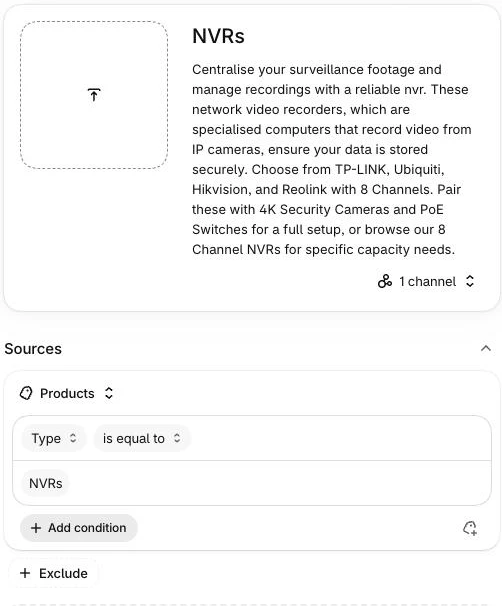
Connect a Merge node (Combine, By Position) to join each Build prompt item with its draft. For /collections/nvr, the test draft read like this:
Centralise your surveillance footage and manage recordings with a reliable nvr. These network
video recorders, which are specialised computers that record video from IP cameras, ensure your
data is stored securely. Choose from TP-LINK, Ubiquiti, Hikvision, and Reolink with 8 Channels.
Pair these with 4K Security Cameras and PoE Switches for a full setup, or browse our 8 Channel
NVRs for specific capacity needs.
On the false branch of Head term?, a Code node named Template copy gives long-tail pages a one-line intro and meta. A brand page names no other brand, so /collections/reolink gets “Shop the Reolink range.” rather than “Shop our Reolink from Reolink.”:
const s = $('Write settings').first().json;
const and = xs => xs.length > 1 ? xs.slice(0, -1).join(', ') + ' and ' + xs.at(-1) : xs.join('');
return $input.all().map(({ json: c }) => {
  const brands = c.brands.filter(b => b.toLowerCase() !== c.title.toLowerCase());   // a brand page names no other brand
  return { json: { ...c, output: {
    intro: brands.length ? `Shop our ${c.title} from ${and(brands)}.` : `Shop the ${c.title} range.`,
    meta_title: brands.length ? `${c.title} | ${and(brands.slice(0, 2))}` : c.title,
    meta_description: `Shop ${brands.length ? c.title + ' from ' + and(brands.slice(0, 3)) : 'the ' + c.title + ' range'} at ${s.store_name}. ${s.store_facts}`,
  } } };
});
Step 5: Check the draft and add links in code
Never let an LLM write <a href="..."> tags directly, because models routinely invent URLs (/collections/ip-security-cameras instead of /collections/security-cameras). Let the model write plain text, and let a Code node named Check and link, connected to both the Merge node and Template copy, read the model’s JSON, verify the facts and wrap the first mention of any related collection title in its real URL, longest title first so “4K Security Cameras” links to its own page rather than to “Security Cameras”. Numbers are allowed when they come from the titles, specs, brands or store facts (8 Channels, 8ware), never from a product. If the collection has child subcategories that weren’t mentioned in the prose, it appends a clean “Shop by type:” line underneath:
const s = $('Write settings').first().json;
const fix = t => String(t || '').replace(/\s*[\u2014\u2013]\s*/g, ', ').replace(/\s+/g, ' ').trim();
const esc = t => String(t).replace(/&/g, '&').replace(/</g, '<').replace(/>/g, '>');
const rx = t => t.replace(/[.*+?^${}()|[\]\\]/g, '\\$&');
const has = (text, word) => new RegExp(`(^|[^\\w])${rx(word)}(?![\\w])`, 'i').test(text);
// Models wrap JSON in code fences and leave trailing commas, so read it leniently.
const readJson = t => {
try {
const j = JSON.parse(String(t || '').replace(/```(json)?/gi, '').replace(/,\s*([}\]])/g, '$1').trim());
return j.output || j;
} catch (e) { return {}; }
};
return $input.all().map((it) => {
const c = it.json, d = c.output || readJson(c.text);
const intro = fix(d.intro), metaDesc = fix(d.meta_description);
const metaTitle = fix(d.meta_title).replace(new RegExp(`\\s*[|-]\\s*${rx(s.store_name)}$`, 'i'), '');
const base = { gid: c.gid, handle: c.handle, title: c.title, keyword: c.keyword, other_searches: c.other_searches, volume: c.volume,
parent_handle: c.parent?.handle || '', live_html: c.live_html, written_by: c.use_ai ? 'the model' : 'the template' };
if (!intro) return { json: { ...base, intro: '', body_html: '', meta_title: '', meta_description: '', links: [],
flags: ['no draft: ' + (c.error || 'the model returned nothing')], status: 'failed' } }; // tried again next run
const flags = [];
const words = intro.split(' ').filter(Boolean).length;
if ((words < s.intro_words[0] - 10 || words > s.intro_words[1] + 10)) flags.push(`intro is ${words} words`);
const stray = c.vendors_all.filter(v => !c.brands.includes(v) && has(intro, v));
if (stray.length) flags.push('brands not in this collection: ' + stray.join(', '));
const codes = [...new Set(c.products.join(' ').match(/\b(?=[A-Z0-9-]*\d)(?=[A-Z0-9-]*[A-Z])[A-Z0-9-]{4,}\b/g) || [])];
const models = codes.filter(m => has(intro, m));
if (models.length) flags.push('names a model: ' + models.join(', '));
// Numbers are fine when they come from the titles, specs, brands or store facts, never from a product.
const known = JSON.stringify([c.title, c.keyword, c.other_searches, c.family.map(f => f.title), c.specs, c.brands, s.store_facts]);
const nums = [...new Set(intro.match(/[\w.]*\d[\w.]*/g) || [])].map(n => n.replace(/\.$/, '')).filter(n => !has(known, n));
if (nums.length) flags.push('names a size or number: ' + nums.join(', '));
if (metaTitle.length > 48) flags.push(`meta title is ${metaTitle.length} characters`);
if (/\b(guide|tips|how to|explained|options)\b/i.test(metaTitle)) flags.push('meta title reads like an article');
if (metaDesc.length < 120 || metaDesc.length > 160) flags.push(`meta description is ${metaDesc.length} characters`);
// First mention of a related collection becomes a link; children not mentioned get a line of their own.
let html = esc(intro), budget = s.max_links;
const linked = [];
for (const f of [...c.family].sort((a, b) => b.title.length - a.title.length)) { // longest first: 4K Security Cameras before Security Cameras
const re = new RegExp(`(^|[^\\w>])(${rx(esc(f.title))})(?![\\w<])`, 'i');
if (budget > 0 && re.test(html)) {
html = html.replace(re, `$1<a href="/collections/${f.handle}">$2</a>`);
linked.push(f.handle); budget--;
}
}
const missing = c.children.filter(k => !linked.includes(k.handle));
const body = `<p>${html}</p>` + (missing.length ? `<p>Shop by type: ${missing.map(k =>
`<a href="/collections/${k.handle}">${esc(k.title)}</a>`).join(', ')}.</p>` : '');
const seoTitle = (metaTitle + ' | ' + s.store_name).length <= 60 ? `${metaTitle} | ${s.store_name}` : metaTitle;
return { json: { ...base, intro, body_html: body, meta_title: seoTitle, meta_description: metaDesc,
links: [...linked, ...missing.map(k => k.handle)], flags, status: 'review' } };
});For /collections/nvr, this produces a <p> linking <a href="/collections/4k-security-cameras">4K Security Cameras</a>, <a href="/collections/poe-switches">PoE Switches</a> and <a href="/collections/8-channel-nvrs">8 Channel NVRs</a>.
Step 6: Approve and publish
Upsert the row into collection_copy with a Data table node matched on handle (status review, or failed when there’s no draft), let a Filter pass only review rows, and post a review card with a Slack node (Message -> Send, Message Type: Blocks) showing the meta title and description with their lengths, the intro, the links and any flags. Build the blocks with JSON.stringify, because copy with a quote mark in it breaks hand-written JSON:
={{ JSON.stringify({ blocks: [
  { type: 'header', text: { type: 'plain_text', text: 'Copy to review: ' + $json.title } },
  { type: 'section', text: { type: 'mrkdwn', text: '*Meta title* (' + $json.meta_title.length + ')\n' + $json.meta_title + '\n*Meta description* (' + $json.meta_description.length + ')\n' + $json.meta_description } },
  { type: 'section', text: { type: 'mrkdwn', text: '*Intro*\n' + $json.intro } },
  { type: 'context', elements: [{ type: 'mrkdwn', text: '`/collections/' + $json.handle + '` · keyword `' + $json.keyword + '` · written by ' + $('Check and link').item.json.written_by +
    ' · links: ' + ($('Check and link').item.json.links.join(', ') || 'none') + ($json.flags ? '\n:warning: ' + $json.flags : '') }] },
  { type: 'actions', elements: [
    { type: 'button', style: 'primary', text: { type: 'plain_text', text: 'Approve' }, action_id: 'copy_approve', value: $json.handle },
    { type: 'button', text: { type: 'plain_text', text: 'Redraft' }, action_id: 'copy_redraft', value: $json.handle },
    { type: 'button', text: { type: 'plain_text', text: 'Skip' }, action_id: 'copy_skip', value: $json.handle } ] }
] }) }}
In the Review lane, add a Webhook node (Respond: Using ‘Respond to Webhook’ Node, Raw Body on) and a Respond to Webhook node straight after it (Slack requires a 200 response within 3 seconds). A Code node named Read the click reads the raw body with getBinaryDataBuffer and rejects requests older than five minutes (n8n’s Code node has no URLSearchParams, so it splits the form body by hand):
const raw = (await this.helpers.getBinaryDataBuffer(0, 'data')).toString('utf8');
const h = $input.first().json.headers;
if (Math.abs(Date.now() / 1000 - Number(h['x-slack-request-timestamp'])) > 300) throw new Error('Stale request');
const field = raw.split('&').find(kv => kv.startsWith('payload=')) || ''; // no URLSearchParams in the Code node
const p = JSON.parse(decodeURIComponent(field.slice(8).replace(/\+/g, ' ')));
const a = p.actions[0];
return [{ json: { base: `v0:${h['x-slack-request-timestamp']}:${raw}`, expected: h['x-slack-signature'],
  action: a.action_id, handle: a.value, user: p.user.username, channel: p.channel.id, ts: p.message.ts } }];
Because anyone holding the webhook URL could otherwise approve copy, add a Crypto node and an If node that check Slack’s request signature:
Crypto node:  Action Hmac, Type SHA256, Value {{ $json.base }},
              Property Name sig, Encoding HEX, Crypto credential = your Slack signing secret
If node:      {{ 'v0=' + $json.sig === $json.expected }}
Connect a Data table Get node named Get draft (handle matches and status equals review, so a second click on an old card stops here), then a Switch node on the action. Redraft sets status to refresh and Skip to skipped. When you click Approve, a Review settings node and its own token node lead to a re-read of the collection’s descriptionHtml; if it no longer matches live_html (ignoring whitespace), someone edited the page in Shopify, so the row goes back to refresh instead of overwriting their change:
={{ String($json.data?.collection?.descriptionHtml || '').replace(/\s+/g, ' ').trim() === String($('Get draft').first().json.live_html || '').replace(/\s+/g, ' ').trim() }}Otherwise call Shopify’s collectionUpdate mutation (2026-10, using the collection input argument), check it came back without userErrors, and update the row’s status to 'approved' with live_html set to what you wrote. One Slack Message Update node rewrites the card with the outcome:
={{ JSON.stringify({
  query: `mutation($c: CollectionUpdateInput!) { collectionUpdate(collection: $c) {
    collection { handle } userErrors { field message } } }`,
  variables: { c: { id: $('Get draft').first().json.gid, descriptionHtml: $('Get draft').first().json.body_html,
    seo: { title: $('Get draft').first().json.meta_title, description: $('Get draft').first().json.meta_description } } }
}) }}
Step 7: Put the right products first
In the Sort lane, add a daily Schedule Trigger and a Set node named Sort settings (keep dry_run on until you’ve read the first report):
{
  "store_domain": "your-store.myshopify.com",
  "keyword_namespace": "seo",
  "skip_handles": [
    "frontpage",
    "new-arrivals",
    "sale"
  ],
  "min_secondary": 0.5,
  "stopwords": [
    "for",
    "with",
    "and",
    "the",
    "a"
  ],
  "synonyms": {
    "wireless": "wifi",
    "recorder": "nvr"
  },
  "dry_run": true,
  "slack_channel": "#log-sort"
}
Copy Read store and Get copy rows into this lane as Sort read store and Sort copy rows (node names must be unique), then add a Code node named Collections to sort, which takes each collection’s keyword from its row or its seo.target_keyword metafield:
const s = $('Sort settings').first().json;
const rows = Object.fromEntries($('Sort copy rows').all().filter(i => i.json.handle).map(i => [i.json.handle, i.json]));
return $('Sort read store').all().flatMap(i => i.json.data.collections.nodes)
  .map(c => ({ c, kw: rows[c.handle]?.keyword || c.keyword?.value }))
  .filter(({ c, kw }) => kw && !s.skip_handles.includes(c.handle))
  .map(({ c, kw }) => ({ json: { gid: c.id, handle: c.handle, keyword: kw,
    other_searches: (rows[c.handle]?.other_searches || '').split(',').map(x => x.trim()).filter(Boolean) } }));
An HTTP Request node pulls each collection’s sortOrder and products, in their current order:
={{ JSON.stringify({ query: `query($id: ID!) { collection(id: $id) { sortOrder products(first: 250, sortKey: COLLECTION_DEFAULT) { nodes {
    id title status totalInventory tracksInventory featuredMedia { id } priceRangeV2 { minVariantPrice { amount } } } } } }`, variables: { id: $json.gid } }) }}
A Code node named Order products scores active, in-stock products by keyword overlap, places sold-out, no-image, unpriced and draft items last, and returns only the diff moves (up to 250):
const s = $('Sort settings').first().json;
const cols = $('Collections to sort').all().map(i => i.json);
const tokens = t => [...new Set(String(t).toLowerCase().replace(/wi-?fi/g, 'wifi').split(/[^a-z0-9]+/)
  .filter(w => w && !s.stopwords.includes(w))
  .map(w => w.length > 4 && w.endsWith('ies') ? w.slice(0, -3) + 'y' : (w.length > 3 && /[^siu]s$/.test(w) ? w.slice(0, -1) : w))
  .map(w => s.synonyms[w] || w))];
const score = (kw, title) => { const k = tokens(kw), t = tokens(title); return k.length ? k.filter(w => t.includes(w)).length / k.length : 0; };
const buyable = p => p.status === 'ACTIVE' && p.featuredMedia && Number(p.priceRangeV2.minVariantPrice.amount) > 0
  && (!p.tracksInventory || p.totalInventory > 0);

return $input.all().map((it, i) => {
  const c = cols[i], col = it.json.data.collection, now = col.products.nodes;
  const ids = now.map(p => p.id);
  const byKeyword = list => list.map(p => ({ p, sc: score(c.keyword, p.title), at: ids.indexOf(p.id) }))
    .sort((a, b) => b.sc - a.sc || a.at - b.at).map(x => x.p);
  const ready = now.filter(buyable), placed = [];
  for (const kw of c.other_searches) {       // one best product per other search, in your order
    const best = ready.filter(p => !placed.includes(p)).map(p => ({ p, sc: score(kw, p.title) })).sort((a, b) => b.sc - a.sc)[0];
    if (best && best.sc >= s.min_secondary) placed.push(best.p);
  }
  const order = [...placed, ...byKeyword(ready.filter(p => !placed.includes(p))), ...byKeyword(now.filter(p => !buyable(p)))];

  // Shopify re-sorts a collection after it switches to Manual, so a switch gets this run and the moves wait for the next.
  if (col.sortOrder !== 'MANUAL') return { json: { gid: c.gid, handle: c.handle, was: col.sortOrder, switch: true, moves: [],
    page1: order.slice(0, 8).map(p => p.title), last: order.filter(p => !buyable(p)).map(p => p.title) } };
  const arr = ids.slice(), moves = [];
  order.forEach((p, pos) => {                // only the moves that change the live order
    if (arr[pos] === p.id) return;
    const at = arr.indexOf(p.id);
    if (at >= 0) arr.splice(at, 1);
    arr.splice(pos, 0, p.id);
    moves.push({ id: p.id, newPosition: String(pos) });
  });
  return { json: { gid: c.gid, handle: c.handle, was: col.sortOrder, switch: false, moves: moves.slice(0, 250), page1: order.slice(0, 8).map(p => p.title),
    last: order.filter(p => !buyable(p)).map(p => p.title) } };
});
Shopify’s collectionReorderProducts mutation requires the collection’s sortOrder to be MANUAL, and switching it starts Shopify re-sorting the collection in the background. When we sent the switch and the moves in one request, the re-sort won on 5 of 13 collections and undid the moves. So Order products only switches a collection on the run that finds it isn’t Manual, and moves its products on the next run. Behind a Filter named Live run? (dry_run off, and a switch or moves to send), one HTTP Request sends whichever is due:
={{ JSON.stringify($json.switch
  ? { query: 'mutation($id: ID!) { collectionUpdate(collection: { id: $id, sortOrder: MANUAL }) { userErrors { message } } }', variables: { id: $json.gid } }
  : { query: 'mutation($id: ID!, $moves: [MoveInput!]!) { collectionReorderProducts(id: $id, moves: $moves) { job { id } userErrors { field message } } }',
      variables: { id: $json.gid, moves: $json.moves } }) }}
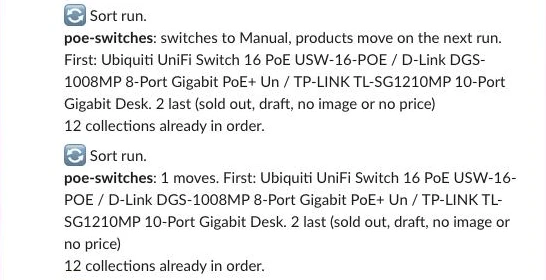
The Live run? branch sits above the report on the canvas, because n8n runs branches top to bottom and the report reads the reorder results. A Slack report lists, for each collection that changes, its move count, the first products and how many sit last, kept short because Slack cuts a message at 4,000 characters:
Step 8: Audit links weekly
As you launch new collections, it’s easy to forget to add them to your navigation menu or link them from their parent collection’s intro. In the Audit lane, add a weekly Schedule Trigger, a Set node named Audit settings, and a copy of the Read store query from Step 2 named Audit read store:
{
  "store_domain": "your-store.myshopify.com",
  "keyword_namespace": "seo",
  "tree_menu": "main-menu",
  "ignore": [
    "frontpage"
  ],
  "theme_linked": [],
  "slack_channel": "#log-seo"
}
Connect a Code node named Find orphans that builds the set of all /collections/<handle> links present in your navigation menus and in the hrefs of every collection’s descriptionHtml, plus the theme_linked pages your theme links in code. Parents come from the menu and, for collections outside it, from their rules, as in the Write lane:
const s = $('Audit settings').first().json;   // { tree_menu, ignore: ["frontpage"], theme_linked: [] }
const cols = $('Audit read store').all().flatMap(i => i.json.data.collections.nodes).filter(c => !s.ignore.includes(c.handle));
const menus = $('Audit read store').first().json.data.menus.nodes;
const handleById = Object.fromEntries(cols.map(c => [c.id, c.handle]));
const handleOf = it => handleById[it.resourceId] || (it.url || '').match(/\/collections\/([^/?#]+)/)?.[1];
const linksTo = (html, h) => new RegExp(`href="[^"]*/collections/${h}(["?#/])`).test(html || '');

const inMenu = new Set(), parent = {};
const walk = (items, up, tree) => {
  for (const it of items || []) {
    const h = handleOf(it);
    if (h) inMenu.add(h);
    if (tree && h && up && h !== up && !parent[h]) parent[h] = up;
    walk(it.items, h && h !== up ? h : up, tree);
  }
};
for (const m of menus) walk(m.items, null, m.handle === s.tree_menu);
// Collections outside the menu sit under the page whose only rule is their type, as in the Write lane.
const typePage = Object.fromEntries(cols.filter(c => c.ruleSet?.rules.length === 1 && c.ruleSet.rules[0].column === 'TYPE')
  .map(c => [c.ruleSet.rules[0].condition.toLowerCase(), c.handle]));
for (const c of cols) if (!parent[c.handle] && c.ruleSet && !c.ruleSet.appliedDisjunctively && c.ruleSet.rules.length > 1) {
  const t = c.ruleSet.rules.find(r => r.column === 'TYPE' && r.relation === 'EQUALS');
  const up = t && typePage[t.condition.toLowerCase()];
  if (up && up !== c.handle) parent[c.handle] = up;
}

const desc = Object.fromEntries(cols.map(c => [c.handle, c.descriptionHtml]));
const today = new Date().toISOString().slice(0, 10);
const orphans = cols.filter(c => !inMenu.has(c.handle) && !s.theme_linked.includes(c.handle)
  && !cols.some(o => o.handle !== c.handle && linksTo(o.descriptionHtml, c.handle)));
const empty = cols.filter(c => inMenu.has(c.handle) && c.productsCount.count === 0);
const unlinked = Object.entries(parent).filter(([kid, up]) => kid in desc && up in desc && !linksTo(desc[up], kid));

return [
  ...orphans.map(c => ({ json: { run_date: today, handle: c.handle, issue: 'orphan', parent_handle: parent[c.handle] || '' } })),
  ...empty.map(c => ({ json: { run_date: today, handle: c.handle, issue: 'menu links to empty collection', parent_handle: '' } })),
  ...unlinked.map(([kid, up]) => ({ json: { run_date: today, handle: kid, issue: 'not linked from parent', parent_handle: up } })),
];
Insert the findings into link_audit. A Code node named Parents to redraft lists each parent missing a child link once, and a Data table Update sets those parents from approved to refresh in collection_copy, so the next Write run redrafts them and its “Shop by type” line adds the missing link. A Slack message sums it up.
What it costs
Here is how the monthly cost of running all five lanes compares against a paid Shopify SEO app or freelance copywriting at 500, 2,000, and 10,000 products, assuming about one collection per ten products (prices checked November 2026):
| Item | 500 products (50 collections) | 2,000 products (200 collections) | 10,000 products (1,000 collections) |
|---|---|---|---|
| n8n self-hosted | Free | Free | Free |
| n8n Cloud Starter (2,500 executions a month) | €20 a month billed annually | €20 | €20 |
Model: one draft per collection, gemma4 on Ollama Cloud pay as you go | about US$0.01 | about US$0.04 | about US$0.20 |
| Sort and audit (Shopify API calls) | Free | Free | Free |
| SEO Content AI app (copy and meta only) | about US$7 a month | about US$7 a month | about US$7 a month |
| Freelance copywriter, about 100 words a page | US$250 to US$2,500 | US$1,000 to US$10,000 | US$5,000 to US$50,000 |
Ollama Cloud pay as you go has no monthly fee, and n8n Cloud Starter’s executions cover every lane plus a few hundred approvals. The copywriter row uses NewMedia’s US$0.05 to US$0.50 a word for simple copy, and SEO Content AI doesn’t link, sort, or audit. A draft measured about 1,000 input and 160 output tokens in testing, which is about US$0.0002 at US$0.14 and US$0.40 per million tokens. Because the Sort and Audit lanes run entirely in deterministic JavaScript and GraphQL, your daily ongoing token cost is zero until you add new categories or queue a parent category for a redraft.
Common mistakes
Copy written from the keyword alone
Prompting from the keyword "nvr" alone produces textbook definitions. Always pass the collection’s live brands, product count, and shared specs.
Naming models or sizes that go out of date
Naming TP-Link VIGI NVR1004H-4P in the intro makes your copy stale the day that model sells out. Describe the overall range (PoE NVRs from TP-LINK and Ubiquiti) instead.
Letting the model write links
Models guess slugs and invent 404 URLs. Have the model write plain text and let Step 5 inject verified <a href="/collections/..."> tags.
Fixing samey copy with more banned phrases
Long lists of banned words make copy stiff without teaching good structure. Retrieve two or three approved intros from the same parent category instead.
Sold-out products on page 1
Out-of-stock cameras in row one send shoppers straight back to Google. Run the daily Sort lane so sold-out items always move last.
Long copy pushing the products below the fold
A case study in Ahrefs’ category page guide showed rankings improved after cutting an 800-word intro above the fold to ~70 words. Keep your top intro between 55 and 75 words.
Filter URLs indexed by the thousand
Letting Google index every filter combination wastes crawl budget and cannibalises your main category. Block non-SEO filter parameters in robots.txt or apply noindex, but not both on the same URL.
Counting orphans without counting menu links
Checking only collection body HTML falsely flags top-level categories as orphans. Always union links from Shopify’s menus query with body HTML links, and treat collections outside the menu as children of the collection whose only rule is their product type.
Make it your own
Add buyer guides
For categories where shoppers compare specs before buying, add a buyer_guide_html output field (150 to 250 words), check it with Step 5’s brand and number rules, and write it to a collection metafield rendered below the product grid. Only draft one when the collection has real specs or manuals to work from, because otherwise the guide makes claims nobody has checked.
Sort by sales or margin and swap platforms
Add a margin or 30-day sales bonus to the score function in Step 7 so bestsellers lead row one. For WooCommerce or BigCommerce, swap the Shopify GraphQL nodes for the WooCommerce REST API or BigCommerce Catalog API.
Use filters instead of thin collections
A cut with no search demand of its own works better as a filter on the parent page than as another collection to write, link, and audit. The Shopify collections SEO guide and its template propose which collections should exist.
When Data Tables aren’t enough
Data tables on an instance share a 200 MiB limit by default (self-hosters can raise N8N_DATA_TABLES_MAX_SIZE_BYTES), and past it, inserts and updates fail. At roughly 3 KB a collection, even 2,000 collections use about 6 MB, so other workflows are the likelier cause. If you hit it, swap the Data table nodes for Postgres nodes on Supabase’s free plan, which has 500 MB per project (checked November 2026).
Frequently asked questions
How long should category page copy be?
Keep the intro above your product grid to 55 to 75 words (two or three sentences). That gives shoppers and Google clear context on your brands and specs without pushing products below the fold.
Should text go above or below the products?
Put the 55-to-75-word intro and 1 to 3 internal links directly under the H1 above the grid. Place longer buyer guides or FAQs below the product grid via a metafield.
Does product sort order affect SEO?
Indirectly. Products on page 1 are the ones crawlers and most shoppers reach first, and keeping relevant, in-stock items in the first rows stops shoppers from bouncing back to search results.
Will manual sorting affect my theme’s filters?
No. Manual sort only sets the collection’s default order, so your filters still work, and a shopper who picks “Price, low to high” still gets that order.
Should filtered pages be indexed?
Usually no. Keep standard filter parameters unindexed, and create dedicated child collections only for attribute combinations with proven search volume. Don’t block a URL in robots.txt and also rely on noindex, because Google can’t read the noindex tag on a page it isn’t allowed to crawl.
Next steps
Import the template into n8n, run the Setup lane once, and test the Write and Sort lanes on one category to review your first Slack card and product reorder diff.