How to Automate Shopify Collections for SEO (Free n8n Template)

Last tested on n8n 2.45.7, November 2026.
Shopify Collections are the pages that rank for your most important category, brand, attribute, colour, and keyword-led searches, yet most stores only build a handful of top-level category pages and leave high-intent attribute cuts trapped behind unindexable filter parameters.
Building smart collections by hand in a spreadsheet takes hours of checking stock counts against search volume, and collection apps build whatever combinations you configure without checking whether "8 PoE Switches" is a real search query (8 port poe switch) or an internal filter value like "1 Patch Leads" that nobody types into Google.
By the end of this guide, you’ll have a six-lane n8n workflow that scans your live products for attribute and brand combinations, names them the way shoppers search with AI, scores them on search demand, product depth, catalogue gap, and ranking ease, creates approved smart collections in Shopify, and proposes unpublishing collections when stock runs thin.
What you’ll build
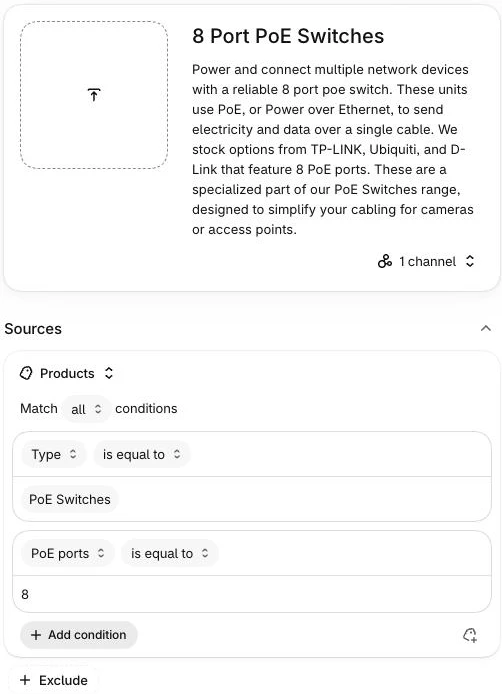
Five kinds of collections earn their own indexable URL on an ecommerce store when backed by search demand and inventory: core category collections (PoE Switches), brand collections (TP-LINK) and brand-by-category cuts (TP-LINK PoE Switches), attribute collections (8 Port PoE Switches), colour or finish collections (Black Bullet Cameras), and keyword-led use-case collections (Outdoor Security Cameras). Each one gives shoppers and Google a dedicated landing page for a specific buying intent instead of forcing them through generic /collections/vendors?q= or ?filter= URLs. The template builds the brand and attribute kinds, colour included when it lives in a metafield, because those are the pages most stores are missing.
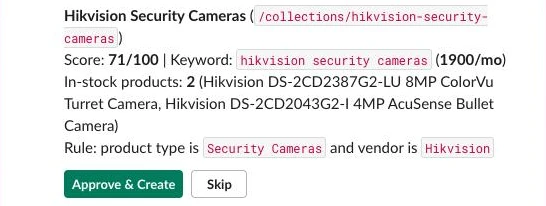
Every week, the workflow posts a Slack card for each high-scoring proposal showing the AI-cleaned title (8 Port PoE Switches), the primary keyword and monthly search volume (8 port poe switch, 390 searches a month in Australia when we tested it), the live in-stock product count (5 products, including TP-LINK TL-SG1210MP and D-Link DGS-1008MP), the smart collection rule in plain English, and Approve & Create and Skip buttons. The card below is one from the same test run.
The workflow lives on one n8n canvas across six lanes: Setup, Propose, Review, Apply, Brands, and Retire.
What you need
- n8n (self-hosted Community Edition or n8n Cloud) with Data Tables enabled.
- A Shopify app (client ID and secret) with
read_products,write_products,read_publications, andwrite_publicationsscopes on Admin GraphQL API2026-10. - Product attributes stored in Shopify metafields with Use as a condition in collections turned on for each definition.
- DataForSEO account for search volume, keyword difficulty and rank checks (about US$0.11 for a run of eight candidates).
- An AI model via n8n’s Chat Model sub-node (defaults to
gpt-oss:120bon Ollama Cloud) and a Slack app with Interactivity enabled.
How it works
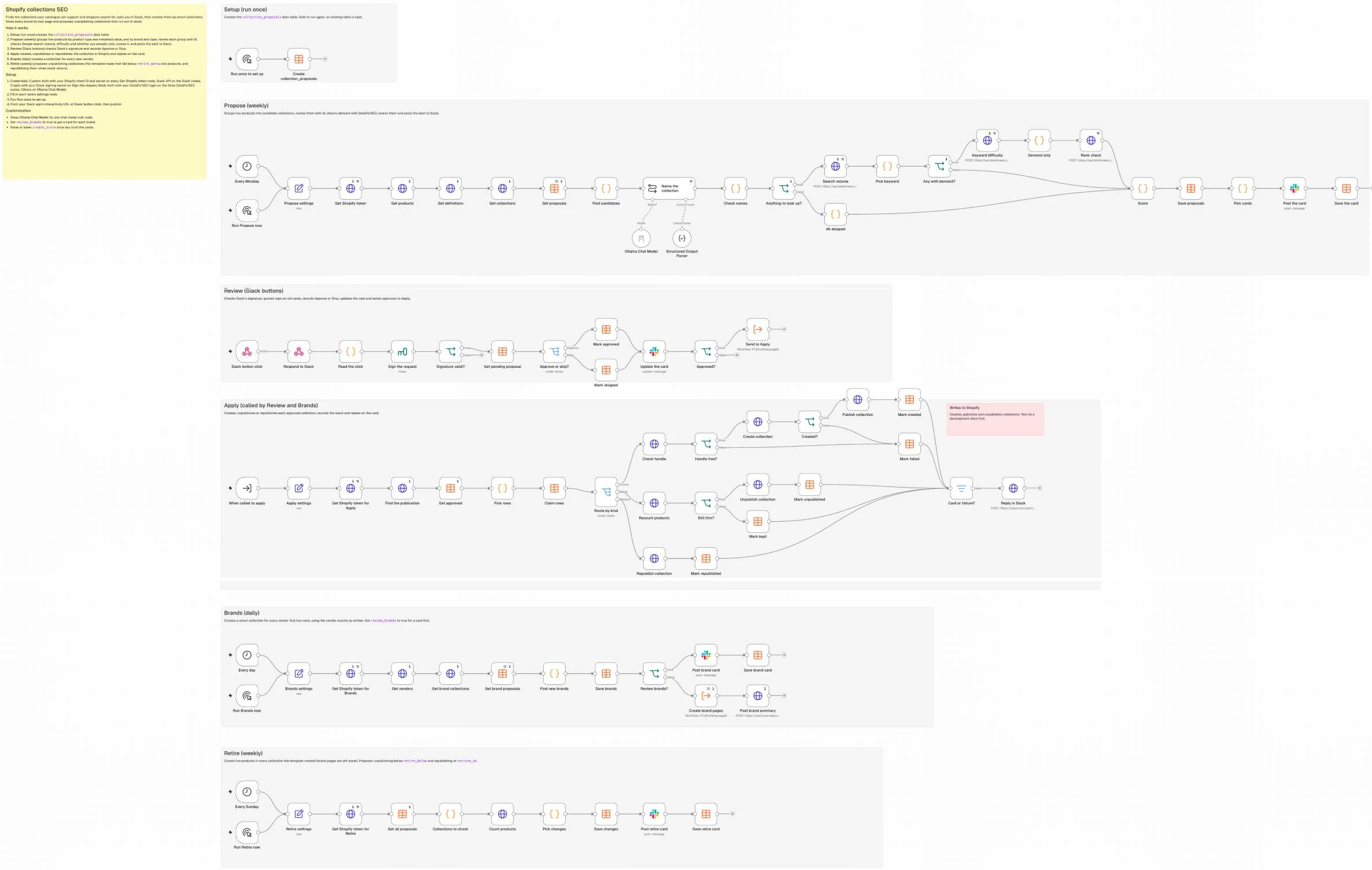
- Setup (Manual Trigger): Creates the
collection_proposalsData Table. - Propose (Schedule Trigger, weekly): Groups active, in-stock products by
productType+ metafield value and by brand + type, names them with AI, checks search volume, difficulty and your current rankings via DataForSEO, scores each candidate on demand, depth, gap, and ease, and posts winners to Slack for you to approve or skip. - Review (Webhook): Verifies the Slack click, ignores taps on old cards, records the decision, and sends approvals to Apply.
- Apply (called by Review and Brands): Checks that the URL handle is free, creates the smart collection via
collectionCreate, publishes it to the Online Store, and replies on the card. It also unpublishes and republishes collections for Retire. - Brands (Schedule Trigger, daily): Creates a
/collections/<brand>smart collection for every newvendorautomatically, with no card unless you turn onreview_brands. - Retire (Schedule Trigger, weekly): Posts an Unpublish or Keep card for collections this template made that drop below your in-stock floor, and a Republish card when stock returns.
Step 1: Get the foundations right, then create the table
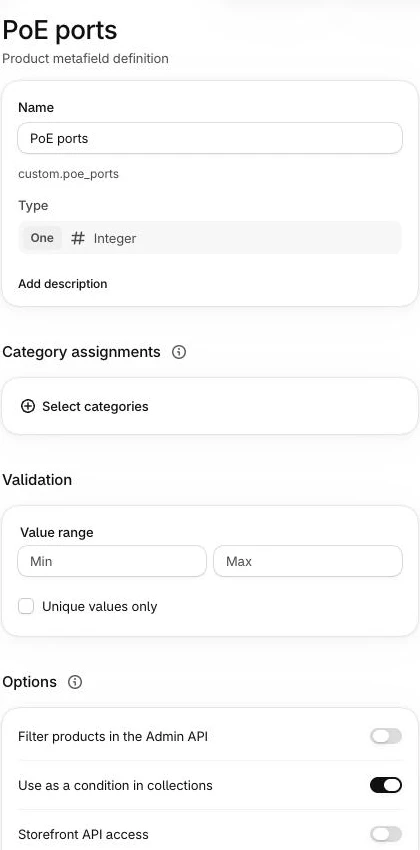
In Shopify, set a productType per category (PoE Switches, Doorbell Cameras), store specs in product metafields (custom.poe_ports, custom.night_vision), and turn on Use as a condition in collections for each metafield definition under Settings > Metafields and metaobjects > Products (the smartCollectionCondition capability in the API). Because Shopify smart collections match either ALL conditions or ANY condition, never a mix, attribute collections need a TYPE EQUALS guard condition alongside the metafield condition.
In the Setup lane, add a Manual Trigger connected to a Data table node set to Table -> Create (Reuse Existing Tables enabled) to create collection_proposals with these columns:
Table: collection_proposals
key            string   rule signature, e.g. PRODUCT_METAFIELD_DEFINITION|poe_ports|8&TYPE||poe switches
kind           string   create | retire | restore
source         string   attribute | brand_type | brand
product_type   string
vendor         string
attr_key       string
attr_value     string
raw_title      string
title          string
handle         string
keywords       string   JSON array
main_keyword   string
volume         number
live_count     number
score          number
floor          number   retire or restore threshold when the card went out
sample_titles  string   JSON array
rule_set       string   JSON, written by code
name_source    string   ai | fallback | vendor
skip_reason    string
status         string   pending | approved | applying | applied | skipped | no_demand | ai_skipped | failed
collection_id  string
slack_channel  string
slack_ts       string
error          string
Step 2: Find candidates in your catalogue
Never trust productsCount on a Shopify collection or product type without filtering for live inventory, because Shopify’s raw count includes draft, archived, and out-of-stock products. In the Propose lane, add a weekly Schedule Trigger followed by a Set node named Propose settings:
{
  "store_domain": "your-store.myshopify.com",
  "namespace": "custom",
  "min_products": 5,
  "max_candidates": 30,
  "max_cards": 10,
  "min_volume": 30,
  "create_score": 65,
  "location_code": 2840,
  "language_code": "en",
  "own_domain": "yourstore.com",
  "slack_channel": "#review-collections"
}
Because n8n’s built-in Shopify node doesn’t return metafields, the template calls Admin GraphQL API 2026-10 (https://{your-store}.myshopify.com/admin/api/2026-10/graphql.json) with HTTP Request nodes. New Shopify apps don’t show a permanent token, so a Get Shopify token node first swaps your app’s client ID and secret for a 24-hour token (client credentials grant, set up in the repo’s SETUP.md), and each request sends it in an X-Shopify-Access-Token header. The first request, Get products, pulls your active products 50 at a time, with the specs in your namespace:
={{ JSON.stringify({ query: `query Products($after: String, $ns: String!) {
  products(first: 50, after: $after, query: "status:active AND published_status:published") {
    pageInfo { hasNextPage endCursor }
    nodes {
      id title vendor productType totalInventory tracksInventory
      metafields(first: 25, namespace: $ns) { nodes { key value type } }
    }
  }
}`, variables: { after: null, ns: $('Propose settings').first().json.namespace } }) }}
Set the node’s Pagination option like this. The value replaces the whole variables object on each page, which is why it repeats ns:
Mode            Update a Parameter in Each Request
Type            Body
Name            variables
Value           {{ { after: $response.body.data.products.pageInfo.endCursor, ns: $('Propose settings').first().json.namespace } }}
Complete When   Other
Expression      {{ !$response.body.data.products.pageInfo.hasNextPage }}
The second, Get definitions, reads the metafield definitions in your namespace so you only propose rules Shopify will accept:
={{ JSON.stringify({ query: `query Definitions($ns: String!) {
  metafieldDefinitions(first: 100, ownerType: PRODUCT, namespace: $ns) {
    nodes { id namespace key name type { name } capabilities { smartCollectionCondition { enabled } } }
  }
}`, variables: { ns: $('Propose settings').first().json.namespace } }) }}
The third, Get collections, pages through your existing collections the same way (with { after: ... } as the value):
={{ JSON.stringify({ query: `query Collections($after: String) {
  collections(first: 100, after: $after) {
    pageInfo { hasNextPage endCursor }
    nodes { id handle title
      ruleSet { appliedDisjunctively rules { column relation condition
        conditionObject { ... on CollectionRuleMetafieldCondition { metafieldDefinition { key } } } } } }
  }
}`, variables: { after: null } }) }}
Connect a Data table Get node (Get proposals, Return All, Always Output Data on so an empty table still runs) that returns every saved row, then a Code node named Find candidates to filter for in-stock products (!tracksInventory || totalInventory > 0), group by productType + metafield (PoE Switches + poe_ports: 8) and vendor + productType, keep groups with at least min_products (5) items that don’t equal 100% of the category, and drop rules that already exist:
const s = $('Propose settings').first().json;
const products = $('Get products').all().flatMap(i => i.json.data.products.nodes);
const live = products.filter(p => !p.tracksInventory || p.totalInventory > 0);
const OK_TYPES = ['single_line_text_field', 'number_integer', 'number_decimal', 'boolean'];
const defs = Object.fromEntries($('Get definitions').first().json.data.metafieldDefinitions.nodes
  .filter(d => d.namespace === s.namespace && d.capabilities.smartCollectionCondition.enabled && OK_TYPES.includes(d.type.name))
  .map(d => [d.key, d]));
const collections = $('Get collections').all().flatMap(i => i.json.data.collections.nodes);
const sig = rules => rules.map(r => [r.column, r.key ?? '', String(r.condition).toLowerCase()].join('|')).sort().join('&');

// Anything Shopify already has, by rule or by handle, is taken.
const taken = new Set(collections.map(c => 'handle:' + c.handle));
for (const c of collections) if (c.ruleSet && !c.ruleSet.appliedDisjunctively)
  taken.add(sig(c.ruleSet.rules.map(r => ({ ...r, key: r.conditionObject?.metafieldDefinition?.key }))));
for (const row of $('Get proposals').all()) if (row.json.key) taken.add(row.json.key);

const byType = {};
for (const p of live) if (p.productType) (byType[p.productType] ??= []).push(p);
const typesPerVendor = {};
for (const p of live) if (p.vendor) (typesPerVendor[p.vendor] ??= new Set()).add(p.productType);

const out = [];
const add = (c) => {
  c.key = sig(c.rules);
  if (taken.has(c.key) || c.products.length < s.min_products || c.products.length === byType[c.product_type].length) return;
  out.push(c);
};
for (const [type, items] of Object.entries(byType)) {
  const groups = {};
  for (const p of items) for (const m of p.metafields.nodes) {
    const d = defs[m.key];
    if (!d || (d.type.name === 'boolean' && m.value !== 'true')) continue;
    (groups[m.key + '=' + m.value] ??= { d, value: m.value, products: [] }).products.push(p);
  }
  for (const g of Object.values(groups)) add({ source: 'attribute', product_type: type, attr_key: g.d.key,
    attr_label: g.d.name, attr_value: g.value, products: g.products,
    rules: [{ column: 'TYPE', relation: 'EQUALS', condition: type },
            { column: 'PRODUCT_METAFIELD_DEFINITION', relation: 'EQUALS', condition: g.value, conditionObjectId: g.d.id, key: g.d.key }] });
  for (const [vendor, types] of Object.entries(typesPerVendor)) if (types.size >= 2) add({ source: 'brand_type',
    product_type: type, vendor, products: items.filter(p => p.vendor === vendor),
    rules: [{ column: 'TYPE', relation: 'EQUALS', condition: type }, { column: 'VENDOR', relation: 'EQUALS', condition: vendor }] });
}
return out.sort((a, b) => b.products.length - a.products.length).slice(0, s.max_candidates).map(c => ({ json: {
  ...c, live_count: c.products.length, vendors: [...new Set(c.products.map(p => p.vendor))],
  sample_titles: c.products.slice(0, 5).map(p => p.title),
  sibling_titles: collections.filter(k => k.ruleSet?.rules.some(r => r.column === 'TYPE' && r.condition === c.product_type)).map(k => k.title),
  products: undefined } }));
For our PoE Switches group where PoE ports = 8, this outputs 5 in-stock products (TP-LINK TL-SG1210MP, TP-LINK TL-SG1008MP, TP-LINK TL-SL1311P, D-Link DGS-1008MP, Ubiquiti USW-16-POE). A sixth 8-port switch with no stock is left out.
Step 3: Name them the way shoppers search
Raw attribute strings produce awkward titles like "8 PoE Switches", "Infrared (black and white) Doorbell Cameras", or "1 Patch Leads". Keep the ruleSet in code, and use a Basic LLM Chain node that returns a shopper title, keyword variants, and a skip_reason for filter-only values as a small JSON object. Any chat model works; the template uses:
Ollama Chat Model
Credential      Ollama, Base URL https://ollama.com, API Key from your Ollama account
Model           gpt-oss:120b
Temperature     0.2
Paste this prompt into the chain. It ends by asking for JSON only:
You name a collection page for an online store.

Category: {{ $json.product_type }}
Attribute: {{ $json.attr_label || 'brand' }}
Value: {{ $json.attr_value || $json.vendor }}
Brand for this page: {{ $json.source === 'brand_type' ? $json.vendor : 'none' }}
Products on the page: {{ $json.live_count }}
Sample product titles:
{{ $json.sample_titles.join('\n') }}
Existing collections in this category:
{{ $json.sibling_titles.join('\n') || 'none' }}

Title:
- The words a shopper would type to find these products, in Title Case, plural.
- Value first, category noun last.
- Units as shoppers write them: 8 Port, 4K, 2TB, 5m.
- Name a brand only if "Brand for this page" is not none, spelled exactly as given.
- No model numbers. No product names. No claims such as best or cheap.
- 60 characters or fewer.

Keywords:
- 3 to 8 phrases a shopper would type into Google to find this page.
- Lower case.
- Every phrase contains the value or the brand.
- No model numbers.

skip_reason:
- Explain in a few words when the value only works as a filter, not a page: pack quantities, internal codes, materials shoppers don't search for.
- Explain when the page would repeat an existing collection.
- Otherwise an empty string.

Reply with only this JSON object: {"title": "...", "keywords": ["..."], "skip_reason": ""}
There’s no Structured Output Parser on purpose: models sometimes wrap the JSON in a code fence or leave a trailing comma, which a parser rejects and the whole run stops. Instead, follow the LLM node with a Code node named Check names that reads the JSON leniently, rejects any title naming a brand other than this page’s, or any word with a digit in it (a size, a spec, a model code) that isn’t in the value or the category, and falls back to the raw title when the check fails. It also catches two candidates that come back with the same title. Candidates with a skip_reason stay in the table as ai_skipped so you can see them, but they never become cards:
const all = $('Find candidates').all().map(i => i.json);
const vendors = [...new Set($('Get products').all().flatMap(i => i.json.data.products.nodes.map(p => p.vendor)).filter(Boolean))];
const words = t => String(t).toLowerCase().split(/[^a-z0-9.+]+/).filter(Boolean);
const slug = t => t.toLowerCase().replace(/&/g, ' and ').replace(/[^a-z0-9]+/g, '-').replace(/^-|-$/g, '');
const seen = new Set();
// Models wrap JSON in code fences and leave trailing commas, so read it leniently.
const readJson = t => {
  try { return JSON.parse(String(t || '').replace(/```(json)?/gi, '').replace(/,\s*([}\]])/g, '$1').trim()); }
  catch (e) { return {}; }
};

return $input.all().map((item, i) => {
  const c = all[i];
  const ai = readJson(item.json.text);
  const own = c.source === 'brand_type' ? c.vendor.toLowerCase() : null;
  const raw = c.source === 'brand_type' ? `${c.vendor} ${c.product_type}` : `${c.attr_value} ${c.product_type}`;
  // Any word with a digit (a size, a spec, a model code) must come from the value or the category.
  const allowed = new Set(words(raw));
  const problems = (text) => {
    const low = ` ${String(text).toLowerCase()} `;
    const found = vendors.filter(v => v.toLowerCase() !== own && low.includes(` ${v.toLowerCase()} `)).map(v => 'brand ' + v);
    return found.concat(words(text).filter(w => /\d/.test(w) && !allowed.has(w)).map(w => 'not in the data: ' + w));
  };
  const aiOk = ai.title && ai.title.length <= 60 && problems(ai.title).length === 0;
  const title = aiOk ? ai.title.trim() : raw;
  let keywords = (ai.keywords ?? []).map(k => k.toLowerCase().replace(/[^a-z0-9 .+&'-]/g, ' ').replace(/\s+/g, ' ').trim())
    .filter(k => k && k.length <= 80 && k.split(' ').length <= 10 && problems(k).length === 0);
  if (!keywords.length) keywords = [raw.toLowerCase()];
  const handle = slug(title);
  const dupe = seen.has(handle); seen.add(handle);
  return { json: { ...c, raw_title: raw, title, handle, keywords: [...new Set(keywords)],
    name_source: aiOk ? 'ai' : 'fallback', name_problems: aiOk ? [] : problems(ai.title ?? ''),
    skip_reason: ai.skip_reason || (dupe ? 'same title as another proposal this week' : '') } };
});
On the test catalogue, the model named eight groups. Three of them show what the check is for:
raw_title                  title                       name_source  skip_reason
8 PoE Switches             8 Port PoE Switches         ai
1 Patch Leads              1 Pack Patch Leads          ai           Pack quantity is a filter, not a standalone collection.
Reolink Security Cameras   Reolink Security Cameras    fallback     (the model wrote "Reolink 4K Security Cameras", but one of the
                                                                    brand's cameras is 12MP: not in the data: 4k)
Step 4: Check demand and score
Add an If node named Anything to look up? (Execute Once on) that checks whether any candidate has no skip_reason; if none has, a small Code node marks them all ai_skipped and goes straight to the save. Otherwise, send all keyword variants in one HTTP Request node (Execute Once enabled, Basic Auth with your DataForSEO login) to DataForSEO’s Google Ads Search Volume Live endpoint (up to 1,000 keywords per task):
POST https://api.dataforseo.com/v3/keywords_data/google_ads/search_volume/live
={{ JSON.stringify([{
  keywords: [...new Set($('Check names').all().filter(i => !i.json.skip_reason).flatMap(i => i.json.keywords))].slice(0, 1000),
  location_code: $('Propose settings').first().json.location_code,
  language_code: $('Propose settings').first().json.language_code
}]) }}
Connect a Code node named Pick keyword that picks each proposal’s highest-volume keyword ("8 port poe switch" at 390/mo in Australia), marks anything under min_volume (30) as no_demand, and throws if the call failed so next week retries. Google Ads combines volume for close variants, so never add variants together:
const s = $('Propose settings').first().json;
const task = $input.first().json.tasks?.[0];
if (!task || task.status_code !== 20000) throw new Error('Search volume failed: ' + (task?.status_message || 'no task'));
const vol = Object.fromEntries((task.result ?? []).map(r => [r.keyword.toLowerCase(), r.search_volume ?? 0]));
return $('Check names').all().map(({ json: c }) => {
  // Google Ads reports close variants with one shared volume, so take the best keyword, never a sum.
  const best = c.keywords.map(k => ({ k, v: vol[k] ?? 0 })).sort((a, b) => b.v - a.v)[0];
  const status = c.skip_reason ? 'ai_skipped' : best.v < s.min_volume ? 'no_demand' : 'pending';
  return { json: { ...c, main_keyword: best.k, volume: best.v, status } };
});
Then, behind an If named Any with demand?, fetch keyword difficulty for the main keywords in one call and check whether you already rank, with one Google results page per proposal (a Demand only Code node in between passes just the pending keywords):
POST https://api.dataforseo.com/v3/dataforseo_labs/google/bulk_keyword_difficulty/live   (Execute Once)
={{ JSON.stringify([{ keywords: [...new Set($('Pick keyword').all().filter(i => i.json.status === 'pending').map(i => i.json.main_keyword))],
  location_code: $('Propose settings').first().json.location_code, language_code: $('Propose settings').first().json.language_code }]) }}

POST https://api.dataforseo.com/v3/serp/google/organic/live/advanced                      (once per item)
={{ JSON.stringify([{ keyword: $json.main_keyword, location_code: $('Propose settings').first().json.location_code,
  language_code: $('Propose settings').first().json.language_code, depth: 10 }]) }}
Finish with a Code node named Score that scores each proposal out of 100 across demand (40 pts), depth (25 pts), gap (20 pts), and ease (15 pts). Both branches lead here, so it checks which lookups ran:
const s = $('Propose settings').first().json;
const clamp = (x, a, b) => Math.max(a, Math.min(b, x));
const demand = vol => vol ? clamp(Math.log10(vol + 1) / Math.log10(5000) * 40, 0, 40) : 0; // 5,000 searches = full 40
const depth = n => clamp(n / 50 * 25, 0, 25);                                          // 50 products = full 25
const gap = ranksNow => ranksNow ? 8 : 20;                                             // more to win if you don't rank
const ease = kd => kd == null ? 8 : clamp((100 - kd) / 100 * 15, 0, 15);

const kd = {}, ranks = {};
const bare = d => String(d || '').toLowerCase().replace(/^www\./, '');
if ($('Keyword difficulty').isExecuted)
  for (const r of $('Keyword difficulty').first().json.tasks?.[0]?.result?.[0]?.items ?? []) kd[r.keyword] = r.keyword_difficulty;
if ($('Rank check').isExecuted)
  for (const it of $('Rank check').all()) {
    const t = it.json.tasks?.[0];
    ranks[t?.data?.keyword] = (t?.result?.[0]?.items ?? []).some(x => x.type === 'organic' && bare(x.domain).endsWith(bare(s.own_domain)));
  }
return $('Pick keyword').all().map(({ json: c }) => ({ json: { ...c, kd: kd[c.main_keyword] ?? null, ranks_now: !!ranks[c.main_keyword],
  score: c.status === 'pending' ? Math.round(demand(c.volume) + depth(c.live_count) + gap(ranks[c.main_keyword]) + ease(kd[c.main_keyword])) : 0 } }));
The 8 Port PoE Switches proposal scores 66 (390 searches, 5 products, not ranking yet, difficulty 0), just above the starting create_score of 65, which you can lower once you trust the cards.
Step 5: Approve in Slack
Upsert every scored candidate to collection_proposals with a Data table node (matched on key, with rule_set, keywords and sample_titles stored as JSON strings). A Code node named Pick cards keeps rows where status is pending and score is at least create_score, sorted by score and capped at max_cards (10):
const s = $('Propose settings').first().json;
return $input.all().filter(i => i.json.status === 'pending' && i.json.score >= s.create_score)
  .sort((a, b) => b.json.score - a.json.score).slice(0, s.max_cards);
Post each one with a Slack node (Message -> Send, Message Type: Blocks), then save the returned channel and message_timestamp on the row with a Data table Update. Build the blocks with JSON.stringify, because a title with a quote mark in it breaks hand-written JSON:
={{ JSON.stringify({ blocks: [
  { type: 'section', text: { type: 'mrkdwn', text: '*' + $json.title + '* (`/collections/' + $json.handle + '`)\n' +
    'Score: *' + $json.score + '/100* | Keyword: `' + $json.main_keyword + '` (*' + $json.volume + '/mo*)\n' +
    'In-stock products: *' + $json.live_count + '* (' + JSON.parse($json.sample_titles).slice(0, 3).join(', ') + ')\n' +
    'Rule: product type is `' + $json.product_type + '` and ' + ($json.attr_key ? '`' + $json.attr_key + '` is `' + $json.attr_value + '`' : 'vendor is `' + $json.vendor + '`') } },
  { type: 'actions', elements: [
    { type: 'button', style: 'primary', text: { type: 'plain_text', text: 'Approve & Create' }, action_id: 'collection_approve', value: String($json.id) },
    { type: 'button', text: { type: 'plain_text', text: 'Skip' }, action_id: 'collection_skip', value: String($json.id) } ] }
] }) }}
In the Review lane, add a Webhook node (Raw Body on) with a Respond to Webhook node straight after it so Slack receives an HTTP 200 within 3 seconds, then check Slack’s signature so nobody holding the webhook URL can approve a collection. The Code node that reads the raw body looks like this (n8n’s Code node has no URLSearchParams, so it splits the form body by hand):
const raw = (await this.helpers.getBinaryDataBuffer(0, 'data')).toString('utf8');
const h = $input.first().json.headers;
if (Math.abs(Date.now() / 1000 - Number(h['x-slack-request-timestamp'])) > 300) throw new Error('Stale request');
const field = raw.split('&').find(kv => kv.startsWith('payload=')) || ''; // no URLSearchParams in the Code node
const p = JSON.parse(decodeURIComponent(field.slice(8).replace(/\+/g, ' ')));
const a = p.actions[0];
return [{ json: { base: `v0:${h['x-slack-request-timestamp']}:${raw}`, expected: h['x-slack-signature'],
  action: a.action_id, id: Number(a.value), user: p.user.username, channel: p.channel.id, ts: p.message.ts } }];
Build the rest of the lane in this order:
Webhook               POST, path collection-review, Raw Body on, Respond: Using 'Respond to Webhook' Node
Respond to Webhook    Respond With: No Data
Code                  Read the click (above)
Crypto                Hmac, SHA256, Value {{ $json.base }}, Secret: Slack signing secret, Encoding HEX, Property Name sig
If                    {{ 'v0=' + $json.sig === $json.expected }}
Data table Get        collection_proposals where id = the button's value and status = pending, so a second tap on an old card does nothing
Switch                Approve or Skip
Data table Update     status = approved, or status = skipped
Slack                 Message, Update: rewrite the card with who decided
If                    approved?
Execute Sub-workflow  Workflow ID {{ $workflow.id }}, input id = the row's id
Step 6: Create the collection
In the Apply lane, add these nodes:
When Executed by Another Workflow   input: id (number; 0 means every approved row)
Apply settings (Set)                see below
Get Shopify token for Apply
Find the publication                HTTP: { publications(first: 20) { nodes { id name } } }, Execute Once
Data table Get                      status = approved, Return All
Code: Pick rows                     keep the row whose id was passed in, or every row when it's 0
Data table Update: Claim rows       status = applying, so an overlapping run can't create it twice
Switch                              on kind: create | retire | restore
{
"store_domain": "your-store.myshopify.com",
"seo_title_suffix": " | Your Store",
"sort_order": "BEST_SELLING",
"publication_name": "Online Store",
"keyword_namespace": "seo",
"slack_channel": "#review-collections"
}Query collectionByIdentifier first, because someone may have made the page by hand since the card went out. In API 2026-10, collectionCreate refuses a taken handle with “Handle has already been taken”, so checking first lets the reply name the collection that holds it:
={{ JSON.stringify({ query: 'query($h: String!) { collectionByIdentifier(identifier: { handle: $h }) { id handle } }', variables: { h: $('Pick rows').item.json.handle } }) }}If that returns a collection, mark the row failed with “handle taken”. Otherwise call collectionCreate (2026-10) with ruleSet (Shopify admin now shows these conditions under Sources, and ruleSet remains the API field) in an HTTP Request whose body is below. It also saves the main keyword and its volume on the collection as metafields, which the category page template reads when it writes the intro:
={{ JSON.stringify({
  query: `mutation Create($input: CollectionInput!) {
    collectionCreate(input: $input) { collection { id handle } userErrors { field message } } }`,
  variables: { input: (r => ({
    title: r.title,
    handle: r.handle,
    sortOrder: $('Apply settings').first().json.sort_order,
    seo: { title: r.title + $('Apply settings').first().json.seo_title_suffix },
    ruleSet: { appliedDisjunctively: false, rules: JSON.parse(r.rule_set).map(({ key, ...rule }) => rule) },
    metafields: r.main_keyword ? [
      { namespace: $('Apply settings').first().json.keyword_namespace, key: 'target_keyword', type: 'single_line_text_field', value: r.main_keyword },
      { namespace: $('Apply settings').first().json.keyword_namespace, key: 'keyword_volume', type: 'number_integer', value: String(r.volume || 0) }
    ] : []
  }))($('Pick rows').item.json) }
}) }}
An If checks the collection came back with the handle you asked for, then publishablePublish puts it on the Online Store, because collections are unpublished by default:
mutation($id: ID!, $pub: ID!) {
  publishablePublish(id: $id, input: [{ publicationId: $pub }]) { userErrors { field message } }
}
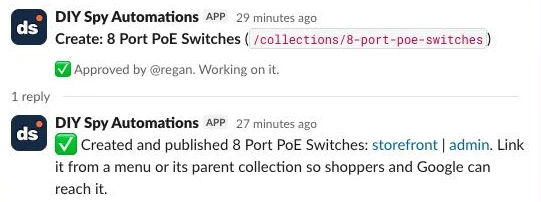
Then mark the row applied with its collection_id and reply in the card’s thread with the storefront and admin links. Publishing doesn’t link the page from anywhere, so add it to a menu or its parent collection’s description, otherwise shoppers and Google can’t reach it. Its intro and meta description are the next guide’s job.
Step 7: Give every brand a collection
Shopify’s /collections/vendors?q=TP-LINK URL is a preset filter rather than an editable collection page. In the Brands lane, read every active product’s vendor and your existing collections daily, and create a VENDOR EQUALS smart collection for each vendor that has none, keeping the vendor exactly as stored (TP-LINK, 8ware). With review_brands false, the rows are saved as approved and sent to Apply in one call, and one Slack message lists the new pages instead of one per brand:
{
  "store_domain": "your-store.myshopify.com",
  "exclude_vendors": [
    "Generic",
    "Other",
    "Unbranded"
  ],
  "review_brands": false,
  "slack_channel": "#review-collections"
}
const s = $('Brands settings').first().json;
const count = {};
for (const p of $('Get vendors').all().flatMap(i => i.json.data.products.nodes)) if (p.vendor) count[p.vendor] = (count[p.vendor] || 0) + 1;
const cols = $('Get brand collections').all().flatMap(i => i.json.data.collections.nodes);
// A brand page is a collection whose only rule is VENDOR EQUALS.
const hasPage = new Set(cols.filter(c => c.ruleSet?.rules.length === 1 && c.ruleSet.rules[0].column === 'VENDOR' && c.ruleSet.rules[0].relation === 'EQUALS')
.map(c => c.ruleSet.rules[0].condition.toLowerCase()));
const handles = new Set(cols.map(c => c.handle));
const seen = new Set($('Get brand proposals').all().map(i => String(i.json.vendor || '').toLowerCase()));
const skip = new Set(s.exclude_vendors.map(v => v.toLowerCase()));
const slug = t => t.toLowerCase().replace(/&/g, ' and ').replace(/[^a-z0-9]+/g, '-').replace(/^-|-$/g, '');
return Object.entries(count)
.filter(([v]) => !skip.has(v.toLowerCase()) && !hasPage.has(v.toLowerCase()) && !seen.has(v.toLowerCase()) && !handles.has(slug(v)))
.map(([v, n]) => ({ json: { key: 'VENDOR||' + v.toLowerCase(), source: 'brand', vendor: v, title: v, handle: slug(v), live_count: n,
rule_set: JSON.stringify([{ column: 'VENDOR', relation: 'EQUALS', condition: v }]), status: s.review_brands ? 'pending' : 'approved' } }));Step 8: Retire collections that stop qualifying
Empty collections cause soft 404 errors in Google Search Console. In the Retire lane, check every collection this template created (brand pages are left alone) once a week:
{
  "store_domain": "your-store.myshopify.com",
  "retire_below": 3,
  "restore_at": 5,
  "keep_days": 28,
  "slack_channel": "#review-collections"
}
A Code node named Collections to check works out which collections are live, skipping any with a card already out or that you chose to keep in the last keep_days:
const s = $('Retire settings').first().json;
const rows = $('Get all proposals').all().map(i => i.json);
const byCol = {};
for (const r of rows) if (r.collection_id) (byCol[r.collection_id] ??= []).push(r);
const cutoff = Date.now() - s.keep_days * 864e5;
const out = [];
for (const [id, rs] of Object.entries(byCol)) {
  const made = rs.find(r => r.kind === 'create' && r.status === 'applied' && r.source !== 'brand');
  if (!made) continue;
  const changes = rs.filter(r => r.kind !== 'create').sort((a, b) => a.id - b.id);
  if (changes.some(r => ['pending', 'approved', 'applying'].includes(r.status))) continue;    // a card is already out
  if (changes.some(r => r.status === 'skipped' && new Date(r.updatedAt) > cutoff)) continue;  // you chose to keep it recently
  const last = changes.filter(r => r.status === 'applied').at(-1);
  out.push({ json: { collection_id: id, title: made.title, handle: made.handle, source: made.source, live: !last || last.kind === 'restore' } });
}
return out;
An HTTP Request counts each one’s products, and Pick changes proposes retire below retire_below (3) and restore when a retired collection is back to restore_at (5). Creating at 5 and retiring under 3 stops a collection near the floor flipping weekly:
const s = $('Retire settings').first().json;
const cols = $('Collections to check').all().map(i => i.json);
const today = new Date().toISOString().slice(0, 10);
return $input.all().flatMap((it, i) => {
  const c = cols[i], col = it.json.data?.collection;
  if (!col) return [];                                         // deleted in Shopify
  const live = col.products.nodes.filter(p => p.status === 'ACTIVE' && (!p.tracksInventory || p.totalInventory > 0)).length;
  const kind = c.live && live < s.retire_below ? 'retire' : !c.live && live >= s.restore_at ? 'restore' : null;
  if (!kind) return [];
  return [{ json: { key: `${kind}|${c.collection_id}|${today}`, kind, source: c.source, title: c.title, handle: c.handle,
    collection_id: c.collection_id, live_count: live, floor: kind === 'retire' ? s.retire_below : s.restore_at } }];
});
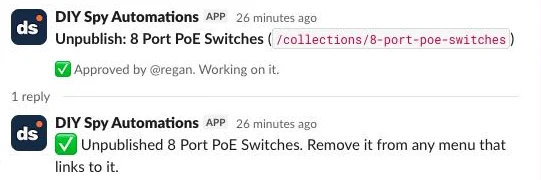
Save the rows and post an Unpublish or Keep card (Republish or Leave unpublished for a restore). They go through the same Review lane. On approval, Apply recounts in case stock came back (if it has, the row is marked skipped and the reply says so), then unpublishes it with publishableUnpublish rather than deleting it so it can return when stock lands:
mutation($id: ID!, $pub: ID!) {
  publishableUnpublish(id: $id, input: [{ publicationId: $pub }]) { userErrors { field message } }
}
Unpublishing leaves any menu link pointing at a hidden page, so the reply reminds you to take it out of the menu. If the page had traffic, add a redirect to its parent under Online Store > Navigation > URL Redirects, and remove it if you republish.
What it costs
Because the Propose lane runs weekly and batches all keyword lookups into a single DataForSEO request, running this automation costs less than a cup of coffee per month. The caps (max_candidates 30 and max_cards 10) keep the weekly work flat whatever the catalogue size. All prices below were checked November 2026:
| Component | Unit price | 500 products | 2,000 products | 10,000 products |
|---|---|---|---|---|
| n8n | $0 self-hosted or €20/mo (n8n Cloud Starter, annual) | $0 or €20/mo | $0 or €20/mo | $0 or €20/mo |
| DataForSEO Google Ads Volume | $0.09 per live task (up to 1,000 keywords/task) | $0.39/mo | $0.39/mo | $0.39/mo |
| DataForSEO difficulty and SERP | about $0.013 a difficulty task; $0.002 a results page, up to 30 a week | $0.32/mo | $0.32/mo | $0.32/mo |
Ollama Cloud (gpt-oss:120b) | $0.15/1M in, $0.60/1M out | $0.05/mo | $0.05/mo | $0.05/mo |
A test run that named eight candidates and checked six of them cost US$0.11 (US$0.09 for the volumes, US$0.013 for difficulty and US$0.012 for six results pages). DataForSEO is pay as you go with a US$50 minimum top-up, which lasts years at this rate. Collection apps on the Shopify App Store charge a monthly fee, from about US$9.50 a month for Rankify Smart Collections (checked November 2026), and build every combination you configure without checking search demand, and the bigger saving is the keyword research, rule, handle and title you’d otherwise do by hand for each page.
Common mistakes
Building collections from your category tree before you have stock
Creating 200 empty subcategories on launch day fills your sitemap with zero-product pages. Let live inventory drive creation (min_products: 5).
Thin or empty collections left indexed
Leaving a one-product collection published wastes crawling on a page with nothing to buy. Unpublish collections below retire_below (3 live products) with publishableUnpublish.
Two collections with the same products under different names
Creating both /collections/poe-cameras and /collections/power-over-ethernet-cameras splits link equity across two identical grids. Deduplicate against existing ruleSet definitions before proposing, and for near misses Shopify suggests keeping both only if Google shows different results.
A collection for every filter value with no search demand
Not every attribute earns an indexable URL, as Ahrefs’ category SEO guide notes. Combine the Step 3 filter check ("1 Patch Leads") with Step 4’s min_volume floor (30 searches/mo).
Counting drafts as products
Shopify’s productsCount includes draft and sold-out items, and archived products stay in collections. Always count status: 'ACTIVE' products with totalInventory > 0 (or untracked stock) in your Code node, and exclude products with a tag rather than “is not equal to” rules, as Shopify recommends.
Duplicate handles
Two proposals can come back from the model with the same title, and a page made by hand can already hold the handle. Check names skips the second of a pair, and Apply checks collectionByIdentifier before calling collectionCreate, which refuses a taken handle.
Metafields not enabled for smart collection conditions
Passing a PRODUCT_METAFIELD_DEFINITION rule fails unless Use as a condition in collections is on for that metafield definition in Shopify admin, and Find candidates skips it silently.
Titles built from raw attribute values
Concatenating raw values produces "8 PoE Switches" instead of "8 Port PoE Switches". Run candidates through Step 3’s naming prompt and validator.
Parent collections that don’t pick up new child types
A parent collection matching only TYPE EQUALS Network Switches misses PoE Switches. Use appliedDisjunctively: true (ANY condition) across all child productType values, and add each new type when you create the category.
Make it your own
Each new collection still needs an intro and meta description written from its own products, which the category page SEO guide covers.
Start from keyword research instead of attributes
If you haven’t populated metafields yet, load a keyword export into a Data Table and have a Code node match searched phrases against product titles and tags.
Use Search Console as the gap signal
Search Console queries with impressions but no matching collection make a strong gap signal, so feed them into Step 4 and score matches higher.
Fashion occasion, colour, and manual merchandising collections
For apparel, group candidates by VARIANT_TITLE or TAG (Black Linen Dresses), and exclude manual collections like New Arrivals from the Retire lane.
When Data Tables aren’t enough
All data tables on an instance share a 200 MiB limit by default (self-hosters can raise it with N8N_DATA_TABLES_MAX_SIZE_BYTES), and past it inserts and updates fail. At 1 to 2 KB a row, a 2,000-product store stays under 1 MB and a 10,000-product store near 10 MB, so other workflows usually fill it first. If you hit it, swap the Data table nodes for Postgres nodes; Supabase’s free plan includes a 500 MB database, though free projects pause after a week without activity.
FAQ
How many collections should a Shopify store have?
Create as many collections as you have distinct search queries backed by at least 5 in-stock products. There’s no target number beyond that.
Smart or manual collections?
Use smart collections for all SEO category, brand, and attribute pages so new products sort themselves automatically. Save manual collections for curated promos or gift guides.
Does a product in several collections cause duplicate content?
No, provided your theme links to canonical /products/<handle> URLs rather than /collections/<collection>/products/<handle> URLs (the within filter creates the second kind), and each collection targets a distinct search query. Ensure Google can crawl clean internal links to both.
What should I do with empty or thin collections?
Unpublish them via publishableUnpublish when they drop below 3 in-stock products, and republish when stock returns. Only delete and 301-redirect a collection if the range is permanently discontinued.
Next steps
Import the template into n8n, enable smart collection conditions on your key product metafields, and run the Propose lane to review your first scored collection cards in Slack. Then follow the category page SEO guide to write their intros and internal links automatically.