Product Title Optimisation With AI: A Free n8n Template for Shopify

Last tested on n8n 2.45, November 2026.
Supplier product titles rarely match how people actually search. Wholesalers send warehouse strings like ASUS RT-AX54HP V2 AX1800 DUALBAND WIRELESS GIGABIT ROUTER 3Y, and an AI writing tool with nothing checking its output can add fluffy adjectives, drop the manufacturer part number (MPN), or hallucinate specs that aren’t in the box.
By the end of this guide, you’ll have an n8n workflow that rewrites tagged Shopify products to a category-specific formula using AI, validates every model code and number in JavaScript, sends a before-and-after card to Slack for one-click approval or editing, and feeds approved titles back into your prompt as examples for the next batch.
What you’ll build
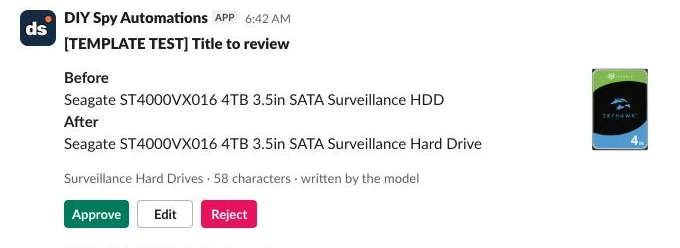
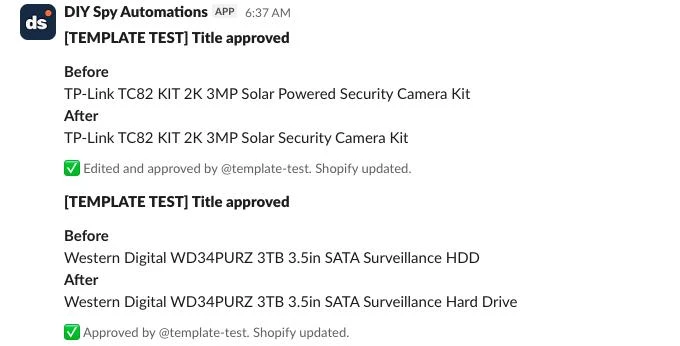
Whenever you add the retitle tag to a product in Shopify (or set a Shopify Flow rule to tag new products automatically), the workflow generates a clean title, checks it against strict code rules, and posts a before-and-after card to Slack.
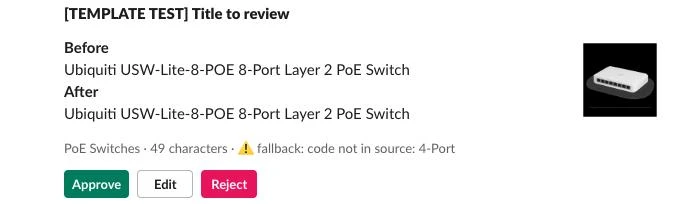
For example, a raw supplier listing for Ubiquiti G6 Pro Bullet, White All-Weather 4K PoE+ Camera, Multi-TOPS AI Engine, 2.36x Optical Zoom, Large 1/1.2"CMOS Sensor,Long-Range IR Night Vision arrives in Slack with the proposed title Ubiquiti UVC-G6-PRO-BULLET-W 4K All-Weather PoE+ Camera White, showing its character count (61 characters), which source produced it (ai or the fallback), and three buttons: Approve, Edit, and Reject.
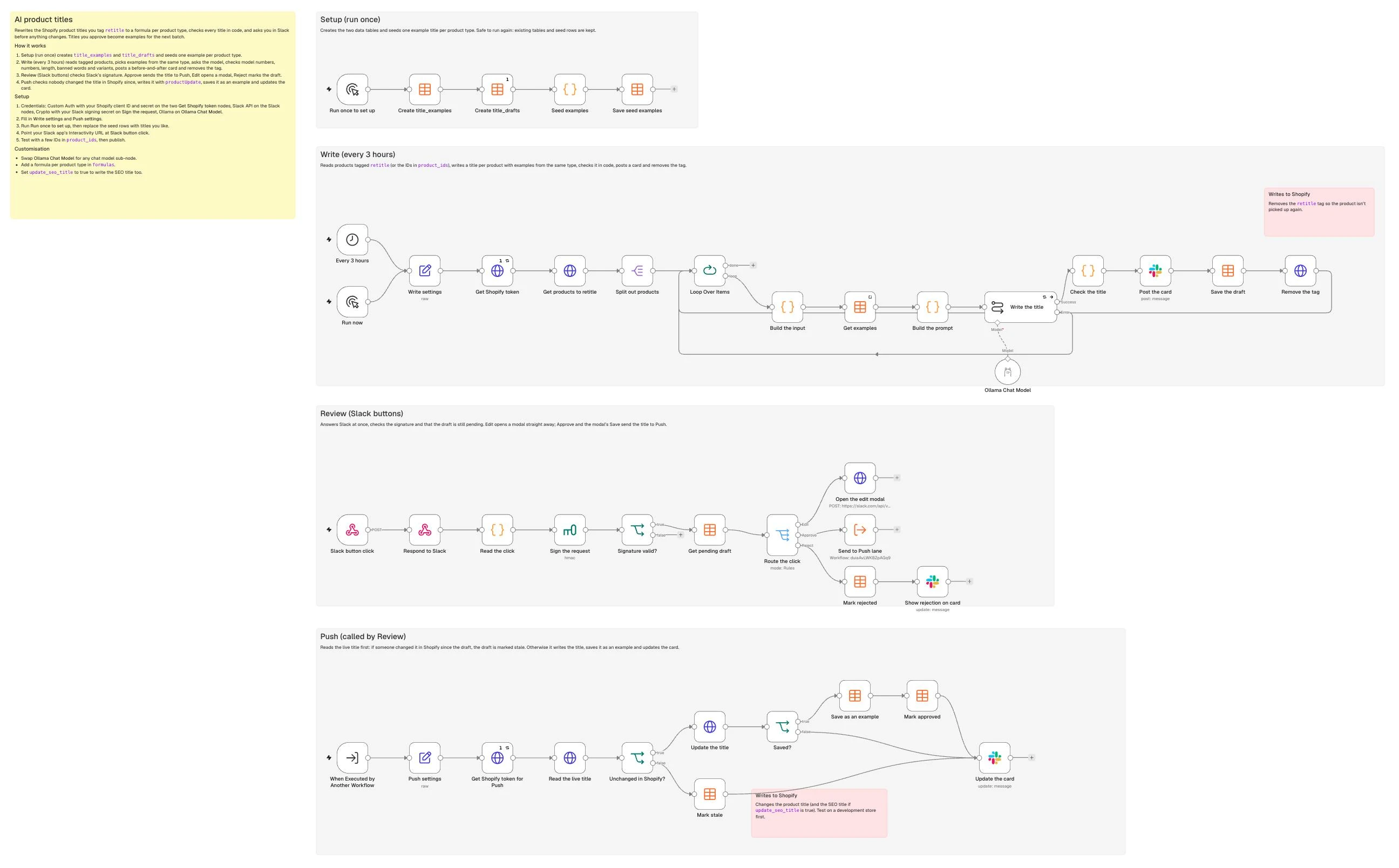
The workflow runs across four lanes on a single n8n canvas: Setup, Write, Review, and Push.
What you need
- n8n with Data Tables enabled: the free self-hosted Community Edition (recommended) or n8n Cloud.
- A Shopify app with
read_productsandwrite_productsscopes on Admin GraphQL API version2026-10, and its client ID and secret. - A Slack app with Interactivity enabled,
chat:writescope for your review channel, and its signing secret. - An AI model via n8n’s Chat Model sub-node. The template defaults to
gemma4:31b(Gemma 4 31B) on Ollama Cloud, which takes about 0.9 seconds per title and costs an estimated US$0.0002. - An MPN metafield on your products (or their first variant), if your catalogue has model numbers.
How it works
- Setup (Manual Trigger): Creates the
title_examplesandtitle_draftsData Tables and seedstitle_exampleswith one example per product type. - Write (Schedule / Manual Trigger): Queries Shopify for products tagged
retitle, pulls approved examples from the same category, prompts the AI model, checks the title in code, posts the Slack card, and removes theretitletag. - Review (Webhook): Verifies that each request came from Slack, handles button clicks and modal edits within Slack’s 3-second window, and forwards approved titles to Push.
- Push (When Executed by Another Workflow): Checks nobody has edited the title in Shopify since the draft, updates the product title via
productUpdate, saves the approved title intotitle_examples, and updates the Slack card.
Step 1: Set up your formula and examples table
Salsify’s shopper research found that 51% of shoppers say the product title and description are the most important elements on a product page, while Google Merchant Center’s title specification allows up to 150 characters, notes that shoppers usually notice only the first 70 or fewer characters, and advises putting the most important details first. For branded hardware, keeping the exact manufacturer part number in the title is critical because high-intent buyers search by model code.
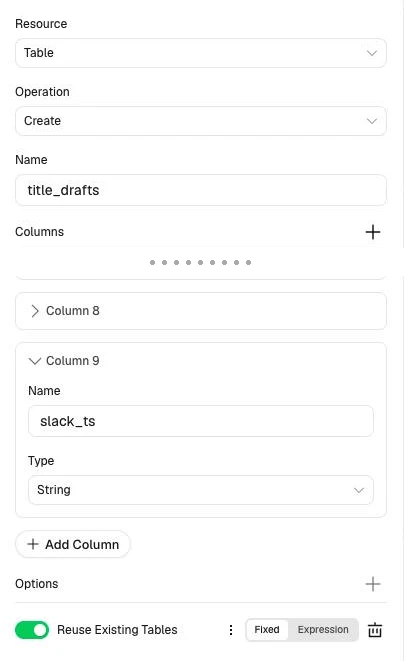
In the Setup lane, add a Manual Trigger connected to two Data table nodes set to Table -> Create, with Reuse Existing Tables turned on so running Setup twice does no harm:
| Table | Columns (all String) |
|---|---|
title_examples | category (the product type), input (the product data the model saw), title (the approved title), source (seed, approved or edited) |
title_drafts | product_id, category, input, old_title, new_title, title_source (ai or fallback), problems (why the check failed, if it did), status (pending, approved, rejected or stale), slack_ts |
Add a Code node that returns one seed example per product type and connect a Data table Upsert node (matching on title) to populate title_examples:
return [
  { json: { category: 'Security Cameras', source: 'seed',
    input: 'Current title: TP-LINK VIGI C540(4MM) 4MP OUTDOOR FULL-COLOUR PAN/TILT NETWORK CAMERA\nBrand: TP-Link\nMPN: VIGI C540(4mm)\nType: Security Cameras\nDescription: 4MP outdoor network camera with a 4mm lens, full-colour night vision, pan and tilt, powered by PoE or 12V DC.',
    title: 'TP-Link VIGI C540 4MP Outdoor Full-Colour Pan/Tilt PoE Camera' } },
  { json: { category: 'PoE Switches', source: 'seed',
    input: 'Current title: TP-LINK TL-SG1008P 8-PORT GIGABIT DESKTOP SWITCH WITH 4-PORT POE+\nBrand: TP-Link\nMPN: TL-SG1008P\nType: PoE Switches\nDescription: 8 Gigabit ports, 4 of them PoE+, 64W total PoE budget, desktop steel case, plug and play.',
    title: 'TP-Link TL-SG1008P 8-Port Gigabit Switch with 4 PoE+ Ports' } },
  { json: { category: 'Hard Drives', source: 'seed',
    input: 'Current title: WD PURPLE 4TB 3.5IN SATA SURVEILLANCE HARD DRIVE WD43PURZ\nBrand: WD\nMPN: WD43PURZ\nType: Hard Drives\nDescription: 4TB 3.5 inch SATA 6Gb/s hard drive built for 24/7 surveillance recording in NVRs and DVRs.',
    title: 'WD Purple 4TB 3.5in SATA Surveillance Hard Drive WD43PURZ' } }
];
At the start of the Write lane, add a Set node named Write settings. Different product categories need different attribute orders, so store a formula per product type alongside your global settings:
{
  "store_domain": "your-store.myshopify.com",
  "queue_tag": "retitle",
  "product_ids": [],
  "batch_size": 25,
  "model": "gemma4:31b",
  "max_length": 70,
  "mpn_namespace": "custom",
  "mpn_key": "mpn",
  "slack_channel": "#review-titles",
  "banned_words": ["best", "cheap", "sale", "new", "free shipping", "warranty"],
  "colour_words": ["Black", "White", "Grey", "Silver", "Blue", "Red"],
  "formulas": {
    "Security Cameras": "Brand, model number, resolution, form factor, what it is, then colour or lens",
    "PoE Switches": "Brand, model number, port count, speed, PoE ports, what it is",
    "Hard Drives": "Brand, product line, capacity, form factor, interface, what it is, model number",
    "default": "Brand, model number, the key spec, what it is"
  }
}
Run the Setup lane once and check that all three seed rows appear in your title_examples table.
Step 2: Pull the products to rewrite
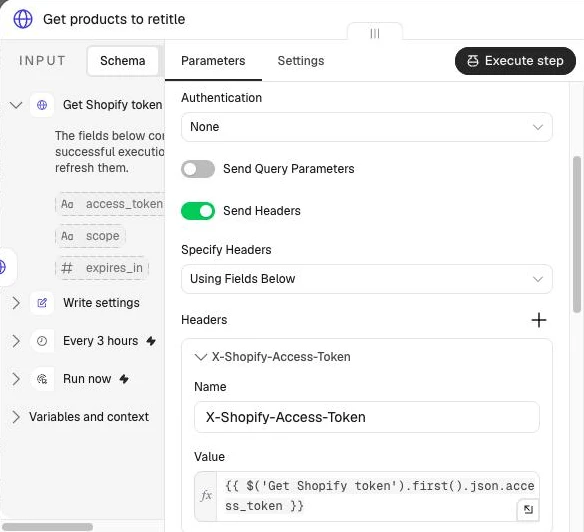
Queue products with a single retitle tag in Shopify (or use Shopify Flow to tag new products automatically). In the Write lane, add a Schedule Trigger and a Manual Trigger connected to Write settings. Because n8n’s built-in Shopify node doesn’t return metafields, add a Get Shopify token HTTP Request node (the repo’s SETUP.md covers it), then an HTTP Request node calling Shopify’s Admin GraphQL API (2026-10) at https://{{ $('Write settings').first().json.store_domain }}/admin/api/2026-10/graphql.json, with the token in an X-Shopify-Access-Token header:
query ProductsToRetitle($q: String!, $n: Int!, $ns: String!, $key: String!) {
  products(first: $n, query: $q) {
    nodes {
      id
      title
      vendor
      productType
      mpn: metafield(namespace: $ns, key: $key) { value }
      description(truncateAt: 600)
      hasOnlyDefaultVariant
      options { name values }
      variants(first: 1) { nodes { sku mpn: metafield(namespace: $ns, key: $key) { value } } }
      featuredMedia { preview { image { url } } }
    }
  }
}
Pass these variables:
{{ (s => ({ q: s.product_ids.length ? s.product_ids.map(id => 'id:' + id).join(' OR ') : 'tag:' + s.queue_tag, n: s.batch_size, ns: s.mpn_namespace, key: s.mpn_key }))($('Write settings').first().json) }}With IDs in product_ids, it fetches those products instead of the tagged ones, which suits a test batch. Always pull the MPN explicitly in this query. On a store I run, the model number went missing from about a third of titles when the prompt had no MPN line, against 0.5% with it.
Connect a Split Out node on data.products.nodes, then a Loop Over Items node (Batch Size: 1), because the Basic LLM Chain doesn’t keep n8n’s item pairing. Add a Code node named Build the input to extract the MPN and strip curly braces {} so LangChain’s template parser doesn’t misread product text:
const s = $('Write settings').first().json;
const p = $json;
const clean = t => String(t || '').replace(/[{}]/g, '').replace(/\s+/g, ' ').trim();
const options = p.hasOnlyDefaultVariant ? [] : p.options.filter(o => o.name !== 'Title');
const type = p.productType || 'default';
const variant = p.variants.nodes[0] || {};
const mpn = (p.mpn || variant.mpn || {}).value || '';

const lines = [
  'Current title: ' + clean(p.title),
  'Brand: ' + clean(p.vendor),
  'MPN: ' + clean(mpn || 'unknown'),
  'Type: ' + clean(type),
  'Description: ' + clean(p.description)
];
if (options.length) lines.push('Options: ' + options.map(o => o.name + ' (' + o.values.join(', ') + ')').join('; '));

return { json: {
  product_id: p.id, old_title: p.title, vendor: p.vendor, mpn, category: type,
  sku: variant.sku || '',
  description: clean(p.description),
  formula: s.formulas[type] || s.formulas.default,
  option_values: options.flatMap(o => o.values),
  image: p.featuredMedia && p.featuredMedia.preview ? p.featuredMedia.preview.image.url : '',
  input: lines.join('\n')
} };
Step 3: Add examples from the same category
Few-shot examples work best when they match the product’s category and only include titles a human has already approved. Add a Data table node set to Row -> Get on title_examples, matching any condition of category = {{ $json.category }} or source = seed, with Limit set to 20, newest first, and Always Output Data turned on so a new category doesn’t stop the loop.
Connect a Code node named Build the prompt that keeps up to five approved titles from the same category and falls back to the seed rows if the category has none yet:
const p = $('Build the input').first().json;
const rows = $input.all().map(i => i.json).filter(r => r.title);
const same = rows.filter(r => r.category === p.category).slice(0, 5);
const extra = rows.filter(r => r.category !== p.category).slice(0, Math.max(0, 3 - same.length));
const examples = [...same, ...extra]
  .map(r => (r.input + '\nTitle: ' + r.title).replace(/[{}]/g, ''))
  .join('\n\n');
return [{ json: { ...p, examples } }];
Step 4: Write the title
Add a Basic LLM Chain node connected to an Ollama Chat Model sub-node (gemma4:31b, Temperature 0.2). Ask for a plain Title: <your title> line rather than JSON, because a single field doesn’t need an output parser and JSON braces break the chain’s prompt templates. Set Prompt to Define below and pass in the examples and the product:
Approved titles (format only, different products, don't copy their facts):

{{ $json.examples }}

Now this product:
{{ $json.input }}
Under Chat Messages, add a System message with the rules:
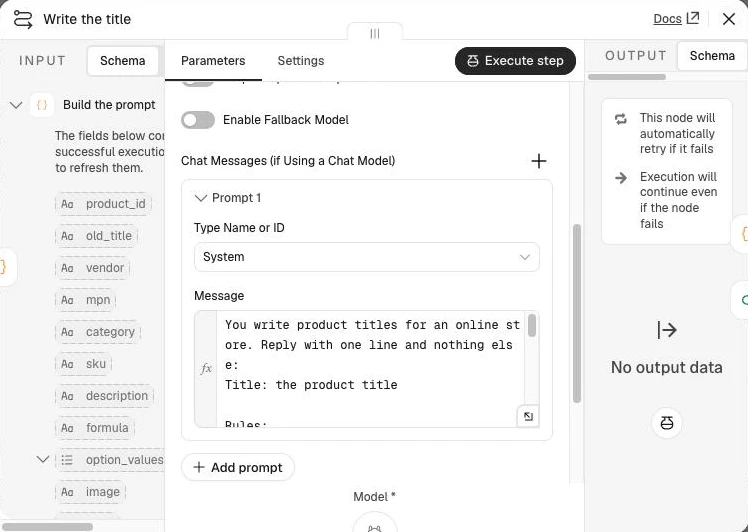
You write product titles for an online store. Reply with one line and nothing else:
Title: the product title

Rules:
- Formula: {{ $json.formula }}.
- Write the brand as on the Brand line, and any model number exactly as given in MPN.
- {{ $('Write settings').first().json.max_length }} characters or fewer.
- Capitalise each word. Keep model numbers and terms like PoE, 4K, USB-C and Wi-Fi as written.
- Only facts in the product data. Never add a spec, a number or a model code that isn't there.
- If Options is given, don't name any option value.
- No prices, stock words, warranty, shipping, sales words, quote marks, emojis, or dashes as separators.
Set the model on the sub-node:
| Setting | Value |
|---|---|
| Model | {{ $('Write settings').first().json.model }} |
| Sampling Temperature | 0.2 |
In the chain’s Settings, turn on Retry On Fail (2 tries) and wire the error output back to Loop Over Items.
When we benchmarked a version of this prompt on one camera on 31 October 2026, three runs per model, Gemma 4 31B on Ollama Cloud took a median 0.9 seconds per title, while Claude Opus took 6.0 seconds at roughly US$0.016 per title. Start with the fast open model and let the code check in Step 5 catch edge cases.
Step 5: Check it in code
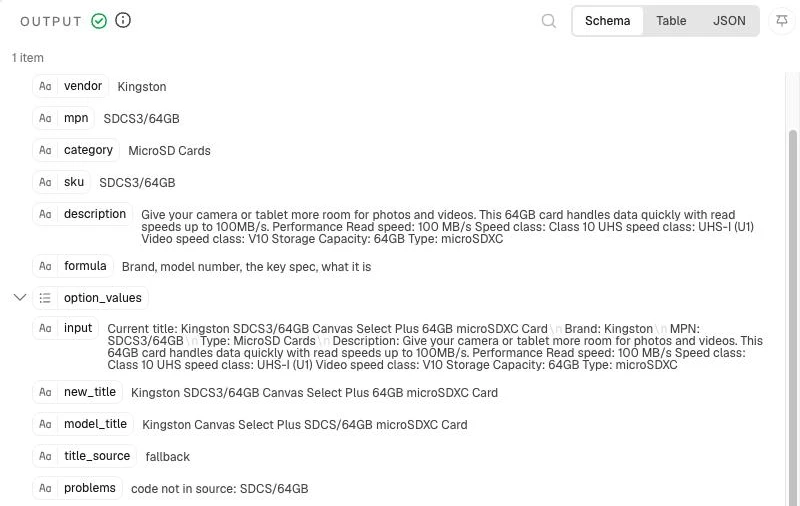
As Steve Toth noted in SEO Notebook’s title-tag guide, you should rely on code to do the counting and checking. If a Kingston card has the MPN SDCS3/64GB and the model writes SDCS/64GB, a check that splits on slashes finds 64GB in the source, never tests SDCS, and passes a title that names a different card. Add a Code node named Check the title that matches model codes as whole tokens, checks numbers, length, banned words and variants, and falls back to a tidied version of the current title if any check fails:
const s = $('Write settings').first().json;
const p = $('Build the input').first().json;
const reply = String($json.text || '');

const esc = t => t.replace(/[.*+?^${}()|[\]\\]/g, '\\$&');
const has = (text, word) => new RegExp('(^|[^A-Za-z0-9])' + esc(word) + '($|[^A-Za-z0-9])', 'i').test(text);
const inches = t => String(t).replace(/(\d)\s*(?:"|inch(?:es)?\b)/gi, '$1in');
const tidy = t => String(t || '').replace(/\s*[\u2013\u2014]\s*/g, ', ').replace(/["\u201C\u201D]/g, '').replace(/\s+/g, ' ').trim();

let title = tidy(inches((reply.match(/^\s*\**title\**\s*:\s*(.+)$/im) || [])[1] || ''));
const source = inches([p.old_title, p.vendor, p.mpn, p.sku, p.description].join(' '));

// Whole tokens from the source, plus the pieces of each one split on / - ( )
const sourceTokens = new Set();
for (const w of source.toUpperCase().split(/\s+/)) {
  const t = w.replace(/^[^A-Z0-9]+|[^A-Z0-9+]+$/g, '');
  if (!t) continue;
  sourceTokens.add(t);
  t.split(/[\/()\-]/).filter(Boolean).forEach(x => sourceTokens.add(x));
}

const problems = [];
if (!title) problems.push('no title in the reply');

// 1. Any code with letters and digits must be a whole token from the source
for (const w of title.split(' ')) {
  const t = w.toUpperCase().replace(/^[^A-Z0-9]+|[^A-Z0-9+]+$/g, '');
  if (/[A-Z]/.test(t) && /\d/.test(t) && !sourceTokens.has(t)) problems.push('code not in source: ' + w);
}

// 2. Every number must appear in the source
const nums = t => t.match(/\d+(?:\.\d+)?/g) || [];
const sourceNums = new Set(nums(source));
for (const n of nums(title)) if (!sourceNums.has(n)) problems.push('number not in source: ' + n);

// 3. Variants: no option values on a multi-variant product, its own colour on a single one
if (p.option_values.length) {
  for (const v of p.option_values) if (has(title, v)) problems.push('names one option: ' + v);
} else {
  const colour = s.colour_words.find(c => has(p.old_title, c));
  if (colour && title && !has(title, colour)) {
    const at = p.mpn ? title.toUpperCase().indexOf(p.mpn.toUpperCase()) : -1;
    title = at >= 0
      ? title.slice(0, at + p.mpn.length) + ' ' + colour + title.slice(at + p.mpn.length)
      : title + ' ' + colour;
  }
}

// 4. Length and banned words
if (title.length > s.max_length) problems.push('too long (' + title.length + ')');
for (const b of s.banned_words) if (has(title, b)) problems.push('banned word: ' + b);

// 5. A failed title falls back to the current one, tidied
const fallback = () => {
  let t = tidy(p.old_title).replace(/,?\s*\b\d+\s*(?:years?|yrs?|y)\b(?:\s+warranty)?/gi, '').replace(/\s+/g, ' ').trim();
  if (t === t.toUpperCase()) t = t.split(' ').map(w => /\d/.test(w) || w.length <= 3 ? w : w[0] + w.slice(1).toLowerCase()).join(' ');
  // the brand as the brand writes it
  if (p.vendor && t.toUpperCase().startsWith(p.vendor.toUpperCase())) t = p.vendor + t.slice(p.vendor.length);
  else if (p.vendor) t = p.vendor + ' ' + t;
  if (t.length > s.max_length) t = t.slice(0, s.max_length + 1).replace(/\s+\S*$/, '');
  return t.replace(/[\s,;:\/-]+$/, '');
};

const failed = problems.length > 0;
return { json: { ...p,
  new_title: failed ? fallback() : title,
  model_title: title,
  title_source: failed ? 'fallback' : 'ai',
  problems: problems.join('; ')
} };
Test this node with TP-Link VIGI C440 and Ubiquiti UVC-G6-PRO-BULLET-W to confirm title_source is 'ai', then pin Title: Kingston Canvas Select Plus SDCS/64GB microSDXC Card on the Kingston card to confirm it catches code not in source: SDCS/64GB and falls back cleanly.
Step 6: Review in Slack
Post a before-and-after card to Slack with a Slack node set to Message -> Send (Message Type: Blocks):
{{ JSON.stringify({ blocks: [
  { type: 'header', text: { type: 'plain_text', text: 'Title to review' } },
  Object.assign(
    { type: 'section', text: { type: 'mrkdwn', text: '*Before*\n' + $json.old_title + '\n*After*\n' + $json.new_title } },
    $json.image ? { accessory: { type: 'image', image_url: $json.image, alt_text: $json.new_title } } : {}),
  { type: 'context', elements: [{ type: 'mrkdwn', text: $json.category + ' · ' + $json.new_title.length + ' characters · ' +
    ($json.title_source === 'ai' ? 'written by the model' : ':warning: fallback: ' + $json.problems) }] },
  { type: 'actions', elements: [
    { type: 'button', style: 'primary', text: { type: 'plain_text', text: 'Approve' }, action_id: 'title_approve', value: $json.product_id },
    { type: 'button', text: { type: 'plain_text', text: 'Edit' }, action_id: 'title_edit', value: $json.product_id },
    { type: 'button', style: 'danger', text: { type: 'plain_text', text: 'Reject' }, action_id: 'title_reject', value: $json.product_id }
  ] }
] }) }}
Then upsert the result into title_drafts (status: 'pending', with the message’s slack_ts) and call Shopify’s tagsRemove mutation to remove retitle:
mutation Done($id: ID!, $tags: [String!]!) {
  tagsRemove(id: $id, tags: $tags) { userErrors { field message } }
}
In the Review lane, add a Webhook node (POST, Raw Body on, Respond set to Using ‘Respond to Webhook’ Node) connected to Respond to Webhook (No Data) for an immediate, empty 200 OK. Because anyone who finds the webhook URL could otherwise approve titles, add a Code node named Read the click that rejects requests older than 300 seconds and builds the string Slack signs:
const raw = (await this.helpers.getBinaryDataBuffer(0, 'data')).toString('utf8');
const h = $input.first().json.headers;
if (Math.abs(Date.now() / 1000 - Number(h['x-slack-request-timestamp'])) > 300) throw new Error('Stale request');
const field = raw.split('&').find(kv => kv.startsWith('payload=')) || ''; // no URLSearchParams in the Code node
const b = JSON.parse(decodeURIComponent(field.slice(8).replace(/\+/g, ' ')));
const sig = { base: `v0:${h['x-slack-request-timestamp']}:${raw}`, expected: h['x-slack-signature'] };
if (b.type === 'view_submission') {
  const m = JSON.parse(b.view.private_metadata);
  return [{ json: { ...sig, action: 'edit_submit', product_id: m.product_id, channel: m.channel, ts: m.ts,
    title: b.view.state.values.title.title.value.trim(), user: b.user.username } }];
}
const a = b.actions[0];
return [{ json: { ...sig, action: a.action_id.replace('title_', ''), product_id: a.value,
  trigger_id: b.trigger_id, user: b.user.username, channel: b.channel.id, ts: b.message.ts } }];
Next, add a Crypto node (Action Hmac, Type SHA256, Encoding HEX, your Slack signing secret, Property Name sig) that signs {{ $json.base }}, and an If node that only continues when {{ 'v0=' + $json.sig }} equals {{ $json.expected }}. A Data table Get for a pending row with this product_id then stops a second click on an old card from doing anything.
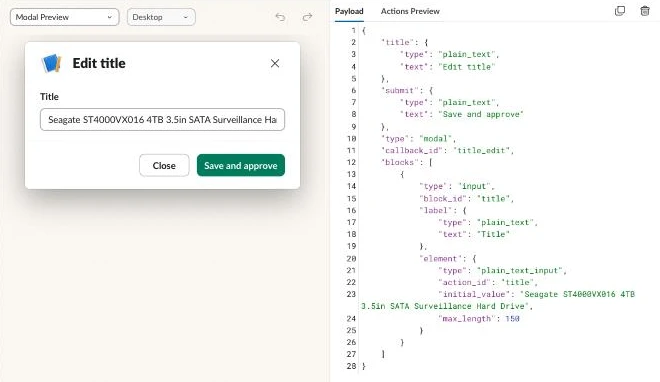
Slack’s trigger_id expires in 3 seconds, so when you click Edit, a Switch node immediately calls views.open to open a modal pre-filled with the proposed title:
{{ JSON.stringify({
  trigger_id: $('Read the click').first().json.trigger_id,
  view: {
    type: 'modal', callback_id: 'title_edit',
    private_metadata: JSON.stringify({ product_id: $json.product_id,
      channel: $('Read the click').first().json.channel, ts: $('Read the click').first().json.ts }),
    title: { type: 'plain_text', text: 'Edit title' },
    submit: { type: 'plain_text', text: 'Save and approve' },
    blocks: [{ type: 'input', block_id: 'title', label: { type: 'plain_text', text: 'Title' },
      element: { type: 'plain_text_input', action_id: 'title', initial_value: $json.new_title, max_length: 150 } }]
  }
}) }}
When the user either clicks Approve on the card or submits the Edit modal (view_submission), pass the product_id, the old title and the final chosen title to the Push lane via an Execute Sub-workflow node (By ID, {{ $workflow.id }}). Reject marks the draft rejected and updates the card.
Step 7: Push to Shopify and learn from it
In the Push lane, start with a When Executed by Another Workflow trigger and a Push settings Set node holding store_domain and update_seo_title (false by default so you don’t overwrite custom meta titles unless you choose to). Before writing, an HTTP Request node reads the live title, and an If node compares it with the draft’s old_title, so a title someone has edited by hand in Shopify since the draft is marked stale on the card rather than overwritten:
query Current($id: ID!) {
  product(id: $id) { title }
}
On the true branch, an HTTP Request node calls Shopify’s productUpdate mutation (2026-10). If update_seo_title is false, only id and title are sent; if true, seo: { title } is included as well:
mutation SetTitle($product: ProductUpdateInput!) {
  productUpdate(product: $product) {
    product { id title seo { title } }
    userErrors { field message }
  }
}
Variables expression:
{{ (t => ({ product: Object.assign(
  { id: t.product_id, title: t.title },
  $('Push settings').first().json.update_seo_title ? { seo: { title: t.title } } : {}
) }))($('When Executed by Another Workflow').first().json) }}
Add an If node checking that userErrors is empty. On success, insert the title into title_examples with a Data table Insert node (source set to approved, or edited when it came from the modal), mark the draft approved, and update the Slack card with a Slack node set to Message -> Update.

What it costs
Rewriting titles is mostly a one-off job, so these are the costs of rewriting 500, 2,000, and 10,000 titles once (checked November 2026):
| Component | Unit price | 500 titles | 2,000 titles | 10,000 titles |
|---|---|---|---|---|
| n8n | US$0 self-hosted (Community Edition) or €20/mo billed annually (n8n Cloud Starter) | US$0 or €20 | US$0 or €20 | US$0 or €50 (Cloud Pro) |
| Gemma 4 31B (Ollama Cloud) | US$0.14 / 1M in, US$0.40 / 1M out (an estimated US$0.0002 a title, 0.9 s median) | US$0.10 | US$0.40 | US$2.00 |
| Claude Opus (comparison) | about US$0.016 a title (6.0 s median, measured) | US$8.00 | US$32.00 | US$160.00 |
| Paid AI copy apps (e.g. Describely) | US$0.75 a product, pay as you go up to 500 products | US$375.00 | custom pricing | custom pricing |
Two settings move your cost: the model you attach to the Chat Model sub-node, and how many few-shot examples you fetch in Step 3. On n8n Cloud the schedule counts too, because running every 3 hours uses 240 executions a month even when nothing is tagged. I’d self-host n8n: the Community Edition is free and has no execution limits, so an idle schedule costs nothing.
Common mistakes
No MPN in the input
Passing only the existing title and description loses the part number whenever the supplier omitted it from the name. Always query the MPN metafield in Step 2 and include an explicit MPN: line in the prompt.
Examples that teach the model its own mistakes
Saving unreviewed AI outputs as few-shot examples copies formatting errors into every future batch. Only insert rows into title_examples in the Push lane after a person approves the title.
Substring checks passing a shortened code
A check that splits the title on slashes lets SDCS/64GB pass when the real Kingston code is SDCS3/64GB, because it finds 64GB and never tests SDCS. Split on spaces only and match each code as a whole token.
A title naming one variant of a multi-variant product
Putting White in the parent title of a multi-variant product misleads shoppers who land on the Black option. Pass the product’s options into Step 5 and reject option values on multi-variant items.
Keyword stuffing
Repeating synonyms like "Security Camera CCTV Camera IP Camera" goes against Google’s title link guidance, which says there’s no reason to repeat the same words, and pushes the model code past 70 characters. Use one product type per category formula.
Doing slow work before opening the edit modal
Slack’s trigger_id expires three seconds after the click, so a Shopify call placed ahead of views.open is enough to make the Edit button fail some of the time.
Pushing a whole catalogue without review
Updating 5,000 products without a Slack gate overwrites edge-case bundles and kits. Tag and review one category at a time in batches of 25.
Changing titles on pages that already rank without checking their traffic first
Rewriting the H1 and <title> on a page with steady organic clicks can disrupt the query match it ranks for. Filter out URLs with recent Google Search Console clicks before tagging legacy items with retitle.
Make it your own
Clothing and own-brand products with no MPN
For apparel or private-label items without model numbers, leave mpn blank and set your category formula in Step 1 to Brand + Gender/Fit + Material + Garment Type, leaving colour and size to the variant options.
Marketplace title lengths and Google Shopping supplemental feeds
Channels enforce different limits, as Hypotenuse AI’s title guide notes, from Shopify’s 60-to-70-character SEO page title to 150 characters in Google Merchant Center. Write a longer 130-character variant to a custom.google_shopping_title metafield if you want separate storefront and Shopping feed titles.
When Data Tables aren’t enough
All the data tables on an n8n instance share a 200 MiB limit by default (self-hosters can raise it with N8N_DATA_TABLES_MAX_SIZE_BYTES), and past it, inserts and updates fail. At about 1 KB a draft row, this guide’s tables reach roughly 3 MB at 2,000 products and 15 MB at 10,000, so other workflows sharing the limit usually cause it. Swap the Data table nodes for n8n’s Postgres node if you hit it; Supabase’s free plan gives you a 500 MB database, though it pauses after a week of inactivity.
The next guide in this set, How to Automate Shopify Collections for SEO, groups well-named products into the collections people search for.
Frequently asked questions
Will changing titles hurt my rankings?
Fixing messy supplier strings on new or zero-traffic products gives them the brand, product type, and MPN shoppers search for, so there’s little to lose. On pages that already get organic clicks, the product title is also the page heading, so change those a few at a time and watch Search Console.
Does this change the product URL?
No. Shopify builds a product’s handle from its title when the product is created, and changing the title with productUpdate leaves the handle, and so the URL, as it was.
How long should a product title be?
Keep the brand, model number, and main spec inside the first 70 characters. Google Merchant Center allows 150, but says shoppers usually notice only the first 70 or fewer.
Should the Shopify title and Google Shopping title differ?
On single-variant technical products, the same formula-driven title works for both. On multi-variant products like clothing, keep the parent Shopify title free of variant colours and let your Shopping feed append each variant’s colour and size.
Which AI model is best for titles?
gemma4:31b (Gemma 4 31B) at temperature 0.2 took 0.9 seconds a title in our test and is a good place to start when it’s paired with few-shot examples and code checks. Save slower frontier models for long-form copy.
Can I undo a title change?
Yes. Every row in title_drafts keeps old_title, so you can send a batch back through the Push lane with the old and new titles swapped.
Next steps
Import the template into n8n, run the Setup lane once, and tag five products with retitle to review your first batch in Slack.