Product Data Enrichment With AI: Scrape Manufacturer Specs and Extract Product Attributes Into Shopify Metafields (+ Free n8n Template)

Last tested on n8n 2.45, November 2026.
Supplier feeds almost never give you clean filter values. A security camera arrives with a paragraph of sales copy that says “weatherproof” when the spec sheet says “IP67”, and a tumbler lands with the capacity buried in the title while material and care instructions are missing altogether, leaving your storefront filters half-empty. Most guides on ecommerce product data enrichment tell you to fill in missing attributes without saying where the numbers come from, while catalogue apps charge by the SKU and ungrounded AI prompts happily guess specifications your product doesn’t have. By the end of this guide, you’ll have an n8n workflow that scrapes the manufacturer’s spec page, extracts verified attributes with an evidence quote for every value, routes uncertain picks to Slack for bulk review, and writes approved specs into both custom metafields and Shopify’s standard product attributes for under half a cent a product.
What you’ll build
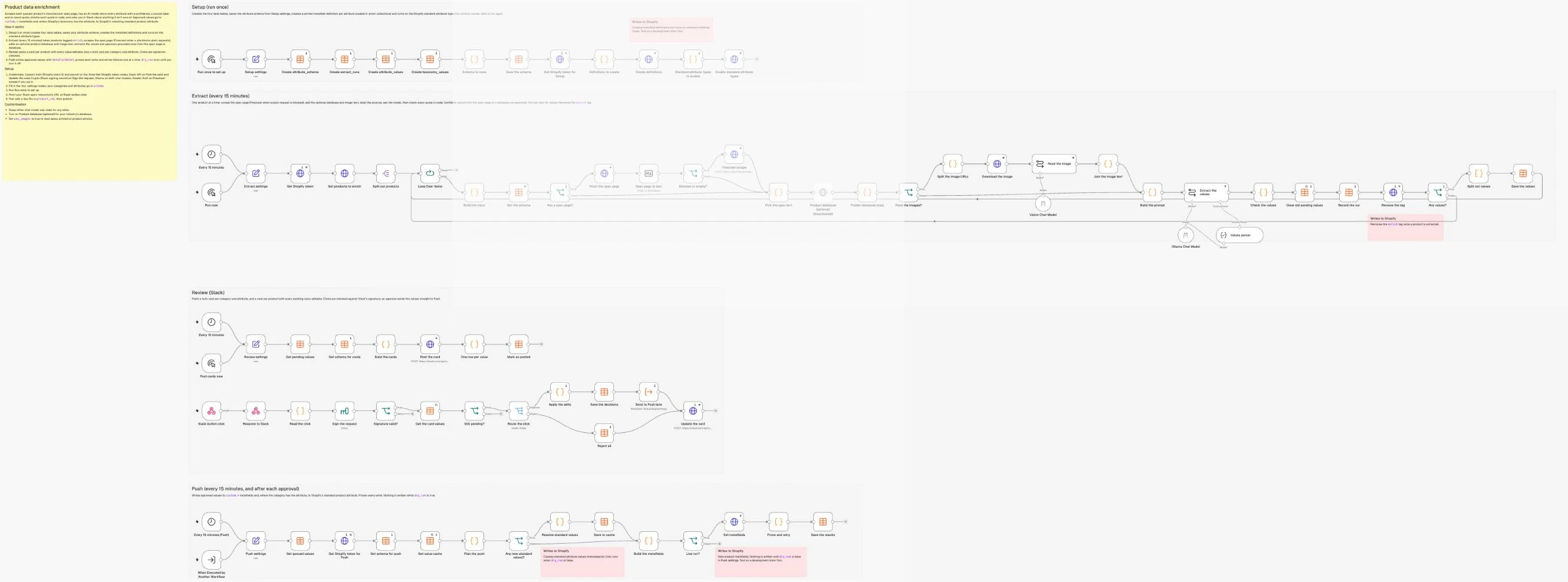
You’ll build a four-lane product data enrichment workflow in n8n that turns raw manufacturer pages and supplier copy into structured attributes across any product category. We’ll follow three real products across two unrelated categories: the TP-LINK VIGI C340 (4mm) outdoor bullet network camera, its lookalike sibling the TP-LINK VIGI C340 (2.8mm) which shares the same spec page but has a wider field of view, and the Stanley Quencher H2.0 FlowState Tumbler, 40 oz (1.18 L), whose manufacturer site blocks plain automated requests.
For each tagged product, the workflow scrapes the manufacturer’s spec page, pulls in the supplier description and optional image text or database records, and asks an AI model to return every attribute alongside the exact quote it came from. Code checks that each quote appears verbatim in the source and carries the extracted value, auto-approving high-confidence specs from trusted sources and sending the rest to Slack, before writing approved values to your custom metafields and Shopify’s standard product attributes.
What you need
- n8n with Data Tables (self-hosted Community Edition is free, or n8n Cloud Starter).
- A custom Shopify app with
read_products,write_products,read_metaobjects,write_metaobjects,read_metaobject_definitionsandwrite_metaobject_definitionsscopes, connected with client credentials as shown in the repo’sSETUP.md. - An AI model account on Ollama Cloud (
gemma4:31bby default, for both the extraction and the optional image reading), or another chat model, since the model sub-node is swappable. - A Slack app with Interactivity turned on and a channel for review cards.
- Products with a category set from Shopify’s Standard Product Taxonomy and the manufacturer’s spec page URL for each product, which goes in a metafield Setup creates (
custom.spec_urlby default), plus an optional Firecrawl API key for sites that block plain scrapes.
How it works
- Setup lane (Manual Trigger, run once): Creates the four n8n Data Tables (
attribute_schema,extract_runs,attribute_valuesandtaxonomy_values), seeds your attribute schema per category, creates the matching product metafield definitions in Shopify (pinned, and ready for smart collection rules), and turns on the standard attribute types your schema twins. - Extract lane (Schedule Trigger every 15 minutes, plus Manual Trigger): Pulls products tagged
enrich, scrapes the manufacturer spec page (falling back to Firecrawl when blocked), gathers the supplier description and optional product database or image text, and ranks them in trust order because the manufacturer’s spec sheet is far more reliable than supplier copy. The AI model extracts each value with an evidence quote, and code checks that quote against the source so unambiguous specs from the spec page or database auto-approve while family-page or supplier-sourced values wait for review. - Review lane (Schedule Trigger every 10 minutes, plus Webhook): Posts one bulk Slack card per category and attribute when five or more products share pending values, plus one inline-editable card per product for the remaining values, so a person glances at the quote and approves in seconds instead of researching specs from scratch.
- Push lane (Schedule Trigger every 15 minutes, and called on approval): Writes approved values to
custom.*metafields and, when the attribute maps to Shopify’s taxonomy, resolves the taxonomy value on demand into ataxonomy_valuescache table, upserts the metaobject by handle, writes the standard attribute, and proves every write before marking rows pushed.
Step 1: Plan your attributes, then create the tables and definitions
Only attributes that shoppers filter by, compare across products, or need on the product page belong in your schema. Filter candidates need a small set of shared values (such as IP65, IP66, IP67, IP68 for an IP rating), whereas detail fields like microSD capacity belong on the product template. Each attribute in this workflow creates a custom.* metafield in your own shopper-friendly wording for filters and smart collections, and can optionally name a standard attribute to turn on a twin write to one of Shopify’s standard product attributes, the attributes its Standard Product Taxonomy defines for each category.
Filling those standard attributes alongside your custom metafields is worth doing because Shopify uses them beyond your theme. When Shopify introduced the taxonomy, it described these attributes as category-specific product metafields with shared values you edit in one place, and said it was working with Google to use them across channels, with Shop, Facebook and Instagram to follow. Today they work as storefront filters in Search & Discovery (where values are grouped automatically around their taxonomy base value), appear as filters and dimensions in Shopify’s analytics and reports, and make products more discoverable on your own site, on marketplaces and on search engines (product taxonomy). Charle’s taxonomy guide adds that they feed Google Shopping, Facebook and Instagram, and give AI shopping assistants structured data to match products against.
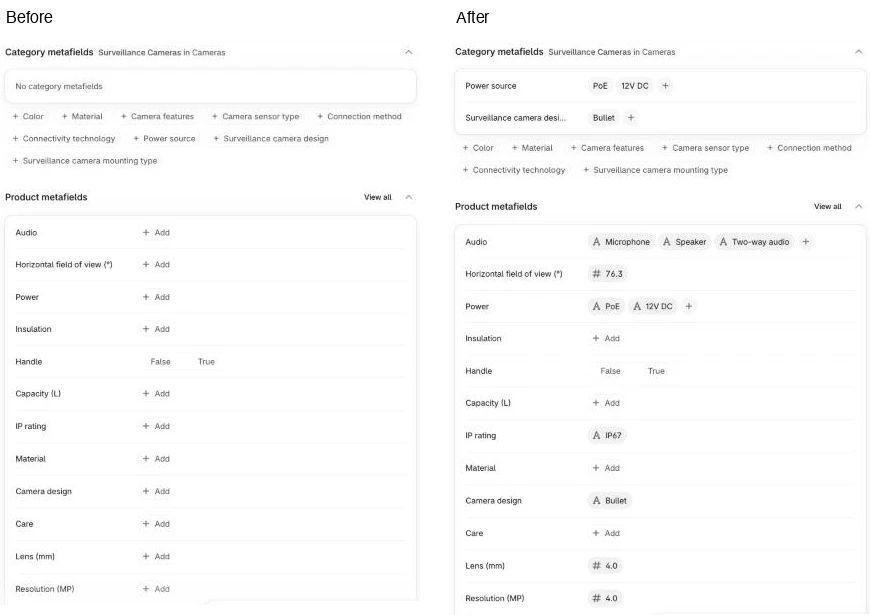
However, standard attributes only exist on categories where Shopify defines them, which is why custom metafields stay your primary store of truth. In Shopify’s taxonomy, Surveillance Cameras (gid://shopify/TaxonomyCategory/co-2-5) has Power source and Surveillance camera design, but no attribute for IP rating, resolution or field of view. Even when a standard attribute exists, its list can miss common industry values: Power source has DC-powered and Other, but no PoE, so standard_map maps 12V DC to DC-powered while PoE falls back to Other with your own label.
Write the schema
In the Setup lane, add a Manual Trigger named Run once to set up and connect a Set node named Setup settings in JSON mode with your store domain, custom namespace, the two metafields the workflow reads from (the spec page URL and the model number, matching Extract settings) and your per-category attribute schema:
{
  "store_domain": "your-store.myshopify.com",
  "namespace": "custom",
  "spec_url_metafield": "custom.spec_url",
  "mpn_metafield": "custom.mpn",
  "schema": {
    "Surveillance Cameras": [
      { "key": "ip_rating", "label": "IP rating", "type": "enum", "allowed": ["IP65", "IP66", "IP67", "IP68"] },
      { "key": "resolution_mp", "label": "Resolution (MP)", "type": "number", "unit": "MP" },
      { "key": "lens_mm", "label": "Lens (mm)", "type": "number", "unit": "mm" },
      { "key": "field_of_view", "label": "Horizontal field of view (°)", "type": "number", "unit": "degrees" },
      { "key": "night_vision_m", "label": "Night vision range (m)", "type": "number", "unit": "m" },
      { "key": "camera_design", "label": "Camera design", "type": "enum", "allowed": ["Bullet", "Dome", "Turret", "PTZ"], "standard": "Surveillance camera design" },
      { "key": "power_source", "label": "Power", "type": "list", "allowed": ["PoE", "12V DC", "Battery", "Solar"], "standard": "Power source", "standard_map": { "12V DC": "DC-powered", "Battery": "Battery-powered" } },
      { "key": "audio", "label": "Audio", "type": "list", "allowed": ["Microphone", "Speaker", "Two-way audio"] }
    ],
    "Tumblers": [
      { "key": "capacity_l", "label": "Capacity (L)", "type": "number", "unit": "L" },
      { "key": "material", "label": "Material", "type": "enum", "allowed": ["Stainless steel", "Plastic", "Glass", "Ceramic"], "standard": "Drinkware material" },
      { "key": "insulation", "label": "Insulation", "type": "enum", "allowed": ["Vacuum insulated", "Double wall", "Non-insulated"], "standard": "Drinkware insulation" },
      { "key": "care", "label": "Care", "type": "enum", "allowed": ["Dishwasher safe", "Hand wash only"], "standard": "Cleaning instructions" },
      { "key": "has_handle", "label": "Handle", "type": "boolean" }
    ]
  }
}
Find your categories’ standard attributes
To go beyond these two categories, look each of your categories up in Shopify’s taxonomy explorer, which is built from the open-source Shopify/product-taxonomy repo. Click down the category tree to your category and read its Category Attributes: the attribute’s name goes in standard exactly as written (Power source, Drinkware material), and the Values tab shows the values it accepts. Because of that, standard_map only needs an entry where your shopper wording differs from Shopify’s (such as 12V DC to DC-powered), while anything the taxonomy lacks automatically falls back to Other with your label.
The category’s name is also the key for its block in schema, and it has to match the category set on the products in Shopify (Surveillance Cameras, Tumblers). Keep in mind that Shopify only accepts a standard attribute on products in the categories it’s mapped to, even where the field would make sense elsewhere: writing a standard attribute to a product whose category doesn’t include it fails with Owner subtype does not match, which is why the same attribute can have a standard twin in one category and be custom-only in the next. Add one block per category to Setup settings by hand, or have an AI agent draft the blocks for your range from the explorer (the repo README’s setup prompt asks it to), then run Setup again to create the new definitions and turn on the new types.
Create the tables
Next, add four Data table nodes in series, each set to Table > Create with Reuse Existing Tables turned on so re-running Setup never fails:
| Table | Columns |
|---|---|
attribute_schema | category, key, label, type, unit, allowed (JSON text), standard, standard_map (JSON text), all String |
extract_runs | product_id, title, sources, spec_status, error (String); values_found, auto_approved, to_review (Number); extracted_at (Date) |
attribute_values | product_id, product_title, category, category_id, key, value, source, source_url, evidence, review_status, push_status, push_error, reviewed_by, slack_channel, slack_ts (String); confidence (Number); valid (Boolean) |
taxonomy_values | category_id, standard_key, value, taxonomy_value_gid, metaobject_gid, status (String) |
In attribute_values, review_status holds pending, auto_approved, approved, edited or rejected, and push_status holds none, queued, pushed, failed or category_mismatch. Connect a Code node named Schema to rows to flatten the schema object into table rows:
const s = $('Setup settings').first().json;
const rows = [];
for (const [category, fields] of Object.entries(s.schema)) {
  for (const f of fields) rows.push({ json: {
    category, key: f.key, label: f.label || f.key, type: f.type, unit: f.unit || '',
    allowed: JSON.stringify(f.allowed || []), standard: f.standard || '',
    standard_map: JSON.stringify(f.standard_map || {})
  } });
}
return rows;
Create the metafield definitions
Connect a Data table node named Save the schema (Row > Upsert on attribute_schema, matching on category and key, mapping columns automatically). Every Shopify GraphQL request in this workflow (apart from the ones Resolve standard values makes from code) uses an HTTP Request node configured to POST https://{{ store_domain }}/admin/api/2026-10/graphql.json with an X-Shopify-Access-Token header set to {{ $('Get Shopify token').first().json.access_token }}, where Get Shopify token is the client-credentials token request from SETUP.md. Each lane has its own copy (Get Shopify token for Setup, Get Shopify token in Extract and Get Shopify token for Push), and every request references the one in its own lane.
After Get Shopify token for Setup, add a Code node named Definitions to create to map each unique key to a metafield type that storefront filters support, pin it to the product page, and switch on its use in smart collection rules and admin filters, which saves you ticking those boxes in the admin:
const s = $('Setup settings').first().json;
const TYPE = { enum: 'single_line_text_field', list: 'list.single_line_text_field', number: 'number_decimal', boolean: 'boolean', text: 'single_line_text_field' };
const seen = new Set();
const out = [];
for (const fields of Object.values(s.schema)) for (const f of fields) {
  if (seen.has(f.key)) continue;
  seen.add(f.key);
  out.push({ json: { definition: {
    name: f.label || f.key, namespace: s.namespace, key: f.key,
    type: TYPE[f.type] || 'single_line_text_field', ownerType: 'PRODUCT',
    description: 'Filled by the product data enrichment workflow',
    pin: true,
    // usable in smart collection rules and as a filter in the admin product list
    capabilities: { smartCollectionCondition: { enabled: true }, adminFilterable: { enabled: true } }
  } } });
}
// The two fields the Extract lane reads: the manufacturer's spec page and the model number
const input = (ref, name, type, description) => {
  const [namespace, key] = ref.split('.');
  return { json: { definition: { name, namespace, key, type, ownerType: 'PRODUCT', description, pin: true } } };
};
out.push(input(s.spec_url_metafield, 'Spec page URL', 'url', "The manufacturer's spec page for this exact model"));
out.push(input(s.mpn_metafield, 'Model number (MPN)', 'single_line_text_field', "The manufacturer's part number"));
return out;
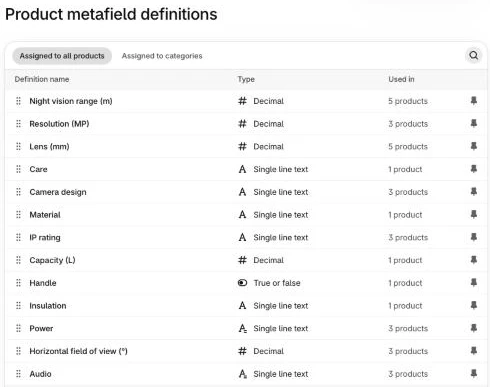
The last two definitions are the fields the Extract lane reads, custom.spec_url (a URL) and custom.mpn (text), pinned so they show on every product page ready to fill in. Connect an HTTP Request node named Create definitions (On Error: Continue) that calls metafieldDefinitionCreate with the body expression {{ JSON.stringify({ query: <the mutation>, variables: { definition: $json.definition } }) }} and this GraphQL mutation:
mutation CreateDefinition($definition: MetafieldDefinitionInput!) {
  metafieldDefinitionCreate(definition: $definition) {
    createdDefinition { id namespace key type { name } }
    userErrors { field message code }
  }
}
Turn on the standard attribute types
Standard attribute values are stored as metaobject entries of a standard type named after the attribute (shopify--power-source, shopify--surveillance-camera-design), and a store doesn’t have those types until something turns them on. Shopify turns one on when you first set that attribute by hand in the admin, so rather than asking you to do that once per attribute, Setup turns them all on automatically. Connect a Code node named Standard attribute types to enable (Execute Once on) that lists one type per standard attribute in your schema:
const s = $('Setup settings').first().json;
const toHandle = t => String(t || '').toLowerCase().replace(/[^a-z0-9]+/g, '-').replace(/^-|-$/g, '');
const KEY_OVERRIDE = { color: 'color-pattern' };   // the taxonomy's Color attribute is stored as shopify.color-pattern
const types = new Set();
for (const fields of Object.values(s.schema)) for (const f of fields)
  if (f.standard) types.add('shopify--' + (KEY_OVERRIDE[toHandle(f.standard)] || toHandle(f.standard)));
return [...types].map(type => ({ json: { type } }));
Then add an HTTP Request node named Enable standard attribute types (On Error: Continue) with the body expression {{ JSON.stringify({ query: <the mutation>, variables: { type: $json.type } }) }} and this mutation, which needs the write_metaobject_definitions scope (without it, Shopify answers Record not found):
mutation EnableType($type: String!) {
  standardMetaobjectDefinitionEnable(type: $type) {
    metaobjectDefinition { id type }
    userErrors { field message code }
  }
}
Run the Setup lane once and check Settings > Custom data > Products in Shopify to confirm all definitions exist alongside the four Data Tables in n8n. Re-running Setup is safe because a TAKEN error simply means the definition is already there, and enabling a type that’s already on returns the same definition.
Step 2: Pull the products that need enriching
Before you queue anything, fill in the two fields Setup created for each product: the URL of the manufacturer’s page for that exact model in Spec page URL, and the manufacturer’s part number in Model number (MPN). Both are pinned under Product metafields on the product page, so you can paste a handful in by hand. For larger batches, add both as columns in the bulk editor (select products, click Bulk edit, then add the columns), or import a CSV with columns headed Spec page URL (product.metafields.custom.spec_url) and Model number (MPN) (product.metafields.custom.mpn). A product with no spec page URL still runs on its description and images alone, though nothing it returns can skip review.
Products enter the queue when you (or Shopify Flow) add the enrich tag, or when you list specific product IDs in product_ids for a test batch. At 5 products every 15 minutes, the workflow processes 480 products a day (2,000 products in about four days) without hammering any manufacturer’s server. Even when you aren’t calling a product database, passing the MPN, SKU and GTIN into the workflow is essential because manufacturer pages often cover a whole product family on one URL: TP-LINK’s VIGI C340 page lists the 2.8mm, 4mm and 6mm models together, so the model needs the exact MPN and title to pick the 4mm lens specs rather than the 2.8mm ones.
In the Extract lane, add a Schedule Trigger (every 15 minutes) and a Manual Trigger (Run now), wiring both into a Set node named Extract settings in JSON mode:
{
  "store_domain": "your-store.myshopify.com",
  "queue_tag": "enrich",
  "product_ids": [],
  "batch_size": 5,
  "text_model": "gemma4:31b",
  "vision_model": "gemma4:31b",
  "spec_url_metafield": "custom.spec_url",
  "mpn_metafield": "custom.mpn",
  "use_firecrawl": false,
  "use_images": false,
  "max_images": 3,
  "auto_approve_confidence": 0.85,
  "max_list_values": 6,
  "max_chars_spec": 14000,
  "max_chars_other": 6000,
  "user_agent": "YourStoreBot/1.0 (+https://your-store.com)"
}
Connect Get Shopify token and an HTTP Request node named Get products to enrich using this GraphQL query:
query ProductsToEnrich($q: String!, $n: Int!, $mpnNs: String!, $mpnKey: String!, $urlNs: String!, $urlKey: String!) {
  products(first: $n, query: $q) {
    nodes {
      id
      title
      vendor
      descriptionHtml
      category { id name }
      mpn: metafield(namespace: $mpnNs, key: $mpnKey) { value }
      specUrl: metafield(namespace: $urlNs, key: $urlKey) { value }
      variants(first: 1) { nodes { sku barcode } }
      media(first: 3) { nodes { preview { image { url } } } }
    }
  }
}
Set the GraphQL variables expression on Get products to enrich to build the tag or ID filter dynamically:
{{ (s => {
  const [mpnNs, mpnKey] = s.mpn_metafield.split('.');
  const [urlNs, urlKey] = s.spec_url_metafield.split('.');
  return { q: s.product_ids.length ? s.product_ids.map(id => 'id:' + id).join(' OR ') : 'tag:' + s.queue_tag,
    n: s.batch_size, mpnNs, mpnKey, urlNs, urlKey };
})($('Extract settings').first().json) }}
Add a Split Out node on data.products.nodes, then connect a Loop Over Items node with Batch Size set to 1 because the Basic LLM Chain node doesn’t preserve item pairing across multiple items. Inside the loop, connect a Code node named Build the input to strip HTML from the supplier description and normalise the product fields:
const s = $('Extract settings').first().json;
const p = $json;
const strip = h => String(h || '')
.replace(/<(script|style)[\s\S]*?<\/\1>/gi, ' ')
.replace(/<br\s*\/?>|<\/(p|li|h\d|tr|div)>/gi, '\n')
.replace(/<[^>]+>/g, ' ').replace(/ /g, ' ').replace(/&/g, '&')
.replace(/[ \t]+/g, ' ').replace(/\n\s*\n+/g, '\n').trim();
const v = (p.variants && p.variants.nodes && p.variants.nodes[0]) || {};
return { json: {
product_id: p.id,
title: p.title,
brand: p.vendor || '',
mpn: (p.mpn && p.mpn.value) || '',
sku: v.sku || '',
gtin: v.barcode || '',
category: p.category ? p.category.name : '',
category_id: p.category ? p.category.id : '',
spec_url: (p.specUrl && p.specUrl.value) || '',
description: strip(p.descriptionHtml).slice(0, 3000),
images: ((p.media && p.media.nodes) || [])
.map(m => m.preview && m.preview.image && m.preview.image.url).filter(Boolean).slice(0, s.max_images)
} };Follow that with a Data table node named Get the schema (Row > Get on attribute_schema where category equals {{ $json.category }}, Return All on, Always Output Data on so a product whose category isn’t in your schema doesn’t stall the loop). Run a test with five tagged products and check that Build the input outputs each item with its category and spec_url.
Step 3: Gather the sources
Manufacturer spec pages are the best source most stores can reach, so the workflow scrapes spec_url first with a plain HTTP request that identifies your store, converts the HTML to Markdown, and checks whether a bot wall blocked the request. When we fetched the TP-LINK VIGI C340 spec page, a plain GET returned the full table (Focal Length: 2.8 mm/4 mm/6 mm, a separate Horizontal FOV line for each lens, IP67 Waterproof), whereas Stanley’s Quencher 40 oz page rejected plain requests with HTTP 429 (Too Many Requests) through most of our testing (a later run got straight through, so treat a block as something that comes and goes), which is where the optional Firecrawl scrape endpoint steps in.
Connect an If node named Has a spec page? testing {{ !!$('Build the input').first().json.spec_url }} (Execute Once on, because Get the schema hands it one item per attribute), and on the true branch add an HTTP Request node named Fetch the spec page with these settings:
| Setting | Value |
|---|---|
| Method | GET |
| URL | {{ $('Build the input').first().json.spec_url }} |
| Send Headers | User-Agent: {{ $('Extract settings').first().json.user_agent }} |
| Response > Response Format | Text |
| Response > Include Response Headers and Status | On |
| Response > Never Error | On |
| Timeout | 20000 |
| On Error | Continue (regular output) |
Connect a Markdown node named Spec page to text (Mode: HTML to Markdown, HTML {{ $json.data }}, Destination Key spec_md; a text response with headers and status puts the page in data), followed by an If node named Blocked or empty? with this condition:
{{ $('Extract settings').first().json.use_firecrawl && ([401, 403, 429, 503].includes(Number($json.statusCode)) || String($json.spec_md || '').length < 1500) }}On the true branch of Blocked or empty?, add an HTTP Request node named Firecrawl scrape (POST https://api.firecrawl.dev/v2/scrape, Header Auth with Authorization: Bearer <your Firecrawl key>, Timeout 90000, On Error: Continue) with this JSON body:
{{ JSON.stringify({ url: $('Build the input').first().json.spec_url, formats: ['markdown'], onlyMainContent: false, proxy: 'auto', maxAge: 3600000 }) }}Wire the false branch of Has a spec page?, the false branch of Blocked or empty?, and the output of Firecrawl scrape into a Code node named Pick the spec text so all three paths converge cleanly inside the loop:
const p = $('Build the input').first().json;
const r = $input.first().json;
const MARKERS = ['just a moment', 'verify you are human', 'checking your browser', 'access denied', 'captcha',
  'are you a robot', 'enable javascript and cookies', 'pardon our interruption'];
const looksBlocked = t => t.length < 1500 && MARKERS.some(m => t.slice(0, 3000).toLowerCase().includes(m));
let text = '', status = 'no spec URL';
if (p.spec_url && 'spec_md' in r) {
  // a plain request got through
  const code = Number(r.statusCode) || 0;
  const md = String(r.spec_md || '');
  if (code < 400 && md.length > 300 && !looksBlocked(md)) { text = md; status = 'ok'; }
  else status = code >= 400 ? 'blocked (' + code + ')' : 'empty';
} else if (p.spec_url) {
  // the Firecrawl fallback answered
  const md = String((r.data && r.data.markdown) || '');
  if (md.length > 300 && !looksBlocked(md)) { text = md; status = 'firecrawl'; }
  else status = 'blocked, Firecrawl too';
}
return [{ json: { spec_text: text.slice(0, 60000), spec_status: status } }];
Next, add a disabled HTTP Request node named Product database (optional) (a disabled node passes its input straight through) and connect a Code node named Flatten database reply so you have a ready-made slot if your industry has a structured database:
// Runs whether or not the database node is on: a disabled node passes its input through unchanged.
const r = $input.first().json;
const data = r.body && r.body.data;
const lines = [];
if (Number(r.statusCode) === 200 && data && data.FeaturesGroups) {
  for (const g of data.FeaturesGroups) for (const f of (g.Features || [])) {
    const name = f.Feature && f.Feature.Name && f.Feature.Name.Value;
    const val = f.PresentationValue;
    if (name && val !== undefined && val !== null && String(val).trim() !== '') lines.push(name + ': ' + val);
  }
}
return [{ json: { database_text: lines.join('\n') } }];
For products where labels or packaging photos carry specs, connect an If node named Read the images? testing {{ $('Extract settings').first().json.use_images && $('Build the input').first().json.images.length > 0 }}. On its true branch, add a Code node named Split the image URLs:
const p = $('Build the input').first().json;
return p.images.map(u => ({ json: {
  image: 'https://wsrv.nl/?url=' + encodeURIComponent(u) + '&w=768&h=768&fit=contain&cbg=white&output=jpg'
} }));
Connect an HTTP Request node named Download the image (GET {{ $json.image }}, Response Format: File, Output Field data), then a Basic LLM Chain node named Read the image with an Ollama Chat Model sub-node ({{ $('Extract settings').first().json.vision_model }}, Temperature 0) and a User message of type Image (Binary) on data using this prompt:
This is a product photo for {{ $('Build the input').first().json.title }}.
Copy out any specifications printed on the product, its packaging or a label, exactly as written, one per line.
Then list what you can see that a shopper would filter by (colour, material, a handle, a lid, the number of lenses), one per line, starting each with "Visible:".
Write nothing you can't read or see. If there is nothing, reply "none".
Connect a Code node named Join the image text (and wire both Join the image text and the false branch of Read the images? to the next step) so any image text is treated like supplier copy and never auto-approved without review:
const texts = $input.all().map(i => String(i.json.text || '').trim()).filter(t => t && t.toLowerCase() !== 'none');
return [{ json: { image_text: texts.join('\n') } }];
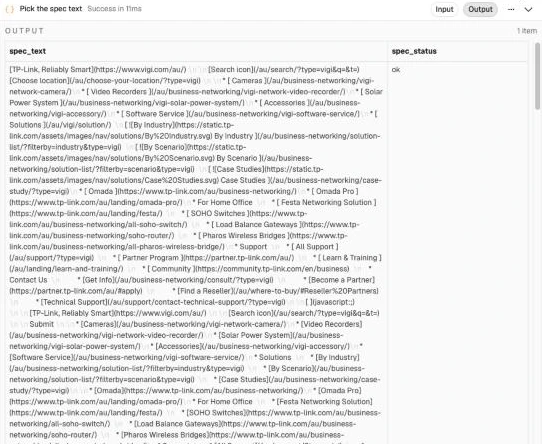
Check Pick the spec text across your test batch: if most products report blocked (403) or blocked (429), turn on use_firecrawl in Extract settings before tuning anything else.
Step 4: Label the sources and build the prompt
Manufacturer pages often start with thousands of characters of navigation menus before reaching the technical table, so taking the first N characters drops the specs you actually need. Instead, Build the prompt strips markdown images and bare link lines, scores paragraphs by spec density (units, numbers and your schema’s field words) to fit within max_chars_spec, and labels the sources S1 to Sn in trust order with the supplier description last as SUP.
Add a Code node named Build the prompt after Read the images? and Join the image text:
const s = $('Extract settings').first().json;
const p = $('Build the input').first().json;
const spec = $('Pick the spec text').first().json;
const db = $('Flatten database reply').first().json.database_text || '';
const img = 'image_text' in $input.first().json ? $input.first().json.image_text : '';
const schema = $('Get the schema').all().map(i => i.json).filter(r => r.key)
  .map(r => ({ ...r, allowed: JSON.parse(r.allowed || '[]'), standard_map: JSON.parse(r.standard_map || '{}') }));

const clean = t => String(t || '').split('\n').filter(l => {
  const x = l.trim();
  if (/^!\[/.test(x)) return false;                                        // image lines
  if (/^([*\-+]|\d+\.)?\s*\[[^\]]*\]\([^)]*\)\s*$/.test(x)) return false;  // lines that are only a link
  return true;
}).join('\n').replace(/\]\([^)]*\)/g, ']').replace(/\n{3,}/g, '\n\n');

// Long pages: keep the paragraphs that look like specs, not the first N characters (menus come first)
const SPEC = /(spec|dimension|weight|capacity|material|size|colou?r|power|voltage|watt|battery|resolution|lens|rating|ip6\d|warranty|compatib|includes|in the box|temperature|\d+\s?(mm|cm|m|kg|g|l|ml|oz|w|v|mah|gb|tb|mp)\b)/gi;
const words = schema.flatMap(f => (f.label + ' ' + f.key.replace(/_/g, ' ')).toLowerCase().split(/[^a-z0-9]+/)).filter(w => w.length >= 4);
const focus = (text, budget) => {
  if (text.length <= budget) return text;
  const pieces = [];
  for (const para of text.split(/\n{2,}/)) {
    if (pieces.length && pieces[pieces.length - 1].length + para.length < 700) pieces[pieces.length - 1] += '\n\n' + para;
    else pieces.push(para);
  }
  const scored = pieces.map((t, i) => {
    const low = t.toLowerCase();
    let sc = (t.match(SPEC) || []).length * 3 + (t.match(/\d/g) || []).length / 15;
    for (const w of words) if (low.includes(w)) sc += 2;
    if ((t.match(/\]/g) || []).length > 8) sc -= 5;   // navigation blocks
    return { i, t, sc: sc / Math.max(1, Math.sqrt(t.length / 300)) };
  }).sort((a, b) => b.sc - a.sc);
  const keep = [];
  let used = 0;
  for (const c of scored) {
    if (c.sc <= 0 || used + c.t.length > budget) continue;
    keep.push(c); used += c.t.length;
  }
  return keep.sort((a, b) => a.i - b.i).map(c => c.t).join('\n...\n');
};

// Most trusted first. The product description is SUP, the least trusted.
const sources = [];
if (spec.spec_text) sources.push({ kind: 'spec_page', name: 'manufacturer spec page', text: focus(clean(spec.spec_text), s.max_chars_spec) });
if (db) sources.push({ kind: 'database', name: 'product database', text: focus(db, s.max_chars_other) });
if (img) sources.push({ kind: 'images', name: 'text read from the product images', text: img.slice(0, s.max_chars_other) });
sources.forEach((x, i) => { x.label = 'S' + (i + 1); });
if (p.description) sources.push({ kind: 'description', name: 'supplier description', label: 'SUP', text: p.description });

const fields = schema.map(f => {
  let line = `- ${f.key} (${f.type}${f.unit ? ', ' + f.unit : ''}): ${f.label}`;
  if (f.allowed.length) line += (f.type === 'list' ? '. Any of: ' : '. One of: ') + f.allowed.map(a => JSON.stringify(a)).join(' | ');
  return line;
}).join('\n');

const prompt = `PRODUCT
Brand: ${p.brand}
Model / MPN: ${p.mpn || 'unknown'}
GTIN: ${p.gtin || 'unknown'}
Title: ${p.title}
Category: ${p.category}

SOURCES (the manufacturer spec page and a product database are the most reliable; image text and the supplier description (SUP) are less reliable)
${sources.map(x => `=== ${x.label} (${x.name}) ===\n${x.text}`).join('\n\n') || '(none)'}

FIELDS
${fields}

RULES
1. Use only facts stated in the sources. Never fill a field from what similar products usually have.
2. The title and model number define this exact product. A page may cover a family (other lens sizes, capacities, colours or kits). Report only values for this model.
3. When sources disagree, prefer the spec page, then the product database, then the image text, then SUP.
4. enum fields: return exactly one allowed value, copied verbatim. list fields: return an array of allowed values. If a source clearly states a value that is not in the allowed list, return it as written; a person will review it.
5. number fields: a bare number in the field's unit. Convert if the source uses another unit (40 oz = 1.18 for a field in L).
6. boolean fields: true or false only when a source says so explicitly.
7. Leave a field out when the sources don't state it. Accuracy matters more than coverage.
8. confidence: 0.95 when a spec table or spec line states it for this exact model; 0.8 when stated in prose; 0.6 when you had to interpret or the page covers several models. Leave out anything below 0.6.
9. evidence: a short quote (under 120 characters) copied exactly from the source.

Return only a JSON object: {"values": [{"key": "<field>", "value": <value>, "confidence": <0-1>, "source": "S1", "evidence": "<quote>"}]}`;

return [{ json: { ...p, prompt, schema, field_count: schema.length,
  sources: sources.map(x => ({ label: x.label, kind: x.kind, text: x.text })) } }];
The rules inside Build the prompt do the heavy lifting: rule 2 tells the model to isolate the exact MPN and title from family pages, rule 4 requires verbatim allowed values while letting genuinely new values through for human review, rule 5 converts units (such as 40 oz to 1.18 L), rule 8 forces confidence down to 0.6 whenever a page covers multiple models, and rule 9 requires a verbatim quote under 120 characters. Open one item’s prompt field in n8n and read it from top to bottom to verify the spec table survived trimming.
Step 5: Extract the values with AI
Start with a capable mid-size open model such as gemma4:31b on Ollama Cloud and only move up to a larger model for categories it gets wrong. When we ran three models through the same prompt twice on the same six products, gemma4:31b and gpt-oss:120b tied where it counts: neither failed to return usable JSON, each auto-approved 56 of 114 values, and neither auto-approved a wrong value. While gpt-oss:120b passed the quote check slightly more often (75% of spec-page values against 68%), gemma4:31b was twice as fast (1.3 to 2.7 seconds a product against 2.5 to 6.6), a little cheaper, and able to read product photos as well, so one model covers the whole lane. A small local model is tempting because it’s free to run, but qwen3.5:9b returned broken JSON for 3 of 12 products (which the parser couldn’t repair), passed the quote check on only 61% of values, and took 6 to 18 seconds a product.
Add a Basic LLM Chain node named Extract the values with these settings:
| Setting | Value |
|---|---|
| Source for Prompt | Define below |
| Prompt | {{ $json.prompt }} |
| Require Specific Output Format | On |
| On Error | Continue (regular output) |
Add a System message under Chat Messages on Extract the values:
You extract product specifications for an online store from the source text you are given. You return JSON only, with no commentary. DO NOT wrap the output in a markdown code block.Attach an Ollama Chat Model sub-node to both Extract the values and its output parser, setting Max Tokens to Generate to 8000 because a 2,000-token limit can cut a long list of values off mid-JSON, and reasoning models such as gpt-oss spend part of that budget thinking even with Think turned off:
| Setting | Value |
|---|---|
| Model | {{ $('Extract settings').first().json.text_model }} |
| Sampling Temperature | 0.1 |
| Think | Off |
| Context Window Length (numCtx) | 32768 |
| Max Tokens to Generate (numPredict) | 8000 |
| Output Format | JSON |
Attach a Structured Output Parser sub-node with Auto-Fix Format turned on and this manual JSON schema:
{
  "type": "object",
  "properties": {
    "values": {
      "type": "array",
      "items": {
        "type": "object",
        "properties": {
          "key": { "type": "string", "description": "Field key from the FIELDS list" },
          "value": { "description": "string, number, boolean, or an array of strings for list fields" },
          "confidence": { "type": "number", "description": "0 to 1" },
          "source": { "type": "string", "description": "Source label, for example S1 or SUP" },
          "evidence": { "type": "string", "description": "Short quote copied from the source" }
        },
        "required": ["key", "value"]
      }
    }
  },
  "required": ["values"]
}
Turn on Customize Retry Prompt on the parser and paste this prompt, which restricts retries to formatting fixes so a truncated reply becomes an empty list rather than hallucinated specs:
Instructions:
--------------
{instructions}
--------------
Completion:
--------------
{completion}
--------------

Above, the Completion did not satisfy the constraints given in the Instructions.
Error:
--------------
{error}
--------------

Rewrite the Completion so it satisfies the Instructions. Keep only values that appear in the Completion. Never add, guess or copy example values. If the Completion is empty or cut off before any complete value, return an empty values list. Return raw JSON only. DO NOT wrap the output in a markdown code block.
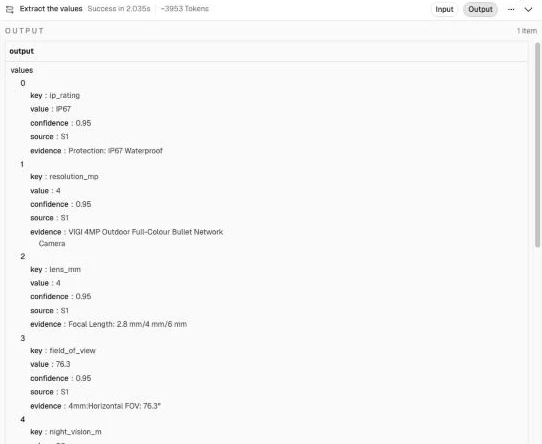
Check the output on the VIGI C340 (4mm): you should see ip_rating (IP67), resolution_mp (4), lens_mm (4), field_of_view (76.3), night_vision_m (30), camera_design (Bullet), power_source (["PoE", "12V DC"]) and audio (["Microphone", "Speaker", "Two-way audio"]), each with its S1 label and quote. In our test runs, gemma4:31b took 1.3 to 2.7 seconds a product and used about 3,100 to 3,500 prompt tokens and 280 to 510 output tokens with a spec page, or about 1,150 tokens in when only the description was there.
Step 6: Check every value against its source
Prompt rules alone don’t stop a model from guessing, so Check the values enforces three hard confidence caps in code: if the evidence quote isn’t a substring of the named source, confidence is capped at 0.6 (a quote the model shortens with ... passes only when every piece is in the source); if the quote doesn’t contain the words or exact number of the extracted value, confidence is capped at 0.8; and if the source isn’t spec_page or database, confidence is capped at 0.8. Since auto_approve_confidence is 0.85, only grounded values from the manufacturer spec page or product database can skip human review, and list keys are gated as a whole so all values for a list metafield are approved or held together.
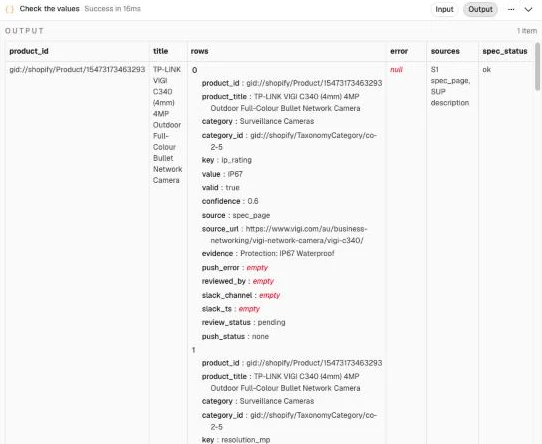
On the VIGI C340 (4mm), IP67 with the quote "IP67 Waterproof" passes all checks at 0.95 and goes straight to auto_approved. Although the page lists three fields of view (102.5° for 2.8 mm, 76.3° for 4 mm and 50.6° for 6 mm), in our test the model quoted the line that names the lens ("4mm:Horizontal FOV: 76.3°"), so 76.3 passed at 0.95 as well. By contrast, night_vision_m (30) shows the check catching an altered quote: the model returned "IR LED Range: 30m", which isn’t on the page verbatim (the table says IR LED • Quantity: 2 • Range: 30m), so it was capped at 0.6 and held as pending. Because model outputs vary slightly between runs, in the screenshot below the model quoted Protection: IP67 Waterproof with a colon the page doesn’t have, so even IP67 was capped at 0.6 and held for review rather than letting an inexact quote through.
At the same time, lens_mm (4) shows where code checks hit their limit: its quote, "Focal Length 2.8 mm/4 mm/6 mm", really is on the page and really contains 4, so it passed at 0.95, even though the same quote would have passed 2.8 or 6 just as easily. Substring matching proves the quote exists on the page, not that the number belongs to this variant on a multi-model table, which is why rule 8 tells the model to score family-page values at 0.6 whenever its quote doesn’t name the exact model, and why you should spot-check family pages in your first batches.
Connect a Code node named Check the values after Extract the values:
const s = $('Extract settings').first().json;
const p = $('Build the prompt').first().json;
const r = $json;

// The parser puts the reply in output; fall back to text if it's a raw string
let reply = r.output !== undefined ? r.output : r.text;
if (typeof reply === 'string') {
  const t = reply.replace(/<think>[\s\S]*?<\/think>/g, '').replace(/```(json)?/g, '');
  try { reply = JSON.parse(t.slice(t.indexOf('{'), t.lastIndexOf('}') + 1)); } catch (e) { reply = null; }
}
let error = null;
if (r.error) error = 'model call failed: ' + String(r.error.message || r.error).slice(0, 200);
else if (!reply) error = 'unreadable model reply';
else if (!p.schema.length) error = 'no fields set up for category ' + p.category;
const vals = reply && Array.isArray(reply.values) ? reply.values : [];

const squash = t => String(t || '').toLowerCase().replace(/[*_`#|>\[\]•·]/g, ' ').replace(/\s+/g, ' ').trim();
const bySrc = Object.fromEntries(p.sources.map(x => [x.label, x]));
const byKey = Object.fromEntries(p.schema.map(f => [f.key, f]));
const TRUSTED = ['spec_page', 'database'];

const normalise = (f, raw) => {
  const el = String(raw).trim();
  if (f.type === 'enum' || f.type === 'list') {
    const hit = f.allowed.find(a => a.toLowerCase() === el.toLowerCase());
    return hit ? { value: hit, valid: true } : { value: el, valid: f.allowed.length === 0 };
  }
  if (f.type === 'number') {
    const m = el.replace(/,/g, '').match(/-?\d+(?:\.\d+)?/);
    return m ? { value: String(Number(m[0])), valid: true } : { value: el, valid: false };
  }
  if (f.type === 'boolean') {
    const b = { true: 'true', yes: 'true', y: 'true', '1': 'true', false: 'false', no: 'false', n: 'false', '0': 'false' }[el.toLowerCase()];
    return b ? { value: b, valid: true } : { value: el, valid: false };
  }
  return { value: el, valid: el.length > 0 };
};

const rows = [];
for (const v of vals) {
  const f = v && byKey[v.key];
  if (!f || v.value === null || v.value === undefined || v.value === '') continue;
  let conf = Math.max(0, Math.min(1, Number(v.confidence) || 0));
  const src = bySrc[String(v.source || '').toUpperCase()] || null;
  // 1. The quote has to be in the source it names. A quote shortened with "..." passes when every piece is there.
  const pieces = String(v.evidence || '').split(/\.{3}|…/).map(t => squash(t).slice(0, 80)).filter(t => t.length >= 3);
  const hay = src ? squash(src.text) : '';
  if (!(src && pieces.length && pieces.every(t => hay.includes(t)))) conf = Math.min(conf, 0.6);
  // 2. The quote has to carry the value: every word of a text value, or the exact number
  const evTok = new Set(String(v.evidence || '').toLowerCase().split(/[^a-z0-9]+/).filter(Boolean));
  const supports = x => {
    if (typeof x === 'boolean') return true;
    const t = String(x).trim().toLowerCase();
    if (/^-?\d+(\.\d+)?$/.test(t)) return new RegExp('(^|[^0-9.])' + t.replace('.', '\\.') + '([^0-9]|$)').test(String(v.evidence || ''));
    const toks = t.split(/[^a-z0-9]+/).filter(w => w.length >= 2);
    return toks.length > 0 && toks.every(w => evTok.has(w));
  };
  const list = Array.isArray(v.value) ? v.value : [v.value];
  if (!list.every(supports)) conf = Math.min(conf, 0.8);
  // 3. Only the spec page and a product database can skip review
  if (!src || !TRUSTED.includes(src.kind)) conf = Math.min(conf, 0.8);
  // 4. Check each value against the schema
  for (const raw of (f.type === 'list' ? list : list.slice(0, 1))) {
    const n = normalise(f, raw);
    if (!n.value || rows.some(x => x.key === f.key && x.value === n.value)) continue;
    rows.push({ product_id: p.product_id, product_title: p.title, category: p.category, category_id: p.category_id,
      key: f.key, value: n.value, valid: n.valid, confidence: conf, source: src ? src.kind : 'unknown',
      source_url: src && src.kind === 'spec_page' ? p.spec_url : '', evidence: String(v.evidence || '').slice(0, 300),
      push_error: '', reviewed_by: '', slack_channel: '', slack_ts: '' });
  }
}

// 5. The gate. A key goes straight through only when it's unambiguous: one valid value at or above the threshold,
//    or, for a list key, every value valid and confident and no more than max_list_values of them.
for (const k of [...new Set(rows.map(x => x.key))]) {
  const kr = rows.filter(x => x.key === k);
  const ok = kr.every(x => x.valid && x.confidence >= s.auto_approve_confidence)
    && (byKey[k].type === 'list' ? kr.length <= s.max_list_values : kr.length === 1);
  for (const x of kr) {
    x.review_status = ok ? 'auto_approved' : 'pending';
    x.push_status = ok ? 'queued' : 'none';
    if (ok) x.reviewed_by = 'auto';
  }
}

return [{ json: { product_id: p.product_id, title: p.title, rows, error,
  sources: p.sources.map(x => x.label + ' ' + x.kind).join(', '),
  spec_status: $('Pick the spec text').first().json.spec_status,
  values_found: rows.length,
  auto_approved: rows.filter(x => x.review_status === 'auto_approved').length,
  to_review: rows.filter(x => x.review_status === 'pending').length } }];
After Check the values, connect a Data table node named Clear old pending values (Always Output Data on, so deleting zero rows doesn’t end the run; Row > Delete on attribute_values where product_id equals {{ $json.product_id }} and review_status equals pending, so re-running a product replaces unreviewed rows without touching approved ones), then a Data table node named Record the run (Row > Upsert on extract_runs matching on product_id, mapping the summary fields and setting extracted_at to {{ $now.toISO() }}). Connect an HTTP Request node named Remove the tag with variables {{ JSON.stringify({ id: $('Check the values').first().json.product_id, tags: [$('Extract settings').first().json.queue_tag] }) }} and this mutation:
mutation Done($id: ID!, $tags: [String!]!) {
  tagsRemove(id: $id, tags: $tags) { userErrors { field message } }
}
Next, add an If node named Any values? (Execute Once on) testing {{ $('Check the values').first().json.rows.length > 0 }}. Its false branch goes straight back to Loop Over Items, so a product with no values still advances the loop. On its true branch, add a Code node named Split out values, which takes the rows from Check the values because the nodes in between return other data:
// One item per extracted value, from Check the values (the nodes in between return other data)
return $('Check the values').first().json.rows.map(r => ({ json: r }));
Follow it with a Data table node named Save the values (Row > Insert on attribute_values, mapping columns automatically) and wire that back to Loop Over Items. Keep the two paths in one chain like this: if you split Remove the tag into two parallel branches instead, n8n runs the loop branch first and only saves values after the last product, all of them taken from that last product. Check extract_runs after your first 20 products: if almost everything lands in to_review, inspect spec_status and your source text before lowering auto_approve_confidence.
Step 7: Review in Slack, in bulk
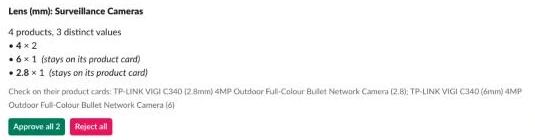
Reviewing one product at a time gets old fast, so Build the cards groups shared, valid pending values across a category and attribute into a single bulk card as soon as bulk_min_products (5) products are waiting, leaving outliers, off-list values and list fields on per-product cards with inline dropdowns and text inputs. In part one of the Review lane, add a Schedule Trigger (every 10 minutes) and connect a Set node named Review settings in JSON mode (store_handle is the slug after admin.shopify.com/store/):
{
  "slack_channel": "#review-specs",
  "store_handle": "your-store",
  "max_products": 15,
  "bulk_min_products": 5
}
Connect a Data table node named Get pending values (Row > Get on attribute_values where review_status equals pending and slack_ts is empty, Return All on), a Data table node named Get schema for cards (Row > Get on attribute_schema, Return All on, Execute Once on), and a Code node named Build the cards:
const s = $('Review settings').first().json;
const rows = $('Get pending values').all().map(i => i.json).filter(r => r.id);
const schema = $('Get schema for cards').all().map(i => i.json);
const fieldOf = (cat, key) => {
  const f = schema.find(x => x.category === cat && x.key === key) || {};
  return { label: f.label || key, type: f.type || 'text', allowed: JSON.parse(f.allowed || '[]') };
};
const txt = (v, n) => String(v == null ? '' : v).slice(0, n);
const pct = c => Math.round(Number(c) * 100) + '%';
const cards = [];

// 1. Bulk cards: one per category and attribute once enough products are waiting on it.
//    Shared, valid values go on the bulk card; one-offs and off-list values stay on the product cards.
//    List keys always stay on product cards, so all of a product's values for a list key are decided together.
const onBulk = new Set();
const groups = {};
for (const r of rows) {
  if (fieldOf(r.category, r.key).type === 'list') continue;
  (groups[r.category + '|' + r.key] = groups[r.category + '|' + r.key] || []).push(r);
}
for (const rs of Object.values(groups)) {
  const products = new Set(rs.map(r => r.product_id));
  if (products.size < s.bulk_min_products) continue;
  const f = fieldOf(rs[0].category, rs[0].key);
  const counts = {};
  for (const r of rs) counts[r.value] = (counts[r.value] || 0) + 1;
  const shared = rs.filter(r => r.valid && counts[r.value] > 1);
  if (!shared.length) continue;
  const outliers = rs.filter(r => !shared.includes(r));
  shared.forEach(r => onBulk.add(r.id));
  const lines = Object.entries(counts).sort((a, b) => b[1] - a[1])
    .map(([v, n]) => `• *${txt(v, 60)}* × ${n}` + (shared.some(r => r.value === v) ? '' : '  _(stays on its product card)_'));
  cards.push({ ids: shared.map(r => r.id), text: `${f.label}: ${products.size} ${rs[0].category} to review`, blocks: [
    { type: 'header', text: { type: 'plain_text', text: txt(`${f.label}: ${rs[0].category}`, 150) } },
    { type: 'section', text: { type: 'mrkdwn', text: `${products.size} products, ${Object.keys(counts).length} distinct value${Object.keys(counts).length === 1 ? '' : 's'}\n` + lines.slice(0, 30).join('\n') } },
    ...(outliers.length ? [{ type: 'context', elements: [{ type: 'mrkdwn', text: txt('Check on their product cards: ' +
      outliers.slice(0, 8).map(r => `${r.product_title} (${r.value}${r.valid ? '' : ', not in list'})`).join('; '), 3000) }] }] : []),
    { type: 'actions', elements: [
      { type: 'button', style: 'primary', text: { type: 'plain_text', text: `Approve all ${shared.length}` }, action_id: 'bulk_approve', value: 'bulk' },
      { type: 'button', style: 'danger', text: { type: 'plain_text', text: 'Reject all' }, action_id: 'bulk_reject', value: 'bulk' }
    ] }
  ] });
}

// 2. Product cards: every remaining pending value as an editable input.
//    block_id = field_<key>, so the click comes back with the edits keyed.
const byProduct = {};
for (const r of rows) if (!onBulk.has(r.id)) (byProduct[r.product_id] = byProduct[r.product_id] || []).push(r);
const opt = (v, aiPick) => ({ text: { type: 'plain_text', text: txt(v + (aiPick ? ' (AI pick, not in list)' : ''), 75) }, value: txt(v, 150) });
for (const rs of Object.values(byProduct).sort((a, b) => b.length - a.length).slice(0, s.max_products)) {
  const p = rs[0];
  const byKey = {};
  for (const r of rs) (byKey[r.key] = byKey[r.key] || []).push(r);
  const inputs = Object.entries(byKey).slice(0, 40).map(([key, krs]) => {
    const f = fieldOf(p.category, key);
    const vals = krs.map(r => String(r.value));
    const hint = txt(krs.map(r => `${pct(r.confidence)} ${r.source}${r.valid ? '' : ' (not in list)'}` +
      (r.evidence ? ': "' + txt(r.evidence, 90) + '"' : '')).join(' | '), 150) || ' ';
    const block = { type: 'input', block_id: 'field_' + key, optional: true,
      label: { type: 'plain_text', text: txt(f.label, 2000) }, hint: { type: 'plain_text', text: hint } };
    const action_id = 'edit_' + key;
    if ((f.type === 'enum' || f.type === 'list') && f.allowed.length) {
      const extra = vals.filter(v => !f.allowed.some(a => a.toLowerCase() === v.toLowerCase()));
      const options = [...f.allowed.map(a => opt(a)), ...extra.map(v => opt(v, true))].slice(0, 100);
      const init = vals.map(v => options.find(o => o.value.toLowerCase() === v.toLowerCase())).filter(Boolean);
      block.element = f.type === 'list'
        ? { type: 'multi_static_select', action_id, options, ...(init.length ? { initial_options: init } : {}) }
        : { type: 'static_select', action_id, options, ...(init[0] ? { initial_option: init[0] } : {}) };
    } else if (f.type === 'boolean') {
      block.element = { type: 'static_select', action_id, options: [opt('true'), opt('false')], initial_option: opt(vals[0] === 'true' ? 'true' : 'false') };
    } else {
      block.element = { type: 'plain_text_input', action_id, initial_value: txt(vals.join(', '), 3000) };
    }
    return block;
  });
  const specUrl = rs.map(r => r.source_url).find(Boolean);
  cards.push({ ids: rs.map(r => r.id), text: `Specs to review: ${txt(p.product_title, 200)}`, blocks: [
    { type: 'header', text: { type: 'plain_text', text: txt(p.product_title, 150) } },
    { type: 'context', elements: [{ type: 'mrkdwn', text: `${txt(p.category, 80)} · ${rs.length} values to check · hints show confidence, source and the quote` }] },
    { type: 'divider' },
    ...inputs,
    { type: 'actions', elements: [
      { type: 'button', style: 'primary', text: { type: 'plain_text', text: 'Approve' }, action_id: 'attr_approve', value: p.product_id },
      { type: 'button', style: 'danger', text: { type: 'plain_text', text: 'Reject' }, action_id: 'attr_reject', value: p.product_id },
      { type: 'button', text: { type: 'plain_text', text: 'Edit in Shopify' }, action_id: 'link_shopify',
        url: `https://admin.shopify.com/store/${s.store_handle}/products/${String(p.product_id).split('/').pop()}` },
      ...(specUrl ? [{ type: 'button', text: { type: 'plain_text', text: 'Spec page' }, action_id: 'link_spec', url: txt(specUrl, 3000) }] : [])
    ] }
  ] });
}
return cards.map(c => ({ json: c }));
Connect an HTTP Request node named Post the card (POST https://slack.com/api/chat.postMessage, Slack API credential, On Error: Continue) with this body:
{{ JSON.stringify({ channel: $('Review settings').first().json.slack_channel, text: $json.text, blocks: $json.blocks }) }}Follow Post the card with a Code node named One row per value to pair each row ID with the Slack message timestamp:
const cards = $('Build the cards').all();
return $input.all().flatMap((it, i) => it.json.ok
  ? cards[i].json.ids.map(id => ({ json: { id, slack_channel: it.json.channel, slack_ts: it.json.ts } }))
  : []);
Connect a Data table node named Mark as posted (Row > Update on attribute_values matching id to {{ $json.id }}, setting slack_channel and slack_ts).
In part two of the Review lane, add a Webhook node named Slack button click (POST, path spec-review, Options > Raw Body on, Respond: Using ‘Respond to Webhook’ Node) and immediately connect a Respond to Webhook node named Respond to Slack (Respond With: No Data) because Slack interactivity requires an HTTP 200 within 3 seconds. Set the webhook’s production URL as the Request URL under Interactivity in your Slack app. Connect a Code node named Read the click to verify the timestamp and parse any inline edits from state.values:
const raw = (await this.helpers.getBinaryDataBuffer(0, 'data')).toString('utf8');
const h = $input.first().json.headers;
if (Math.abs(Date.now() / 1000 - Number(h['x-slack-request-timestamp'])) > 300) throw new Error('Stale request');
const field = raw.split('&').find(kv => kv.startsWith('payload=')) || ''; // no URLSearchParams in the Code node
const b = JSON.parse(decodeURIComponent(field.slice(8).replace(/\+/g, ' ')));
const a = b.actions[0];
// The card's inputs come back in state.values, keyed by block_id field_<key>
const edits = {};
for (const [blockId, inputs] of Object.entries((b.state && b.state.values) || {})) {
  if (!blockId.startsWith('field_')) continue;
  const el = Object.values(inputs)[0] || {};
  const key = blockId.slice(6);
  if (el.type === 'multi_static_select') edits[key] = (el.selected_options || []).map(o => o.value);
  else if (el.type === 'static_select') { if (el.selected_option) edits[key] = el.selected_option.value; }
  else if (el.type === 'plain_text_input') { if (el.value != null) edits[key] = el.value; }
}
const head = (b.message.blocks || [])[0];
return [{ json: { base: `v0:${h['x-slack-request-timestamp']}:${raw}`, expected: h['x-slack-signature'],
  action: a.action_id, product_id: a.value || '', user: b.user.username, channel: b.channel.id, ts: b.message.ts,
  title: head && head.text ? head.text.text : 'Specs', edits } }];
Connect a Crypto node named Sign the request (Action: Hmac, Type: SHA256, Value {{ $json.base }}, Property Name sig, Encoding: HEX, Secret: your Slack signing secret) and an If node named Signature valid? checking {{ 'v0=' + $json.sig }} equals {{ $json.expected }}. Then add a Data table node named Get the card values (Row > Get on attribute_values where slack_ts equals {{ $('Read the click').first().json.ts }} and review_status equals pending, Return All on, Always Output Data on), an If node named Still pending? on {{ $json.id !== undefined }}, and a Switch node named Route the click with two outputs, Approve for {{ ['attr_approve', 'bulk_approve'].includes($('Read the click').first().json.action) }} and Reject for the same test on attr_reject and bulk_reject (clicks on the link buttons match neither and stop there). Connect Approve to a Code node named Apply the edits (Execute Once on):
const click = $('Read the click').first().json;
const rows = $('Get the card values').all().map(i => i.json).filter(r => r.id);
const edits = click.edits || {};   // bulk cards have no inputs, so no edits
const out = [];
const byKey = {};
for (const r of rows) (byKey[r.product_id + '|' + r.key] = byKey[r.product_id + '|' + r.key] || []).push(r);
for (const rs of Object.values(byKey)) {
  const base = rs[0];
  const proposed = rs.map(r => String(r.value));
  let chosen = edits[base.key];
  if (chosen === undefined) chosen = proposed;                                 // no input for this key: approve as proposed
  else if (typeof chosen === 'string') chosen = rs.length > 1 ? chosen.split(',') : [chosen];   // a text box holding several values
  chosen = chosen.map(v => String(v).trim()).filter(Boolean);
  for (const r of rs) {
    const { id, createdAt, updatedAt, ...row } = r;   // the table's own columns aren't written back
    const keep = chosen.some(v => v.toLowerCase() === String(r.value).toLowerCase());
    out.push({ json: { ...row, review_status: keep ? 'approved' : 'rejected', push_status: keep ? 'queued' : 'none', reviewed_by: click.user } });
  }
  for (const v of chosen) if (!proposed.some(x => x.toLowerCase() === v.toLowerCase()))
    out.push({ json: { product_id: base.product_id, product_title: base.product_title, category: base.category, category_id: base.category_id,
      key: base.key, value: v, confidence: 1, source: 'reviewer', source_url: '', evidence: 'Edited in Slack by ' + click.user,
      valid: true, review_status: 'edited', push_status: 'queued', push_error: '', reviewed_by: click.user,
      slack_channel: click.channel, slack_ts: click.ts } });
}
return out;
Connect Apply the edits to a Data table node named Save the decisions (Row > Upsert on attribute_values matching on product_id, key and value). Wire the Reject output of Route the click to a Data table node named Reject all (Execute Once on; Row > Update on attribute_values where slack_ts equals the card’s ts and review_status equals pending, setting review_status to rejected and reviewed_by to {{ $('Read the click').first().json.user }}). Wire both Save the decisions and Reject all into an HTTP Request node named Update the card (POST https://slack.com/api/chat.update, Slack API credential, On Error: Continue, Execute Once on) with this body:
{{ (c => JSON.stringify({ channel: c.channel, ts: c.ts, text: c.title, blocks: [
  { type: 'header', text: { type: 'plain_text', text: c.title } },
  { type: 'context', elements: [{ type: 'mrkdwn', text: (c.action.endsWith('approve') ? ':white_check_mark: Approved' : ':x: Rejected')
    + ' by @' + c.user + ', ' + $('Get the card values').all().length + ' values.' }] }
] }))($('Read the click').first().json) }}
After Save the decisions, also connect an Execute Workflow node named Send to Push lane (Source: Database, By ID {{ $workflow.id }}, Wait For Sub-Workflow Completion off, Execute Once on) passing product_id set to {{ $('Read the click').first().json.action === 'attr_approve' ? $('Read the click').first().json.product_id : '' }}.
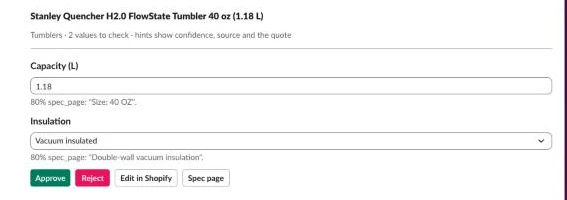
Test this flow with the Stanley Quencher 40 oz. Because Stanley’s page (read through Firecrawl) explicitly lists 90% recycled 18/8 stainless steel, Double-wall vacuum insulation, Comfort-grip handle and Dishwasher safe, in our run the material, care and handle values went straight through, leaving just two values on its Slack card: the capacity, which the model converted from 40 OZ to 1.18, and the insulation, whose quote doesn’t contain the word insulated. Confirm or edit them, click Approve, and check attribute_values to verify the rows show approved (or edited for a value you typed in) with push_status set to queued.
Step 8: Push the values to metafields and standard attributes
Writing to Shopify metafields has three traps that the Push lane handles for you: a list metafield is overwritten as a single JSON array so all of a product’s values for that key must go together, metafieldsSet is atomic across its 25-item batch so one bad metafield rejects the other 24 unless you retry individually, and writing a standard attribute to a product whose category doesn’t have it returns an "Owner subtype does not match" error that should be parked as category_mismatch rather than retried forever.
In the Push lane, add a Schedule Trigger (every 15 minutes) and an Execute Workflow Trigger named When Executed by Another Workflow (accepting product_id), wiring both to a Set node named Push settings in JSON mode (dry_run ships true so nothing writes until you flip it):
{
  "store_domain": "your-store.myshopify.com",
  "namespace": "custom",
  "dry_run": true,
  "max_products": 25
}
Connect a Data table node named Get queued values (Row > Get on attribute_values where push_status equals queued, Return All on, so the lane stops when nothing is queued), Get Shopify token for Push, a Data table node named Get schema for push (Row > Get on attribute_schema, Return All on, Execute Once on), and a Data table node named Get value cache (Row > Get on taxonomy_values, Return All on, Execute Once on, Always Output Data on). Then add a Code node named Plan the push:
const s = $('Push settings').first().json;
const trig = $('When Executed by Another Workflow');
const only = trig.isExecuted ? String(trig.first().json.product_id || '') : '';
const schema = $('Get schema for push').all().map(i => i.json);
const cache = $('Get value cache').all().map(i => i.json);
const toHandle = t => String(t || '').toLowerCase().replace(/[^a-z0-9]+/g, '-').replace(/^-|-$/g, '');
const KEY_OVERRIDE = { color: 'color-pattern' };   // the taxonomy's Color attribute is stored as shopify.color-pattern

const rows = $('Get queued values').all().map(i => i.json).filter(r => r.id && (!only || r.product_id === only));
const byProduct = {};
for (const r of rows) (byProduct[r.product_id] = byProduct[r.product_id] || []).push(r);

const products = Object.entries(byProduct).slice(0, s.max_products).map(([product_id, rs]) => {
  const groups = {};
  for (const r of rs) {
    if (!groups[r.key]) {
      const f = schema.find(x => x.category === r.category && x.key === r.key) || {};
      const std = f.standard ? (KEY_OVERRIDE[toHandle(f.standard)] || toHandle(f.standard)) : '';
      // a category already known not to have this attribute gets the custom write only
      const notHere = !!std && cache.some(c => c.category_id === r.category_id && c.standard_key === std && c.status === 'not_on_category');
      groups[r.key] = { key: r.key, type: f.type || 'text', standard: f.standard || '', standard_key: notHere ? '' : std,
        standard_map: JSON.parse(f.standard_map || '{}'), rows: [] };
    }
    groups[r.key].rows.push(r);
  }
  return { product_id, category_id: rs[0].category_id, groups: Object.values(groups) };
});

// Standard values with no metaobject yet, grouped by category so each category's taxonomy is read once
const known = new Set(cache.filter(c => c.metaobject_gid).map(c => c.standard_key + '|' + String(c.value).toLowerCase()));
const misses = {};
for (const p of products) for (const g of p.groups) {
  if (!g.standard_key) continue;
  for (const r of g.rows) {
    const value = String(r.value);
    if (known.has(g.standard_key + '|' + value.toLowerCase())) continue;
    const m = misses[p.category_id] = misses[p.category_id] || { category_id: p.category_id, values: [] };
    if (!m.values.some(v => v.standard_key === g.standard_key && v.value === value))
      m.values.push({ standard: g.standard, standard_key: g.standard_key, value, taxonomy_name: g.standard_map[value] || value });
  }
}
return [{ json: { products, misses: Object.values(misses) } }];
Connect an If node named Any new standard values? checking {{ $json.misses.length > 0 && $('Push settings').first().json.dry_run === false }}, so a dry run never creates anything in Shopify (it just leaves the standard attribute twins out of the payload). On the true branch, add a Code node named Resolve standard values that queries the category’s taxonomy attributes, matches each value or falls back to Other, and calls metaobjectUpsert keyed by handle:
const s = $('Push settings').first().json;
const token = $('Get Shopify token for Push').first().json.access_token;
const url = `https://${s.store_domain}/admin/api/2026-10/graphql.json`;
const gql = (query, variables) => this.helpers.httpRequest({ method: 'POST', url, json: true,
  headers: { 'X-Shopify-Access-Token': token }, body: { query, variables } });
const READ = `query CategoryAttributes($id: ID!) {
  node(id: $id) {
    ... on TaxonomyCategory {
      attributes(first: 100) {
        nodes { __typename ... on TaxonomyChoiceListAttribute { id name values(first: 250) { nodes { id name } } } }
      }
    }
  }
}`;
const UPSERT = `mutation UpsertValue($handle: MetaobjectHandleInput!, $metaobject: MetaobjectUpsertInput!) {
  metaobjectUpsert(handle: $handle, metaobject: $metaobject) {
    metaobject { id handle }
    userErrors { field message code }
  }
}`;
const toHandle = t => String(t || '').toLowerCase().replace(/[^a-z0-9]+/g, '-').replace(/^-|-$/g, '');
const PATTERN_SOLID = 'gid://shopify/TaxonomyValue/2874';   // colour entries also need a pattern
const out = [];
for (const m of $('Plan the push').first().json.misses) {
  const r = await gql(READ, { id: m.category_id });
  const attrs = ((((r.data || {}).node || {}).attributes || {}).nodes || []).filter(a => a.__typename === 'TaxonomyChoiceListAttribute');
  const flagged = new Set();
  for (const v of m.values) {
    const attr = attrs.find(a => a.name.toLowerCase() === v.standard.toLowerCase());
    if (!attr) {
      // this category has no such attribute: remember it, and write the custom metafield only
      if (!flagged.has(v.standard_key)) out.push({ json: { category_id: m.category_id, standard_key: v.standard_key, value: '',
        taxonomy_value_gid: '', metaobject_gid: '', status: 'not_on_category' } });
      flagged.add(v.standard_key);
      continue;
    }
    const tv = attr.values.nodes.find(x => x.name.toLowerCase() === v.taxonomy_name.toLowerCase())
      || attr.values.nodes.find(x => x.name.toLowerCase() === 'other');
    if (!tv) { out.push({ json: { category_id: '', standard_key: v.standard_key, value: v.value, taxonomy_value_gid: '', metaobject_gid: '', status: 'failed: no taxonomy value and no Other' } }); continue; }
    const fields = v.standard_key === 'color-pattern'
      ? [{ key: 'label', value: v.value }, { key: 'color_taxonomy_reference', value: JSON.stringify([tv.id]) }, { key: 'pattern_taxonomy_reference', value: PATTERN_SOLID }]
      : [{ key: 'label', value: v.value }, { key: 'taxonomy_reference', value: tv.id }];
    const u = await gql(UPSERT, { handle: { type: 'shopify--' + v.standard_key, handle: toHandle(v.value) }, metaobject: { fields } });
    const mo = u.data && u.data.metaobjectUpsert;
    const errs = [].concat(u.errors || [], (mo && mo.userErrors) || []).map(e => e.message);
    out.push({ json: { category_id: '', standard_key: v.standard_key, value: v.value, taxonomy_value_gid: tv.id,
      metaobject_gid: mo && mo.metaobject ? mo.metaobject.id : '', status: errs.length ? 'failed: ' + errs.join('; ').slice(0, 200) : 'ok' } });
  }
}
return out;
Connect Resolve standard values to a Data table node named Save to cache (Row > Insert on taxonomy_values), then wire both Save to cache and the false branch of Any new standard values? into a Code node named Build the metafields:
const s = $('Push settings').first().json;
const plan = $('Plan the push').first().json;
const fresh = $('Resolve standard values').isExecuted ? $('Resolve standard values').all().map(i => i.json) : [];
const cache = [...$('Get value cache').all().map(i => i.json), ...fresh];
const gidFor = (key, value) => (cache.find(c => c.standard_key === key && c.metaobject_gid
  && String(c.value).toLowerCase() === String(value).toLowerCase()) || {}).metaobject_gid;
const notHere = (cat, key) => fresh.some(c => c.category_id === cat && c.standard_key === key && c.status === 'not_on_category');
const TYPE = { enum: 'single_line_text_field', list: 'list.single_line_text_field', number: 'number_decimal', boolean: 'boolean', text: 'single_line_text_field' };
const M = `mutation Push($mf: [MetafieldsSetInput!]!) {
  metafieldsSet(metafields: $mf) {
    metafields { id namespace key }
    userErrors { field message code }
  }
}`;
const units = [];    // one per metafield: { kind, mf, rowIds }
const parked = [];   // rows settled before any request
for (const p of plan.products) {
  for (const g of p.groups) {
    const values = [...new Set(g.rows.map(r => String(r.value)))];
    const ids = g.rows.map(r => r.id);
    const type = TYPE[g.type] || 'single_line_text_field';
    if (!type.startsWith('list.') && values.length > 1) {
      parked.push(...ids.map(id => ({ id, push_status: 'failed', push_error: 'More than one value for a single-value field' })));
      continue;
    }
    units.push({ kind: 'custom', rowIds: ids, mf: { ownerId: p.product_id, namespace: s.namespace, key: g.key, type,
      value: type.startsWith('list.') ? JSON.stringify(values) : values[0] } });
    // the twin: Shopify's standard product attribute, when the schema names one
    if (g.standard_key && !notHere(p.category_id, g.standard_key)) {
      const gids = values.map(v => gidFor(g.standard_key, v)).filter(Boolean);
      if (gids.length === values.length)
        units.push({ kind: 'standard', rowIds: ids, mf: { ownerId: p.product_id, namespace: 'shopify', key: g.standard_key,
          type: 'list.metaobject_reference', value: JSON.stringify([...new Set(gids)]) } });
      else parked.push(...ids.map(id => ({ id, twin: 'no metaobject for every value yet' })));
    }
  }
}
const out = [];
for (let i = 0; i < units.length; i += 25) {
  const chunk = units.slice(i, i + 25);
  out.push({ json: { query: M, variables: { mf: chunk.map(u => u.mf) }, units: chunk, parked: i === 0 ? parked : [] } });
}
if (!out.length) out.push({ json: { query: M, variables: { mf: [] }, units: [], parked } });
return out;
Connect an If node named Live run? checking {{ $('Push settings').first().json.dry_run === false && $json.units.length > 0 }}. On the true branch, add an HTTP Request node named Set metafields (On Error: Continue) with a red sticky note above it and the body {{ JSON.stringify({ query: $json.query, variables: $json.variables }) }}, then connect a Code node named Prove and retry to verify each batch and retry individual items if a batch error occurred:
const s = $('Push settings').first().json;
const token = $('Get Shopify token for Push').first().json.access_token;
const url = `https://${s.store_domain}/admin/api/2026-10/graphql.json`;
const reqs = $('Build the metafields').all().map(i => i.json);
const resps = $input.all().map(i => i.json);
const norm = r => {
  const ms = r && r.data && r.data.metafieldsSet;
  const errs = [].concat((r && r.errors) || [], (ms && ms.userErrors) || []);
  return { written: (ms && ms.metafields) || [], errors: errs.map(e => e.message || JSON.stringify(e)) };
};
const state = {};   // row id -> { custom, twin, error }
const note = (u, ok, msg) => {
  for (const id of u.rowIds) {
    const st = state[id] = state[id] || {};
    if (u.kind === 'custom') { st.custom = ok; if (!ok) st.error = msg; }
    else st.twin = ok ? 'ok' : (/subtype does not match/i.test(msg) ? 'mismatch' : 'failed: ' + msg);
  }
};
for (let i = 0; i < reqs.length; i++) {
  const q = reqs[i];
  for (const p of q.parked) state[p.id] = { ...(state[p.id] || {}), ...(p.push_status ? { custom: false, error: p.push_error } : { twin: 'skipped: ' + p.twin }) };
  if (!q.units.length) continue;
  const b = norm(resps[i]);
  if (b.errors.length === 0 && b.written.length >= q.units.length) { q.units.forEach(u => note(u, true, '')); continue; }
  for (const u of q.units) {
    let ok = false, msg = '';
    try {
      const n = norm(await this.helpers.httpRequest({ method: 'POST', url, json: true,
        headers: { 'X-Shopify-Access-Token': token }, body: { query: q.query, variables: { mf: [u.mf] } } }));
      ok = n.written.length > 0 && n.errors.length === 0;
      msg = n.errors.join('; ');
    } catch (e) { msg = 'HTTP error: ' + (e.message || String(e)); }
    note(u, ok, msg || (ok ? '' : 'Write not confirmed by Shopify'));
  }
}
return Object.entries(state).map(([id, st]) => {
  let push_status, push_error = '';
  if (st.custom === false) { push_status = 'failed'; push_error = st.error || ''; }
  else if (st.twin === 'mismatch') { push_status = 'category_mismatch'; push_error = 'Category has no such attribute; custom metafield written'; }
  else { push_status = 'pushed'; if (st.twin && st.twin !== 'ok') push_error = 'Standard attribute ' + st.twin; }
  return { json: { id, push_status, push_error: push_error.slice(0, 300) } };
});
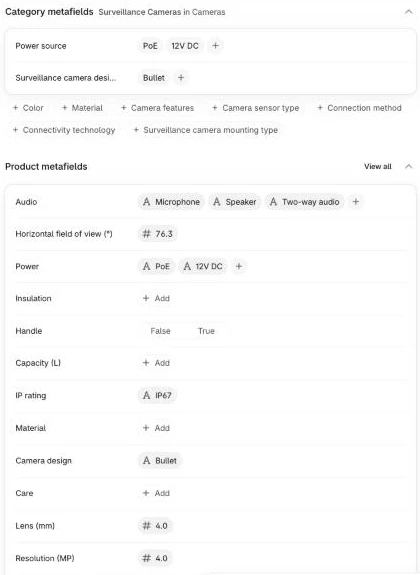
Connect a Data table node named Save the results (Row > Update on attribute_values where id equals {{ $json.id }}, setting push_status and push_error). Inspect Build the metafields with dry_run set to true, then set dry_run to false, run the Push lane, and open the VIGI C340 (4mm) in Shopify admin to see both custom metafields and standard attributes populated (the admin’s product page lists the standard ones under Category metafields). In our test, 34 approved rows went out as 36 metafields in two calls, plus 7 new standard attribute values, in about 6 seconds. When a reviewer typed text into a number field (50.6 degrees wide) and made Shopify reject a batch of 10 with Value must be a decimal., Prove and retry automatically pushed the other 8 rows one at a time and marked the bad row failed with Shopify’s message.
Step 9: Turn the values into filters, collections and feeds
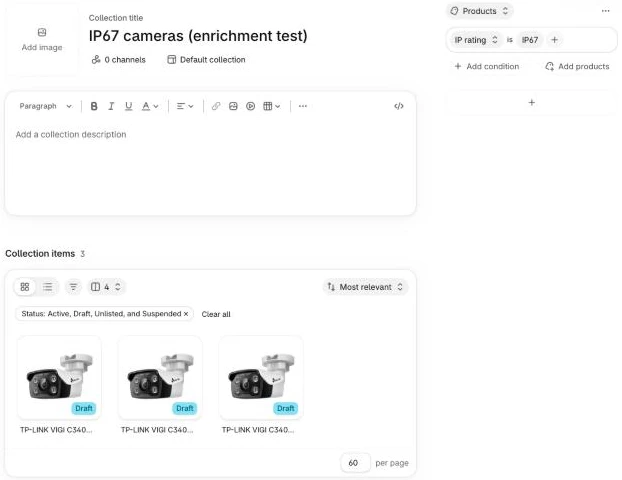
Once your metafields are populated, you wire them up once in the Shopify admin rather than in n8n. In Search & Discovery > Filters, add your custom metafields (or standard product attributes) as Shopify product filters, keeping in mind that Shopify allows up to 25 filters per store, hides filters on collections with more than 5,000 products, and displays at most 100 values per filter. Because Setup already switched every definition on for smart collections, you can build collections on them straight away (such as all cameras where custom.ip_rating equals IP67), and check what your Google & YouTube channel actually sends to Google Merchant Center rather than assuming every standard attribute syncs. Open a camera collection on your storefront and filter by IP rating: IP67 to confirm your enriched products appear.
What it costs
All prices below were checked November 2026:
| Piece | Cost | Notes |
|---|---|---|
| n8n | Free (self-hosted) or €20/month billed annually (n8n Cloud Starter) | Self-hosted Community Edition is free. |
AI model (Ollama Cloud gemma4:31b) | US$0.14 / 1M input tokens, US$0.40 / 1M output tokens | Measured at about 3,100 to 3,500 tokens in and 280 to 510 out per product with a spec page = ~US$0.0007 per product (pay as you go, no subscription). |
| Image reading (optional, same model) | As above | Off by default; each photo took under a second in our test, and the cost depends on how many images you read. |
| Firecrawl (pricing, optional) | Free for 1,000 credits/month; Hobby US$19/month for 5,000 | 1 credit per fallback scrape when a plain GET is blocked. |
| Product database (optional) | Free (Open Icecat, Open Food Facts) or paid | Optional slot in the Extract lane. |
| Slack | Free plan works | Standard interactivity webhooks. |
From the token counts we measured and Ollama’s list prices, enriching 500 products costs about US$0.35, 2,000 products costs about US$1.40, and 10,000 products costs about US$7 one-off (double it if your spec pages run long or the parser often has to fix a reply), after which you only pay for new products. For comparison, Describely charges US$0.75 per product on pay-as-you-go (US$1,500 for 2,000 products), and Segments starts metafield writeback on its Launch plan at about US$149 a month (A$212.86) for up to 1,000 SKUs. To keep costs even lower, query a free product database first where your industry has one, call Firecrawl only when plain requests fail, keep batch_size modest, use a smaller model for simple categories, and filter your prompt to backfill only the missing key when you add a new attribute later.
Common mistakes
Matching products by title alone
Product titles often leave out the exact variant or share a stem across several models, such as the VIGI C340 2.8mm and 4mm cameras. Always pass the MPN and GTIN into Build the input so the model and any database lookup match the exact unit.
Assuming a product database covers your range
On a store I run, of 3,453 Open Icecat lookups, 1,593 matched (1,441 by GTIN, 152 by brand and MPN) and 1,118 came back as Full Icecat only, which is about half and about a third. Community databases like Open Food Facts are similarly patchy and volunteer-entered, so treat database records as another input that goes through the same grounding and review rather than a replacement for manufacturer spec scraping.
Letting the AI model fill gaps from memory
Left unchecked, language models happily fill missing attributes using what similar products usually have. Rule 1 in Build the prompt and the substring quote check in Check the values cap every ungrounded pick at 0.6 confidence so it cannot auto-approve.
Auto-approving values from family spec pages
Manufacturer pages that list three lens sizes or four capacities in one table pass a simple substring check because all three numbers appear on the page. Rule 8 instructs the model to score multi-model pages at 0.6 confidence whenever a quote doesn’t name the exact variant, holding the value so a person confirms the right column in Slack.
Allowing free-text values that split storefront filters
If one product says IP-67, another says IP67 rated and a third says ip67, your storefront filter shows three separate checkboxes. Define an allowed list on every enum and list field so Check the values normalises case and holds off-list wording for review.
Writing a standard attribute the category doesn’t have
When a Shopify taxonomy category doesn’t include a standard attribute in your schema, Resolve standard values records not_on_category in taxonomy_values and Prove and retry parks any "Owner subtype does not match" error as category_mismatch. Because Shopify updates the taxonomy every quarter (Charle) and categories do move (Futur Media’s example is the restructure of Baby & Children’s Clothing in February 2026, in their taxonomy guide), re-check your standard names after an update and clear any stale not_on_category rows from taxonomy_values.
Pushing one value of a list key at a time
Shopify overwrites list.single_line_text_field and list.metaobject_reference metafields completely on every write. Check the values gates list keys as a unit and Build the metafields joins all approved rows for a key into one array before calling Shopify.
Trusting a batch write without reading the response
Because metafieldsSet is atomic, a single invalid metafield silently rolls back all 25 items in the batch if you only check for HTTP 200. Prove and retry checks userErrors and verifies that metafields.length matches the number of units sent, retrying one by one when a batch fails.
Creating a storefront filter for every attribute
A filter sidebar that scrolls through twenty minor specifications is hard to use, and Search & Discovery caps stores at 25 filters anyway. Keep storefront filters to the attributes buyers actually narrow by in each category and display the rest in a spec table on the product page.
Make it your own
Plug in a product database for your industry
To use Open Icecat for electronics, enable Product database (optional), set Method to GET, Response Format to JSON with Include Response Headers and Status and Never Error turned on, add a Custom Auth credential with your Icecat token headers, and use this URL expression (where HTTP 403 means a paid Full Icecat brand like Ubiquiti and 404 means no match):
{{ (p => 'https://live.icecat.biz/api?lang=EN&shopname=' + encodeURIComponent('YOUR_ICECAT_USERNAME')
+ (p.gtin ? '>IN=' + encodeURIComponent(p.gtin) : '&Brand=' + encodeURIComponent(p.brand) + '&ProductCode=' + encodeURIComponent(p.mpn))
+ '&content=')($('Build the input').first().json) }}For other industries, adjust Flatten database reply to read Open Food Facts (free ODbL barcode lookups at 15 reads/minute or bulk exports), Open Beauty Facts and Open Products Facts (same barcode API), UPCitemdb (free 100 requests/day, paid from US$99/month), Go-UPC (from US$74.95/month), TecDoc by TecAlliance for licensed auto-parts fitment, or Syndigo GDSN for GS1 data pools published by your suppliers.
Enrich products that have no manufacturer spec pages
If you sell own-brand, fashion or handmade goods where no external spec page exists, leave custom.spec_url blank, put your sizing chart or supplier sheet in the description, and set use_images to true so Read the image extracts visible details and care labels; every value will cap at 0.8 confidence and route through Slack review.
Fill remaining gaps with deterministic rules
When an entire brand or product family shares a known attribute (for example, every camera in a series uses PoE), add a small Code node before Save the values that inserts missing rows with source set to rule and the rule text in evidence so you keep a full audit trail.
Swap Data Tables for Postgres when your catalogue outgrows 200 MiB
All n8n Data Tables on an instance share a 200 MiB default limit (self-hosters can raise N8N_DATA_TABLES_MAX_SIZE_BYTES), and at 10,000 products across 25 attributes attribute_values passes 250,000 rows, which is the point to swap the Data table nodes for Postgres (for example on Supabase’s free 500 MB plan).
Frequently asked questions
Do I need a PIM for product data enrichment?
Most Shopify stores don’t need a dedicated PIM because Shopify metafields, metaobjects and n8n Data Tables already give you a schema, an evidence log and an approval queue inside tools you own. A standalone PIM only earns its fee when multiple teams manage translations, print catalogues and wholesale syndication outside Shopify.
Where do the specs come from if I don’t have a product database?
They come from the manufacturer’s public spec page (stored in custom.spec_url), backed up by your supplier description and optional product packaging photos. Even in electronics, a product database rarely covers a whole range, so scraping the manufacturer’s page is the primary path for almost every store.
Should filters use custom metafields or Shopify’s standard product attributes?
Use custom metafields (custom.*) for storefront filters and smart collections because you control the exact wording and can give every category the attributes your shoppers expect. Where Shopify’s taxonomy also defines a matching attribute, set the standard field in your schema so the workflow populates both, giving you clean storefront filters alongside Shopify’s built-in analytics dimensions and marketplace discovery.
Can I trust AI-extracted specs?
You can when the model has to return a verbatim source quote and code verifies that both the quote and the extracted value exist in that source text before anything can auto-approve. Values drawn from supplier descriptions or images are capped below the 0.85 auto-approval threshold in code, and the prompt tells the model to score values from multi-model family pages at 0.6, so both are held for a quick review in Slack.
Next steps
Import the template, run the Setup lane once to create your tables and metafield definitions, tag five products in a single category with enrich, and review your first cards in Slack before flipping dry_run to false in Push settings.