How to Run Any n8n Workflow From a Slack Slash Command (+ Free Template)

Last tested on n8n 2.46, November 2026.
Most automation workflows run on a schedule, which works fine until a supplier changes their prices at 9am or a feed fix needs to go live before lunch. To run a job right now, you usually have to open n8n, find the right canvas and click execute by hand. Most n8n Slack tutorials stop at posting channel alerts, whereas setting up custom Slack slash commands lets your team trigger jobs and check review queues directly from the channel where they already work. By the end of this guide, you’ll have a /store command that verifies Slack’s signature, runs allowlisted workflows on demand, reports how long they took, and shows what’s waiting for review.
What you’ll build
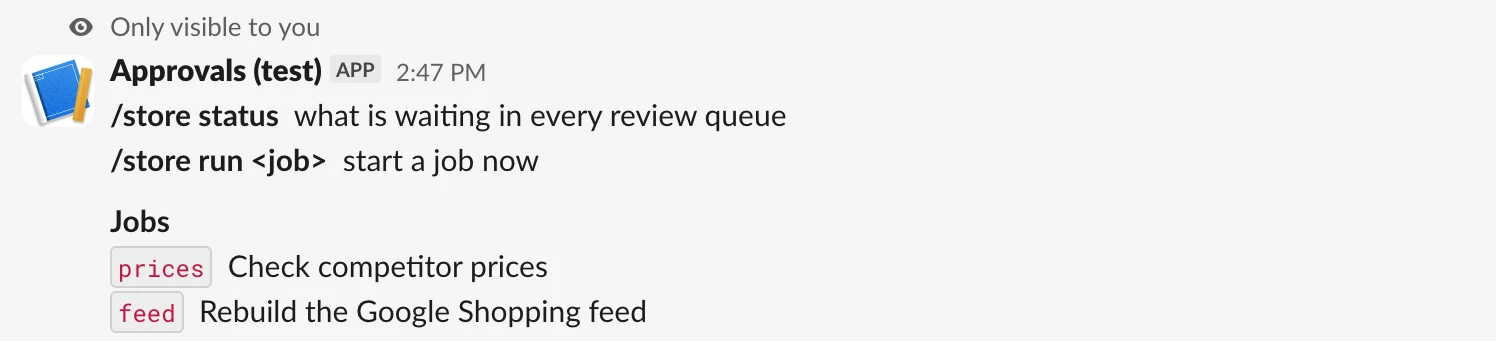
We’ll build /store for an online store with two scheduled workflows we want to start on demand: prices (“Check competitor prices”) and feed (“Rebuild the Google Shopping feed”). Typing /store or /store help returns an ephemeral reply listing the commands and jobs:
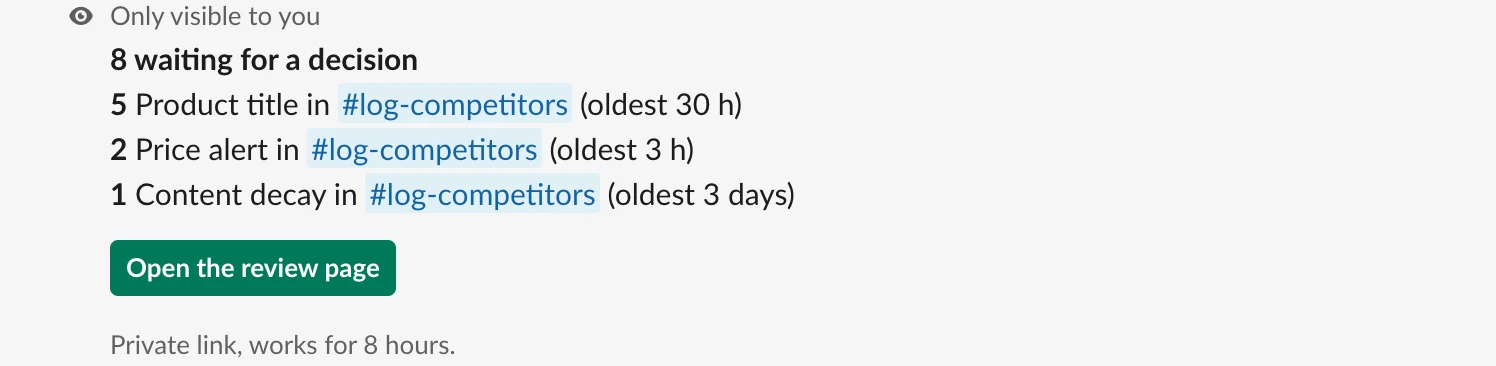
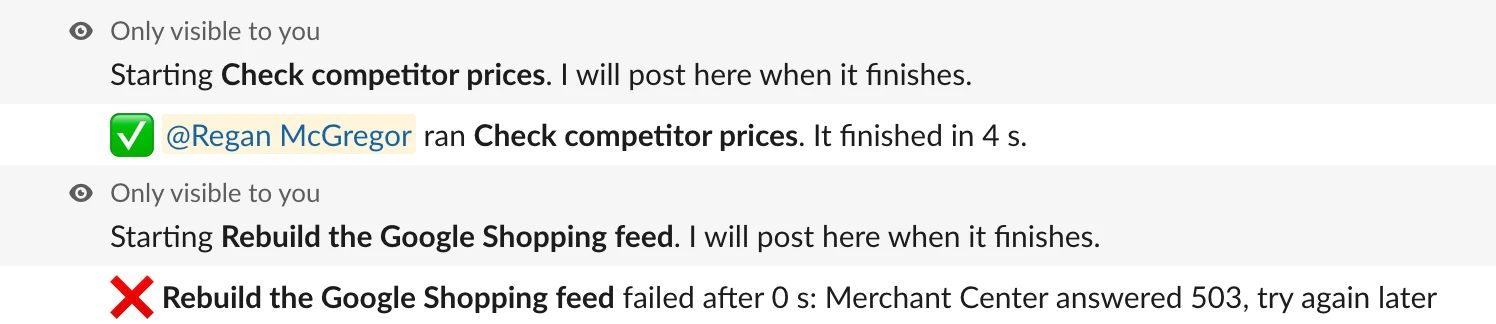
Typing /store status shows 8 waiting items across your queues (5 product titles, 2 price alerts and 1 content decay alert, all in one channel) with a button to open the review page. Typing /store run prices answers right away, runs the job and posts the 4-second finish time to the channel, while /store run feed posts the 503 error from Merchant Center.
What you need
- n8n on a public HTTPS URL with Data Tables (self-hosted or Cloud), because Slack has to reach the webhook.
- A Slack app you can add a slash command to (the free plan works).
- Optional: the Build Human-in-the-Loop Slack Approvals With n8n and Block Kit template for
/store status; the rest of the command works without it. The repo also has a Supabase (Postgres) version.
How it works
- Receive and check catches Slack’s
POSTon a Webhook node with Raw Body on, checks the HMAC-SHA256 signature against the exact bytes sent, rejects anything altered or over five minutes old with a401, and splits the command text intoverb,jobandargs. - Help handles
/store,/store helpand any unknown verb by returning an ephemeral list of commands and the allowlisted jobs fromCommand settings. - Status reads pending rows from the
approvalsData Table, counts them by queue and channel with the age of the oldest card, and attaches an HMAC-signed link to the review page for approvers. - Run checks that the caller is allowed and the job is on the allowlist, answers Slack inside three seconds before calling Execute Workflow, posts the duration or error to the channel via
response_url, and logs the run incommand_runs.
Step 1: Create the Slack slash command in your app
In your Slack app at api.slack.com/apps, open Slash Commands > Create New Command to set up your Slack slash command. If you already use the Slack approvals template, add the command to that app so both share one signing secret. Fill in the four fields:
| Field | Value |
|---|---|
| Command | /store |
| Request URL | https://your-n8n.example.com/webhook/slack-command |
| Short Description | See what's waiting and run n8n jobs now |
| Usage Hint | [help | status | run <job>] |
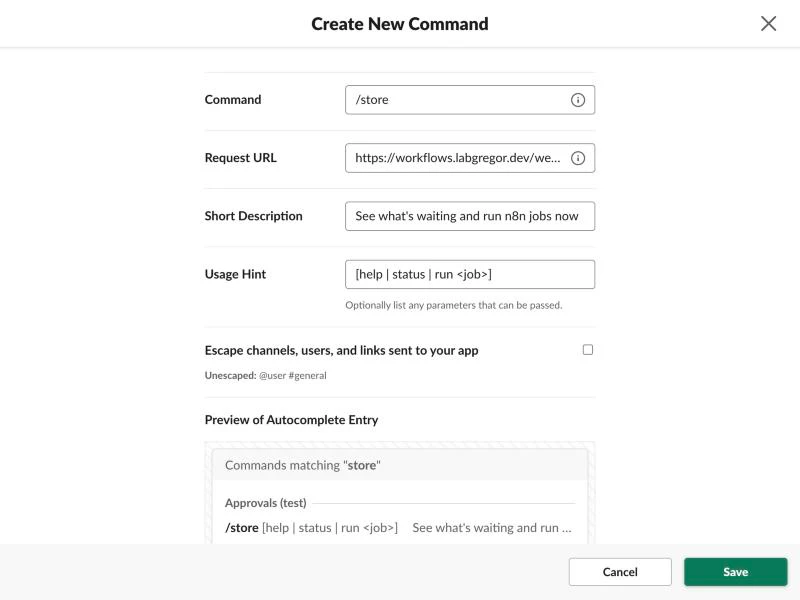
Click Save, then reinstall the app under Install App because a slash command adds the commands scope. Under Basic Information, copy your Signing Secret and App ID, plus your workspace ID (T...) from your browser URL bar.
When someone runs /store run prices, Slack sends form fields including text, user_id, user_name, team_id, api_app_id and response_url. Because Slack must receive the response within 3,000 milliseconds or the user sees an error, our workflow answers on the webhook connection first and posts delayed results to response_url, requiring no bot token.
Step 2: Receive the command and check it came from Slack
First, add the two-node Setup lane: a Manual Trigger named Run once to set up wired to a Data table node named Create command_runs (Resource: table, Operation: create, Table name: command_runs, Create If Not Exists: on) with columns job, args, user_id, user_name, result, error (all string) and seconds (number). Click Execute workflow once to create the table; saving every run in n8n gives you a permanent record because Slack’s free plan keeps only 90 days of history and ephemeral replies are never stored at all.
To receive commands, add a Webhook node named Slack sends /store with Raw Body on so the exact bytes Slack sent are kept in binary.data:
| Setting | Value |
|---|---|
| HTTP Method | POST |
| Path | slack-command |
| Respond | Using ‘Respond to Webhook’ Node |
| Options > Raw Body | on |
Next, add an Extract from File node named Read the raw body. Because Slack signs the exact bytes it sent, placing a Set node straight after the webhook drops the binary body and causes the signature check to fail every time:
| Setting | Value |
|---|---|
| Operation | Extract From Text File (text) |
| Input Binary Field | data |
| Destination Output Field | raw_body |
Connect an Edit Fields (Set) node named Command settings (Mode: JSON), which we’ll explain in Step 3:
{
  "slack_app_id": "",
  "slack_team_id": "",
  "approver_ids": [],
  "page_url": "https://your-n8n.example.com/webhook/slack-approvals-page",
  "link_hours": 8,
  "jobs": [
    {
      "key": "prices",
      "label": "Check competitor prices",
      "workflow_id": "REPLACE_WITH_WORKFLOW_ID"
    },
    {
      "key": "feed",
      "label": "Rebuild the Google Shopping feed",
      "workflow_id": "REPLACE_WITH_WORKFLOW_ID"
    }
  ]
}
Next, add a Crypto node named Sign the request. As Slack’s guide to verifying requests from Slack shows, the signature in X-Slack-Signature is v0= plus the HMAC-SHA256 hex digest of v0:<timestamp>:<body> using your Signing Secret, with the timestamp in X-Slack-Request-Timestamp:
| Setting | Value |
|---|---|
| Action | HMAC |
| Type | SHA256 |
| Value | ={{ 'v0:' + $('Slack sends /store').first().json.headers['x-slack-request-timestamp'] + ':' + $('Read the raw body').first().json.raw_body }} |
| Property Name | expected |
| Encoding | HEX |
| Credential | Slack signing secret |
Connect an If node named From your Slack? (Boolean > is true) to verify the digest, reject requests more than five minutes old so nobody can replay a captured request later, and check the app and workspace IDs:
={{ (h => ('v0=' + $json.expected) === h['x-slack-signature']
  && Math.abs($now.toSeconds() - Number(h['x-slack-request-timestamp'])) < 300
  && (!$json.slack_app_id || $json.slack_app_id === $('Slack sends /store').first().json.body.api_app_id)
  && (!$json.slack_team_id || $json.slack_team_id === $('Slack sends /store').first().json.body.team_id)
)($('Slack sends /store').first().json.headers) }}
Wire the false branch to a Respond to Webhook node named Turn it away (Respond With: Text, Response Body: That request did not come from this Slack app., Response Code: 401). Wire the true branch to an Edit Fields (Set) node named Read the command to split body.text into verb, job and args:
| Field | Type | Value |
|---|---|---|
verb | string | ={{ ($('Slack sends /store').first().json.body.text || '').trim().split(/\\s+/)[0].toLowerCase() || 'help' }} |
job | string | ={{ ($('Slack sends /store').first().json.body.text || '').trim().split(/\\s+/)[1]?.toLowerCase() || '' }} |
args | string | ={{ ($('Slack sends /store').first().json.body.text || '').trim().split(/\\s+/).slice(2).join(' ') }} |
user_id | string | ={{ $('Slack sends /store').first().json.body.user_id }} |
user_name | string | ={{ $('Slack sends /store').first().json.body.user_name }} |
response_url | string | ={{ $('Slack sends /store').first().json.body.response_url }} |
started_at | number | ={{ $now.toMillis() }} |
exp | number | ={{ Math.floor($now.toSeconds()) + $('Command settings').first().json.link_hours * 3600 }} |
is_approver | boolean | ={{ !$('Command settings').first().json.approver_ids.length || $('Command settings').first().json.approver_ids.includes($('Slack sends /store').first().json.body.user_id) }} |
Connect a Switch node named Which command? with two rules on {{ $json.verb }}: equals status (output status) and equals run (output run), plus Fallback Output set to Extra Output and renamed help.
Step 3: List the jobs Slack is allowed to start
A command that ran any workflow ID or name typed into Slack would let anyone in the workspace start anything on your instance. Using the jobs allowlist in Command settings means callers only type a short key (prices or feed), while n8n pairs that key with its label and workflow_id (found in the workflow’s browser URL after /workflow/).
Setting approver_ids to an array of Slack user IDs limits who can run jobs and who gets the review page button on status, whereas leaving approver_ids empty ([]) lets anyone in the workspace use both. Connect the help output of Which command? to a Respond to Webhook node named Reply with help (Respond With: JSON), which uses Slack’s ephemeral response type so only the caller sees the reply:
={{ JSON.stringify({ response_type: 'ephemeral', text: [
  $json.verb === 'help' ? '' : "I don't know `" + $json.verb + "`.",
  '*/store status*  what is waiting in every review queue',
  '*/store run <job>*  start a job now',
  '',
  '*Jobs*',
  ...$('Command settings').first().json.jobs.map(j => '`' + j.key + '`  ' + j.label)
].filter((l, i) => l || i > 0).join('\n') }) }}
Step 4: Show what’s waiting for a decision
The Status lane reads pending rows from the Slack approvals template’s approvals table and adds a button to its batch review page (Step 10). Because that page checks an HMAC of user_id|exp signed with the Slack app’s secret, connect the status output of Which command? to a Crypto node named Sign a page link (Action: HMAC, Type: SHA256, Value: ={{ $json.user_id + '|' + $json.exp }}, Property Name: page_sig, Encoding: HEX, Credential: Slack signing secret).
Next, add a Data table node named Get waiting cards with On Error: Continue and Always Output Data on so status replies “Nothing waiting for a decision.” if the approvals table doesn’t exist:
| Setting | Value |
|---|---|
| Resource / Operation | row / get |
| Data Table | approvals (By Name) |
| Filter (All Conditions) | status equals (eq) pending |
| Return All | on |
| Node Settings | On Error: Continue, Always Output Data: on |
Connect a Summarize node named Count what's waiting (Aggregation Count on id, Aggregation Min on requested_at, Fields to Split By: kind, channel, Node Settings > Always Output Data: on), then wire it to a Respond to Webhook node named Reply with the status (Respond With: JSON):
={{ (() => {
  const c = $('Read the command').first().json;
  const s = $('Command settings').first().json;
  const sig = $('Sign a page link').first().json.page_sig;
  const rows = $input.all().map(i => i.json).filter(r => r.kind && r.count_id > 0);
  const total = rows.reduce((n, r) => n + Number(r.count_id), 0);
  const age = d => { const h = ($now.toMillis() - new Date(d).getTime()) / 3600000; return !d ? '' : h < 1 ? 'under an hour' : h < 48 ? Math.round(h) + ' h' : Math.round(h / 24) + ' days'; };
  const name = k => k.charAt(0).toUpperCase() + k.slice(1).replace(/_/g, ' ');
  const where = ch => /^[CG][A-Z0-9]{8,}$/.test(ch || '') ? ' in <#' + ch + '>' : '';
  const lines = rows.map(r => '*' + r.count_id + '* ' + name(r.kind) + where(r.channel) + ' (oldest ' + age(r.min_requested_at) + ')');
  const link = s.page_url + '?u=' + encodeURIComponent(c.user_id) + '&exp=' + c.exp + '&sig=' + sig;
  const blocks = [{ type: 'section', text: { type: 'mrkdwn', text: total ? '*' + total + ' waiting for a decision*\n' + lines.join('\n') : ':white_check_mark: Nothing waiting for a decision.' } }];
  if (total && c.is_approver) blocks.push({ type: 'actions', elements: [{ type: 'button', style: 'primary', action_id: 'approval_link', text: { type: 'plain_text', text: 'Open the review page' }, url: link }] },
    { type: 'context', elements: [{ type: 'mrkdwn', text: 'Private link, works for ' + s.link_hours + ' hours.' }] });
  return JSON.stringify({ response_type: 'ephemeral', text: total ? total + ' waiting' : 'Nothing waiting', blocks });
})() }}
Step 5: Answer Slack first, then run the job
Wire the run output of Which command? to an If node named Can it run? (Boolean > is true) to check that the caller is an approver and the job key is on the allowlist:
={{ $json.is_approver && $('Command settings').first().json.jobs.some(j => j.key === $json.job) }}Connect the false branch to a Respond to Webhook node named Say why not (Respond With: JSON):
={{ JSON.stringify({ response_type: 'ephemeral', text: !$json.is_approver
  ? 'Only the people in approver_ids can run jobs. Try `/store status`.'
  : ($json.job ? 'No job called `' + $json.job + '`.' : 'Which job?') + ' Try one of: ' + $('Command settings').first().json.jobs.map(j => '`' + j.key + '`').join(', ') }) }}
Connect the true branch to a Respond to Webhook node named Say it's starting (Respond With: JSON) so n8n answers Slack inside the 3-second limit before starting the job:
={{ JSON.stringify({ response_type: 'ephemeral', text: 'Starting *' + $('Command settings').first().json.jobs.find(j => j.key === $json.job).label + '*. I will post here when it finishes.' }) }}Next, add an Edit Fields (Set) node named What the job gets. Because a sub-workflow trigger set to Accept all data receives the item that reaches Execute Workflow, shaping that item first passes only three clean fields: run_source (slack), requested_by (={{ $('Read the command').first().json.user_name }}) and args (={{ $('Read the command').first().json.args }}).
Connect an Execute Workflow node named Run the job. Setting On Error to Continue (regular output) means a failed job arrives at the next node as an item with an error field instead of stopping the command:
| Setting | Value |
|---|---|
| Source | Database |
| Workflow (By ID) | ={{ $('Command settings').first().json.jobs.find(j => j.key === $('Read the command').first().json.job).workflow_id }} |
| Mode | Run once with all items (once) |
| Options > Wait For Sub-Workflow Completion | on |
| Node Settings | On Error: Continue, Always Output Data: on |
Step 6: Post the result when the job ends
Connect Run the job to an Edit Fields (Set) node named How it went, with Execute Once on in its node settings so a job that returns many items only reports once:
| Field | Type | Value |
|---|---|---|
result | string | ={{ $json.error ? 'failed' : 'finished' }} |
error | string | ={{ $json.error ? String($json.error.message || $json.error).slice(0, 300) : '' }} |
seconds | number | ={{ Math.round(($now.toMillis() - $('Read the command').first().json.started_at) / 1000) }} |
Next, connect an HTTP Request node named Post when it's done (Method: POST, URL: ={{ $('Read the command').first().json.response_url }}, Send Body: on, Specify Body: Using JSON, Node Settings > On Error: Continue). Posting with response_type: 'in_channel' lets the whole channel see the outcome:
={{ (() => {
  const c = $('Read the command').first().json;
  const label = $('Command settings').first().json.jobs.find(j => j.key === c.job).label;
  const took = $json.seconds < 90 ? $json.seconds + ' s' : Math.round($json.seconds / 60) + ' min';
  const text = $json.result === 'finished'
    ? ':white_check_mark: <@' + c.user_id + '> ran *' + label + '*' + (c.args ? ' for ' + c.args : '') + '. It finished in ' + took + '.'
    : ':x: *' + label + '* failed after ' + took + ': ' + $json.error;
  return JSON.stringify({ response_type: 'in_channel', replace_original: false, text });
})() }}
Because response_url works for 30 minutes and up to 5 posts, a job longer than 30 minutes still runs, though its finished line won’t post and such a job should post its own summary. Finally, wire Post when it's done to a Data table node named Log the run (Resource: row, Operation: insert, Data Table: command_runs) mapping job, args, user_id and user_name from Read the command, and result, seconds and error from How it went.
Step 7: Let a workflow be started from Slack
In each job’s workflow, add a When Executed by Another Workflow trigger (Input data mode: Accept all data) beside its Schedule Trigger, wired into the same first node. When $json.args is present (such as /store run prices 15482774847741), use it to check that single product ID instead of every product. Publish both workflows, paste the Production URL of Slack sends /store into the command’s Request URL in Slack, and try /store help.
Common mistakes
Running the job before answering Slack
If you put Execute Workflow before Say it's starting, any job over three seconds makes Slack show operation_timeout to the person even though the job ran. Always run Say it's starting first, then execute the sub-workflow and report back via response_url.
Checking the signature against the parsed body, or after a Set node
Slack signs the exact form-encoded bytes it sent, so re-encoding $json.body never matches, and a Set node straight after the webhook drops binary.data. Keep Raw Body on the Webhook node and place Read the raw body directly after it.
Pasting the webhook’s Test URL into Slack
The /webhook-test/ URL only listens while the editor is waiting for a test event. Publish the workflow and paste the /webhook/slack-command Production URL into your Slack app.
Running whatever workflow ID or name is typed after run
Passing raw text from Slack straight into Execute Workflow lets anyone in the workspace run any workflow on your instance. Keep the jobs allowlist in Command settings and check it in Can it run?.
Expecting a reply in a thread
Slack doesn’t let custom slash commands run in message threads, so always run /store from the main channel or a direct message.
Make it your own
Rename the command
We used /store to match the complete kit, and the name is yours to choose. One Slack app can carry several commands, each with a different Request URL.
Count other queues in status
Point Get waiting cards at any Data Table or database table that holds open work, such as failed orders or unassigned support tickets.
Run several workflows as one job
To run a multi-step sequence from one command, build a coordinator workflow that calls each child workflow with Execute Workflow and add the coordinator’s ID to Command settings.
Ask for confirmation before a job that spends API credit
For costly batch jobs, check $json.args === 'confirm' before Run the job and otherwise reply asking the person to re-run /store run <job> confirm.
FAQ
Can n8n’s Slack Trigger node receive slash commands?
No, the n8n Slack Trigger documentation lists workspace events such as new messages, mentions, reactions and shared files, and doesn’t list slash commands. Use a Webhook node set to POST with Raw Body turned on instead.
Does this work on n8n Cloud and Slack’s free plan?
Yes, it works on both n8n Cloud and self-hosted n8n, as well as Slack’s free plan. n8n only needs a public HTTPS URL that Slack can reach, which n8n Cloud has by default.
How do I pass a value to the workflow?
Type the value after the job key, such as /store run prices 15482774847741. Read the command stores everything after the job key in args, and the target workflow reads $json.args from its sub-workflow trigger.
What happens if a job takes longer than 30 minutes?
The job still runs to the end and Log the run still logs the result in command_runs, because Post when it's done carries on when Slack refuses the expired response_url. Only the finished line in the channel is lost after the 30-minute response_url window, so let a long job post its own summary.
Next steps
Import the template into n8n, run Run once to set up to create command_runs, add your Slack signing secret credential, paste your job workflow IDs into Command settings, and test /store help in Slack.