How to Automate Google Shopping Feed Optimisation With n8n (Free Template)

Last tested on n8n 2.46, November 2026.
When a product in your Shopify product feed has a broken barcode, a missing brand or a low-resolution image, you usually find out days later inside Merchant Center after Google has already disapproved or quietly limited the listing. Supplier spreadsheets that drop leading zeros and unbranded catalogue imports are the usual culprits, especially once your range grows past a few dozen items. Most guides on Google Shopping feed optimisation lean on third-party feed apps or Merchant Center attribute rules, which only reshape whatever data is already in the store, while diagnostics only report problems after Google has rejected the item, even though Google’s own figures show that retailers who added correct GTINs saw a 20% increase in clicks on average. By the end of this guide, you’ll have a daily n8n workflow that pre-checks every product before Google sees it, holds back anything that would fail, lets you fix the source fields in Shopify from Slack, and reads back Merchant Center’s verdict.
What you’ll build
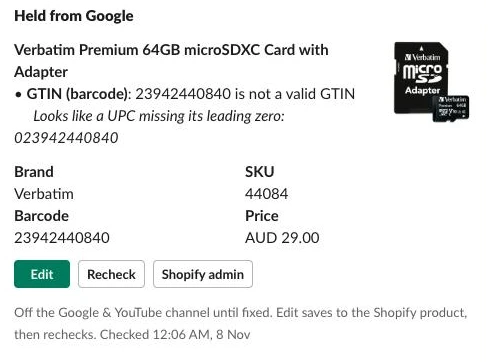
This Google Shopping feed automation runs a daily check across your active catalogue so every product Google sees is complete and valid. When an item would fail, the workflow takes it off the Google & YouTube sales channel before it can collect a disapproval and posts a Slack card that names the field, the problem and often the exact fix. Clicking Edit on the card opens a modal that saves the correction straight to the Shopify product and rechecks it on the spot. Every check is a deterministic rule in code rather than an AI model, which is why you can trust the output across thousands of products without reviewing every item by hand.
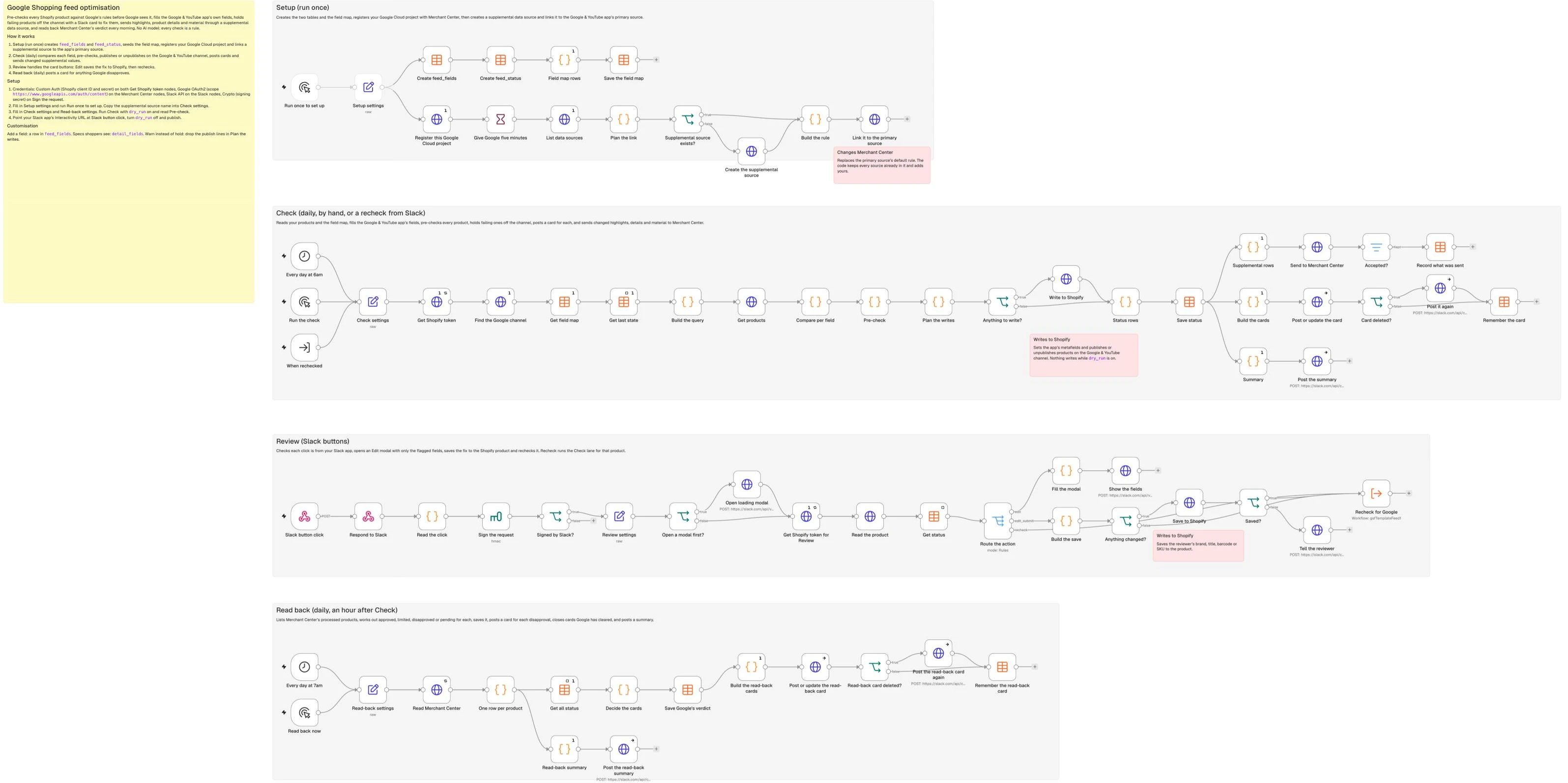
An hour after the morning check, a second scheduled run queries the Merchant API to read back what Google actually approved and posts a review card for any product that passed your pre-check but still got disapproved during Google’s own crawl.
What you need
- n8n with Data Tables: Either the free self-hosted Community Edition or n8n Cloud.
- Shopify and Google Merchant Center: The free Google & YouTube app connected to your Merchant Center account, plus a Shopify custom app with
read_products,write_products,read_publicationsandwrite_publicationsscopes (setup steps are in the repo’sSETUP.md). - Google Cloud and Merchant API: A Google Cloud project with the Merchant API enabled, and an n8n Google OAuth2 API credential with the
https://www.googleapis.com/auth/contentscope signed in as a Merchant Center admin. - Slack app: A Slack app with interactivity turned on and the
chat:writescope (SETUP.md). - No Google Ads account and no AI model: Free listings are opted in by default on new Merchant Center accounts, so running this costs nothing beyond n8n.
How it works
- Setup (Manual Trigger): Creates the
feed_fieldsandfeed_statusdata tables, seeds the eleven default field mapping rules, registers your Google Cloud project with Merchant Center, and creates and links a supplemental data source to your primary Google & YouTube feed so you can send attributes the app doesn’t support. - Check (Schedule Trigger, Manual Trigger and Execute Workflow Trigger): Reads every active product from Shopify, compares each Google attribute against its source field, fills the Google & YouTube app’s metafields, pre-checks the product against Google’s specs, keeps any product you’ve tagged
no-googleoff the channel, publishes passing products or unpublishes failing ones from the Google & YouTube channel so broken items never reach Merchant Center, posts a Slack card for each held product, and sends changed product highlights, details and material to the supplemental source. - Review (Webhook): Verifies the Slack signature on each button click, opens an Edit modal showing only the flagged fields, writes the fix back to the Shopify product so the Google & YouTube app never overwrites it on the next sync, and triggers an immediate single-product recheck.
- Read back (Schedule Trigger): Runs an hour after Check to pull the processed products from Merchant Center, filtering to Shopping ads and free listings in your target country, and posts a Slack card for any listing Google disapproves while closing cards once Google approves the product again.
What the Google & YouTube app already sends
Before adding anything to the feed, it’s worth knowing what the app sends on its own, because Shopify’s help pages don’t list it. Reading back every product on a live store with about 1,500 products through the Merchant API showed where each Google attribute came from:
| What Google holds | Where it comes from |
|---|---|
| Title, description, images, price, availability, brand, GTIN | Shopify’s product and variant fields |
| Google product category | The product’s Shopify category, which the app converts to Google’s taxonomy |
| Product type | Shopify’s product type |
| Colour | The colour standard product attribute on the product’s Shopify category |
| MPN, condition | The app’s own mm-google-shopping metafields |
| Cost of goods sold, shipping weight | The variant’s cost per item and weight |
| Product highlights and product details | Not sent by the app: only a supplemental source adds them |
Colour was the only standard product attribute that reached Google as its own attribute. Every other one (connection method, mounting type, IP rating and so on) only reached Google as a product detail sent through a supplemental source. So the cheapest feed fix of all is to give every product a Shopify category, which sets its Google product category and unlocks the standard product attributes for that category, and then fill in colour. This store sells no clothing, so I couldn’t confirm how size, age group and gender arrive; if you sell apparel, check one product in Merchant Center under Additional details before relying on them.
Step 1: Map your feed fields and create the tables
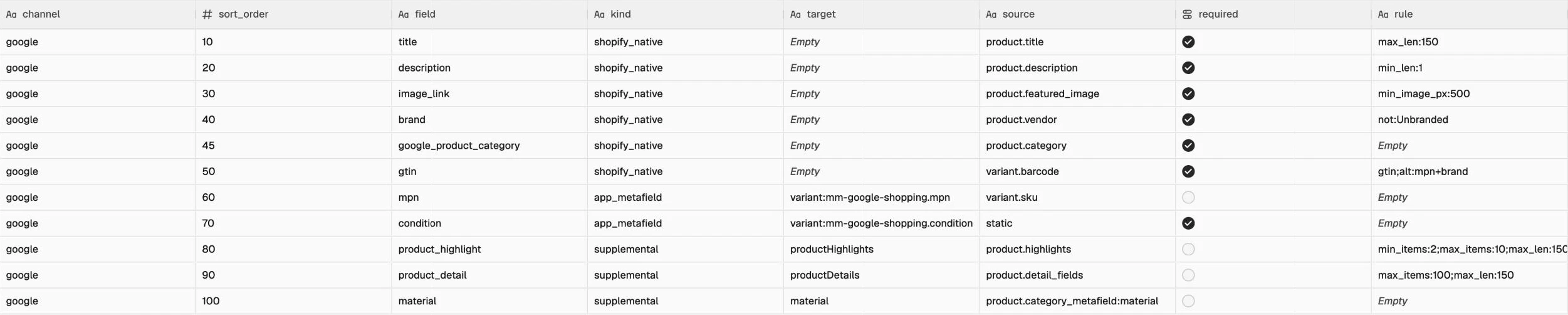
The Google & YouTube app stays your primary feed because it handles real-time price and stock updates well, so the workflow works alongside it rather than replacing it. Each row in the feed_fields table maps one Google attribute to its Shopify source, its destination (kind), and the semicolon-separated validation rules (name:value) it has to pass:
shopify_native: attributes the Google & YouTube app already reads straight from Shopify, such as title, description, main image, vendor as brand, barcode as GTIN, and the product’s Shopify category. The workflow only checks these, and any fix goes back into the Shopify product.app_metafield: fields the app reads from its ownmm-google-shoppingmetafield namespace, such as MPN and condition, which the workflow populates from your Shopify data.supplemental: attributes the app cannot send at all, including product highlights, product details and material, which the workflow sends to a supplemental data source in Merchant Center.
The rules match Google’s product data specification: the image check enforces 500 px because Google’s image spec requires “at least 500 x 500 pixels for all products beginning January 31, 2027”, titles allow up to 150 characters (title spec), and brand must be 1 to 70 characters and shouldn’t be your store name unless you manufacture the item (brand spec). Product highlights take between 2 and 100 items of up to 150 characters, with 4 to 6 recommended (highlight spec), so the template caps them at 10, while product details allow up to 100 entries of up to 150 characters (detail spec). On the GTIN row, alt:mpn+brand means an empty barcode is acceptable when both MPN and brand are present and clean. The google_product_category row is required, so a product left without a Shopify category (or in Uncategorized) is held until someone picks one; set required to false if you’d rather let Google guess the category from the title.
In the Setup lane, add a Manual Trigger, then connect a Set node named Setup settings with these values:
| Setting | Value |
|---|---|
merchant_id | 1234567890 (your Merchant Center account ID) |
developer_email | blank, or a Merchant Center user’s email: Google gives that user the API developer role and sends them API notices |
primary_data_source | blank (the template uses the only primary source; set the ID if you have more than one) |
supplemental_name | n8n supplemental |
From Setup settings, add two Data table nodes (Table > Create, with Reuse Existing Tables turned on so running Setup twice does no harm) to create feed_fields and feed_status:
feed_fields:
| Column | Type |
|---|---|
channel | String |
sort_order | Number |
field | String |
kind | String |
target | String |
source | String |
required | Boolean |
rule | String |
static_value | String |
active | Boolean |
feed_status:
| Column | Type |
|---|---|
product_id | String |
state | String (live, held, excluded or off) |
missing | String (JSON list of problems) |
app_fields | String (JSON) |
sent | String (JSON: supplemental values last accepted) |
google_state | String (approved, limited, disapproved or pending) |
google_issues | String (JSON) |
slack_channel | String |
slack_ts | String |
checked_at | Date |
read_at | Date |
Next, connect a Code node named Field map rows to seed the eleven default rules:
// One row per Google attribute: where its value comes from in Shopify, where it goes, and the rule it has to pass.
const rows = [
  { sort_order: 10, field: 'title', kind: 'shopify_native', target: '', source: 'product.title', required: true, rule: 'max_len:150' },
  { sort_order: 20, field: 'description', kind: 'shopify_native', target: '', source: 'product.description', required: true, rule: 'min_len:1' },
  { sort_order: 30, field: 'image_link', kind: 'shopify_native', target: '', source: 'product.featured_image', required: true, rule: 'min_image_px:500' },
  { sort_order: 40, field: 'brand', kind: 'shopify_native', target: '', source: 'product.vendor', required: true, rule: 'not:Unbranded' },
  { sort_order: 45, field: 'google_product_category', kind: 'shopify_native', target: '', source: 'product.category', required: true, rule: '' },
  { sort_order: 50, field: 'gtin', kind: 'shopify_native', target: '', source: 'variant.barcode', required: true, rule: 'gtin;alt:mpn+brand' },
  { sort_order: 60, field: 'mpn', kind: 'app_metafield', target: 'variant:mm-google-shopping.mpn', source: 'variant.sku', required: false, rule: '' },
  { sort_order: 70, field: 'condition', kind: 'app_metafield', target: 'variant:mm-google-shopping.condition', source: 'static', static_value: 'new', required: true, rule: '' },
  { sort_order: 80, field: 'product_highlight', kind: 'supplemental', target: 'productHighlights', source: 'product.highlights', required: false, rule: 'min_items:2;max_items:10;max_len:150' },
  { sort_order: 90, field: 'product_detail', kind: 'supplemental', target: 'productDetails', source: 'product.detail_fields', required: false, rule: 'max_items:100;max_len:150' },
  { sort_order: 100, field: 'material', kind: 'supplemental', target: 'material', source: 'product.category_metafield:material', required: false, rule: '' }
];
return rows.map(r => ({ json: { channel: 'google', static_value: '', active: true, ...r } }));
Finish the branch with a Data table node (Row > Upsert on feed_fields, matching rows where channel equals {{ $json.channel }} and field equals {{ $json.field }}, mapping every column). When you run the Setup lane and open the feed_fields data table, you’ll see the eleven seeded rows.
Step 2: Connect Merchant Center and add a supplemental source
Before the Setup lane can talk to Google, set up your credential once:
- In a Google Cloud project, enable the Merchant API, configure the OAuth consent screen, and create an OAuth client ID (Web application) with n8n’s redirect URL (n8n’s Google OAuth2 credential docs).
- In n8n, create a Google OAuth2 API credential with your Client ID, Client Secret and the scope
https://www.googleapis.com/auth/content, then sign in as a Merchant Center admin. - Set the consent screen’s publishing status to In production (or choose the Internal user type on Google Workspace), because a project in Testing gets refresh tokens that expire in 7 days.
Because the Merchant API blocks every call from a Google Cloud project that isn’t registered with the account with a 401 error except the registration call itself, and asks you to retry five minutes after registering (the account must be a production account with a verified website), the Setup lane handles registration first. It then creates a supplemental data source so you can merge extra attributes onto the Google & YouTube app’s primary feed. Because a data source’s feed label may only contain capital letters, digits and dashes, whereas the Google & YouTube app’s feed label contains an underscore, we create the supplemental source without a feed label and pass the feed label and language on each product row instead. A supplemental source does nothing until it is included in the primary source’s default rule, and updating that rule replaces the entire rule, so the code preserves every source already in the list.
From Setup settings, start a second branch with an HTTP Request node named Register this Google Cloud project:
| Setting | Value |
|---|---|
| Method | POST |
| URL | https://merchantapi.googleapis.com/accounts/v1/accounts/{{ $('Setup settings').first().json.merchant_id }}/developerRegistration:registerGcp |
| Authentication | Predefined Credential Type > Google OAuth2 API |
| Send Body | JSON: {{ JSON.stringify($('Setup settings').first().json.developer_email ? { developerEmail: $('Setup settings').first().json.developer_email } : {}) }} |
| Options > Response > Never Error | On (a project that’s already registered answers 409 ALREADY_EXISTS, which is fine) |
| Settings > Execute Once | On |
Connect a Wait node named Give Google five minutes (Resume: After Time Interval, 5 minutes), followed by an HTTP Request node named List data sources:
| Setting | Value |
|---|---|
| Method | GET |
| URL | https://merchantapi.googleapis.com/datasources/v1/accounts/{{ $('Setup settings').first().json.merchant_id }}/dataSources |
| Authentication | Predefined Credential Type > Google OAuth2 API |
Next, add a Code node named Plan the link to locate the primary feed and check whether the supplemental source already exists:
// Finds the primary source the Google & YouTube app feeds, and any supplemental source this template made before.
const s = $('Setup settings').first().json;
const sources = $json.dataSources || [];
const primaries = sources.filter(d => d.primaryProductDataSource);
const primary = s.primary_data_source
  ? primaries.find(d => String(d.dataSourceId) === String(s.primary_data_source))
  : (primaries.length === 1 ? primaries[0] : null);
if (!primary) throw new Error('Set primary_data_source in Setup settings. Primary sources found: ' +
  (primaries.map(d => `${d.displayName} (${d.dataSourceId})`).join(', ') || 'none'));
const existing = sources.find(d => d.supplementalProductDataSource && d.displayName === s.supplemental_name);
return [{ json: { primary, existing_supplemental: existing ? existing.name : '' } }];
Add an If node named Supplemental source exists? checking whether {{ !!$json.existing_supplemental }} is true, and on the false branch add an HTTP Request node named Create the supplemental source:
| Setting | Value |
|---|---|
| Method | POST |
| URL | https://merchantapi.googleapis.com/datasources/v1/accounts/{{ $('Setup settings').first().json.merchant_id }}/dataSources |
| Authentication | Predefined Credential Type > Google OAuth2 API |
| Send Body | JSON: {{ JSON.stringify({ displayName: $('Setup settings').first().json.supplemental_name, supplementalProductDataSource: {} }) }} |
Connect both the true branch and Create the supplemental source to a Code node named Build the rule:
// Updating the default rule replaces the whole rule, so keep every source already in it and add ours once.
const plan = $('Plan the link').first().json;
const supplemental = plan.existing_supplemental || $('Create the supplemental source').first().json.name;
const current = plan.primary.primaryProductDataSource.defaultRule?.takeFromDataSources || [{ self: true }];
const linked = current.some(r => r.supplementalDataSourceName === supplemental);
const rule = linked ? current : current.concat([{ supplementalDataSourceName: supplemental }]);
return [{ json: { primary: plan.primary.name, supplemental, linked,
  body: { primaryProductDataSource: { defaultRule: { takeFromDataSources: rule } } } } }];
Follow that with an HTTP Request node named Link it to the primary source:
| Setting | Value |
|---|---|
| Method | PATCH |
| URL | https://merchantapi.googleapis.com/datasources/v1/{{ $json.primary }}?updateMask=primaryProductDataSource.defaultRule |
| Authentication | Predefined Credential Type > Google OAuth2 API |
| Send Body | JSON: {{ JSON.stringify($json.body) }} |
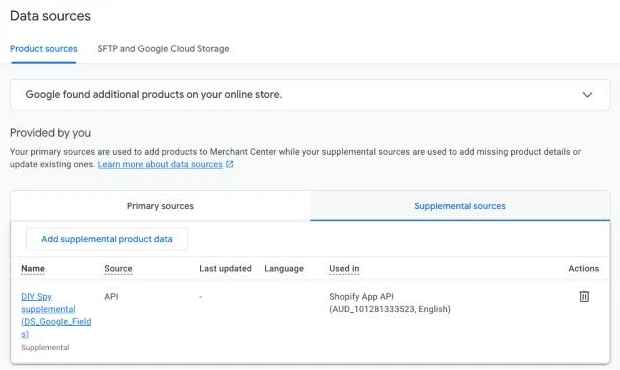
Copy the supplemental value (accounts/<id>/dataSources/<id>) from Build the rule’s output so you can paste it into Check settings in Step 3. In Merchant Center under Settings > Data sources, you’ll see the new supplemental source listed and linked under the Google & YouTube app’s primary source. While you’re in Merchant Center, open any synced product and copy its feed label and item ID, which the app formats as shopify_ZZ_<product id>_<variant id> (the two letters can differ by store, so copy what appears in your account).
Step 3: Pull your products and what Google gets now
In the Check lane, add three triggers: a Schedule Trigger (every day at 6am), a Manual Trigger, and an Execute Workflow Trigger named When rechecked (Input data mode: Define using fields below, with one field, product_ids, of type Array), which the Review lane calls when rechecking a single product. Connect all three triggers to a Set node named Check settings (Mode: JSON), where product_ids uses an expression so a single-product recheck overrides the full-catalogue query:
{
  "store_domain": "your-store.myshopify.com",
  "admin_handle": "your-store",
  "sales_channel": "Google & YouTube",
  "merchant_id": "1234567890",
  "supplemental_data_source": "accounts/1234567890/dataSources/1234567890",
  "feed_label": "COPY_FROM_MERCHANT_CENTER",
  "content_language": "en",
  "offer_id_template": "shopify_ZZ_{product_id}_{variant_id}",
  "product_query": "status:active",
  "exclude_tag": "no-google",
  "page_size": 10,
  "product_ids": {{ JSON.stringify($('When rechecked').isExecuted ? [].concat($('When rechecked').first().json.product_ids || []).map(String) : []) }},
  "highlights_metafield": "custom.highlights",
  "detail_fields": [
    {"metafield": "custom.resolution_mp", "name": "Resolution", "section": "Camera", "unit": "MP"},
    {"metafield": "custom.lens_mm", "name": "Focal length", "section": "Camera", "unit": "mm"},
    {"metafield": "custom.field_of_view", "name": "Field of view", "section": "Camera", "unit": "°"},
    {"metafield": "custom.night_vision", "name": "Night vision", "section": "Camera"},
    {"metafield": "custom.night_vision_m", "name": "Night vision range", "section": "Camera", "unit": "m"},
    {"metafield": "custom.ip_rating", "name": "Weather rating", "section": "Build"},
    {"metafield": "custom.power_source", "name": "Power", "section": "Power"}
  ],
  "currency": "USD",
  "review_channel": "C0123456789",
  "log_channel": "#log-google",
  "timezone": "UTC",
  "supplemental_enabled": true,
  "dry_run": true
}
In Check settings, sales_channel is the name of the Google & YouTube app as Shopify shows it under Sales channels, and detail_fields maps your Shopify product metafields to the section and attribute labels shoppers see on Google (a clothing store would list fabric, fit and care instructions here instead of camera specs), while highlights_metafield points at a list of single-line text, multi-line text or bulleted rich text metafield. Set review_channel to a Slack channel ID starting with C because Slack’s chat.update method requires the channel ID rather than the channel name, and leave dry_run set to true so nothing writes until you’ve inspected your first test run. Any product carrying the exclude_tag tag (no-google by default) stays off the Google & YouTube channel without a card, which suits gift cards, samples and anything Google’s policies don’t allow; leave it empty to switch exclusions off.
Connect an HTTP Request node named Get Shopify token to exchange your custom app’s client credentials for an access token as shown in the repo’s SETUP.md. Next, add an HTTP Request node named Find the Google channel to look up the publication ID for the Google & YouTube sales channel. Shopify has deprecated the publication’s name field, so the query asks for the app behind each channel’s catalog instead, and Build the query matches its title (or its handle, google) against sales_channel:
| Setting | Value |
|---|---|
| Method | POST |
| URL | https://{{ $('Check settings').first().json.store_domain }}/admin/api/2026-10/graphql.json |
| Send Headers | X-Shopify-Access-Token = {{ $('Get Shopify token').first().json.access_token }} |
| Send Body | JSON: {{ JSON.stringify({ query: "query Channels { publications(first: 50) { nodes { id catalog { title ... on AppCatalog { apps(first: 1) { nodes { title handle } } } } } } }", variables: {} }) }} |
| Settings > Execute Once | On |
After Find the Google channel, add two Data table nodes (Row > Get): Get field map on feed_fields (matching channel = google and active = true, with Return All and Settings > Execute Once turned on), and Get last state on feed_status (no conditions, with Return All, Settings > Execute Once and Always Output Data turned on so the first run carries on when the table is still empty).
Connect a Code node named Build the query, which assembles the GraphQL query dynamically from your field map and detail_fields so adding a new attribute later only requires a table row rather than editing GraphQL:
// Builds the product query from the field map and the detail fields, so a new field is a new row, not a new query.
const s = $('Check settings').first().json;
const fm = $('Get field map').all().map(i => i.json);
// Publication.name is deprecated: a sales channel's publication is found through the app behind its catalog.
const pubs = ($('Find the Google channel').first().json.data || {}).publications?.nodes || [];
const appOf = p => (((p.catalog || {}).apps || {}).nodes || [])[0] || {};
const pub = pubs.find(p => appOf(p).title === s.sales_channel || appOf(p).handle === s.sales_channel);
if (!pub) throw new Error('No sales channel called "' + s.sales_channel + '". Install the Google & YouTube app, or fix sales_channel. Channels found: ' +
  pubs.map(p => appOf(p).title).filter(Boolean).join(', '));
const split = ref => { const dot = ref.lastIndexOf('.'); return [ref.slice(0, dot), ref.slice(dot + 1)]; };
const appFields = owner => fm.filter(r => r.kind === 'app_metafield' && r.target.startsWith(owner + ':')).map(r => {
  const [ns, key] = split(r.target.split(':')[1]);
  return `g_${r.field}: metafield(namespace: "${ns}", key: "${key}") { value }`;
}).join('\n          ');
const details = (s.detail_fields || []).map((d, i) => {
  const [ns, key] = split(d.metafield);
  return `d${i}: metafield(namespace: "${ns}", key: "${key}") { value reference { ... on Metaobject { displayName } } references(first: 5) { nodes { ... on Metaobject { displayName } } } }`;
}).join('\n      ');
const [hns, hkey] = split(s.highlights_metafield);
const query = `query GoogleSource($q: String!, $pub: ID!, $after: String) {
  products(first: ${s.page_size}, after: $after, query: $q) {
    pageInfo { hasNextPage endCursor }
    nodes {
      id legacyResourceId title handle status vendor descriptionHtml tags
      category { id fullName }
      publishedOnPublication(publicationId: $pub)
      featuredMedia { ... on MediaImage { image { url width height } } }
      highlights: metafield(namespace: "${hns}", key: "${hkey}") { type value }
      material: metafield(namespace: "shopify", key: "material") { references(first: 3) { nodes { ... on Metaobject { label: field(key: "label") { value } } } } }
      ${details}
      ${appFields('product')}
      variants(first: 1) {
        nodes {
          id legacyResourceId sku price barcodes(first: 5) { nodes { type value } }
          ${appFields('variant')}
        }
      }
    }
  }
}`;
const q = s.product_ids.length ? s.product_ids.map(id => 'id:' + id).join(' OR ') : s.product_query;
return [{ json: { query, variables: { q, pub: pub.id, after: null } } }];
Notice that the query fetches variants(first: 1) to check the first variant of each product, and reads its barcode from barcodes rather than barcode: from API version 2026-10 Shopify keeps a variant’s barcodes as a typed list (GTIN, UPC, EAN, ISBN and others) and has deprecated the single barcode field. The code treats the GTIN, UPC, EAN or ISBN entry, or an untyped one, as the GTIN. Also, page_size defaults to 10 because Shopify refuses a single query whose cost is over 1,000 points, where every metafield and metaobject reference adds to the query cost. Connect an HTTP Request node named Get products to paginate through the results:
| Setting | Value |
|---|---|
| Method | POST |
| URL | https://{{ $('Check settings').first().json.store_domain }}/admin/api/2026-10/graphql.json |
| Send Headers | X-Shopify-Access-Token = {{ $('Get Shopify token').first().json.access_token }} |
| Send Body | JSON: {{ JSON.stringify({ query: $json.query, variables: $json.variables }) }} |
| Pagination > Mode | Update a Parameter in Each Request |
| Pagination > Type | Body |
| Pagination > Name | variables |
| Pagination > Value | {{ { ...$('Build the query').first().json.variables, after: $response.body.data.products.pageInfo.endCursor } }} |
| Pagination Complete When | Other |
| Complete Expression | {{ !$response.body.data.products.pageInfo.hasNextPage }} |
| Pagination > Limit Pages Fetched | On, 1,000 |
| Pagination > Interval Between Requests | 500 ms |
When you test Get products, the first page returns the TP-Link VIGI C240(2.8mm) with publishedOnPublication, its barcode 4895252501070, its d0 to d6 detail metafields (resolution 4, focal length 2.8, field of view 95.7, night vision “Full colour”, night vision range 30, weather rating IP67, and power “PoE (802.3af)” and “12V DC”), and its five highlights in custom.highlights (“4MP images through a 2.8 mm lens with a 95.7° field of view”, “Full-colour night vision with a spotlight range of up to 30 m”, “IP67 weatherproof housing for walls and ceilings outdoors”, “Powered by PoE (802.3af) or a 12V DC supply”, and “Person, vehicle, line-crossing and intrusion detection”).
Step 4: Compare each field, then pre-check the product
Two Code nodes handle the logic: the first compares each Shopify source value against what Google currently receives, and the second evaluates the rules. When Shopify has a value and Google’s field is empty, the workflow fills it; when they differ, Shopify wins and updates it; when they match, it does nothing; when Shopify is empty but Google’s field already has a value, it leaves the field alone so a manual fix is never wiped; and when both are empty, it flags the field for the pre-check. Because the Google & YouTube app reads shopify_native fields straight from Shopify, those are only checked rather than written here.
Connect a Code node named Compare per field after Get products:
// Per product, per row in the field map: the Shopify source against what Google gets now, and what to do about it.
// Source full, Google empty: fill. Different: update (Shopify wins). Same: none.
// Source empty, Google full: leave (a fix made by hand is never wiped). Both empty: flag (the pre-check decides if it matters).
const s = $('Check settings').first().json;
const fm = $('Get field map').all().map(i => i.json).sort((a, b) => a.sort_order - b.sort_order);
const last = Object.fromEntries($('Get last state').all().filter(i => i.json.product_id).map(i => [String(i.json.product_id), i.json]));
const pubId = $('Build the query').first().json.variables.pub;
const parse = (t, d) => { try { return JSON.parse(t || ''); } catch (e) { return d; } };
const text = html => String(html || '').replace(/<[^>]+>/g, ' ').replace(/ /g, ' ').replace(/&/g, '&').replace(/\s+/g, ' ').trim();
const labels = mf => ((mf && mf.references && mf.references.nodes) || []).map(n => n && n.label && n.label.value).filter(Boolean);
// Highlights from a list metafield, a multi-line text field, or the bullets of a rich text field
const bullets = mf => {
if (!mf || !mf.value) return [];
if (mf.type === 'multi_line_text_field') return mf.value.split(/\n+/).map(t => t.replace(/^[-•*]\s*/, '').trim()).filter(Boolean);
const v = parse(mf.value, null);
if (Array.isArray(v)) return v.map(t => String(t).trim()).filter(Boolean);
const out = [];
const flat = n => n.value || (n.children || []).map(flat).join('');
const walk = n => { if (!n) return; if (n.type === 'list-item') { const t = flat(n).replace(/\s+/g, ' ').trim(); if (t) out.push(t); return; } (n.children || []).forEach(walk); };
walk(v);
return out;
};
// One product detail per entry in detail_fields: a metaobject's name, a list joined with commas, or the value with its unit
const withUnit = (v, unit) => !unit ? v : v + (/^[°%]/.test(unit) ? '' : ' ') + unit;
const details = p => (s.detail_fields || []).map((d, i) => {
const mf = p['d' + i];
if (!mf) return null;
const refs = ((mf.references && mf.references.nodes) || []).map(n => n && n.displayName).filter(Boolean);
let value = refs.length ? refs.join(', ') : (mf.reference && mf.reference.displayName) || '';
if (!value && mf.value) {
const j = parse(mf.value, null);
if (Array.isArray(j)) value = j.join(', ');
else if (j && typeof j === 'object' && 'value' in j) value = withUnit(String(j.value), j.unit ? '' : d.unit);
else if (/^-?\d+(\.\d+)?$/.test(mf.value)) value = withUnit(String(Number(mf.value)), d.unit); // 4.0 reads as 4
else value = withUnit(String(mf.value), d.unit);
}
return value ? { section: d.section || 'Specifications', name: d.name, value } : null;
}).filter(Boolean);
const isEmpty = v => v === null || v === undefined || v === '' || (Array.isArray(v) && v.length === 0);
// Shopify 2026-10 keeps barcodes as a typed list: the GTIN is the GTIN, UPC, EAN or ISBN entry, or an untyped one
const gtinOf = v => { const ns = (v.barcodes && v.barcodes.nodes) || []; const b = ns.find(n => ['GTIN', 'UPC', 'EAN', 'ISBN'].includes(n.type)) || ns.find(n => !n.type); return b ? b.value : ''; };
const same = (a, b) => JSON.stringify(a ?? '') === JSON.stringify(b ?? '');
const rules = row => (row.rule || '').split(';').map(t => t.trim()).filter(Boolean).map(t => { const i = t.indexOf(':'); return i < 0 ? [t, ''] : [t.slice(0, i), t.slice(i + 1)]; });
const rule = (row, name) => (rules(row).find(r => r[0] === name) || [])[1];
function resolveSource(row, p, v) {
switch (row.source) {
case 'product.title': return p.title || '';
case 'product.description': return text(p.descriptionHtml);
case 'product.featured_image': { const im = p.featuredMedia && p.featuredMedia.image; return im && im.url ? { url: im.url, width: im.width || 0, height: im.height || 0 } : null; }
case 'product.vendor': return String(p.vendor || '').trim();
case 'product.category': return p.category && !/\/na$/.test(p.category.id) ? p.category.fullName : ''; // "Uncategorized" counts as none
case 'variant.barcode': return String(gtinOf(v)).replace(/\s+/g, '');
case 'variant.sku': return String(v.sku || '').trim();
case 'static': return row.static_value || '';
case 'product.highlights': return bullets(p.highlights);
case 'product.detail_fields': return details(p);
case 'product.category_metafield:material': return labels(p.material).join('/');
default: return null;
}
}
// Supplemental values are shaped to Google's limits here, so the compare sees exactly what would be sent.
function shape(row, val) {
const max = Number(rule(row, 'max_len')) || 150, n = Number(rule(row, 'max_items')) || 100, min = Number(rule(row, 'min_items')) || 0;
if (row.field === 'product_highlight') {
const list = (val || []).filter(t => t.length <= max).slice(0, n);
return list.length >= min ? list : []; // Google wants at least 2 highlights, so a single one is sent as none
}
if (row.field === 'product_detail') {
return (val || []).filter(d => d.value.length <= max).slice(0, n)
.map(d => ({ sectionName: d.section, attributeName: d.name, attributeValue: d.value }));
}
return val;
}
function googleNow(row, p, v, prev, src) {
if (row.kind === 'shopify_native') return src; // the app reads these straight from Shopify
if (row.kind === 'app_metafield') {
const mf = (row.target.startsWith('variant:') ? v : p)['g_' + row.field];
return mf && mf.value != null ? mf.value : '';
}
return parse(prev.sent, {})[row.target] ?? ''; // supplemental: what Merchant Center last accepted
}
const out = [];
for (const page of $input.all()) {
if (page.json.errors || !page.json.data) throw new Error('Shopify read failed, so nothing changed: ' + JSON.stringify(page.json.errors || page.json).slice(0, 400));
for (const p of page.json.data.products.nodes) {
const id = String(p.legacyResourceId);
const prev = last[id] || {};
const v = (p.variants.nodes || [])[0] || {};
const fields = [], metafields = [], supplemental = {};
let supplementalChanged = false;
for (const row of fm) {
let src = resolveSource(row, p, v);
if (row.kind === 'supplemental') src = shape(row, src);
const now = googleNow(row, p, v, prev, src);
let action;
if (row.kind === 'shopify_native') action = isEmpty(src) ? 'flag' : 'none';
else if (!isEmpty(src) && isEmpty(now)) action = 'fill';
else if (!isEmpty(src) && !same(src, now)) action = 'update';
else if (!isEmpty(src)) action = 'none';
else if (!isEmpty(now)) action = 'leave';
else action = 'flag';
const value = ['fill', 'update', 'none'].includes(action) ? src : now;
fields.push({ field: row.field, kind: row.kind, source: row.source, action, value, required: row.required, rule: row.rule || '' });
if (row.kind === 'app_metafield' && (action === 'fill' || action === 'update')) {
const [owner, ref] = row.target.split(':');
const dot = ref.lastIndexOf('.');
metafields.push({ ownerId: owner === 'variant' ? v.id : p.id, namespace: ref.slice(0, dot), key: ref.slice(dot + 1), type: 'single_line_text_field', value: String(src) });
}
if (row.kind === 'supplemental') {
if (!isEmpty(value)) supplemental[row.target] = value;
if (action === 'fill' || action === 'update') supplementalChanged = true;
}
}
out.push({ json: {
product_id: id, product_gid: p.id, variant_id: String(v.legacyResourceId || ''), title: p.title || '', status: p.status,
excluded: !!s.exclude_tag && (p.tags || []).some(t => t.toLowerCase() === s.exclude_tag.toLowerCase()),
published: p.publishedOnPublication === true, image: (p.featuredMedia && p.featuredMedia.image && p.featuredMedia.image.url) || '',
vendor: p.vendor || '', sku: v.sku || '', barcode: gtinOf(v), price: Number(v.price || 0), publication_id: pubId,
fields, metafields, supplemental, supplemental_changed: supplementalChanged,
last_state: prev.state || null, last_missing: parse(prev.missing, []), slack_channel: prev.slack_channel || '', slack_ts: prev.slack_ts || ''
} });
}
}
return out;Next, add a Code node named Pre-check. Every required field must be present and pass its rules, or the product is held. The GTIN rule checks both the length (8, 12, 13 or 14 digits) and the GS1 modulo-10 check digit required by Google’s GTIN spec, and attaches a hint when an 11-digit number becomes a valid 12-digit UPC with a leading zero or when letters suggest an internal supplier code. A product with no barcode at all still passes if it has both an MPN and a brand, matching the fallback described in both Google’s GTIN spec and Shopify’s Google & YouTube requirements, whereas a barcode that is present but invalid is always held because a wrong GTIN can match your listing to a completely different product:
// Every required field present and every rule met: the product goes on the Google channel. Otherwise it comes off and is held.
const s = $('Check settings').first().json;
const LABELS = { title: 'Title', description: 'Description', image_link: 'Main image', brand: 'Brand', google_product_category: 'Shopify category', gtin: 'GTIN (barcode)', mpn: 'MPN', condition: 'Condition' };
// What to do about a missing field that can't be fixed from Slack
const MISSING_HINT = { google_product_category: 'Pick a category in Shopify admin: the Google & YouTube app turns it into Google\'s product category.' };
// The Shopify field a reviewer can fix from Slack for each source (images are fixed in Shopify admin)
const EDIT = { 'variant.barcode': 'barcode', 'variant.sku': 'sku', 'product.vendor': 'vendor', 'product.title': 'title' };
const isEmpty = v => v === null || v === undefined || v === '' || (Array.isArray(v) && v.length === 0);
const rules = r => (r.rule || '').split(';').map(t => t.trim()).filter(Boolean).map(t => { const i = t.indexOf(':'); return i < 0 ? [t, ''] : [t.slice(0, i), t.slice(i + 1)]; });
// GTIN-8, 12, 13 or 14 with a valid GS1 check digit
const validGtin = g => {
  if (!/^(\d{8}|\d{12}|\d{13}|\d{14})$/.test(g)) return false;
  const d = g.padStart(14, '0').split('').map(Number);
  const sum = d.slice(0, 13).reduce((a, n, i) => a + n * (i % 2 === 0 ? 3 : 1), 0);
  return (10 - (sum % 10)) % 10 === d[13];
};
const gtinHint = g => {
  if (/^\d{11}$/.test(g) && validGtin('0' + g)) return 'Looks like a UPC missing its leading zero: 0' + g;
  if (!/^\d+$/.test(g)) return 'Letters or symbols in it: probably a supplier code, not a barcode. Clear it if the product has no GTIN.';
  return '';
};

const out = [];
for (const item of $input.all()) {
  const p = item.json;
  const byField = Object.fromEntries(p.fields.map(f => [f.field, f]));
  const problems = {};
  // pass 1: each field's own rules
  for (const f of p.fields) {
    if (f.kind === 'supplemental') continue;
    const v = f.value;
    if (isEmpty(v)) { if (f.required) problems[f.field] = { problem: 'missing', suggestion: MISSING_HINT[f.field] || '' }; continue; }
    for (const [name, arg] of rules(f)) {
      const t = typeof v === 'string' ? v : '';
      if (name === 'max_len' && t.length > Number(arg)) problems[f.field] = { problem: `over ${arg} characters (${t.length})` };
      if (name === 'min_len' && t.length < Number(arg)) problems[f.field] = { problem: 'missing' };
      if (name === 'min_image_px' && (Number(v.width) < Number(arg) || Number(v.height) < Number(arg))) problems[f.field] = { problem: `smaller than ${arg} x ${arg} px (${v.width} x ${v.height})` };
      if (name === 'not' && t.toLowerCase() === arg.toLowerCase()) problems[f.field] = { problem: `"${t}" is not a brand` };
      if (name === 'gtin' && !validGtin(t)) problems[f.field] = { problem: `${t} is not a valid GTIN`, suggestion: gtinHint(t) };
    }
  }
  // pass 2: an empty GTIN is fine when every alt: field is present and clean (MPN + brand).
  // A GTIN that's there but wrong stays a problem: a wrong barcode is worse than none.
  for (const f of p.fields) {
    const alt = (rules(f).find(r => r[0] === 'alt') || [])[1];
    if (!alt || !isEmpty(f.value) || !problems[f.field]) continue;
    const need = alt.split('+');
    if (need.every(k => byField[k] && !isEmpty(byField[k].value) && !problems[k])) delete problems[f.field];
    else {
      const lacking = need.filter(k => !byField[k] || isEmpty(byField[k].value) || problems[k]);
      problems[f.field] = { problem: 'no GTIN, and no ' + lacking.map(k => (LABELS[k] || k).split(' ')[0]).join(' or ') + ' to fall back on',
        edit_also: lacking.map(k => byField[k] && EDIT[byField[k].source]).filter(Boolean) };
    }
  }
  const missing = Object.entries(problems).map(([field, x]) => {
    const f = byField[field];
    const edit = [EDIT[f.source]].concat(x.edit_also || []).filter(Boolean);
    return { field, label: LABELS[field] || field, problem: x.problem, suggestion: x.suggestion || '', edit: [...new Set(edit)] };
  });
  // A product tagged with exclude_tag stays off the channel with no card, whatever its fields look like
  const state = p.status !== 'ACTIVE' ? 'off' : p.excluded ? 'excluded' : (missing.length ? 'held' : 'live');
  if (state === 'excluded') missing.length = 0;
  const publish = state === 'live' && !p.published;
  const unpublish = (state === 'held' || state === 'excluded') && p.published;
  const key = list => JSON.stringify(list.map(m => m.field + ':' + m.problem).sort());
  const missingChanged = key(missing) !== key(p.last_missing || []);
  let card = null;
  if (state === 'held' && (!p.slack_ts || missingChanged || s.product_ids.length)) card = p.slack_ts ? 'update' : 'post';
  if (state === 'live' && p.slack_ts && (['held', 'excluded'].includes(p.last_state) || s.product_ids.length)) card = 'resolve';
  if (state === 'excluded' && p.slack_ts && (p.last_state === 'held' || s.product_ids.length)) card = 'excluded';
  out.push({ json: { ...p, state, missing, publish, unpublish, card } });
}
return out;
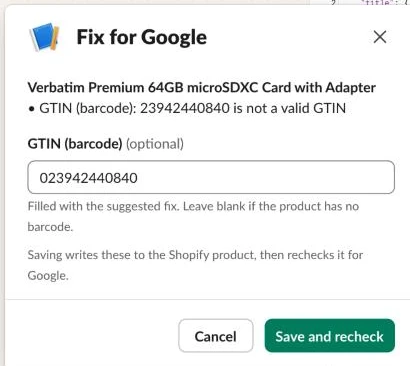
With dry_run still on, run the Check lane by hand and inspect Pre-check. The TP-Link VIGI C240(2.8mm) and the Ubiquiti UVC-G6-PRO-BULLET-W come out live, while the Verbatim 44084 comes out held with 23942440840 is not a valid GTIN and the suggestion Looks like a UPC missing its leading zero: 023942440840. On a store I run, the first pre-check held 43 of 327 products (13%). In testing, products with no Shopify category came out held with Shopify category: missing and the hint to pick one in Shopify admin; a card for that problem alone has no Edit button, because the category picker lives in Shopify admin.
Step 5: Fill the app’s fields and switch the channel
Holding failing products off the sales channel is what keeps your Merchant Center account clean: an unpublished product never reaches Google, so it cannot accumulate disapprovals, and it goes back on the channel automatically the first morning it passes.
Excluded products come off the same way but without a card, and a product that was already held gets its card switched to “Excluded from Google”. Filtering them out in product_query instead would leave any excluded product that’s already on the channel sitting there, because the workflow would never see it again, which is why the exclusion is a state rather than a filter. Remove the tag and the next run puts the product back and marks its card fixed.

Each batch combines up to 10 products into a single GraphQL request, with one metafieldsSet per product (it takes up to 25 metafields and is atomic, so a product’s fields are written together or not at all) and a publishablePublish or publishableUnpublish call where the channel switches, which is why the custom app needs the write_publications scope.
Add a Code node named Plan the writes after Pre-check:
// One Shopify request per 10 products that need a change: the app's fields (metafieldsSet) plus the channel switch
// (publishablePublish or publishableUnpublish). Always returns at least one item so the run carries on.
const todo = $input.all().map(i => i.json).filter(p => p.metafields.length || p.publish || p.unpublish);
const batches = [];
for (let i = 0; i < todo.length; i += 10) batches.push(todo.slice(i, i + 10));
const out = batches.map(batch => {
  const decl = [], body = [], variables = {};
  if (batch.some(p => p.publish || p.unpublish)) { decl.push('$pub: [PublicationInput!]!'); variables.pub = [{ publicationId: batch[0].publication_id }]; }
  batch.forEach((p, n) => {
    if (p.metafields.length) { decl.push(`$mf${n}: [MetafieldsSetInput!]!`); variables['mf' + n] = p.metafields; body.push(`p${n}_fields: metafieldsSet(metafields: $mf${n}) { userErrors { field message } }`); }
    if (p.publish || p.unpublish) { decl.push(`$id${n}: ID!`); variables['id' + n] = p.product_gid; }
    if (p.publish) body.push(`p${n}_on: publishablePublish(id: $id${n}, input: $pub) { userErrors { field message } }`);
    if (p.unpublish) body.push(`p${n}_off: publishableUnpublish(id: $id${n}, input: $pub) { userErrors { field message } }`);
  });
  return { json: { product_ids: batch.map(p => p.product_id), query: `mutation GoogleChannel(${decl.join(', ')}) {\n  ${body.join('\n  ')}\n}`, variables } };
});
return out.length ? out : [{ json: { product_ids: [], query: '', variables: {} } }];
Connect an If node named Anything to write? that checks whether {{ !!$json.query && !$('Check settings').first().json.dry_run }} is true, and on the true branch add an HTTP Request node named Write to Shopify:
| Setting | Value |
|---|---|
| Method | POST |
| URL | https://{{ $('Check settings').first().json.store_domain }}/admin/api/2026-10/graphql.json |
| Send Headers | X-Shopify-Access-Token = {{ $('Get Shopify token').first().json.access_token }} |
| Send Body | JSON: {{ JSON.stringify({ query: $json.query, variables: $json.variables }) }} |
Connect both the false branch of Anything to write? and Write to Shopify to a Code node named Status rows:
// One feed_status row per product. A product whose Shopify write failed keeps its old state, so tomorrow's run tries again.
// In a dry run nothing is saved and nothing goes further: read the Pre-check output instead.
const s = $('Check settings').first().json;
if (s.dry_run) return [];
const plans = $('Plan the writes').all();
const writes = $('Write to Shopify').isExecuted ? $('Write to Shopify').all() : [];
const failed = new Set();
plans.forEach((pl, i) => {
  const w = (writes[i] || {}).json;
  if (!w) return;
  pl.json.product_ids.forEach((id, n) => {
    const errs = (w.errors || []).length || !w.data ? ['request failed']
      : ['fields', 'on', 'off'].flatMap(k => (w.data[`p${n}_${k}`] && w.data[`p${n}_${k}`].userErrors) || []);
    if (errs.length) failed.add(id);
  });
});
return $('Pre-check').all().map(i => i.json).filter(p => !failed.has(p.product_id)).map(p => ({ json: {
  product_id: p.product_id, state: p.state, missing: JSON.stringify(p.missing),
  app_fields: JSON.stringify(Object.fromEntries(p.fields.filter(f => f.kind === 'app_metafield').map(f => [f.field, f.value]))),
  checked_at: new Date().toISOString()
} }));
Follow Status rows with a Data table node (Row > Upsert) named Save status on feed_status, matching product_id = {{ $json.product_id }} and setting product_id, state, missing, app_fields and checked_at. When you set dry_run to false and run the lane, Shopify admin shows the Verbatim 44084 removed from the Google & YouTube channel and the Ubiquiti UVC-G6-PRO-BULLET-W’s mm-google-shopping.mpn metafield filled with UVC-G6-PRO-BULLET-W.
Step 6: Send highlights, details and material through the supplemental source
Because Google’s default quota lets you update a product up to twice a day, and a productInputs.insert call with the same offer ID, content language and data source replaces that product’s entire row in the supplemental source, the workflow only sends a product when its supplemental values have changed since Merchant Center last accepted them, and includes all of that product’s supplemental attributes (productHighlights, productDetails and material, matching the Merchant API’s ProductAttributes schema) in one call.
From Save status, add a Code node named Supplemental rows (with Settings > Execute Once turned on):
// One supplemental row per live product whose highlights, details or material changed since Merchant Center last accepted them.
// An insert replaces that offer's whole row in the supplemental source, so every value goes each time.
const s = $('Check settings').first().json;
if (!s.supplemental_enabled || s.dry_run || !s.supplemental_data_source) return [];
const out = [];
for (const p of $('Pre-check').all().map(i => i.json)) {
  if (p.state !== 'live' || !p.supplemental_changed || !p.variant_id) continue;
  if (!Object.keys(p.supplemental).length) continue;
  const offerId = s.offer_id_template.replace('{product_id}', p.product_id).replace('{variant_id}', p.variant_id);
  out.push({ json: { product_id: p.product_id, sent: JSON.stringify(p.supplemental),
    body: { offerId, contentLanguage: s.content_language, feedLabel: s.feed_label, productAttributes: p.supplemental } } });
}
return out;
Connect an HTTP Request node named Send to Merchant Center:
| Setting | Value |
|---|---|
| Method | POST |
| URL | https://merchantapi.googleapis.com/products/v1/accounts/{{ $('Check settings').first().json.merchant_id }}/productInputs:insert |
| Authentication | Predefined Credential Type > Google OAuth2 API |
| Send Query Parameters | dataSource = {{ $('Check settings').first().json.supplemental_data_source }} |
| Send Body | JSON: {{ JSON.stringify($json.body) }} |
| Options > Batching | 10 items per batch, 1,000 ms interval |
| Options > Response | Include Response Headers and Status on, Never Error on |
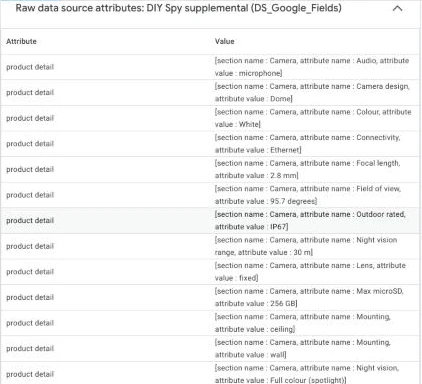
Add a Filter node named Accepted? ({{ $json.statusCode }} equals 200), followed by a Data table node (Row > Update) named Record what was sent on feed_status, matching product_id = {{ $('Supplemental rows').item.json.product_id }} and setting sent = {{ $('Supplemental rows').item.json.sent }}. Merchant Center only accepts a supplemental row for an offer it already has: a product the app hasn’t synced yet answers 404 The resource with name Product was not found, Accepted? drops it, and the next run sends it again. Open the TP-Link VIGI C240(2.8mm) in Merchant Center, expand Additional details, and the supplemental source’s raw attributes list its product details and highlights.
Step 7: Post held products to Slack and fix them at the source
Also branching from Save status, add a Code node named Build the cards (with Settings > Execute Once turned on) to build one Slack card per held product, update existing cards in place when problems change, and flip the card to “Fixed: on Google” once the product passes:
// One review card per held product, updated in place. A product that passes later gets its card marked fixed.
const s = $('Check settings').first().json;
if (!s.review_channel) return [];
const esc = t => String(t ?? '').replace(/&/g, '&').replace(/</g, '<').replace(/>/g, '>');
const when = DateTime.now().setZone(s.timezone).toFormat('h:mm a, d LLL');
const saved = new Set($('Status rows').all().map(i => i.json.product_id));
const out = [];
for (const p of $('Pre-check').all().map(i => i.json)) {
if (!p.card || !saved.has(p.product_id)) continue;
const admin = 'https://admin.shopify.com/store/' + s.admin_handle + '/products/' + p.product_id;
const thumb = sec => { if (/^https:\/\//.test(p.image)) sec.accessory = { type: 'image', image_url: p.image, alt_text: String(p.title).slice(0, 100) }; return sec; };
const blocks = [];
if (p.card === 'excluded') {
blocks.push({ type: 'header', text: { type: 'plain_text', text: 'Excluded from Google' } });
blocks.push(thumb({ type: 'section', text: { type: 'mrkdwn', text: '*' + esc(p.title) + '*\nTagged `' + esc(s.exclude_tag) + '`, so it stays off the Google & YouTube channel and is no longer checked. Remove the tag to bring it back.' } }));
blocks.push({ type: 'actions', elements: [ { type: 'button', text: { type: 'plain_text', text: 'Shopify admin' }, url: admin, action_id: 'link_admin' } ] });
blocks.push({ type: 'context', elements: [ { type: 'mrkdwn', text: 'Excluded at ' + when } ] });
} else if (p.card === 'resolve') {
blocks.push({ type: 'header', text: { type: 'plain_text', text: 'Fixed: on Google' } });
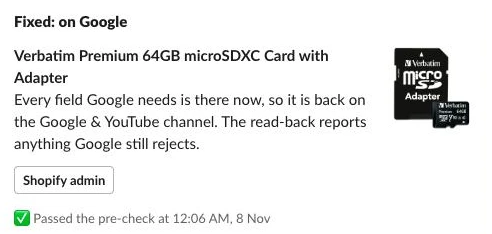
blocks.push(thumb({ type: 'section', text: { type: 'mrkdwn', text: '*' + esc(p.title) + '*\nEvery field Google needs is there now, so it is back on the Google & YouTube channel. The read-back reports anything Google still rejects.' } }));
blocks.push({ type: 'actions', elements: [ { type: 'button', text: { type: 'plain_text', text: 'Shopify admin' }, url: admin, action_id: 'link_admin' } ] });
blocks.push({ type: 'context', elements: [ { type: 'mrkdwn', text: ':white_check_mark: Passed the pre-check at ' + when } ] });
} else {
blocks.push({ type: 'header', text: { type: 'plain_text', text: 'Held from Google' } });
const lines = p.missing.map(m => '• *' + esc(m.label) + '*: ' + esc(m.problem) + (m.suggestion ? '\n _' + esc(m.suggestion) + '_' : ''));
blocks.push(thumb({ type: 'section', text: { type: 'mrkdwn', text: ('*' + esc(p.title) + '*\n' + lines.join('\n')).slice(0, 2900) } }));
blocks.push({ type: 'section', fields: [
{ type: 'mrkdwn', text: '*Brand*\n' + esc(p.vendor || 'none') },
{ type: 'mrkdwn', text: '*SKU*\n' + esc(p.sku || 'none') },
{ type: 'mrkdwn', text: '*Barcode*\n' + esc(p.barcode || 'none') },
{ type: 'mrkdwn', text: '*Price*\n' + (p.price > 0 ? s.currency + ' ' + p.price.toFixed(2) : 'n/a') }
] });
const buttons = [];
if (p.missing.some(m => m.edit.length)) buttons.push({ type: 'button', style: 'primary', text: { type: 'plain_text', text: 'Edit' }, action_id: 'google_edit', value: p.product_id });
buttons.push({ type: 'button', text: { type: 'plain_text', text: 'Recheck' }, action_id: 'google_recheck', value: p.product_id });
buttons.push({ type: 'button', text: { type: 'plain_text', text: 'Shopify admin' }, url: admin, action_id: 'link_admin' });
blocks.push({ type: 'actions', elements: buttons });
blocks.push({ type: 'context', elements: [ { type: 'mrkdwn', text: 'Off the Google & YouTube channel until fixed. Edit saves to the Shopify product, then rechecks. Checked ' + when } ] });
}
out.push({ json: { product_id: p.product_id, channel: p.slack_channel || s.review_channel, ts: p.slack_ts || '',
text: ({ resolve: 'Fixed: on Google: ', excluded: 'Excluded from Google: ' }[p.card] || 'Held from Google: ') + p.title, blocks } });
}
return out;Connect an HTTP Request node named Post or update the card:
| Setting | Value |
|---|---|
| Method | POST |
| URL | {{ $json.ts ? 'https://slack.com/api/chat.update' : 'https://slack.com/api/chat.postMessage' }} |
| Authentication | Predefined Credential Type > Slack API |
| Send Body | JSON: {{ JSON.stringify($json.ts ? { channel: $json.channel, ts: $json.ts, text: $json.text, blocks: $json.blocks } : { channel: $json.channel, text: $json.text, blocks: $json.blocks, unfurl_links: false, unfurl_media: false }) }} |
| Settings > On Error | Continue |
Follow that with a Data table node (Row > Update) named Remember the card on feed_status, matching product_id = {{ $('Build the cards').item.json.product_id }} and setting slack_channel = {{ $json.channel || $('Build the cards').item.json.channel }} and slack_ts = {{ $json.ts || $('Build the cards').item.json.ts }} so tomorrow’s run updates the existing message rather than posting a duplicate. If someone has deleted the old card, chat.update answers message_not_found, so put an If node named Card deleted? ({{ $json.error === 'message_not_found' }}) between the two, with an HTTP Request node named Post it again on its true branch (POST https://slack.com/api/chat.postMessage, Slack API credential, body {{ JSON.stringify({ channel: $('Build the cards').item.json.channel, text: $('Build the cards').item.json.text, blocks: $('Build the cards').item.json.blocks, unfurl_links: false, unfurl_media: false }) }}) that also leads into Remember the card.
Add a third branch from Save status with a Code node named Summary (Execute Once on) connected to an HTTP Request node named Post the summary posting to https://slack.com/api/chat.postMessage (Slack API credential, body {{ JSON.stringify({ channel: $json.channel, text: $json.text }) }}), which posts the daily totals while staying quiet during single-product rechecks:
// The daily counts for the log channel. A one-product recheck from Slack doesn't post a summary.
const s = $('Check settings').first().json;
if (s.product_ids.length || !s.log_channel) return [];
const ps = $('Pre-check').all().map(i => i.json);
const writes = $('Write to Shopify').isExecuted ? $('Write to Shopify').all().map(i => i.json) : [];
const failed = writes.filter(w => (w.errors || []).length || !w.data).length;
const live = ps.filter(p => p.state === 'live'), held = ps.filter(p => p.state === 'held'), off = ps.filter(p => p.state === 'off');
const excluded = ps.filter(p => p.state === 'excluded');
const reasons = {};
held.forEach(p => p.missing.forEach(m => {
  const k = m.label + ': ' + m.problem.replace(/^.*? is not a valid GTIN$/, 'not a valid GTIN').replace(/\(\d+.*\)$/, '').trim();
  reasons[k] = (reasons[k] || 0) + 1;
}));
const top = Object.entries(reasons).sort((a, b) => b[1] - a[1]).slice(0, 5).map(([k, n]) => `    ${n} × ${k}`);
const count = action => ps.reduce((a, p) => a + p.fields.filter(f => f.kind === 'app_metafield' && f.action === action).length, 0);
const on = ps.filter(p => p.publish).length, offGoogle = held.filter(p => p.unpublish).length, exclOff = excluded.filter(p => p.unpublish).length;
const lines = [
  `Checked ${ps.length} product${ps.length === 1 ? '' : 's'} for Google.`,
  `• ${live.length} pass` + (on ? `, ${on} went on Google` : ''),
  `• ${held.length} held` + (offGoogle ? `, ${offGoogle} came off Google` : '') + (top.length ? ':\n' + top.join('\n') : ''),
  `• ${count('fill')} Google fields filled, ${count('update')} updated`
];
if (excluded.length) lines.push(`• ${excluded.length} excluded by the ${s.exclude_tag} tag` + (exclOff ? `, ${exclOff} came off Google` : ''));
if (off.length) lines.push(`• ${off.length} not active, left alone`);
if (failed) lines.push(`• ${failed} Shopify write${failed === 1 ? '' : 's'} failed; those products keep their old state`);
return [{ json: { channel: s.log_channel, text: lines.join('\n') } }];
To handle button clicks in the Review lane, start with the Slack signature verification pattern (explained in full in the Slack approvals guide): add a Webhook node (POST, Raw Body on, Respond: Using ‘Respond to Webhook’ Node), a Respond to Webhook node (No Data) so Slack gets an immediate acknowledgement, a Code node named Read the click, a Crypto node (Hmac, SHA256, Hex, your Slack signing secret, Value {{ $json.base }}, Property Name sig), and an If node named Signed by Slack? checking {{ 'v0=' + $json.sig }} equals {{ $json.expected }}:
// Reads a Slack button click or a submitted Edit modal, and builds the string Slack signs.
const raw = (await this.helpers.getBinaryDataBuffer(0, 'data')).toString('utf8');
const h = $input.first().json.headers;
if (Math.abs(Date.now() / 1000 - Number(h['x-slack-request-timestamp'])) > 300) throw new Error('Stale request');
const field = raw.split('&').find(kv => kv.startsWith('payload=')) || ''; // no URLSearchParams in the Code node
const b = JSON.parse(decodeURIComponent(field.slice(8).replace(/\+/g, ' ')));
const sig = { base: `v0:${h['x-slack-request-timestamp']}:${raw}`, expected: h['x-slack-signature'] };
if (b.type === 'view_submission') {
  const m = JSON.parse(b.view.private_metadata);
  const values = {};
  for (const block of Object.values(b.view.state.values)) for (const [key, el] of Object.entries(block)) values[key] = String(el.value || '').trim();
  return [{ json: { ...sig, action: 'edit_submit', product_id: m.product_id, channel: m.channel, ts: m.ts, values, user: b.user.username } }];
}
const a = b.actions[0];
return [{ json: { ...sig, action: a.action_id.replace('google_', ''), product_id: a.value,
  trigger_id: b.trigger_id, user: b.user.username, channel: b.channel.id, ts: b.message.ts } }];
After Signed by Slack?, add a Set node named Review settings (store_domain, admin_handle), then an If node named Open a modal first? ({{ $('Read the click').first().json.action === 'edit' }}). Because Slack’s trigger_id expires 3 seconds after the click, the true branch immediately calls an HTTP Request node named Open loading modal (POST https://slack.com/api/views.open, Slack API credential) before we fetch the product from Shopify:
{{ JSON.stringify({ trigger_id: $('Read the click').first().json.trigger_id, view: {
  type: 'modal', callback_id: 'google_edit_submit',
  title: { type: 'plain_text', text: 'Fix for Google' }, close: { type: 'plain_text', text: 'Cancel' },
  blocks: [ { type: 'section', text: { type: 'mrkdwn', text: 'Loading the product from Shopify…' } } ] } }) }}
Connect both branches to Get Shopify token, then an HTTP Request node named Read the product (Shopify GraphQL as before) with this body:
{{ JSON.stringify({ query: "query GoogleEditSource($id: ID!) { product(id: $id) { id title vendor variants(first: 1) { nodes { id sku barcodes(first: 20) { nodes { type value } } } } } }", variables: { id: 'gid://shopify/Product/' + $('Read the click').first().json.product_id } }) }}Add a Data table node (Row > Get) named Get status on feed_status where product_id = {{ $('Read the click').first().json.product_id }} (Always Output Data on), followed by a Switch node named Route the action on {{ $('Read the click').first().json.action }} with three outputs: edit, edit_submit, and recheck.
On the edit output, add a Code node named Fill the modal connected to an HTTP Request node named Show the fields (POST https://slack.com/api/views.update, Slack API credential, body {{ JSON.stringify($json) }}), which populates inputs only for the flagged fields (images are fixed in Shopify admin, then rechecked):
// The Edit modal shows only the Shopify fields behind what was flagged, filled with today's values (or the suggested GTIN fix).
const c = $('Read the click').first().json;
const st = $('Get status').first().json || {};
const p = ($('Read the product').first().json.data || {}).product || {};
const v = ((p.variants || {}).nodes || [])[0] || {};
const GTIN_TYPES = ['GTIN', 'UPC', 'EAN', 'ISBN'];
const gtin = ((v.barcodes || {}).nodes || []).find(n => GTIN_TYPES.includes(n.type) || !n.type);
const parse = (t, d) => { try { return JSON.parse(t || ''); } catch (e) { return d; } };
const missing = parse(st.missing, []);
const want = new Set(missing.flatMap(m => m.edit || []));
// issues Merchant Center reported in the read-back open the same Shopify fields
const ATTR = { gtin: ['barcode'], mpn: ['sku'], brand: ['vendor'], title: ['title'] };
const googleIssues = parse(st.google_issues, []).filter(x => x.severity === 'DISAPPROVED' || x.severity === 'DEMOTED');
googleIssues.forEach(x => (ATTR[x.attribute] || []).forEach(k => want.add(k)));
const hint = Object.fromEntries(missing.map(m => [m.field, m]));
const esc = t => String(t ?? '').replace(/&/g, '&').replace(/</g, '<').replace(/>/g, '>');
const input = (key, label, initial, opts = {}) => {
const el = { type: 'plain_text_input', action_id: key, ...(opts.el || {}) };
if (initial) el.initial_value = String(initial).slice(0, opts.max || 3000);
const b = { type: 'input', block_id: 'field_' + key, label: { type: 'plain_text', text: label }, element: el, optional: !!opts.optional };
if (opts.hint) b.hint = { type: 'plain_text', text: opts.hint.slice(0, 150) };
return b;
};
const summary = missing.map(m => '• ' + esc(m.label) + ': ' + esc(m.problem))
.concat(googleIssues.map(x => '• Google: ' + esc(x.description) + (x.attribute ? ' (' + esc(x.attribute) + ')' : '')));
const blocks = [ { type: 'section', text: { type: 'mrkdwn', text: '*' + esc(p.title || 'Product') + '*\n' + (summary.join('\n') || 'Nothing flagged right now.') } } ];
const gtinSuggest = ((hint.gtin && hint.gtin.suggestion) || '').match(/:\s*(\d{12,14})$/);
if (want.has('barcode')) blocks.push(input('barcode', 'GTIN (barcode)', gtinSuggest ? gtinSuggest[1] : (gtin ? gtin.value : ''), { optional: true, max: 14, el: { max_length: 14 },
hint: gtinSuggest ? 'Filled with the suggested fix. Leave blank if the product has no barcode.' : '8, 12, 13 or 14 digits from the box. Leave blank if the product has none.' }));
if (want.has('sku')) blocks.push(input('sku', 'MPN (manufacturer part number)', v.sku, { el: { max_length: 70 }, hint: 'Saved as the variant SKU, which feeds Google the MPN.' }));
if (want.has('vendor')) blocks.push(input('vendor', 'Brand', p.vendor === 'Unbranded' ? '' : p.vendor, { el: { max_length: 70 } }));
if (want.has('title')) blocks.push(input('title', 'Title', p.title, { max: 150, el: { max_length: 150 }, hint: 'Google allows 150 characters.' }));
if (blocks.length === 1) blocks.push({ type: 'context', elements: [ { type: 'mrkdwn', text: 'Nothing here can be fixed from Slack (an image, say). Fix it in Shopify admin, then tap Recheck.' } ] });
else blocks.push({ type: 'context', elements: [ { type: 'mrkdwn', text: 'Saving writes these to the Shopify product, then rechecks it for Google.' } ] });
const view = { type: 'modal', callback_id: 'google_edit_submit', private_metadata: JSON.stringify({ product_id: c.product_id, channel: c.channel, ts: c.ts }),
title: { type: 'plain_text', text: 'Fix for Google' }, close: { type: 'plain_text', text: 'Cancel' }, blocks };
if (blocks.length > 2) view.submit = { type: 'plain_text', text: 'Save and recheck' };
return [{ json: { view_id: ($('Open loading modal').first().json.view || {}).id, view } }];On the edit_submit output, add a Code node named Build the save. Because the Google & YouTube app continuously re-syncs from Shopify, typing a fix into Merchant Center gets overwritten or drifts, whereas saving the fix to the product’s source fields in Shopify updates Google, your storefront and every other channel at once:
// Turns the modal into one Shopify request on the source fields: brand and title on the product, barcode and SKU on the variant.
// Google's own fields are never typed in here; the recheck derives them from these.
const c = $('Read the click').first().json;
const got = c.values || {};
const p = ($('Read the product').first().json.data || {}).product || {};
const v = ((p.variants || {}).nodes || [])[0] || {};
const has = k => Object.prototype.hasOwnProperty.call(got, k);
const product = { id: p.id }, variant = { id: v.id };
let doProduct = false, doVariant = false;
if (has('vendor') && got.vendor && got.vendor !== p.vendor) { product.vendor = got.vendor; doProduct = true; }
if (has('title') && got.title && got.title !== p.title) { product.title = got.title.replace(/\s+/g, ' '); doProduct = true; }
// Barcodes are a typed list that a write replaces whole: swap the GTIN entry and keep any others (an ASIN, say).
// Saving it as type GTIN makes Shopify check the digits too.
const GTIN_TYPES = ['GTIN', 'UPC', 'EAN', 'ISBN'];
const barcodes = ((v.barcodes || {}).nodes || []);
const isGtin = n => GTIN_TYPES.includes(n.type) || !n.type;
const oldGtin = (barcodes.find(isGtin) || {}).value || '';
const newGtin = has('barcode') ? got.barcode.replace(/\s+/g, '') : oldGtin;
if (newGtin !== oldGtin) {
  variant.barcodes = barcodes.filter(n => !isGtin(n)).map(n => ({ type: n.type, value: n.value }))
    .concat(newGtin ? [{ type: 'GTIN', value: newGtin }] : []);
  doVariant = true;
}
if (has('sku') && got.sku && got.sku !== v.sku) { variant.inventoryItem = { sku: got.sku }; doVariant = true; }
const query = `mutation GoogleSourceEdit($product: ProductUpdateInput!, $pid: ID!, $variants: [ProductVariantsBulkInput!]!, $doProduct: Boolean!, $doVariant: Boolean!) {
  productUpdate(product: $product) @include(if: $doProduct) { product { id } userErrors { field message } }
  productVariantsBulkUpdate(productId: $pid, variants: $variants) @include(if: $doVariant) { productVariants { id sku barcodes(first: 5) { nodes { type value } } } userErrors { field message } }
}`;
return [{ json: { changed: doProduct || doVariant, query, variables: { product, pid: p.id, variants: [variant], doProduct, doVariant } } }];
Connect an If node named Anything changed? ({{ $json.changed }}). On its true branch, add an HTTP Request node named Save to Shopify (Shopify GraphQL as before, body {{ JSON.stringify({ query: $json.query, variables: $json.variables }) }}), followed by an If node named Saved? with this condition:
{{ !($json.errors || []).length && !!$json.data && !(($json.data || {}).productUpdate?.userErrors || []).length && !(($json.data || {}).productVariantsBulkUpdate?.userErrors || []).length }}Barcodes are a typed list that a write replaces whole, so Build the save swaps only the GTIN entry and keeps any other barcode types, and saving it as type GTIN makes Shopify check the digits as well: in testing, 023942440841 came back as GTIN barcode checksum validation failed for '023942440841'. When Saved? is false, connect an HTTP Request node named Tell the reviewer (POST https://slack.com/api/chat.postMessage, Slack API credential) to reply in the card’s thread without rechecking:
{{ JSON.stringify((() => {
  const c = $('Read the click').first().json;
  const errs = ($json.errors || []).concat(($json.data || {}).productUpdate?.userErrors || [], ($json.data || {}).productVariantsBulkUpdate?.userErrors || [])
    .map(e => String(e.message).replace(/\.$/, '')).join('; ').slice(0, 300);
  return { channel: c.channel, thread_ts: c.ts,
    text: ":warning: Shopify didn't save the fix: " + (errs || 'unknown error') + '. Try Edit again, or fix it in Shopify admin and tap Recheck.' };
})()) }}
Connect the true branch of Saved?, the false branch of Anything changed?, and the Switch node’s recheck output to one Execute Workflow node named Recheck for Google:
| Setting | Value |
|---|---|
| Source | Database |
| Workflow | By ID: {{ $workflow.id }} |
| Mode | Run once with all items |
| Workflow Inputs | product_ids = {{ [ $('Read the click').first().json.product_id ] }} |
| Options > Wait For Sub-Workflow Completion | Off |
Using {{ $workflow.id }} calls the When rechecked trigger in the Check lane of the same workflow so it keeps working even after importing the template, running Steps 3 to 7 for that single product. Tap Edit on the Verbatim 44084 card in Slack: the modal opens with the GTIN field already pre-filled with 023942440840, and clicking Save and recheck updates the Shopify barcode, publishes the product back to the Google & YouTube channel, and turns the Slack card into “Fixed: on Google”.
Step 8: Read back what Merchant Center did
Even when a product passes every pre-check, Google’s own review can still disapprove it later, for instance if a product page returns an error when Googlebot crawls it. Calling products.list returns up to 1,000 processed products per page after all feed rules and supplemental sources have been applied, and each Product resource includes destinationStatuses and itemLevelIssues (with severity NOT_IMPACTED, DEMOTED or DISAPPROVED, the attribute name, description, detail and documentation link). To avoid false alarms, the read-back filters to the SHOPPING_ADS and FREE_LISTINGS reporting contexts in your store’s country (ignoring Display, Demand Gen and Video issues) and treats both resolution: pending_processing (“Pending initial review” and “Image under review”) and issues whose detail starts with “No action needed” as pending rather than disapproved.
In the Read back lane, add a Schedule Trigger (every day at 7am, an hour after Check) and a Manual Trigger, connected to a Set node named Read-back settings (Mode: JSON):
{
  "merchant_id": "1234567890",
  "country": "US",
  "contexts": [
    "SHOPPING_ADS",
    "FREE_LISTINGS"
  ],
  "offer_id_pattern": "^shopify_[A-Z]{2}_(\\d+)_(\\d+)$",
  "review_channel": "C0123456789",
  "log_channel": "#log-google",
  "admin_handle": "your-store",
  "timezone": "UTC"
}
Next, add an HTTP Request node named Read Merchant Center:
| Setting | Value |
|---|---|
| Method | GET |
| URL | https://merchantapi.googleapis.com/products/v1/accounts/{{ $json.merchant_id }}/products |
| Authentication | Predefined Credential Type > Google OAuth2 API |
| Send Query Parameters | pageSize = 1000 |
| Pagination > Mode | Update a Parameter in Each Request |
| Pagination > Type | Query |
| Pagination > Name | pageToken |
| Pagination > Value | {{ $response.body.nextPageToken }} |
| Pagination Complete When | Other |
| Complete Expression | {{ !$response.body.nextPageToken }} |
| Pagination > Limit Pages Fetched | On, 50 |
| Settings > Retry On Fail | On, 3 tries, 5,000 ms |
Connect a Code node named One row per product to group offers by Shopify product ID and classify each product’s status:
// One item per Shopify product from Merchant Center's processed products: approved, limited, disapproved or pending in the
// configured country, with the item-level issues that apply there. The Google & YouTube app's offer id carries the Shopify ids.
const cfg = $('Read-back settings').first().json;
const products = $input.all().flatMap(i => i.json.products || []);
const country = cfg.country;
const byProduct = {};
let unmatched = 0;
for (const g of products) {
  const m = String(g.offerId || '').match(new RegExp(cfg.offer_id_pattern));
  if (!m) { unmatched++; continue; }
  const pid = m[1];
  const st = g.productStatus || {};
  // only Shopping ads and free listings; Display, Demand Gen and Video are ignored
  const dests = (st.destinationStatuses || []).filter(d => cfg.contexts.includes(d.reportingContext));
  // "Pending initial review" and "Image under review" come back as DISAPPROVED with resolution pending_processing: that's pending
  const issues = (st.itemLevelIssues || [])
    .filter(x => cfg.contexts.includes(x.reportingContext))
    .filter(x => !x.applicableCountries || !x.applicableCountries.length || x.applicableCountries.includes(country))
    .filter(x => x.severity !== 'NOT_IMPACTED')
    // Google's own retries ("No action needed...") are pending too
    .map(x => (x.resolution === 'pending_processing' || /^no action needed/i.test(x.detail || '')) ? { ...x, severity: 'PENDING' } : x)
    .map(x => ({ code: x.code, severity: x.severity, attribute: x.attribute || '', description: x.description || x.code, detail: x.detail || '', documentation: x.documentation || '' }));
  const inC = k => dests.some(d => (d[k] || []).includes(country));
  const waiting = issues.some(x => x.severity === 'PENDING');
  let state;
  if (issues.some(x => x.severity === 'DISAPPROVED') || (inC('disapprovedCountries') && !inC('approvedCountries') && !inC('pendingCountries') && !waiting)) state = 'disapproved';
  else if ((inC('pendingCountries') || waiting) && !inC('approvedCountries')) state = 'pending';
  else if (issues.some(x => x.severity === 'DEMOTED')) state = 'limited';
  else if (inC('approvedCountries')) state = 'approved';
  else state = 'pending';
  // one product can have several variants (offers); the worst state wins
  const real = issues.filter(x => x.severity !== 'PENDING');
  const rank = { disapproved: 3, limited: 2, pending: 1, approved: 0 };
  const dedup = a => { const seen = new Set(); return a.filter(x => { const k = x.code + '|' + x.attribute; if (seen.has(k)) return false; seen.add(k); return true; }); };
  const prev = byProduct[pid];
  if (!prev) byProduct[pid] = { product_id: pid, state, issues: dedup(real), title: (g.productAttributes && g.productAttributes.title) || '' };
  else { if (rank[state] > rank[prev.state]) prev.state = state; prev.issues = dedup(prev.issues.concat(real)); }
}
const out = Object.values(byProduct).map(p => ({ json: p }));
const meta = { total_offers: products.length, unmatched };
if (!out.length) return [{ json: { product_id: null, meta } }];
out[0].json.meta = meta;
return out;
Add a Data table node (Row > Get) named Get all status on feed_status (Return All, Execute Once, and Always Output Data on), followed by a Code node named Decide the cards:
// Google's verdict for every product, and which ones need a card: a disapproved product gets one,
// and a product that had a disapproval card and is fine now gets that card closed.
const old = Object.fromEntries($('Get all status').all().filter(i => i.json.product_id).map(i => [String(i.json.product_id), i.json]));
const now = new Date().toISOString();
return $('One row per product').all().map(i => i.json).filter(p => p.product_id).map(p => {
  const o = old[p.product_id] || {};
  const card = p.state === 'disapproved' ? 'post' : (o.google_state === 'disapproved' && o.slack_ts ? 'resolve' : null);
  return { json: { product_id: p.product_id, google_state: p.state, google_issues: JSON.stringify(p.issues), read_at: now,
    card, title: p.title, issues: p.issues, slack_channel: o.slack_channel || '', slack_ts: o.slack_ts || '' } };
});
Connect a Data table node (Row > Upsert) named Save Google's verdict on feed_status, matching product_id and setting product_id, google_state, google_issues and read_at. From Save Google's verdict, add a Code node named Build the read-back cards (Execute Once on), followed by copies of the Post or update the card, Card deleted?, Post it again and Remember the card nodes from Step 7, named Post or update the read-back card, Read-back card deleted?, Post the read-back card again and Remember the read-back card (referencing $('Build the read-back cards') in place of $('Build the cards')):
// A product Google disapproved gets a review card (the same card the pre-check uses). When Google approves it again, the card is marked fixed.
const cfg = $('Read-back settings').first().json;
if (!cfg.review_channel) return [];
const esc = t => String(t ?? '').replace(/&/g, '&').replace(/</g, '<').replace(/>/g, '>');
const when = DateTime.now().setZone(cfg.timezone).toFormat('h:mm a, d LLL');
const EDITABLE = ['gtin', 'mpn', 'brand', 'title'];
const out = [];
for (const r of $('Decide the cards').all().map(i => i.json)) {
if (!r.card) continue;
const title = r.title || 'Product ' + r.product_id;
const admin = 'https://admin.shopify.com/store/' + cfg.admin_handle + '/products/' + r.product_id;
const mc = 'https://merchants.google.com/mc/items?a=' + cfg.merchant_id;
const blocks = [];
if (r.card === 'resolve') {
const approved = r.google_state === 'approved' || r.google_state === 'limited';
blocks.push({ type: 'header', text: { type: 'plain_text', text: approved ? 'Fixed: approved by Google' : 'No action needed' } });
blocks.push({ type: 'section', text: { type: 'mrkdwn', text: '*' + esc(title) + '*\n' + (approved ? 'Merchant Center no longer disapproves it.' : 'Google is processing it again by itself. The read-back reports it if Google still rejects it afterwards.') } });
blocks.push({ type: 'actions', elements: [ { type: 'button', text: { type: 'plain_text', text: 'Shopify admin' }, url: admin, action_id: 'link_admin' } ] });
blocks.push({ type: 'context', elements: [ { type: 'mrkdwn', text: ':white_check_mark: Read back at ' + when } ] });
} else {
const issues = r.issues.filter(x => x.severity === 'DISAPPROVED').concat(r.issues.filter(x => x.severity !== 'DISAPPROVED')).slice(0, 8);
const lines = issues.map(x => '• *' + esc(x.description) + '*' + (x.attribute ? ' (' + esc(x.attribute) + ')' : '') + (x.detail ? '\n ' + esc(x.detail).slice(0, 200) : '') + (x.documentation ? ' <' + x.documentation + '|How to fix>' : ''));
blocks.push({ type: 'header', text: { type: 'plain_text', text: 'Disapproved by Google' } });
blocks.push({ type: 'section', text: { type: 'mrkdwn', text: ('*' + esc(title) + '*\n' + (lines.join('\n') || 'Disapproved, with no issue detail from Google.')).slice(0, 2900) } });
const buttons = [];
if (issues.some(x => EDITABLE.includes(x.attribute))) buttons.push({ type: 'button', style: 'primary', text: { type: 'plain_text', text: 'Edit' }, action_id: 'google_edit', value: String(r.product_id) });
buttons.push({ type: 'button', text: { type: 'plain_text', text: 'Recheck' }, action_id: 'google_recheck', value: String(r.product_id) });
buttons.push({ type: 'button', text: { type: 'plain_text', text: 'Shopify admin' }, url: admin, action_id: 'link_admin' });
buttons.push({ type: 'button', text: { type: 'plain_text', text: 'Merchant Center' }, url: mc, action_id: 'link_merchant_center' });
blocks.push({ type: 'actions', elements: buttons });
blocks.push({ type: 'context', elements: [ { type: 'mrkdwn', text: 'Passed the pre-check but Google disapproved it. Read back at ' + when } ] });
}
out.push({ json: { product_id: String(r.product_id), channel: r.slack_channel || cfg.review_channel, ts: r.slack_ts || '',
text: (r.card === 'resolve' ? 'Google read-back: ' : 'Disapproved by Google: ') + title, blocks } });
}
return out;Branching from One row per product (so the summary still posts on a morning when no product needs a card), add a Code node named Read-back summary (Execute Once on) connected to an HTTP Request node named Post the read-back summary posting to https://slack.com/api/chat.postMessage as in Step 7:
// Approved, limited, disapproved and pending counts, and the most common issues, for the log channel.
const cfg = $('Read-back settings').first().json;
if (!cfg.log_channel) return [];
const ps = $('One row per product').all().map(i => i.json).filter(p => p.product_id);
const meta = $('One row per product').first().json.meta || {};
const n = st => ps.filter(p => p.state === st).length;
const counts = {};
ps.forEach(p => p.issues.forEach(x => { const k = x.description + (x.severity === 'DISAPPROVED' ? ' (disapproved)' : ''); counts[k] = (counts[k] || 0) + 1; }));
const top = Object.entries(counts).sort((a, b) => b[1] - a[1]).slice(0, 6).map(([k, c]) => `    ${c} × ${k}`);
const text = [
  `${ps.length} products in Merchant Center (${meta.total_offers || 0} offers).`,
  `• ${n('approved')} approved`, `• ${n('limited')} limited`, `• ${n('disapproved')} disapproved` + (n('disapproved') ? ' (cards in review)' : ''), `• ${n('pending')} under review`,
  top.length ? 'Top issues:\n' + top.join('\n') : 'No issues.',
  meta.unmatched ? `_${meta.unmatched} offers didn't match a Shopify product id. Check offer_id_pattern._` : ''
].filter(Boolean).join('\n');
return [{ json: { channel: cfg.log_channel, text } }];
Run the Read back lane by hand to verify the output. On a store with about 1,500 products it took two minutes, most of it saving each product’s verdict. Your log channel receives a summary with the approved, limited, disapproved and under-review counts alongside the most common issues, while a product whose page returned an error when Google crawled it gets a “Disapproved by Google” card showing Product page unavailable (link) and a direct “How to fix” link. Once the page is back up and Google approves the item again, the next morning’s read-back flips that card to “Fixed: approved by Google”.
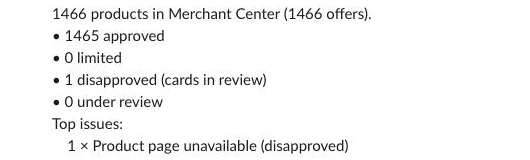
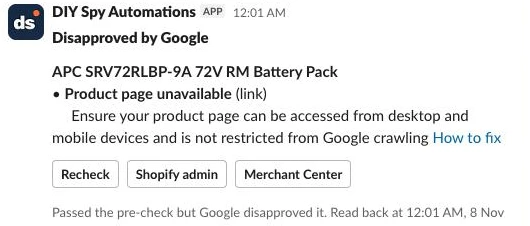
What it costs
At small catalogue sizes, dedicated shopping feed optimisation apps are inexpensive; the case for this workflow is the pre-submission check, saving fixes at the source in Shopify, and the daily disapproval read-back rather than raw subscription price. All prices below were checked November 2026:
| Component or alternative | 500 products | 2,000 products | 10,000 products |
|---|---|---|---|
| n8n Community Edition (self-hosted) | US$0 | US$0 | US$0 |
| n8n Cloud Starter (billed annually, 2,500 executions/mo) | €20/mo | €20/mo | €20/mo |
| Google & YouTube app + Merchant API | Free | Free | Free |
| Simprosys Google Shopping Feed | ~A$7/mo (A$7.13) | ~A$20/mo (A$19.99) | ~A$26/mo (A$25.70) |
| DataFeedWatch | US$64/mo | US$84/mo | US$239/mo |
Three levers control your usage: the schedule (two daily runs use about 60 executions a month on n8n Cloud, plus one execution per Slack button click), sending supplemental rows only when attributes change (staying well inside Google’s two-updates-per-product daily quota), and adjusting page_size alongside the number of detail_fields, which trade off against Shopify’s 1,000-point GraphQL query cost limit rather than money.
Common mistakes
Fixing errors in Merchant Center instead of the store
Editing a title, brand or GTIN directly inside Merchant Center is only temporary because the Google & YouTube app continuously re-syncs from Shopify, causing your manual edits to be overwritten or drift out of sync with your storefront. Always save fixes to the Shopify product or variant so every sales channel gets the clean data.
Sending your own SKU as the MPN
The default field map copies variant.sku into the app’s MPN metafield, which works when your SKU is the manufacturer’s part number (like UVC-G6-PRO-BULLET-W). If your SKUs are internal warehouse codes, point the mpn row in feed_fields at a metafield holding the real manufacturer part number or set active to false on that row.
Barcodes that lost a leading zero in a spreadsheet
Opening a CSV in Excel or Google Sheets often strips the leading zero from a 12-digit UPC, turning 023942440840 into an invalid 11-digit number (23942440840). The pre-check catches 11-digit numbers that pass the GS1 check digit once a leading zero is restored and pre-fills the corrected 12-digit barcode in the Slack Edit modal.
Treating “Pending initial review” as a disapproval
Merchant Center’s API returns newly synced products and images under review with severity DISAPPROVED and resolution: pending_processing. The read-back checks resolution and “No action needed” details so you only get alerted when Google has actually rejected a product.
Updating the supplemental source on every run
Pushing every product to the Merchant API on every run wastes executions and risks hitting Google’s quota of two updates per product per day. Comparing the shaped supplemental payload against feed_status.sent ensures you only call productInputs.insert when highlights, details or material actually change.
Leaving the Google OAuth consent screen in Testing
An external Google Cloud OAuth app left in Testing status issues refresh tokens that expire after seven days, which silently breaks both the supplemental feed updates and the morning read-back a week later. Switch the consent screen to In production (or Internal on Google Workspace) before relying on the schedule.
A supplemental source that isn’t linked to the primary source
Creating a supplemental data source and inserting rows into it does nothing on its own; Merchant Center ignores those rows until the primary data source’s default takeFromDataSources rule includes the supplemental source name. Always run the Link it to the primary source step in Setup and verify the link under Settings > Data sources.
Make it your own
Bing and price comparison sites
Microsoft Merchant Center can import your catalogue directly from Google Merchant Center, so the fixes you make in Shopify reach Bing on its next scheduled import. For price comparison sites that expect a feed URL, reuse feed_fields with channel set to the site’s name and one row per column, format the products that pass Pre-check as a tab-delimited file, and upload it to Shopify Files behind a URL redirect on your store domain so the comparison site always fetches the newest file rather than a cached Shopify CDN URL (on platforms other than Shopify, swap the Shopify GraphQL nodes for your platform’s product API while keeping the field map, pre-check, supplemental source and read-back unchanged).
Custom labels for Shopping ads
When you start running paid Shopping or Performance Max campaigns, custom labels let you bid harder on products that make you more money. A margin band is the most useful one to start with, and Shopify already holds the cost per item it needs. Shoppers never see custom labels, which exist solely to subdivide products inside ad campaigns. To add one, fetch each variant’s cost by adding inventoryItem { unitCost { amount } } to the variant in Build the query (add the read_inventory scope to your custom app if Shopify refuses the field), then add a case to resolveSource in Compare per field:
    case 'variant.margin_band': {
      const cost = Number(v.inventoryItem?.unitCost?.amount || 0), price = Number(v.price || 0);
      if (!cost || !price) return '';
      const margin = (price - cost) / price;
      return margin >= 0.4 ? 'margin-high' : margin >= 0.2 ? 'margin-mid' : 'margin-low';
    }
Finally, add a row to feed_fields with field set to custom_label_0, kind set to app_metafield, target set to variant:mm-google-shopping.custom_label_0 and source set to variant.margin_band, and leave required off so products without a cost aren’t held. In testing, a camera priced at 169 with a cost of 112 came out as margin-mid, while products with no cost were left alone. Change the 40% and 20% cut-offs to suit your range.
Star ratings from a reviews app
Star ratings on Shopping ads and free listings come from Google’s Product Ratings programme rather than from your feed fields. You need at least 50 product reviews across your catalogue, and then you sign up through Google’s interest form (how to send product reviews to Google). The simplest route is a review app on Google’s approved list, such as Judge.me, which sends your reviews to Google for you once it has collected 50 product reviews; you can also upload a product reviews data source yourself. Ratings can take up to two weeks to appear after onboarding (product ratings). Google matches reviews to products by identifiers such as the GTIN, so the barcode checks in this template help your ratings land on the right listings. Collecting the reviews in the first place is its own job, and a topic for a separate guide.
Products with many variants
The default query fetches variants(first: 1) for single-variant products. If you sell clothing or hardware with multiple sizes or colours per product, increase the variant limit in Build the query, loop over every variant in Compare per field and Pre-check so each barcode is validated, and emit one supplemental row per variant’s shopify_ZZ_<product_id>_<variant_id> offer ID.
Warn instead of hold
If you’d rather keep flawed products live on the Google & YouTube channel while you work through the Slack cards, remove the publishablePublish and publishableUnpublish lines from Plan the writes. The workflow will still populate the app’s metafields, push supplemental data and post Slack review cards without switching channel visibility.
When Data Tables aren’t enough
All n8n Data tables on an instance share a 200 MiB storage limit by default (self-hosters can raise it with N8N_DATA_TABLES_MAX_SIZE_BYTES), and every other workflow on the instance counts towards it. For larger catalogues, swap the Data table nodes for Postgres nodes backed by Supabase’s free plan (which includes a 500 MB database), using the same table setup shown in our companion guide, Product Title Optimisation With AI.
FAQ
Do I need a Google Ads account?
No, you don’t need a Google Ads account to use this workflow or show products on Google. New Google Merchant Center accounts are opted into free listings by default, so your approved products can show on Google at no cost.
Does this replace the Google & YouTube app or a feed app?
It works alongside the free Google & YouTube Shopify app rather than replacing it, because the app handles real-time price, inventory and shipping sync well. For a Google Merchant Center Shopify setup, the pair covers much of what a paid product feed optimisation app does for Google, with the difference that the checks run before Google sees a product and the fixes land in Shopify.
How often should it run?
Running the Check lane once a day at 6am and the Read back lane an hour later at 7am fits most stores. Google’s default quota allows up to two updates per product per day, so a single daily run leaves room for on-demand rechecks when you fix products from Slack.
Why not just use Merchant Center’s diagnostics and attribute rules?
Merchant Center diagnostics only report issues after Google has already crawled and disapproved your product, and attribute rules only transform data inside Merchant Center without fixing the broken barcode or missing brand in Shopify. Pre-checking products in n8n prevents disapprovals before they happen and saves every fix back to Shopify so all of your channels stay accurate.
Next steps
Import the workflow, fill in Setup settings and Check settings, and run the Setup lane once to create the tables and link your supplemental data source. Leave dry_run set to true, run the Check lane by hand, and read the Pre-check node’s output to see which products would be held before you let the workflow write to Shopify.