How to Scrape Manufacturer Reviews and Import Them to Shopify With n8n (Free Template)

Last tested on n8n 2.46, November 2026.
A new product page with no reviews is the page shoppers trust least, especially when you sell established brands they already recognise. Waiting months to collect your own feedback leaves new listings bare, whereas marketplace importer apps will happily copy reviews from a listing that turns out to be a twin pack, a solar kit or an older hardware revision. When you want to import reviews to Shopify for a brand you stock, the manufacturer’s own online store often has honest feedback for that exact model. This guide builds an n8n workflow to add reviews to Shopify from the manufacturer’s site, proving the model matches, keeping every rating word for word, and showing the source under each review.
What you’ll build
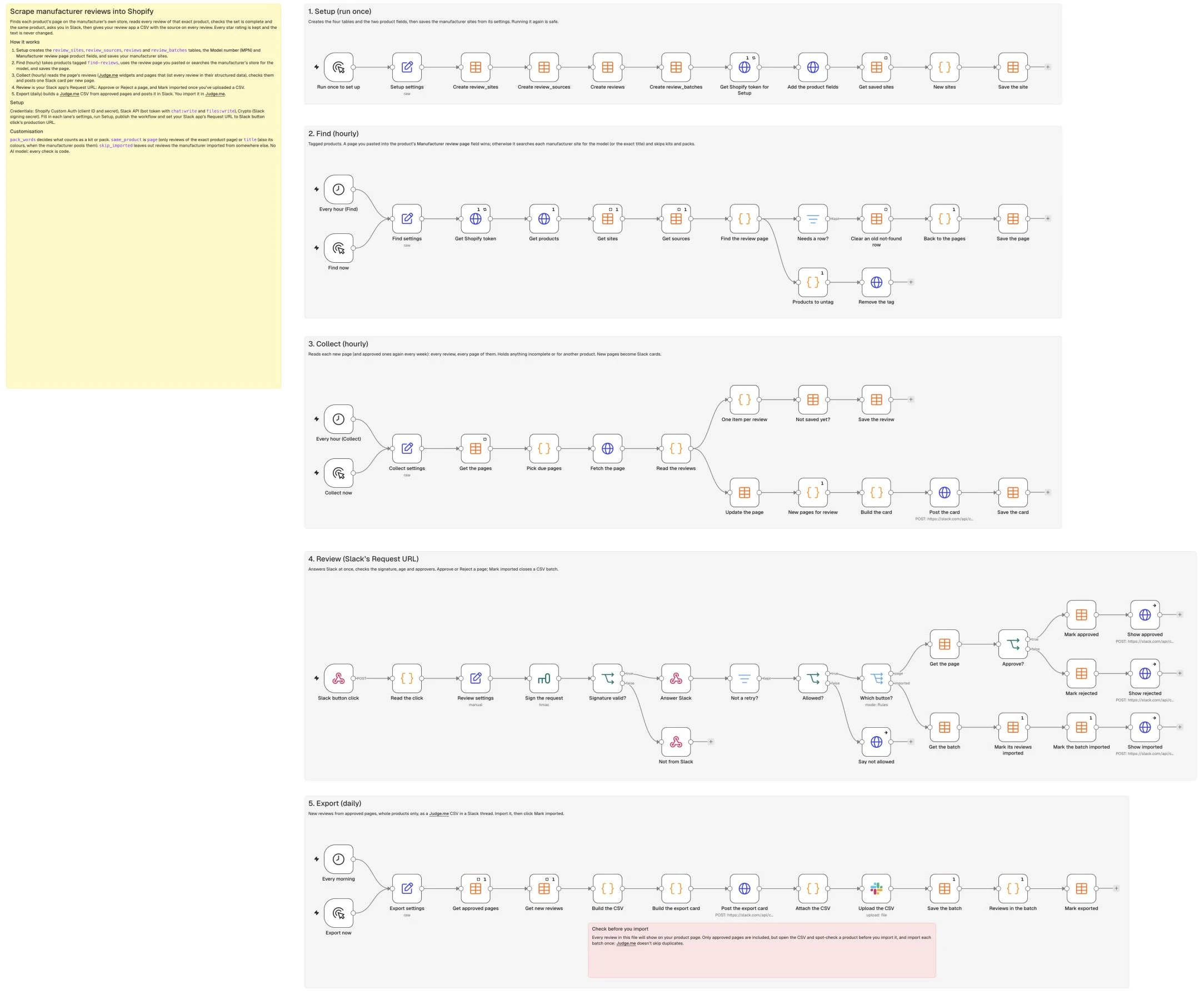
The workflow runs on one n8n canvas across five lanes (Setup, Find, Collect, Review and Export) using four n8n Data tables to track every manufacturer site, product page, review and CSV batch. Every check is plain code with no AI model, and a first run added 391 reviews across four cameras, every star level kept, on a store I run.
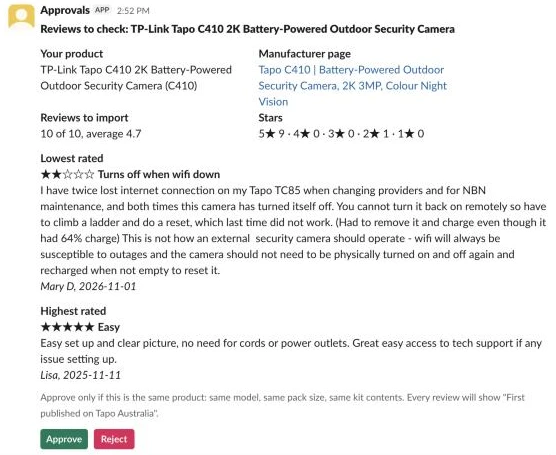
When a new manufacturer page passes the model, count and average checks, the workflow posts a Slack card comparing your product with the manufacturer’s page, showing the star breakdown, anything left out, and the lowest and highest rated reviews in full.
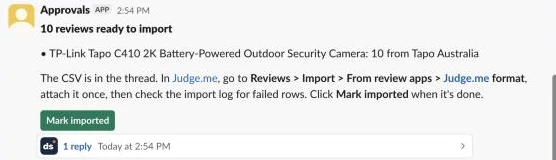
Approved pages roll into a daily export card with a Judge.me CSV in its thread, ready to display on your product page with the source linked under every review.
Is it allowed to reuse manufacturer reviews?
This isn’t legal advice, so check the rules that apply to your store and speak with a lawyer if you aren’t sure. Under both US and Australian consumer law, the core test is whether reviews are genuine and whether your presentation misleads shoppers. Reposting real reviews of the exact same product is allowed under those consumer rules when you show where they came from, keep every review word for word, include every star rating, and never present them as verified purchases from your own store.
| Rule | What it says | What the template does about it |
|---|---|---|
| FTC Consumer Reviews and Testimonials Rule, 16 CFR 465 (US, in force 21 October 2024) | §465.2 bans reviews that misrepresent that the reviewer exists, that they used the product, or what their experience was. §465.7 bans implying the reviews you show are most or all of them when you’ve held back negative ones. The proposed ban on “review hijacking” (reviews of one product shown on a substantially different one) was dropped from the final rule, but lawyers read it as still deceptive under Section 5 of the FTC Act, and the NAD applied it in October 2025. | Same model, no kits or packs, no reviews pooled from other products. Every star rating, word for word. The source on every review, never marked verified. |
| FTC Endorsement Guides, 16 CFR 255 (2023) | Don’t procure, suppress, boost, organise, publish or edit reviews in a way that distorts what shoppers think. | Complete sets only: a page whose count or average doesn’t match is held. |
| ACCC on online reviews (Australian Consumer Law) | Reviews must reflect the genuine opinion of someone who used the product. Don’t edit them, don’t remove genuine negative ones, show your review policy and disclose context. A removalist paid an infringement notice for copying testimonials from an unrelated review site and changing them. | The same checks, plus “First published on” under every review and a line above the reviews saying where some came from. |
| Google: review snippet guidelines | ”Ratings must be sourced directly from users.” “Don’t aggregate reviews or ratings from other websites.” | Keep imported reviews out of any Product review or aggregateRating markup you add yourself. Stars in search aren’t the reason to do this. |
| Google Merchant Center: product ratings policies | ”You must collect and own the reviews you share with Google… we don’t accept reviews syndicated from other sources.” | Nothing to build: Judge.me’s Google Shopping feed already leaves imported reviews out. |
| Copyright and the site’s terms | Each review is its author’s text, licensed to the manufacturer under its site’s terms. Consumer law doesn’t answer this. | Read the terms and robots.txt, and ask the manufacturer or your distributor first. The scraper names your store in its User-Agent and reads one page a second. |
Google is the one party that says no, and only to using third-party reviews for search snippet stars or Shopping ratings. The goal here is giving shoppers on your product page honest feedback on the hardware they’re considering, rather than chasing rich results in Google. You should also add a short note at the top of your review widget stating that some reviews were originally published on the manufacturer’s store so shoppers have the full context before they start reading.
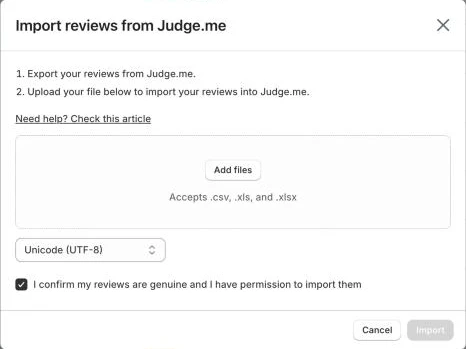
Consumer law also doesn’t answer copyright or a site’s terms of service, and Judge.me’s own import dialog requires you to tick “I confirm my reviews are genuine and I have permission to import them”. Put those rules together and the practical checklist is simple: match the exact same product, take every star rating word for word, show the source on every review, never mark them “verified”, keep them out of your star markup, and ask the manufacturer or your distributor first. Most brands want their reviews visible on authorised resellers’ pages, and some even run official syndication feeds, so a short note to your account rep is usually all it takes:
Hi [Name],

We stock the [Brand] range on [Your Store] and would like to display the customer reviews from [manufacturer domain] on our matching product pages so shoppers can read feedback on each model.

We keep every star rating and review word for word, match identical models only, leave them unverified and out of Google star markup, and credit "First published on [Brand Store]" with a link to your product page under every review.

Could you confirm you're happy for us to include these on our [Brand] pages?

Thanks,
[Your name]
What you need
- n8n with Data tables on a public HTTPS URL so Slack can reach the webhook. A Supabase version of the workflow is in the repo if you prefer external Postgres tables.
- A Shopify app with
read_productsandwrite_productsscopes, saved as a GenerichttpCustomAuthcredential. - A Slack app with
chat:writeandfiles:writescopes, Interactivity enabled, and its Signing Secret stored in an n8n Crypto credential. - A review app with CSV import (Judge.me Free takes this CSV format).
- Manufacturers that sell online and show reviews. Cost: US$0 beyond n8n.
How it works
- Setup creates the
review_sites,review_sources,reviewsandreview_batchesData tables, adds the Model number (MPN) and Manufacturer review page product metafields in Shopify, and saves your manufacturer sites. - Find (hourly) pulls products tagged
find-reviews, uses any URL you pasted into the product’s Manufacturer review page field or searches the manufacturer’s store for the model number while skipping kits and packs, and removes the tag. - Collect (hourly) fetches due pages, reads every review from Judge.me’s widget endpoint or the page’s structured data, checks that the model, count and average match, drops reviews pooled from other products, and posts one Slack card per new page for a person to approve.
- Review (Slack’s Request URL) verifies the Slack signature, answers within 3 seconds, and handles Approve, Reject and Mark imported clicks.
- Export (daily) builds a Judge.me CSV from approved pages and uploads it in a Slack thread for a person to import into Judge.me and click Mark imported.
Step 1: Set up the tables, the product fields and your manufacturer sites
Retail product titles carry extra descriptors that rarely match a manufacturer’s title word for word, whereas the model number (C410) is what the manufacturer’s page names. The Setup lane creates a metafield for that model number (custom.mpn), a second metafield where you can paste a review URL (custom.review_source_url), the four Data tables, and your manufacturer site rows.
In the Setup lane, add a Manual Trigger named Run once to set up and connect an Edit Fields (Set) node named Setup settings in JSON mode. In manufacturer_sites, brand matches your Shopify products’ Vendor (case doesn’t matter), domain is the manufacturer’s online store, and source_name is the label shoppers see under each review:
{
  "store_domain": "your-store.myshopify.com",
  "model_namespace": "custom",
  "model_key": "mpn",
  "page_namespace": "custom",
  "page_key": "review_source_url",
  "manufacturer_sites": [
    {
      "brand": "Your Brand",
      "domain": "www.yourbrand.com",
      "source_name": "Your Brand"
    }
  ]
}
Next, chain four Data table nodes (Create review_sites → Create review_sources → Create reviews → Create review_batches) so running Setup again when you add a new brand keeps your existing tables intact. Configure Create review_sites:
| Setting | Value |
|---|---|
| Resource | table |
| Operation | create |
| Table name | review_sites |
| Options > Reuse existing table | on |
Columns for Create review_sites:
| Setting | Value |
|---|---|
brand | string |
domain | string |
source_name | string |
Connect Create review_sites to a Data table node named Create review_sources:
| Setting | Value |
|---|---|
| Resource | table |
| Operation | create |
| Table name | review_sources |
| Options > Reuse existing table | on |
Columns for Create review_sources:
| Setting | Value |
|---|---|
product_id | string |
product_title | string |
product_handle | string |
brand | string |
model | string |
url | string |
source_name | string |
found_by | string |
status | string |
reader | string |
page_title | string |
stated_count | number |
review_count | number |
average | number |
stars | string |
left_out | string |
error | string |
attempts | number |
checked_at | date |
card_channel | string |
card_ts | string |
card | string |
decided_by | string |
decided_at | date |
Connect Create review_sources to a Data table node named Create reviews:
| Setting | Value |
|---|---|
| Resource | table |
| Operation | create |
| Table name | reviews |
| Options > Reuse existing table | on |
Columns for Create reviews:
| Setting | Value |
|---|---|
key | string |
source_id | number |
product_id | string |
product_handle | string |
review_id | string |
rating | number |
review_date | string |
reviewer_name | string |
row | string |
status | string |
batch_id | string |
found_at | date |
Connect Create reviews to a Data table node named Create review_batches:
| Setting | Value |
|---|---|
| Resource | table |
| Operation | create |
| Table name | review_batches |
| Options > Reuse existing table | on |
Columns for Create review_batches:
| Setting | Value |
|---|---|
batch_id | string |
status | string |
review_count | number |
product_count | number |
card_channel | string |
card_ts | string |
card | string |
delivered_at | date |
imported_by | string |
imported_at | date |
Connect Create review_batches to an HTTP Request node named Get Shopify token for Setup (with executeOnce: True and retryOnFail: on, 3 tries, 2000 ms apart) to request a fresh Admin API token:
| Setting | Value |
|---|---|
| Method | POST |
| URL | https://{{ $('Setup settings').first().json.store_domain }}/admin/oauth/access_token |
| Authentication | Generic credential type: httpCustomAuth |
| Body | Form URL-encoded: grant_type = client_credentials |
Connect Get Shopify token for Setup to an HTTP Request node named Add the product fields, which calls Shopify’s metafieldDefinitionCreate mutation:
| Setting | Value |
|---|---|
| Method | POST |
| URL | https://{{ $('Setup settings').first().json.store_domain }}/admin/api/2026-10/graphql.json |
Header X-Shopify-Access-Token | {{ $('Get Shopify token for Setup').first().json.access_token }} |
Set the JSON body expression on Add the product fields to:
{{ JSON.stringify({ query: "mutation Fields($model: MetafieldDefinitionInput!, $page: MetafieldDefinitionInput!) {\n model: metafieldDefinitionCreate(definition: $model) { createdDefinition { id } userErrors { code message } }\n page: metafieldDefinitionCreate(definition: $page) { createdDefinition { id } userErrors { code message } }\n}", variables: ({ model: { name: 'Model number (MPN)', namespace: $('Setup settings').first().json.model_namespace, key: $('Setup settings').first().json.model_key, type: 'single_line_text_field', ownerType: 'PRODUCT', pin: true }, page: { name: 'Manufacturer review page', namespace: $('Setup settings').first().json.page_namespace, key: $('Setup settings').first().json.page_key, type: 'url', ownerType: 'PRODUCT', pin: true } }) }) }}A field that already exists on your store answers TAKEN in userErrors, which is fine. Next, connect Add the product fields to a Data table node named Get saved sites (with alwaysOutputData: True):
| Setting | Value |
|---|---|
| Resource | row |
| Operation | get |
| Data table | review_sites |
| Return all | on |
Connect Get saved sites to a Code node named New sites, which strips https:// and any path from domain and keeps only sites not yet in review_sites:
// Sites in Setup settings that aren't in the table yet.
const key = x => String(x.brand || '').trim().toLowerCase() + '|' + String(x.domain || '').trim().toLowerCase();
const have = new Set($input.all().map(i => i.json).filter(r => r.brand).map(key));
return ($('Setup settings').first().json.manufacturer_sites || [])
  .filter(x => x.brand && x.domain && !have.has(key(x)))
  .map(x => ({ json: { brand: String(x.brand).trim(),
    domain: String(x.domain).trim().toLowerCase().replace(/^https?:\/\//, '').replace(/\/.*$/, ''),
    source_name: String(x.source_name || x.brand).trim() } }));
Connect New sites to a Data table node named Save the site:
| Setting | Value |
|---|---|
| Resource | row |
| Operation | insert |
| Data table | review_sites |
Column: brand | {{ $json.brand }} |
Column: domain | {{ $json.domain }} |
Column: source_name | {{ $json.source_name }} |
Run Run once to set up with TP-LINK (au.store.tapo.com, Tapo Australia) and KeepCup (keepcup.com, KeepCup) in Setup settings, then check that review_sites has a row per site.
Step 2: Pick the products and find each one’s review page
Most manufacturer stores that display customer reviews run on Shopify, and Shopify stores answer /search/suggest.json (Shopify’s predictive search Ajax API) for free with product titles and URLs. It works in the languages Shopify’s predictive search supports, whereas an unsupported buyer locale returns HTTP 417 (“Unsupported buyer locale”) and marks the row not_found so you can paste the URL instead. A page you paste into the product’s Manufacturer review page field (custom.review_source_url) always wins over search.
In the Find lane, add a Schedule Trigger named Every hour (Find):
| Setting | Value |
|---|---|
| Trigger interval | Hours |
Add a Manual Trigger named Find now, and connect both triggers to an Edit Fields (Set) node named Find settings in JSON mode:
{
  "store_domain": "your-store.myshopify.com",
  "find_tag": "find-reviews",
  "product_ids": [],
  "batch_size": 10,
  "model_namespace": "custom",
  "model_key": "mpn",
  "page_namespace": "custom",
  "page_key": "review_source_url",
  "pack_words": [
    "kit",
    "bundle",
    "combo",
    "pack",
    "set",
    "twin",
    "duo",
    "trio",
    "refurbished",
    "renewed"
  ],
  "user_agent": "YourStoreReviewSync/1.0 (+https://your-store.com)"
}
These settings control what Find searches and rejects:
| Setting | Purpose |
|---|---|
find_tag | Tag (find-reviews) that queues products for search. |
product_ids | Specific product IDs for testing without tags. |
batch_size | Products checked per hour (10). |
pack_words | Words that mark a kit, bundle or multi-pack; if a result has one and your title doesn’t, it’s skipped. |
Connect Find settings to an HTTP Request node named Get Shopify token (with executeOnce: True and retryOnFail: on, 3 tries, 2000 ms apart):
| Setting | Value |
|---|---|
| Method | POST |
| URL | https://{{ $('Find settings').first().json.store_domain }}/admin/oauth/access_token |
| Authentication | Generic credential type: httpCustomAuth |
| Body | Form URL-encoded: grant_type = client_credentials |
Connect Get Shopify token to an HTTP Request node named Get products (with executeOnce: True):
| Setting | Value |
|---|---|
| Method | POST |
| URL | https://{{ $('Find settings').first().json.store_domain }}/admin/api/2026-10/graphql.json |
Header X-Shopify-Access-Token | {{ $('Get Shopify token').first().json.access_token }} |
Set the JSON body expression on Get products to:
{{ JSON.stringify({ query: "query Products($q: String!, $n: Int!, $ids: [ID!]!, $byIds: Boolean!, $mns: String!, $mkey: String!, $pns: String!, $pkey: String!) {\n products(first: $n, query: $q) @skip(if: $byIds) { nodes { id title handle vendor\n model: metafield(namespace: $mns, key: $mkey) { value }\n page: metafield(namespace: $pns, key: $pkey) { value } } }\n nodes(ids: $ids) @include(if: $byIds) { ... on Product { id title handle vendor\n model: metafield(namespace: $mns, key: $mkey) { value }\n page: metafield(namespace: $pns, key: $pkey) { value } } }\n}", variables: ((s => ({ q: 'tag:' + s.find_tag, n: s.batch_size, byIds: s.product_ids.length > 0, ids: s.product_ids.map(x => String(x).startsWith('gid://') ? String(x) : 'gid://shopify/Product/' + x), mns: s.model_namespace, mkey: s.model_key, pns: s.page_namespace, pkey: s.page_key }))($('Find settings').first().json)) }) }}Connect Get products to a Data table node named Get sites (with executeOnce: True and alwaysOutputData: True):
| Setting | Value |
|---|---|
| Resource | row |
| Operation | get |
| Data table | review_sites |
| Return all | on |
Connect Get sites to a Data table node named Get sources (with executeOnce: True and alwaysOutputData: True):
| Setting | Value |
|---|---|
| Resource | row |
| Operation | get |
| Data table | review_sources |
| Return all | on |
Connect Get sources to a Code node named Find the review page. For each product, a pasted URL in custom.review_source_url wins immediately. Otherwise, it searches each site matching the product’s vendor via /search/suggest.json. When the product has a model number, hasModel checks that the result title contains the model as a whole word (C410 matches Tapo C410 and C410(2-Pack) but not C4100), and extraPack skips any result containing a word in pack_words (or a \d+pack token) that your own title lacks. When there’s no model number, sameName removes the brand name from both titles and requires the remaining words to match word for word:
// Same-product helpers.
const esc = t => t.replace(/[.*+?^${}()|[\]\\]/g, '\\$&');
const words = t => String(t || '').toLowerCase().match(/[a-z0-9]+/g) || [];
// The model as a whole token: C410 matches "Tapo C410" and "C410(2-Pack)" but not "C4100".
const hasModel = (text, model) => {
  const parts = String(model || '').match(/[a-z0-9]+/gi);
  if (!parts) return false;
  return new RegExp('(^|[^a-z0-9])' + parts.map(esc).join('[\\s_-]*') + '($|[^a-z0-9])', 'i').test(String(text || ''));
};
// Words that make a page a different product from a single item: kit, 2-pack, bundle...
const packWords = (t, list) => words(t).filter(w => list.includes(w) || /^\d+pack$/.test(w));
const extraPack = (theirs, ours, list) => [...new Set(packWords(theirs, list).filter(w => !packWords(ours, list).includes(w)))];
// Without a model number, the titles must match word for word once the brand is taken out.
const sameName = (a, b, brand) => {
  const skip = new Set(words(brand));
  const clean = t => words(t).filter(w => !skip.has(w)).join(' ');
  return clean(a) !== '' && clean(a) === clean(b);
};

// For each product: the page you pasted, or a search of each manufacturer site's own store search.
// Why Code: one search per site per product with a pause between them, then a pick from the results.
const s = $('Find settings').first().json;
const d = $('Get products').first().json.data || {};
const products = (d.products?.nodes || d.nodes || []).filter(p => p && p.id);
const sites = $('Get sites').all().map(i => i.json).filter(x => x.domain);
// A product that already has a page (other than "not found") is done: Find only untags it.
const done = new Set($('Get sources').all().map(i => i.json).filter(r => r.product_id && r.status !== 'not_found').map(r => r.product_id));
const sleep = ms => new Promise(r => setTimeout(r, ms));
const out = [];
for (const p of products) {
  const base = { product_id: p.id, product_title: p.title, product_handle: p.handle, brand: p.vendor || '', model: String(p.model?.value || '').trim() };
  if (done.has(p.id)) { out.push({ json: { ...base, skip: true } }); continue; }
  const pasted = String(p.page?.value || '').trim();
  const mine = sites.filter(x => String(x.brand).toLowerCase() === base.brand.toLowerCase());
  if (pasted) {
    const site = mine.find(x => pasted.includes(x.domain)) || {};
    out.push({ json: { ...base, url: pasted, source_name: site.source_name || base.brand, found_by: 'pasted', status: 'new', note: '' } });
    continue;
  }
  if (!mine.length) { out.push({ json: { ...base, url: '', source_name: '', found_by: 'search', status: 'not_found', note: 'No manufacturer site for ' + (base.brand || 'this vendor') + ' in review_sites' } }); continue; }
  let pick = null, notes = [];
  for (const site of mine) {
    // A Shopify store's own search: free, and it returns the product titles to check.
    const q = base.model || base.product_title.replace(new RegExp(esc(base.brand), 'ig'), '').trim();
    let hits = [];
    try {
      const r = await this.helpers.httpRequest({ url: 'https://' + site.domain + '/search/suggest.json', json: true, timeout: 20000,
        qs: { q, 'resources[type]': 'product', 'resources[limit]': 10 }, headers: { 'User-Agent': s.user_agent } });
      hits = r?.resources?.results?.products || [];
    } catch (e) { notes.push(site.domain + ': ' + String(e.message).slice(0, 80)); }
    for (const h of hits) {
      const ok = base.model ? hasModel(h.title, base.model) : sameName(h.title, base.product_title, base.brand);
      const extra = extraPack(h.title, base.product_title, s.pack_words);
      if (!ok) continue;
      if (extra.length) { notes.push('Skipped ' + h.title + ' (' + extra.join(', ') + ')'); continue; }
      pick ||= { url: 'https://' + site.domain + String(h.url).split('?')[0], source_name: site.source_name, page_title: h.title };
    }
    if (pick) break;
    await sleep(1000);
  }
  out.push({ json: { ...base, url: pick?.url || '', source_name: pick?.source_name || '', found_by: 'search',
    status: pick ? 'new' : 'not_found', note: (pick ? 'Found ' + pick.page_title + '. ' : 'No matching product. ') + notes.join('; ') } });
}
return out;
In testing, searching Tapo Australia for C410 returned Tapo C410 | Battery-Powered Outdoor Security Camera, 2K 3MP, Colour Night Vision first, followed by Tapo C410 KIT, Tapo C410(2-Pack), Tapo C410 KIT Security Kit and Tapo C410 Security Kit; Find the review page kept the single camera and skipped all four kits and the 2-pack. For KeepCup (no model number), it matched KeepCup’s Commuter Insulated Travel Cup - 12oz | Mulberry page by title once KeepCup was stripped out.
Step 3: Save the page and move the queue on
Every product in the batch loses its find-reviews tag whether a page was found or not, so your hourly queue never gets stuck on a brand that doesn’t list a product online. Keeping a not_found row in review_sources lets you see why the search came up empty, and deleting that not_found row when you re-tag the product lets you retry after pasting a URL or adding a site.
Connect Find the review page to two parallel branches: a Filter node named Needs a row? and a Code node named Products to untag. In Needs a row?, set the boolean condition (with Convert types where required turned on) to:
{{ !$json.skip }}Connect Needs a row? to a Data table node named Clear an old not-found row (with alwaysOutputData: True):
| Setting | Value |
|---|---|
| Resource | row |
| Operation | deleteRows |
| Data table | review_sources |
| Must match | All conditions |
Condition: product_id | eq {{ $json.product_id }} |
Condition: status | eq not_found |
Because deleteRows returns the deleted rows rather than the items from Needs a row?, connect Clear an old not-found row to a Code node named Back to the pages (with executeOnce: True):
// The delete returns the rows it removed (often none); carry on with the pages instead.
return $('Needs a row?').all().map(i => ({ json: i.json }));
Connect Back to the pages to a Data table node named Save the page:
| Setting | Value |
|---|---|
| Resource | row |
| Operation | insert |
| Data table | review_sources |
Column: product_id | {{ $json.product_id }} |
Column: product_title | {{ $json.product_title }} |
Column: product_handle | {{ $json.product_handle }} |
Column: brand | {{ $json.brand }} |
Column: model | {{ $json.model }} |
Column: url | {{ $json.url }} |
Column: source_name | {{ $json.source_name }} |
Column: found_by | {{ $json.found_by }} |
Column: status | {{ $json.status }} |
Column: error | {{ $json.note }} |
Column: attempts | 0 |
Column: checked_at | {{ $now.toISO() }} |
On the second branch from Find the review page, configure the Code node named Products to untag (with executeOnce: True):
return [{ json: { ids: $('Find the review page').all().map(i => i.json.product_id) } }];Connect Products to untag to an HTTP Request node named Remove the tag, which calls Shopify’s tagsRemove mutation for every product in the batch:
| Setting | Value |
|---|---|
| Method | POST |
| URL | https://{{ $('Find settings').first().json.store_domain }}/admin/api/2026-10/graphql.json |
Header X-Shopify-Access-Token | {{ $('Get Shopify token').first().json.access_token }} |
Set the JSON body expression on Remove the tag to:
{{ JSON.stringify({ query: 'mutation Untag($tag: [String!]!) { ' + $json.ids.map((id, i) => 'u' + i + ': tagsRemove(id: "' + id + '", tags: $tag) { userErrors { message } }').join(' ') + ' }', variables: { tag: [$('Find settings').first().json.find_tag] } }) }}Step 4: Fetch each page and check it’s the same product
Even when you paste a URL manually, it’s easy to copy a kit or twin-pack tab by mistake. The Collect lane fetches each due page and checks the page’s <title> against your model number and pack_words before reading any reviews.
In the Collect lane, add a Schedule Trigger named Every hour (Collect):
| Setting | Value |
|---|---|
| Trigger interval | Hours |
| Trigger at minute | 30 |
Add a Manual Trigger named Collect now, and connect both triggers to an Edit Fields (Set) node named Collect settings in JSON mode:
{
  "batch_size": 3,
  "recheck_days": 7,
  "retry_hours": 1,
  "max_attempts": 3,
  "max_pages": 40,
  "same_product": "page",
  "skip_imported": true,
  "max_photos": 5,
  "pack_words": [
    "kit",
    "bundle",
    "combo",
    "pack",
    "set",
    "twin",
    "duo",
    "trio",
    "refurbished",
    "renewed"
  ],
  "user_agent": "YourStoreReviewSync/1.0 (+https://your-store.com)",
  "slack_channel": "#review-reviews"
}
Here is what the main settings in Collect settings do:
| Setting | Purpose |
|---|---|
batch_size / recheck_days | Pages fetched per run (3), and days (7) before re-reading approved or no_reviews pages. |
max_pages | Maximum Judge.me pages (40, at 30 reviews a page) read per product. |
same_product | page keeps only reviews filed under that exact product page; title also keeps other colours that share the title before " | ". |
skip_imported | Leaves out reviews the manufacturer imported from another provider. |
Connect Collect settings to a Data table node named Get the pages (with alwaysOutputData: True):
| Setting | Value |
|---|---|
| Resource | row |
| Operation | get |
| Data table | review_sources |
| Return all | on |
Connect Get the pages to a Code node named Pick due pages, which selects new pages first, then failed pages due a retry, then approved or no_reviews pages older than recheck_days:
// New pages first, then failed ones worth another try, then approved pages due a weekly re-read.
const s = $('Collect settings').first().json;
const now = Date.now(), H = 3600e3, D = 24 * H;
const age = r => now - new Date(r.checked_at || r.updatedAt || 0).getTime();
const due = $input.all().map(i => i.json).filter(r => r.url && (
  r.status === 'new' ||
  (r.status === 'failed' && (r.attempts || 0) < s.max_attempts && age(r) > s.retry_hours * H) ||
  (['approved', 'no_reviews'].includes(r.status) && age(r) > s.recheck_days * D)));
due.sort((a, b) => (a.status === 'new' ? 0 : 1) - (b.status === 'new' ? 0 : 1) || a.id - b.id);
return due.slice(0, s.batch_size).map(json => ({ json }));
Connect Pick due pages to an HTTP Request node named Fetch the page:
| Setting | Value |
|---|---|
| Method | GET |
| URL | {{ $json.url }} |
Header User-Agent | {{ $('Collect settings').first().json.user_agent }} |
| Options > Timeout | 30000 |
| Options > Response > Response Format | Text |
| Options > Response > Include Response Headers and Status | on |
| Options > Response > Never Error | on |
| Options > Batching | 1 item every 1000 ms |
Connect Fetch the page to a Code node named Read the reviews (full code in Step 6). At the top of Read the reviews and inside read(page, res), hasModel and extraPack verify the <title> element before any review reader runs. When we pasted the Tapo C410 KIT page onto the single C410 camera product, Read the reviews stopped immediately with status: mismatch and error: The page is a kit and your product isn't.
Step 5: Read every review on the page
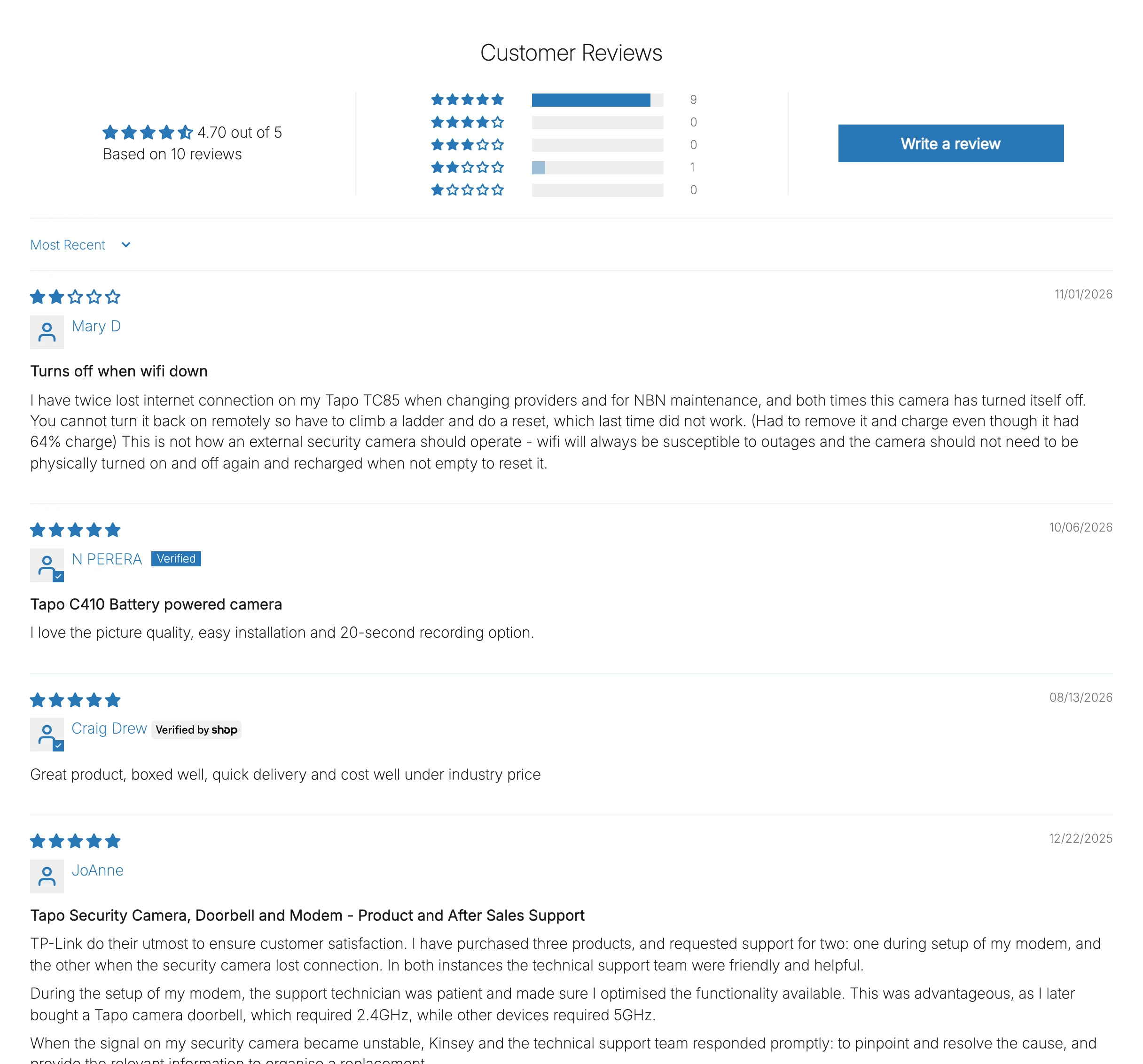
Because Judge.me only puts the first five reviews in the page’s initial HTML, a naive review scraper that only reads the page source misses the rest of the feedback and gets the average wrong. Instead, the judgeMe function inside Read the reviews fetches the product’s JSON from Shopify’s Ajax product API (/products/<handle>.js) to get the numeric product ID that Judge.me files reviews under, then pages through https://api.judge.me/reviews/reviews_for_widget (the same public endpoint the widget on the page calls) at 30 reviews a page.
Older Judge.me widgets return HTML markup inside r.html, whereas newer widgets return a JSON array in r.reviews, and Read the reviews parses both via fromHtml and fromJson. One bug caught during testing is worth noting: the first version of fromHtml matched any class starting with jdgm-rev, which matched the outer jdgm-rev-widg__reviews container as an 11th “review” with no rating, so the regex has to match jdgm-rev as a standalone class token.
If a page doesn’t use Judge.me, structured(html, page) checks the page’s application/ld+json blocks for a Product with aggregateRating and a review list (built in, though no live manufacturer page turned up with a complete JSON-LD review list during testing). Anything else is marked unsupported. In testing, Tapo Australia’s C410 page read all 10 of 10 reviews, whereas tp-link.com’s C410 product page had no widget or review list and was marked unsupported.
Step 6: Check the set is complete and keep what belongs on your page
Once the reader finishes paging, Read the reviews checks that every review has an ID, that there are no duplicate IDs, that r.reviews.length equals the page’s stated total, and that the mean rating matches the page’s stated average within 0.05. If the first page of a paginated widget was all that came back, its average wouldn’t match the full set and would misrepresent the product, so any short set is held as incomplete.
Next, Read the reviews filters individual reviews using rules that apply to every star level equally, so the C410’s 2-star review (“Turns off when wifi down”) stays in alongside the nine 5-star reviews:
- Pooled reviews (
other products). Judge.me lets brands pool reviews across a product group: KeepCup’s 12oz Mulberry page states 152 reviews across 44 products (8oz and 20oz cups, lids and other colours). Withsame_product: "page"(the default), the filter keeps only the21reviews filed under that exact product page (129 other products, 2 imported from another siteleft out). Switchingsame_productto"title"keeps39reviews by including the other 12oz colours whose title before" | "matches (109 other products, 4 imported from another siteleft out). - Collected from another provider (
imported from another site). On KeepCup’s Splashproof Lid page, 87 of 177 reviews carried Judge.me’sreview_collected_from_another_providerbadge. Because stamping “First published on KeepCup” on a review KeepCup imported from elsewhere would be untrue,skip_imported: trueleaves them out. - Missing fields. Reviews with no star rating, stars with no text body (Judge.me’s CSV requires
body), or no valid date are dropped and counted inleft_out. Photos beyondmax_photos(5) are trimmed and counted inleft_out, and review bodies over 5,000 characters spill intoCFReview continued.
Paste this complete script into the Code node named Read the reviews:
// Same-product helpers.
const esc = t => t.replace(/[.*+?^${}()|[\]\\]/g, '\\$&');
const words = t => String(t || '').toLowerCase().match(/[a-z0-9]+/g) || [];
// The model as a whole token: C410 matches "Tapo C410" and "C410(2-Pack)" but not "C4100".
const hasModel = (text, model) => {
const parts = String(model || '').match(/[a-z0-9]+/gi);
if (!parts) return false;
return new RegExp('(^|[^a-z0-9])' + parts.map(esc).join('[\\s_-]*') + '($|[^a-z0-9])', 'i').test(String(text || ''));
};
// Words that make a page a different product from a single item: kit, 2-pack, bundle...
const packWords = (t, list) => words(t).filter(w => list.includes(w) || /^\d+pack$/.test(w));
const extraPack = (theirs, ours, list) => [...new Set(packWords(theirs, list).filter(w => !packWords(ours, list).includes(w)))];
// Without a model number, the titles must match word for word once the brand is taken out.
const sameName = (a, b, brand) => {
const skip = new Set(words(brand));
const clean = t => words(t).filter(w => !skip.has(w)).join(' ');
return clean(a) !== '' && clean(a) === clean(b);
};
// Reads every review of each page, checks the set, and turns each review into a review-app row.
// Why Code: Judge.me's widget pages through its reviews (a loop), and the checks compare the whole set.
const s = $('Collect settings').first().json;
const pages = $('Pick due pages').all().map(i => i.json);
const http = o => this.helpers.httpRequest({ timeout: 30000, ...o, headers: { 'User-Agent': s.user_agent, ...(o.headers || {}) } });
const sleep = ms => new Promise(r => setTimeout(r, ms));
const decode = t => String(t || '').replace(/&#(x[0-9a-f]+|\d+);/gi, (_, n) => String.fromCodePoint(n[0].toLowerCase() === 'x' ? parseInt(n.slice(1), 16) : Number(n)))
.replace(/"/g, '"').replace(/'|'/g, "'").replace(/</g, '<').replace(/>/g, '>').replace(/ /g, ' ').replace(/&/g, '&');
const text = h => decode(String(h || '').replace(/<br\s*\/?>|<\/p>\s*<p[^>]*>/gi, '\n').replace(/<[^>]+>/g, '')).replace(/\n{3,}/g, '\n\n').trim();
const attr = (h, k) => (h.match(new RegExp('\\b' + k + "=[\"']([^\"']*)[\"']", 'i')) || [])[1];
const classText = (h, c) => { const m = h.match(new RegExp('<(div|b|span|p)\\b[^>]*class=["\'][^"\']*\\b' + c + '\\b[^>]*>([\\s\\S]*?)</\\1>', 'i')); return m ? text(m[2]) : ''; };
const handleOf = u => (String(u || '').match(/\/products\/([^/?#]+)/) || [])[1] || '';
const IMPORTED = 'review_collected_from_another_provider';
// Judge.me's older widget sends HTML; its newer one sends JSON. Both come from the same public endpoint.
const fromHtml = html => {
// Each review is a div whose class list has jdgm-rev on its own (not jdgm-rev-widg__reviews).
const starts = [...html.matchAll(/<div\b[^>]*class=['"](?:[^'"]*\s)?jdgm-rev(?:\s[^'"]*)?['"][^>]*>/gi)];
return starts.map((m, i) => {
const b = html.slice(m.index, starts[i + 1]?.index ?? html.length);
return { id: attr(m[0], 'data-review-id'), rating: Number(attr(b, 'data-score')), title: classText(b, 'jdgm-rev__title'),
body: classText(b, 'jdgm-rev__body'), author: classText(b, 'jdgm-rev__author'), date: (b.match(/<time[^>]*datetime=['"]([^'"]+)/i) || [])[1],
product_url: attr(m[0], 'data-product-url') || '', product_title: decode(attr(m[0], 'data-product-title') || ''),
imported: (attr(b, 'data-badge-type') || '') === IMPORTED,
pictures: [...b.matchAll(/(?:href|data-mfp-src)=['"](https:\/\/[^'"]+\.(?:jpe?g|png|webp)[^'"]*)['"]/gi)].map(x => decode(x[1])) };
});
};
const fromJson = x => ({ id: x.uuid, rating: Number(x.rating), title: x.title || '', body: text(x.body_html), author: x.reviewer_name, date: x.created_at,
product_url: x.product_url || '', product_title: x.product_title || '', imported: (x.transparency_badges || []).includes(IMPORTED),
pictures: (x.pictures_urls || []).map(p => typeof p === 'string' ? p : (p.original || p.huge || p.compact || p.url || '')) });
async function judgeMe(html, page) {
if (!/judge\.me|jdgm/i.test(html)) return null;
const shop = (html.match(/Shopify\.shop\s*=\s*["']([^"']+)/) || html.match(/([a-z0-9][a-z0-9-]*\.myshopify\.com)/i) || [])[1];
if (!shop) return null;
// The product's own JSON gives the id Judge.me files reviews under, and its handle.
const product = await http({ url: page.url.split(/[?#]/)[0] + '.js', json: true });
const widget = (html.match(/<div\b[^>]*class=['"][^'"]*\bjdgm-rev-widg\b[^'"]*['"][^>]*>/i) || [''])[0];
let total = null, avg = Number(attr(widget, 'data-average-rating')) || null, reviews = [];
for (let n = 1; n <= s.max_pages; n++) {
const r = await http({ url: 'https://api.judge.me/reviews/reviews_for_widget', json: true,
qs: { url: shop, shop_domain: shop, platform: 'shopify', page: n, per_page: 30, product_id: String(product.id) } });
const batch = Array.isArray(r.reviews) ? r.reviews.map(fromJson) : fromHtml(String(r.html || ''));
total = Number(Array.isArray(r.reviews) ? r.number_of_reviews : r.total_count);
if (Array.isArray(r.reviews) && r.average_rating) avg = Number(r.average_rating);
reviews.push(...batch);
if (!batch.length || reviews.length >= total) break;
await sleep(500);
}
return { reader: 'Judge.me', total, avg, reviews, handle: product.handle, page_title: product.title };
}
// Any site: a Product in the page's structured data that lists every review.
function structured(html, page) {
const found = [];
const walk = x => { if (Array.isArray(x)) x.forEach(walk); else if (x && typeof x === 'object') { if ([x['@type']].flat().includes('Product')) found.push(x); if (x['@graph']) walk(x['@graph']); } };
for (const m of html.matchAll(/<script[^>]*type=["']application\/ld\+json["'][^>]*>([\s\S]*?)<\/script>/gi)) { try { walk(JSON.parse(m[1])); } catch (e) {} }
const p = found.length === 1 ? found[0] : found.find(x => page.model && (hasModel(x.mpn, page.model) || hasModel(x.sku, page.model) || hasModel(x.name, page.model)));
if (!p || !p.aggregateRating || !p.review) return null;
const reviews = [p.review].flat().map((r, i) => ({ id: r['@id'] || r.identifier || [r.author?.name || r.author, r.datePublished, i].join('|'),
rating: Number(r.reviewRating?.ratingValue), title: text(r.name), body: text(r.reviewBody), author: r.author?.name || r.author, date: r.datePublished,
product_url: '', product_title: '', imported: false, pictures: [r.image || []].flat().map(x => typeof x === 'string' ? x : x?.url || '') }));
return { reader: 'Structured data', total: Number(p.aggregateRating.reviewCount || p.aggregateRating.ratingCount), avg: Number(p.aggregateRating.ratingValue),
reviews, handle: handleOf(page.url), page_title: text(p.name) };
}
const ddmmyyyy = d => d.toISOString().slice(0, 10).split('-').reverse().join('/');
const stars = list => [5, 4, 3, 2, 1].map(n => n + '★ ' + list.filter(x => x.rating === n).length).join(' · ');
function toRow(r, page) {
// The review app's columns. The text, rating and date are the manufacturer's, unchanged.
let body = r.body, cont = '';
if (body.length > 5000) { let cut = body.lastIndexOf(' ', 5000); if (cut < 4000) cut = 5000; cont = body.slice(cut).trim(); body = body.slice(0, cut).trim(); }
const pics = [...new Set(r.pictures.filter(u => /^https:\/\/\S+\.(?:jpe?g|png)(?:[?#]|$)/i.test(u)))];
return { title: r.title || '', body, rating: r.rating, review_date: ddmmyyyy(new Date(r.date)), reviewer_name: String(r.author || 'Anonymous').trim().slice(0, 100),
reviewer_email: '', product_handle: page.product_handle, picture_urls: pics.slice(0, s.max_photos).join(','), curated: 'ok', reply: '',
'CFFirst published on': page.source_name, 'CFSource page': page.url, 'CFReview continued': cont, _photos_left_out: Math.max(0, pics.length - s.max_photos) };
}
async function read(page, res) {
const code = Number(res.statusCode) || 0, html = typeof res.body === 'string' ? res.body : (typeof res.data === 'string' ? res.data : '');
if (code >= 400 || !html) return { status: 'failed', error: 'The page answered ' + (code || 'nothing') };
const title = text((html.match(/<title[^>]*>([\s\S]*?)<\/title>/i) || [])[1]);
// Same product: the page names the model (or has the same name), and isn't a kit or pack of it.
if (page.model && !hasModel(title + ' ' + page.url, page.model)) return { status: 'mismatch', page_title: title, error: "The page title doesn't name " + page.model };
const extra = extraPack(title, page.product_title, s.pack_words);
if (extra.length) return { status: 'mismatch', page_title: title, error: 'The page is a ' + [...new Set(extra)].join(', ') + " and your product isn't" };
const r = await judgeMe(html, page) || structured(html, page);
if (!r) return { status: 'unsupported', page_title: title, error: 'No Judge.me widget or complete review list on the page' };
// Complete set: every review the page says it has, no duplicates, and the same average.
if (r.reviews.some(x => !x.id)) return { status: 'failed', reader: r.reader, error: 'A review without an id: the page layout may have changed' };
const ids = new Set(r.reviews.map(x => String(x.id)));
if (!Number.isFinite(r.total)) return { status: 'unsupported', reader: r.reader, error: 'The page gives no review count' };
if (r.total === 0) return { status: 'no_reviews', reader: r.reader, page_title: r.page_title, stated_count: 0 };
if (ids.size !== r.reviews.length) return { status: 'failed', reader: r.reader, error: 'Duplicate review ids' };
if (r.reviews.length < r.total) return { status: 'incomplete', reader: r.reader, stated_count: r.total, error: 'Read ' + r.reviews.length + ' of ' + r.total + ' reviews' };
const mean = r.reviews.reduce((a, x) => a + x.rating, 0) / r.reviews.length;
if (r.avg && Math.abs(mean - r.avg) > 0.051) return { status: 'failed', reader: r.reader, error: 'Average ' + mean.toFixed(2) + " doesn't match the page's " + r.avg };
// Then keep only what belongs on your product page.
const left = {};
const drop = (x, why) => { left[why] = (left[why] || 0) + 1; return false; };
const before = t => String(t || '').split(' | ')[0].trim().toLowerCase();
const kept = r.reviews.filter(x => {
const h = handleOf(x.product_url);
// page: only reviews filed under this product page. title: also its other colours, named the same before " | ".
const samePage = !h || h === r.handle;
const sameTitle = s.same_product === 'title' && x.product_title && before(x.product_title) === before(r.page_title);
if (!samePage && !sameTitle) return drop(x, 'other products');
if (s.skip_imported && x.imported) return drop(x, 'imported from another site');
if (!(x.rating >= 1 && x.rating <= 5)) return drop(x, 'no star rating');
if (!String(x.body || '').trim()) return drop(x, 'stars only, no text');
if (!Number.isFinite(new Date(x.date).getTime())) return drop(x, 'no date');
return true;
});
const rows = kept.map(x => ({ review_id: String(x.id), rating: x.rating, row: toRow(x, page) }));
const photos = rows.reduce((a, x) => a + x.row._photos_left_out, 0);
if (photos) left['photos over ' + s.max_photos + ' a review'] = photos;
const sorted = [...kept].sort((a, b) => a.rating - b.rating);
const brief = x => x && { rating: x.rating, title: x.title, body: x.body.slice(0, 1200), author: x.author, date: String(x.date).slice(0, 10) };
return { status: kept.length ? 'ready' : 'no_reviews', reader: r.reader, page_title: r.page_title, stated_count: r.total, review_count: kept.length,
average: kept.length ? Math.round(kept.reduce((a, x) => a + x.rating, 0) / kept.length * 100) / 100 : null, stars: stars(kept),
left_out: Object.entries(left).map(([k, v]) => v + ' ' + k).join(', '), lowest: brief(sorted[0]), highest: brief(sorted[sorted.length - 1]), rows };
}
const out = [];
for (let i = 0; i < pages.length; i++) {
const page = pages[i];
let r;
try { r = await read(page, $input.all()[i]?.json || {}); } catch (e) { r = { status: 'failed', error: String(e.message).slice(0, 300) }; }
// An approved page stays approved; its new reviews flow straight to Export.
const status = page.status === 'approved' ? 'approved' : r.status;
out.push({ json: { ...page, ...r, status, rows: r.rows || [], error: r.error || '', attempts: r.status === 'failed' ? (page.attempts || 0) + 1 : 0 } });
}
return out;Connect Read the reviews to two branches in parallel: a Code node named One item per review and a Data table node named Update the page. In One item per review, unpack each review row with a composite key (<source_id>:<review_id>):
return $input.all().flatMap(i => i.json.rows.map(r => ({ json: {
  key: i.json.id + ':' + r.review_id, source_id: i.json.id, product_id: i.json.product_id, product_handle: i.json.product_handle,
  review_id: r.review_id, rating: r.rating, review_date: r.row.review_date, reviewer_name: r.row.reviewer_name,
  row: JSON.stringify(Object.fromEntries(Object.entries(r.row).filter(([k]) => !k.startsWith('_')))) } })));
Connect One item per review to a Data table node named Not saved yet?:
| Setting | Value |
|---|---|
| Resource | row |
| Operation | rowNotExists |
| Data table | reviews |
| Must match | All conditions |
Condition: key | eq {{ $json.key }} |
Connect Not saved yet? to a Data table node named Save the review:
| Setting | Value |
|---|---|
| Resource | row |
| Operation | insert |
| Data table | reviews |
Column: key | {{ $json.key }} |
Column: source_id | {{ $json.source_id }} |
Column: product_id | {{ $json.product_id }} |
Column: product_handle | {{ $json.product_handle }} |
Column: review_id | {{ $json.review_id }} |
Column: rating | {{ $json.rating }} |
Column: review_date | {{ $json.review_date }} |
Column: reviewer_name | {{ $json.reviewer_name }} |
Column: row | {{ $json.row }} |
Column: status | new |
Column: found_at | {{ $now.toISO() }} |
On the second branch from Read the reviews, configure the Data table node named Update the page:
| Setting | Value |
|---|---|
| Resource | row |
| Operation | update |
| Data table | review_sources |
| Must match | All conditions |
Condition: id | eq {{ $json.id }} |
Column: status | {{ $json.status }} |
Column: reader | {{ $json.reader || '' }} |
Column: page_title | {{ $json.page_title || '' }} |
Column: stated_count | {{ $json.stated_count ?? null }} |
Column: review_count | {{ $json.review_count ?? 0 }} |
Column: average | {{ $json.average ?? null }} |
Column: stars | {{ $json.stars || '' }} |
Column: left_out | {{ $json.left_out || '' }} |
Column: error | {{ $json.error }} |
Column: attempts | {{ $json.attempts }} |
Column: checked_at | {{ $now.toISO() }} |
Running Collect now a second time saves nothing twice because Not saved yet? blocks existing keys, and an approved page re-read a week later stays approved.
Step 7: Post one card per new page
Showing the lowest and highest rated review in full on the Slack card lets you judge two things before approving: whether the reviewers are describing the exact product you sell, and whether the set is honest across both ends of the star range.
Connect Update the page to a Code node named New pages for review (with executeOnce: True):
// Pages that are ready and have no card yet, with what the card shows.
return $('Read the reviews').all().map(i => i.json).filter(p => p.status === 'ready' && !p.card_ts).map(json => ({ json }));
Connect New pages for review to a Code node named Build the card. When every review on a page has the same rating, the two headings read *A review* and *Another review*:
const s = $('Collect settings').first().json;
const cut = (t, n) => t.length > n ? t.slice(0, n - 1) + '…' : t;
const quote = r => r ? '*' + '★'.repeat(r.rating) + '☆'.repeat(5 - r.rating) + '* ' + (r.title ? '*' + r.title + '*\n' : '') + cut(r.body, 900) + '\n_' + (r.author || 'Anonymous') + ', ' + r.date + '_' : '';
return $input.all().map(({ json: p }) => {
  const same = p.lowest && p.highest && p.lowest.rating === p.highest.rating;
  const blocks = [
    { type: 'header', text: { type: 'plain_text', text: cut('Reviews to check: ' + p.product_title, 150) } },
    { type: 'section', fields: [
      { type: 'mrkdwn', text: '*Your product*\n' + p.product_title + (p.model ? ' (' + p.model + ')' : '') },
      { type: 'mrkdwn', text: '*Manufacturer page*\n<' + p.url + '|' + cut(p.page_title || p.url, 120) + '>' },
      { type: 'mrkdwn', text: '*Reviews to import*\n' + p.review_count + ' of ' + p.stated_count + ', average ' + p.average },
      { type: 'mrkdwn', text: '*Stars*\n' + p.stars } ] },
    ...(p.left_out ? [{ type: 'context', elements: [{ type: 'mrkdwn', text: 'Left out: ' + p.left_out }] }] : []),
    // The lowest and highest rated reviews in full, so you can see the range before approving.
    { type: 'section', text: { type: 'mrkdwn', text: (same ? '*A review*' : '*Lowest rated*') + '\n' + quote(p.lowest) } },
    ...(p.review_count > 1 ? [{ type: 'section', text: { type: 'mrkdwn', text: (same ? '*Another review*' : '*Highest rated*') + '\n' + quote(p.highest) } }] : []),
    { type: 'context', elements: [{ type: 'mrkdwn', text: 'Approve only if this is the same product: same model, same pack size, same kit contents. Every review will show "First published on ' + p.source_name + '".' }] },
    { type: 'actions', block_id: 'review_actions', elements: [
      { type: 'button', action_id: 'reviews_approve', text: { type: 'plain_text', text: 'Approve' }, style: 'primary', value: String(p.id) },
      { type: 'button', action_id: 'reviews_reject', text: { type: 'plain_text', text: 'Reject' }, style: 'danger', value: String(p.id) } ] } ];
  return { json: { id: p.id, product_title: p.product_title, blocks, channel: s.slack_channel } };
});
Connect Build the card to an HTTP Request node named Post the card:
| Setting | Value |
|---|---|
| Method | POST |
| URL | https://slack.com/api/chat.postMessage |
| Authentication | Predefined credential type: slackApi |
Set the JSON body expression on Post the card to:
{{ JSON.stringify({ channel: $json.channel, text: 'Reviews to check: ' + $json.product_title, blocks: $json.blocks, unfurl_links: false }) }}Connect Post the card to a Data table node named Save the card:
| Setting | Value |
|---|---|
| Resource | row |
| Operation | update |
| Data table | review_sources |
| Must match | All conditions |
Condition: id | eq {{ $('Build the card').item.json.id }} |
Column: card_channel | {{ $json.channel }} |
Column: card_ts | {{ $json.ts }} |
Column: card | {{ JSON.stringify($('Build the card').item.json.blocks) }} |
Step 8: Approve or reject each page in Slack
Slack requires an HTTP response within 3 seconds of a button click and signs the exact raw bytes of the request body. The Review lane reads the raw binary body first, verifies the HMAC-SHA256 signature and 5-minute window (the same pattern as the Slack approvals guide), answers Slack immediately, and then updates the tables and message card.
In the Review lane, add a Webhook node named Slack button click:
| Setting | Value |
|---|---|
| HTTP Method | POST |
| Path | manufacturer-reviews |
| Respond | Using Respond to Webhook node |
| Options > Raw Body | on |
Connect Slack button click to a Code node named Read the click before any Set node so the binary data buffer isn’t dropped:
// Reads the raw body first: Slack signs the exact bytes it sent. (A Set node before this would drop them.)
const raw = (await this.helpers.getBinaryDataBuffer(0, 'data')).toString('utf8');
const h = $input.first().json.headers;
const field = raw.split('&').find(kv => kv.startsWith('payload=')) || '';
let p = {};
try { p = JSON.parse(decodeURIComponent(field.slice(8).replace(/\+/g, ' '))); } catch (e) {}
const a = p.actions?.[0] || {};
return [{ json: {
  base: `v0:${h['x-slack-request-timestamp']}:${raw}`, expected: h['x-slack-signature'] || '',
  fresh: Math.abs(Date.now() / 1000 - Number(h['x-slack-request-timestamp'])) <= 300, retry: !!h['x-slack-retry-num'],
  app_id: p.api_app_id || '', user_id: p.user?.id || '', response_url: p.response_url || '',
  action: String(a.action_id || '').replace(/^reviews_/, ''), value: String(a.value || '') } }];
Connect Read the click to an Edit Fields (Set) node named Review settings (with Include other input fields turned on):
| Setting | Value |
|---|---|
slack_app_id (string) | “ |
approver_ids (array) | {{ [] }} |
Connect Review settings to a Crypto node named Sign the request:
| Setting | Value |
|---|---|
| Action | Hmac |
| Type | SHA256 |
| Value | {{ $json.base }} |
| Property Name | sig |
| Encoding | hex |
| Credential | Crypto: Slack signing secret |
Connect Sign the request to an If node named Signature valid? (boolean is true, Convert types where required on):
{{ 'v0=' + $json.sig === $json.expected && $json.fresh }}Connect output [1] (false) of Signature valid? to a Respond to Webhook node named Not from Slack:
| Setting | Value |
|---|---|
| Respond With | Text |
| Response Body | {{ 'Bad signature' }} |
| Response Code | 401 |
Connect output [0] (true) of Signature valid? to a Respond to Webhook node named Answer Slack:
| Setting | Value |
|---|---|
| Respond With | No Data |
Connect Answer Slack to a Filter node named Not a retry? (boolean is true, Convert types where required on) with {{ !$json.retry }}, and connect Not a retry? to an If node named Allowed? (boolean is true, Convert types where required on):
{{ (!$json.slack_app_id || $json.app_id === $json.slack_app_id) && (!$json.approver_ids.length || $json.approver_ids.includes($json.user_id)) }}Connect output [1] (false) of Allowed? to an HTTP Request node named Say not allowed (onError: continueRegularOutput):
| Setting | Value |
|---|---|
| Method | POST |
| URL | {{ $('Read the click').first().json.response_url }} |
Set the JSON body expression on Say not allowed to:
{{ JSON.stringify({ response_type: 'ephemeral', replace_original: false, text: 'Only approvers can decide these cards.' }) }}Connect output [0] (true) of Allowed? to a Switch node named Which button?:
| Setting | Value |
|---|---|
Output 0: page | {{ ['approve', 'reject'].includes($json.action) && Number($json.value) > 0 }} |
Output 1: imported | {{ $json.action === 'imported' && !!$json.value }} |
Connect Output 0 (page) of Which button? to a Data table node named Get the page. Filtering on status: ready ensures a second click on an already-decided card finds no row and stops right here:
| Setting | Value |
|---|---|
| Resource | row |
| Operation | get |
| Data table | review_sources |
| Must match | All conditions |
Condition: id | eq {{ Number($json.value) }} |
Condition: status | eq ready |
| Return all | on |
Connect Get the page to an If node named Approve? (boolean is true, Convert types where required on):
{{ $('Read the click').first().json.action === 'approve' }}Connect output [0] (true) of Approve? to a Data table node named Mark approved:
| Setting | Value |
|---|---|
| Resource | row |
| Operation | update |
| Data table | review_sources |
| Must match | All conditions |
Condition: id | eq {{ $json.id }} |
Column: status | approved |
Column: decided_by | {{ $('Read the click').first().json.user_id }} |
Column: decided_at | {{ $now.toISO() }} |
Connect Mark approved to an HTTP Request node named Show approved (onError: continueRegularOutput):
| Setting | Value |
|---|---|
| Method | POST |
| URL | https://slack.com/api/chat.update |
| Authentication | Predefined credential type: slackApi |
Set the JSON body expression on Show approved to:
{{ JSON.stringify({ channel: $json.card_channel, ts: $json.card_ts, text: 'Approved: ' + $json.product_title, blocks: ((card, note) => { const b = JSON.parse(card || '[]').filter(x => x.type !== 'actions'); b.push({ type: 'context', elements: [{ type: 'mrkdwn', text: note }] }); return b; })($json.card, ':white_check_mark: Approved by <@' + $json.decided_by + '>. Its ' + $json.review_count + ' reviews go in the next CSV.') }) }}Connect output [1] (false) of Approve? to a Data table node named Mark rejected:
| Setting | Value |
|---|---|
| Resource | row |
| Operation | update |
| Data table | review_sources |
| Must match | All conditions |
Condition: id | eq {{ $json.id }} |
Column: status | rejected |
Column: decided_by | {{ $('Read the click').first().json.user_id }} |
Column: decided_at | {{ $now.toISO() }} |
Connect Mark rejected to an HTTP Request node named Show rejected (onError: continueRegularOutput):
| Setting | Value |
|---|---|
| Method | POST |
| URL | https://slack.com/api/chat.update |
| Authentication | Predefined credential type: slackApi |
Set the JSON body expression on Show rejected to:
{{ JSON.stringify({ channel: $json.card_channel, ts: $json.card_ts, text: 'Rejected: ' + $json.product_title, blocks: ((card, note) => { const b = JSON.parse(card || '[]').filter(x => x.type !== 'actions'); b.push({ type: 'context', elements: [{ type: 'mrkdwn', text: note }] }); return b; })($json.card, ':no_entry_sign: Rejected by <@' + $json.decided_by + '>. None of its reviews will be exported.') }) }}Connect Output 1 (imported) of Which button? to a Data table node named Get the batch:
| Setting | Value |
|---|---|
| Resource | row |
| Operation | get |
| Data table | review_batches |
| Must match | All conditions |
Condition: batch_id | eq {{ $json.value }} |
Condition: status | eq delivered |
| Return all | on |
Connect Get the batch to a Data table node named Mark its reviews imported (with executeOnce: True):
| Setting | Value |
|---|---|
| Resource | row |
| Operation | update |
| Data table | reviews |
| Must match | All conditions |
Condition: batch_id | eq {{ $json.batch_id }} |
Column: status | imported |
Connect Mark its reviews imported to a Data table node named Mark the batch imported (with executeOnce: True):
| Setting | Value |
|---|---|
| Resource | row |
| Operation | update |
| Data table | review_batches |
| Must match | All conditions |
Condition: batch_id | eq {{ $('Get the batch').first().json.batch_id }} |
Column: status | imported |
Column: imported_by | {{ $('Read the click').first().json.user_id }} |
Column: imported_at | {{ $now.toISO() }} |
Connect Mark the batch imported to an HTTP Request node named Show imported (onError: continueRegularOutput):
| Setting | Value |
|---|---|
| Method | POST |
| URL | https://slack.com/api/chat.update |
| Authentication | Predefined credential type: slackApi |
Set the JSON body expression on Show imported to:
{{ JSON.stringify({ channel: $json.card_channel, ts: $json.card_ts, text: 'Imported: ' + $json.review_count + ' reviews', blocks: ((card, note) => { const b = JSON.parse(card || '[]').filter(x => x.type !== 'actions'); b.push({ type: 'context', elements: [{ type: 'mrkdwn', text: note }] }); return b; })($json.card, ':white_check_mark: Marked imported by <@' + $json.imported_by + '>.') }) }}In testing, a bad signature or a 10-minute-old timestamp got a 401 (Bad signature), Approve updated the C410 card to ✅ Approved by @Regan McGregor. Its 10 reviews go in the next CSV., and a second click on a decided card stopped at Get the page.
Step 9: Build the CSV and import it
The Export lane gathers new reviews from approved pages into a single CSV formatted for the Judge.me import reviews tool, keeping whole products together up to max_rows. On the canvas, a red sticky note beside the lane reminds you before each import: “Every review in this file will show on your product page. Only approved pages are included, but open the CSV and spot-check a product before you import it, and import each batch once: Judge.me doesn’t skip duplicates.”
In the Export lane, add a Schedule Trigger named Every morning:
| Setting | Value |
|---|---|
| Trigger interval | Days |
| Trigger at hour | 8 |
Add a Manual Trigger named Export now, and connect both triggers to an Edit Fields (Set) node named Export settings in JSON mode:
{
  "max_rows": 500,
  "slack_channel": "#review-reviews",
  "review_app": "Judge.me"
}
Connect Export settings to a Data table node named Get approved pages (with executeOnce: True and alwaysOutputData: True):
| Setting | Value |
|---|---|
| Resource | row |
| Operation | get |
| Data table | review_sources |
| Must match | All conditions |
Condition: status | eq approved |
| Return all | on |
Connect Get approved pages to a Data table node named Get new reviews (with executeOnce: True and alwaysOutputData: True):
| Setting | Value |
|---|---|
| Resource | row |
| Operation | get |
| Data table | reviews |
| Must match | All conditions |
Condition: status | eq new |
| Return all | on |
Connect Get new reviews to a Code node named Build the CSV, which writes these 13 columns into the CSV:
| Column | Value |
|---|---|
title / body / rating | Original review title, body (up to 5,000 characters) and rating (1 to 5). |
review_date | Original date formatted as dd/mm/yyyy. |
reviewer_name | Reviewer name (or Anonymous), cut at 100 characters. |
reviewer_email / reply | Blank (""). |
product_handle | Your Shopify product handle. |
picture_urls | Up to 5 comma-separated HTTPS .jpg, .jpeg or .png links. |
curated | ok so imported reviews publish immediately. |
CFFirst published on | source_name (such as Tapo Australia). |
CFSource page | The manufacturer product URL. |
CFReview continued | Overflow text only when a review body exceeds 5,000 characters. |
Paste this code into Build the CSV:
// New reviews of approved pages, whole products only, as a Judge.me import file.
const s = $('Export settings').first().json;
const pages = Object.fromEntries($('Get approved pages').all().map(i => i.json).filter(p => p.id).map(p => [p.id, p]));
const rows = $input.all().map(i => i.json).filter(r => r.key && pages[r.source_id]);
if (!rows.length) return [];
const byProduct = {};
for (const r of rows) (byProduct[r.product_handle] ||= []).push(r);
const take = [], products = [];
for (const [handle, list] of Object.entries(byProduct)) {
  if (take.length && take.length + list.length > s.max_rows) break;
  take.push(...list);
  products.push({ handle, title: pages[list[0].source_id].product_title, count: list.length, source: pages[list[0].source_id].source_name });
}
const cols = ['title', 'body', 'rating', 'review_date', 'reviewer_name', 'reviewer_email', 'product_handle', 'picture_urls', 'curated', 'reply',
  'CFFirst published on', 'CFSource page', 'CFReview continued'];
const q = v => '"' + String(v ?? '').replace(/"/g, '""') + '"';
const csv = cols.join(',') + '\r\n' + take.map(r => { const x = JSON.parse(r.row); return cols.map(c => q(x[c])).join(','); }).join('\r\n') + '\r\n';
const batch_id = 'batch-' + $now.toFormat('yyyyMMdd-HHmmss');
return [{ json: { batch_id, keys: take.map(r => r.key), count: take.length, products, channel: s.slack_channel, review_app: s.review_app },
  binary: { data: await this.helpers.prepareBinaryData(Buffer.from(csv, 'utf8'), batch_id + '.csv', 'text/csv') } }];
Connect Build the CSV to a Code node named Build the export card:
const b = $json;
const lines = b.products.map(p => '• ' + p.title + ': ' + p.count + ' from ' + p.source).join('\n');
const blocks = [
  { type: 'header', text: { type: 'plain_text', text: b.count + ' reviews ready to import' } },
  { type: 'section', text: { type: 'mrkdwn', text: lines.slice(0, 2900) } },
  { type: 'section', text: { type: 'mrkdwn', text: 'The CSV is in the thread. In ' + b.review_app + ', go to *Reviews > Import > From review apps > Judge.me format*, attach it once, then check the import log for failed rows. Click *Mark imported* when it\'s done.' } },
  { type: 'actions', block_id: 'batch_actions', elements: [
    { type: 'button', action_id: 'reviews_imported', text: { type: 'plain_text', text: 'Mark imported' }, style: 'primary', value: b.batch_id } ] } ];
return [{ json: { ...b, blocks }, binary: $input.first().binary }];
Connect Build the export card to an HTTP Request node named Post the export card:
| Setting | Value |
|---|---|
| Method | POST |
| URL | https://slack.com/api/chat.postMessage |
| Authentication | Predefined credential type: slackApi |
Set the JSON body expression on Post the export card to:
{{ JSON.stringify({ channel: $json.channel, text: $json.count + ' reviews ready to import', blocks: $json.blocks }) }}Connect Post the export card to a Code node named Attach the CSV:
// The HTTP node's answer replaces the item; bring the CSV back for the upload.
return [{ json: { ...$('Build the export card').first().json, ts: $json.ts, channel_id: $json.channel }, binary: $('Build the CSV').first().binary }];
Connect Attach the CSV to a Slack node named Upload the CSV:
| Setting | Value |
|---|---|
| Resource | File |
| Operation | Upload |
| Input Binary Field | data |
Options > channelId | {{ $json.channel_id }} |
Options > threadTs | {{ $json.ts }} |
Options > fileName | {{ $json.batch_id }}.csv |
Options > title | {{ $json.batch_id }} |
Options > initialComment | {{ $json.count }} reviews, one batch. Import it once. |
Connect Upload the CSV to a Data table node named Save the batch (with executeOnce: True):
| Setting | Value |
|---|---|
| Resource | row |
| Operation | insert |
| Data table | review_batches |
Column: batch_id | {{ $('Attach the CSV').first().json.batch_id }} |
Column: status | delivered |
Column: review_count | {{ $('Attach the CSV').first().json.count }} |
Column: product_count | {{ $('Attach the CSV').first().json.products.length }} |
Column: card_channel | {{ $('Attach the CSV').first().json.channel_id }} |
Column: card_ts | {{ $('Attach the CSV').first().json.ts }} |
Column: card | {{ JSON.stringify($('Attach the CSV').first().json.blocks) }} |
Column: delivered_at | {{ $now.toISO() }} |
Connect Save the batch to a Code node named Reviews in the batch (with executeOnce: True):
const b = $('Attach the CSV').first().json;
return b.keys.map(key => ({ json: { key, batch_id: b.batch_id } }));
Connect Reviews in the batch to a Data table node named Mark exported:
| Setting | Value |
|---|---|
| Resource | row |
| Operation | update |
| Data table | reviews |
| Must match | All conditions |
Condition: key | eq {{ $json.key }} |
Column: status | exported |
Column: batch_id | {{ $json.batch_id }} |
Download the CSV from the Slack thread, open Judge.me (Settings > Import reviews > From review apps > Judge.me format, or Reviews > Import), attach the file once, tick “I confirm my reviews are genuine and I have permission to import them”, and import it. Then click Mark imported on the Slack card so the batch is closed.
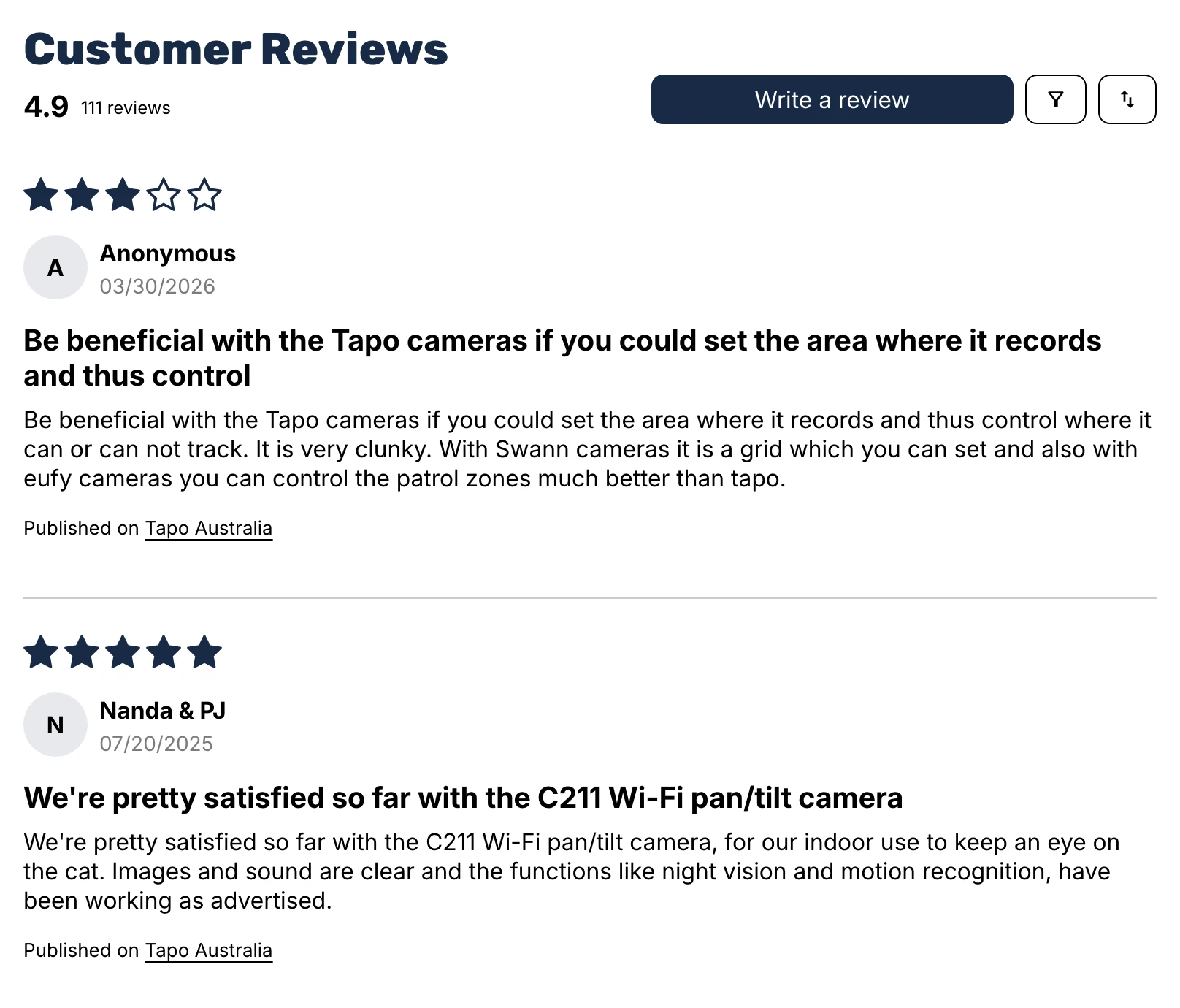
On the product page, imported reviews aren’t marked verified and show the source link beneath each review.
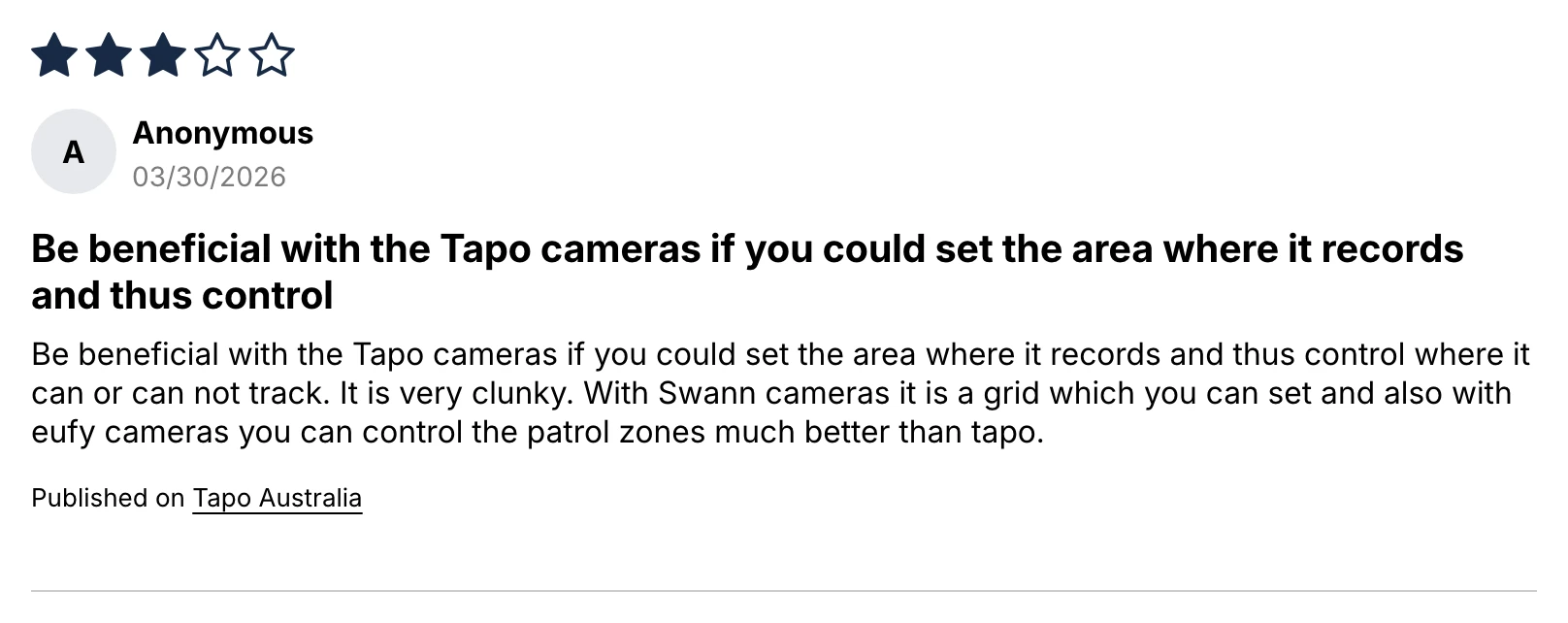
Keep imported reviews out of any custom Product review or aggregateRating structured data you add in your theme (Google’s review snippet guidelines require ratings collected directly from your users), and know that Judge.me’s Google Shopping feed already leaves imported reviews out.
What it costs
| Piece | Cost (checked November 2026) |
|---|---|
| n8n | Free self-hosted, or an n8n Cloud plan |
| Manufacturer store search and pages | Free (public pages and Shopify’s own search) |
| Judge.me | Free plan imports this CSV |
| Slack | Free plan works |
| AI model, paid APIs | None |
Running Find and Collect hourly and Export daily is about 1,470 scheduled runs a month, plus one webhook run per Slack button click. Because the workflow queries Shopify’s public /search/suggest.json endpoint and Judge.me’s public widget endpoint directly without an AI model or a third-party scraping service, there are no per-page API fees to pay. On self-hosted n8n that means the entire pipeline costs US$0, whereas on n8n Cloud your monthly execution allowance matters more than any API fee. Once your initial catalogue backlog is done, slow the Find and Collect schedules down, adjust batch_size in Find and Collect, raise recheck_days for weekly re-reads of approved pages, or paste known URLs into custom.review_source_url by hand instead of searching.
Common mistakes
Matching a kit, twin pack or older generation to a single product
Manufacturer stores often sell a single unit alongside a solar kit, a 2-pack and a multi-camera bundle under the same model prefix. Keep pack_words filled out and put the exact model code in custom.mpn so hasModel and extraPack skip bundles your product isn’t.
Importing only the 4 and 5 star reviews
Dropping 1-star to 3-star reviews risks breaching the FTC rule against hiding negative reviews and ACCC online review guidance, and makes a store look curated. Keeping the C410’s 2-star review alongside its nine 5-star reviews is what makes the set credible.
Importing the first page of a paginated set
Reading only page 1 of a widget gives a skewed average that misrepresents the product. The completeness check holds any page as incomplete unless the count and average match the page’s totals.
Letting a product group’s reviews in
On KeepCup’s 12oz Mulberry page, 129 of the 152 reviews in the widget belong to 8oz cups, 20oz cups, lids and other colours. Keep same_product set to "page" (or "title" for identical sizes across colours) so pooled products are filtered out.
Uploading the same CSV twice
Judge.me doesn’t deduplicate rows on import, so uploading a batch twice doubles your review count. Import each file once and click Mark imported right away.
Labelling imported reviews as verified or putting them in your star markup
Never mark manufacturer reviews as verified buyers from your store, and keep them out of any custom aggregateRating schema in your theme.
Tidying the review text
Editing spelling or trimming sentences goes against both the FTC’s and the ACCC’s guidance on editing reviews, and the reviewer didn’t write your version. Keep the text word for word and let CFReview continued carry anything over 5,000 characters.
Make it your own
Another review app’s CSV
For Loox, Okendo or Yotpo, change the column map in toRow and cols in Build the CSV to match that app’s import columns.
Another widget on the manufacturer’s site
For Yotpo, Okendo, Bazaarvoice or Doran widgets, add a reader in Read the reviews for the widget’s public storefront endpoint with the same completeness checks.
Official syndication if the manufacturer offers it
Some brands run official review syndication through Bazaarvoice or PowerReviews; if your supplier offers syndicated reviews directly, use their feed first.
Email instead of Slack for the CSV
Replace Upload the CSV in the Export lane with a Gmail or Send Email node that attaches the data binary from Build the CSV.
A store that isn’t on Shopify
The scrape and checks stay identical on WooCommerce or BigCommerce; only the product query and CSV format change.
Frequently asked questions
Is it legal to copy reviews from the manufacturer’s website?
Under US (FTC 16 CFR 465) and Australian (ACCC) consumer law, reposting genuine reviews of the exact same product is generally allowed when you keep every star rating, leave the text word for word, show where each review came from, and don’t mark them as verified buyers on your store. Copyright and the manufacturer’s website terms are a separate question that consumer law doesn’t settle, so check the site’s terms and ask the manufacturer or your distributor for permission first.
Will imported reviews show stars in Google?
No, because Google’s review snippet guidelines and Merchant Center policies require ratings to be collected directly from your own customers. Judge.me already leaves imported reviews out of its Google Shopping feed, and you should keep them out of any Product review or aggregateRating markup you add to your theme.
Can I import reviews from Amazon or AliExpress?
AliExpress reviews come with the products you import from AliExpress, and the guide to adding products to Shopify automatically covers them. If you’re asking whether you can import Amazon reviews to Shopify, this template doesn’t read Amazon, and the same-product and source-attribution rules would still apply; read Amazon’s Conditions of Use before you try.
Do imported reviews count as verified?
No. Judge.me doesn’t mark CSV-imported reviews as verified, because import data doesn’t meet its verification standards, and these reviewers didn’t buy from your store anyway. Instead, each review shows First published on and Source page underneath so shoppers can see and visit the original source.
How often does it check for new reviews?
The Find and Collect lanes run hourly for newly tagged products, and Collect re-reads every approved and no_reviews page once every 7 days (recheck_days in Collect settings). Any new reviews found on an approved page flow straight into the next morning’s CSV export without needing a second approval card.
Next steps
Paste the manufacturer review page into three products, tag them find-reviews, run Collect, approve the cards in Slack and import your first CSV.