Automated Inventory Management for Shopify: Sync Supplier Stock With n8n (Free Template)

Last tested on n8n 2.46, November 2026.
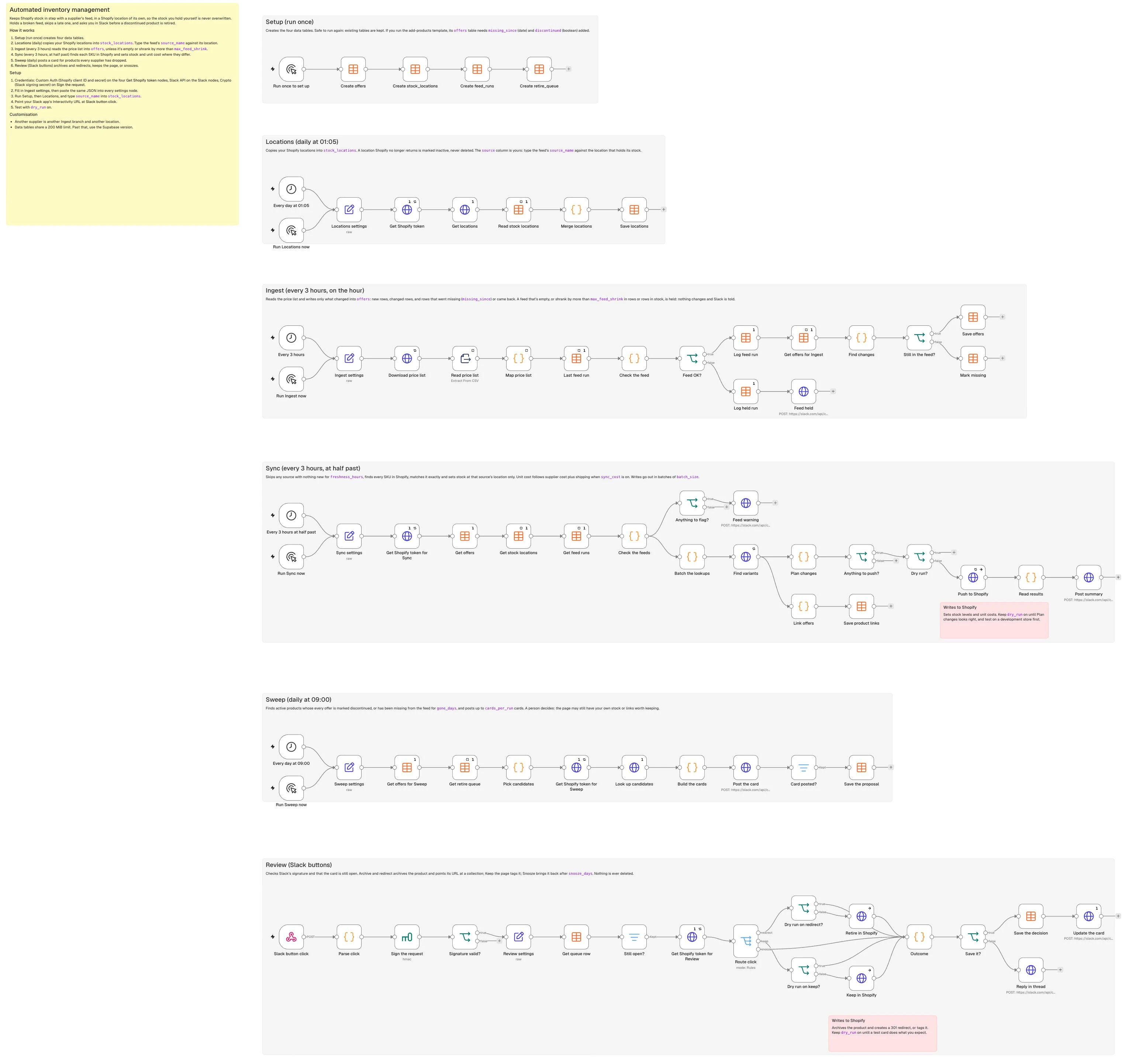
Overselling usually starts the same way: a customer pays for an item your supplier sold out of yesterday, and you spend the morning apologising and refunding the order. Meanwhile, products the supplier quietly dropped months ago still sit in your catalogue as sold out. Most guides on automated inventory management or Shopify inventory sync (such as Extensiv’s and Prediko’s) explain the concept without touching supplier feeds, and a plain CSV import or basic sync job can zero your entire store if a supplier’s file comes through empty, or overwrite the stock you hold in your own warehouse. By the end of this guide, you’ll have an n8n workflow that automates inventory management across supplier locations every three hours, holds broken feeds before they touch Shopify, and proposes discontinued products for retirement in Slack.
What you’ll build
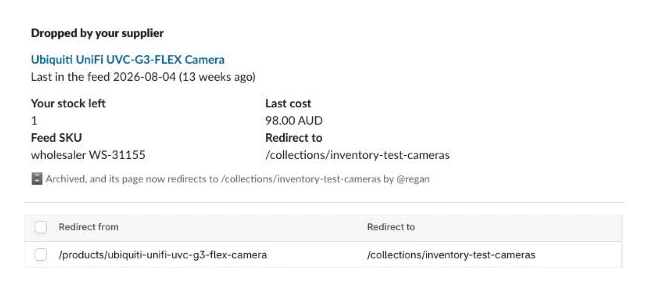
Every three hours, the workflow compares your supplier feed against Shopify, writes only the stock levels and unit costs that changed, and posts a single log line in Slack. We’ll follow one supplier feed (wholesaler) and three cameras through every step: a Reolink RLC-810A whose supplier stock drops from 14 to 9 while you still hold 2 in your own warehouse, a TP-Link VIGI C540(4mm) that drops from 3 to 0, and a Ubiquiti UVC-G3-FLEX (say your wholesaler stopped listing it 94 days ago).

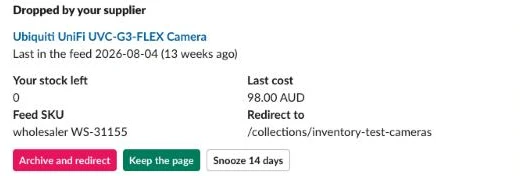
When every offer for a product has been marked discontinued in the feed, or has been missing from it for 90 days, the daily sweep posts a Slack card so a person can decide whether to archive and redirect the URL, keep the page as sold out, or snooze it.
On a store I run with about 3,400 variants, the stock sync ran 218 times in 30 days (every 3 hours) and 186 of those runs (85%) changed at least one stock level, with a median of 51 levels a run.
What you need
- n8n (the free self-hosted Community Edition or n8n Cloud) with Data Tables enabled.
- A Shopify custom app with six Admin API scopes:
read_products,write_products,read_inventory,write_inventory,read_locations, andwrite_online_store_navigation. - One Shopify location per supplier (such as “Wholesaler”) set to fulfil online orders, separate from your own “Warehouse” location.
- A supplier feed you can fetch on a schedule (we use a CSV over HTTP).
- A Slack app with
chat:write, Interactivity enabled, and its signing secret. - No AI model or paid third-party APIs; the running cost is US$0 on self-hosted n8n.
How it works

- Setup (Manual Trigger): Creates the
offers,stock_locations,feed_runs, andretire_queueData Tables once so every lane has a shared place to store state. - Locations (Schedule daily at 01:05, plus Manual): Pulls all active and inactive locations from Shopify into
stock_locationswithout overwriting thesourcename you assign, because writing supplier stock to its own Shopify location is what keeps your own warehouse counts safe. - Ingest (Schedule every 3 hours on the hour, plus Manual): Downloads the supplier CSV, normalises stock and cost, and compares total rows and in-stock rows against the last good run. If the feed is empty or shrank by more than 20%, Ingest holds the file and alerts Slack because the worst inventory bug is a broken file that marks your whole catalogue sold out. A good feed writes only the rows that changed, went missing or came back.
- Sync (Schedule every 3 hours at half past, plus Manual): Skips any source with no good feed run in the last 12 hours, matches variants by SKU, calculates the target stock at the supplier’s location, and pushes only the differences in batches so each run stays fast and inside Shopify’s rate limits.
- Sweep (Schedule daily at 09:00, plus Manual): Finds active products whose supplier offers have all been marked discontinued, or missing from the feed for 90 days, and posts up to 10 Slack cards a morning, leaving the decision to a person because a page might still have warehouse stock to sell through or backlinks worth keeping.
- Review (Webhook): Listens for button clicks on those Slack cards, verifies the Slack signature, and either archives the product with a 301 redirect to its closest collection, tags it to stay live as sold out, or snoozes the card for 14 days.
Step 1: Create the tables and map your locations
In the Setup lane, start with a Manual Trigger connected to four Data table nodes (Table > Create, with Reuse Existing Tables turned on) to create the tables below. If you already run the companion guide How to Add Products to Shopify Automatically, you can reuse its offers table and just add the missing_since (Date) and discontinued (Boolean) columns; this template only reads source, source_sku, mpn, gtin, brand, title, category_raw, cost, shipping_cost, rrp, stock, image_url, product_id, missing_since, and discontinued, while the remaining columns keep the shared table shape intact:
| Table | Columns |
|---|---|
offers | String: source, source_sku, item_id, sku_id, mpn, gtin, brand, title, description, category_raw, product_type, shopify_category_id, ships_from, image_url, raw, freight_method, block_reason, status, reviewed_by, product_id, card_ts, card_nonce, draft_card_tsNumber: cost, shipping_cost, rrp, stock, delivery_days, est_priceDate: missing_sinceBoolean: discontinued |
stock_locations | String: location_id, name, sourceBoolean: is_active, fulfills_online_orders |
feed_runs | String: source, status (ok or held), reasonNumber: rows, in_stockDate: run_at |
retire_queue | String: product_id, title, handle, redirect_to, status (proposed, retired, kept or snoozed), decided_by, slack_channel, slack_tsDate: gone_since, snooze_until, decided_at |
Every remaining lane starts with a <Lane> settings Set node (Mode: JSON) holding the same shared configuration JSON. Paste this JSON into Locations settings (and into Ingest settings, Sync settings, Sweep settings, and Review settings as you build those lanes):
{
  "store_domain": "your-store.myshopify.com",
  "currency": "USD",
  "source_name": "wholesaler",
  "price_list_url": "https://example.com/price-list.csv",
  "columns": {
    "source_sku": "Stock Code", "brand": "Manufacturer", "mpn": "Part No", "gtin": "EAN",
    "title": "Description", "category": "Category", "cost": "Dealer Ex Tax",
    "rrp": "RRP", "stock": "Stock", "image": "Image URL", "discontinued": "Status"
  },
  "discontinued_values": ["discontinued", "eol", "end of life"],
  "cost_includes_tax": false,
  "tax_rate": 0,
  "shipping_per_unit": 0,
  "max_feed_shrink": 0.2,
  "freshness_hours": 12,
  "safety_stock": 0,
  "sync_cost": true,
  "max_changes": 2000,
  "batch_size": 50,
  "gone_days": 90,
  "cards_per_run": 10,
  "snooze_days": 14,
  "retire_tag": "discontinued",
  "keep_template_suffix": "",
  "fallback_redirect": "/collections/all",
  "slack_review_channel": "C0123456789",
  "slack_log_channel": "C0123456789",
  "dry_run": true
}
In the Locations lane, connect a Schedule Trigger (daily at 01:05) and a Manual Trigger into Locations settings, then add an HTTP Request node named Get Shopify token that fetches a fresh Admin API token for the run (the repo’s SETUP.md covers the credential):
| Setting | Value |
|---|---|
| Method | POST |
| URL | https://{{ $('Locations settings').first().json.store_domain }}/admin/oauth/access_token |
| Authentication | Generic Credential Type > Custom Auth (your app’s client ID and secret) |
| Body (Form URL Encoded) | grant_type = client_credentials |
| Settings > Execute Once | On |
| Settings > Retry On Fail | On, 3 tries, 2000 ms between |
Connect Get Shopify token to an HTTP Request node named Get locations with this GraphQL query:
| Setting | Value |
|---|---|
| Method | POST |
| URL | https://{{ $('Locations settings').first().json.store_domain }}/admin/api/2026-10/graphql.json |
| Header | X-Shopify-Access-Token = {{ $('Get Shopify token').first().json.access_token }} |
| Body (JSON) | {{ JSON.stringify({ query: <the query below> }) }} |
| Settings > Execute Once | On |
query Locations {
  locations(first: 100, includeInactive: true) {
    nodes { id name isActive fulfillsOnlineOrders }
  }
}
Shopify adds up available inventory across all locations that fulfil online orders, so giving each supplier its own Shopify location ensures the sync only writes to “Wholesaler” and never touches the 2 units of the Reolink RLC-810A sitting in “Warehouse”. Next, add a Data table node Read stock locations and connect it to a Code node Merge locations that refuses an empty response and marks removed locations inactive:
| Setting | Value |
|---|---|
| Operation | Row > Get, table stock_locations |
| Return All | On |
| Settings > Execute Once | On |
| Settings > Always Output Data | On |
// Refuse an empty answer, so a Shopify hiccup can never mark every location inactive.
const nodes = $('Get locations').first().json.data?.locations?.nodes || [];
if (!nodes.length) throw new Error('Shopify returned no locations; nothing changed');
const known = $('Read stock locations').all().map(i => i.json).filter(r => r.location_id);
const ids = new Set(nodes.map(n => n.id));
const rows = nodes.map(n => ({ location_id: n.id, name: n.name, is_active: n.isActive, fulfills_online_orders: n.fulfillsOnlineOrders }));
for (const r of known) if (!ids.has(r.location_id)) rows.push({ location_id: r.location_id, name: r.name, is_active: false, fulfills_online_orders: false });
return rows.map(json => ({ json }));
Finish the lane with a Data table node Save locations, which leaves source unmapped so the value you type by hand is never overwritten:
| Setting | Value |
|---|---|
| Operation | Row > Upsert, table stock_locations |
| Conditions | location_id equals {{ $json.location_id }} |
| Columns | location_id, name, is_active, fulfills_online_orders, each {{ $json.<column> }} |
Run Setup and Locations once, then open the stock_locations table and type wholesaler into the source column of your “Wholesaler” row. Running Locations again keeps what you typed.

Step 2: Bring the supplier feed into the offers table
Suppliers rarely send a notice when they drop a product; the row simply disappears from the next CSV, which is why comparing each file with the offers you already hold is the only reliable way to tell a live offer from a dead one: a row that’s in offers but not in today’s file has gone, and missing_since records when. In the Ingest lane, connect a Schedule Trigger (Cron 0 */3 * * *) and a Manual Trigger to Ingest settings, followed by an HTTP Request node Download price list and an Extract From File node Read price list:
| Node | Setting | Value |
|---|---|---|
Download price list | Method | GET |
| URL | {{ $json.price_list_url }} | |
| Options > Response > Response Format | File | |
| Settings > Retry On Fail | On, 3 tries, 5000 ms between | |
Read price list | Operation | Extract From CSV |
| Settings > Always Output Data | On, so an empty file still reaches the feed check |
Next, add a Code node Map price list (also with Always Output Data on) to clean the numbers, strip tax when cost_includes_tax is true, and convert stock strings like "20+" to 20 or "CALL" to 0:
// One price list row -> one offer row. Column names come from settings.
const s = $('Ingest settings').first().json;
const c = s.columns;
const text = v => (v ?? '').toString().trim();
const num = v => {
  let t = text(v).replace(/[^0-9.,\-]/g, '');
  if (/,\d{1,2}$/.test(t)) t = t.replace(/\./g, '').replace(',', '.'); // "1.234,50" -> 1234.50
  else t = t.replace(/,/g, '');                                       // "1,234.50" -> 1234.50
  const n = parseFloat(t); return Number.isFinite(n) ? n : null;
};
const qty = v => { const n = parseInt(text(v).replace(/[^0-9]/g, ''), 10); return Number.isFinite(n) ? n : 0; }; // "20+" -> 20, "CALL" -> 0
const gone = v => s.discontinued_values.includes(text(v).toLowerCase());
return $input.all().map(({ json: r }) => {
  let cost = num(r[c.cost]);
  if (cost !== null && s.cost_includes_tax) cost = +(cost / (1 + s.tax_rate)).toFixed(2);
  return { json: {
    source: s.source_name, source_sku: text(r[c.source_sku]),
    mpn: text(r[c.mpn]), gtin: text(r[c.gtin]).replace(/\D/g, ''),
    brand: text(r[c.brand]), title: text(r[c.title]), category_raw: text(r[c.category]),
    cost, shipping_cost: s.shipping_per_unit || 0, rrp: num(r[c.rrp]),
    stock: qty(r[c.stock]), image_url: text(r[c.image]),
    discontinued: c.discontinued ? gone(r[c.discontinued]) : false,
  } };
}).filter(i => i.json.source_sku);
Step 3: Hold a feed that looks broken
If a supplier’s server truncates the CSV or exports zeroes during a nightly rebuild, writing that file straight into offers would zero your store on the next sync. After Map price list, add a Data table node Last feed run that reads the newest good run for this source, once per execution rather than once per CSV row:
| Setting | Value |
|---|---|
| Operation | Row > Get, table feed_runs |
| Conditions | source equals {{ $('Ingest settings').first().json.source_name }} and status equals ok |
| Return All | Off, Limit 1 |
| Order By | On, column run_at, direction DESC |
| Settings > Execute Once | On |
| Settings > Always Output Data | On |
Connect it to a Code node Check the feed that flags an empty file or a drop of more than max_feed_shrink (20%) in total rows or in-stock rows:
// Hold the whole feed when it looks broken, so a bad file can't zero your store.
const s = $('Ingest settings').first().json;
const rows = $('Map price list').all().map(i => i.json).filter(r => r.source_sku);
const last = $('Last feed run').first().json || {};
const inStock = rows.filter(r => r.stock > 0).length;
const reasons = [];
if (!rows.length) reasons.push('the feed has no rows');
if (last.rows > 0 && rows.length < last.rows * (1 - s.max_feed_shrink))
  reasons.push(`the feed shrank from ${last.rows} to ${rows.length} rows`);
if (last.in_stock > 0 && inStock < last.in_stock * (1 - s.max_feed_shrink))
  reasons.push(`rows in stock fell from ${last.in_stock} to ${inStock}`);
return [{ json: {
  source: s.source_name, rows: rows.length, in_stock: inStock,
  status: reasons.length ? 'held' : 'ok', reason: reasons.join('; '),
  run_at: new Date().toISOString(),
} }];
Connect Check the feed to an If node Feed OK? ({{ $json.status }} equals ok). On the true branch, add a Data table node Log feed run (Row > Insert on feed_runs, mapping source, status, reason, rows, in_stock and run_at from {{ $('Check the feed').first().json }}, Execute Once on), then a Data table node Get offers for Ingest (Row > Get on offers where source equals {{ $('Ingest settings').first().json.source_name }}, Return All, Execute Once and Always Output Data on).
Writing every row on every run would be simple, but Data table writes are one call per row, and on our test instance an upsert took between 50 ms and 1 second, so a 3,400-row feed would spend up to an hour a run just restating what hasn’t changed. Instead, connect a Code node Find changes that returns only new rows, changed rows, rows that came back, and rows that went missing:
// Write only what changed: new rows, changed rows, rows that came back, and rows that went missing.
const feed = $('Map price list').all().map(i => i.json).filter(r => r.source_sku);
const known = new Map($('Get offers for Ingest').all().map(i => i.json).filter(o => o.source_sku).map(o => [o.source_sku, o]));
const fields = ['mpn', 'gtin', 'brand', 'title', 'category_raw', 'cost', 'shipping_cost', 'rrp', 'stock', 'image_url', 'discontinued'];
const same = (a, b) => (a ?? '') === (b ?? '') || ((typeof a === 'number' || typeof b === 'number') && Number(a) === Number(b));
const now = new Date().toISOString();
const out = [], inFeed = new Set();
for (const r of feed) {
  inFeed.add(r.source_sku);
  const o = known.get(r.source_sku);
  if (!o || o.missing_since || fields.some(f => !same(r[f], o[f]))) out.push({ ...r, kind: 'seen', missing_since: null });
}
for (const [sku, o] of known)
  if (!inFeed.has(sku) && !o.missing_since) out.push({ kind: 'missing', id: o.id, source_sku: sku, missing_since: now });
return out.map(json => ({ json }));
On our test feed of 30 rows, the first run wrote all 30 in 1.7 seconds, an unchanged feed wrote nothing, and the next day’s file wrote three rows: the Reolink’s new stock and cost, the VIGI C540 at 0, and the UVC-G3-FLEX marked missing. Connect Find changes to an If node Still in the feed? ({{ $json.kind }} equals seen) and finish with two Data table nodes:
| Node | Setting | Value |
|---|---|---|
Save offers (true) | Operation | Row > Upsert, table offers |
| Conditions | source equals {{ $json.source }} and source_sku equals {{ $json.source_sku }} | |
| Columns | source, source_sku, mpn, gtin, brand, title, category_raw, cost, shipping_cost, rrp, stock, image_url, discontinued, missing_since, each {{ $json.<column> }} | |
Mark missing (false) | Operation | Row > Update, table offers |
| Conditions | id equals {{ $json.id }} | |
| Columns | missing_since = {{ $json.missing_since }} |
Save offers leaves status and product_id unmapped so existing product links and review states survive. On the false branch of Feed OK?, add a Data table node Log held run (the same Insert into feed_runs, Execute Once on) and an HTTP Request node Feed held (POST https://slack.com/api/chat.postMessage, Predefined Credential Type > Slack API) with this body:
{{ JSON.stringify({ channel: $('Ingest settings').first().json.slack_log_channel, unfurl_links: false, text: ':warning: Held the ' + $('Check the feed').first().json.source + ' feed: ' + $('Check the feed').first().json.reason + '. Nothing in offers or Shopify changed.' }) }}Because a held run never touches offers, and the Sync lane judges freshness from the last good run in feed_runs, a feed that stays broken past freshness_hours (12 hours) is skipped altogether instead of zeroing your stock. On our test store, a file with only a header row was held with “the feed has no rows; the feed shrank from 30 to 0 rows; rows in stock fell from 29 to 0”, and a seven-row file whose in-stock rows fell from 7 to 5 was held too, which is a reminder that a tiny test feed trips the 20% rule easily. Test this after your first good ingest by pinning a short CSV on Read price list and running the lane to confirm Feed held fires in Slack.

Step 4: Find each product’s variants in Shopify
In the Sync lane, connect a Schedule Trigger (Cron 30 */3 * * *) and a Manual Trigger into Sync settings, followed by Get Shopify token for Sync (set up like Get Shopify token) and three Data table nodes in a row:
| Node | Operation | Other settings |
|---|---|---|
Get offers | Row > Get, table offers | Return All, Execute Once |
Get stock locations | Row > Get, table stock_locations | Return All, Execute Once, Always Output Data |
Get feed runs | Row > Get, table feed_runs, status equals ok | Limit 200, Order By run_at DESC, Execute Once, Always Output Data |
Connect them to a Code node Check the feeds to filter out any supplier with no good feed run within freshness_hours or without an active mapped location, and to spot any supplier location that isn’t fulfilling online orders (because Shopify shows a product as out of stock online when the online-fulfilment location is at zero):
// Skip any source whose feed has gone quiet or has nowhere to put its stock, and say so.
const s = $('Sync settings').first().json;
const offers = $('Get offers').all().map(i => i.json).filter(o => o.source && o.source_sku);
const locations = $('Get stock locations').all().map(i => i.json).filter(l => l.is_active && l.source);
const hours = d => (Date.now() - new Date(d).getTime()) / 36e5;

const newest = {};   // the last good feed run per source
for (const { json: r } of $('Get feed runs').all())
  if (r.source) newest[r.source] = Math.max(newest[r.source] || 0, new Date(r.run_at).getTime());
const sources = [...new Set([...Object.keys(newest), ...locations.map(l => l.source)])]
  .filter(src => offers.some(o => o.source === src));
const stale = sources.filter(src => !newest[src] || hours(newest[src]) > s.freshness_hours);
const unmapped = sources.filter(src => !locations.some(l => l.source === src));
const offline = locations.filter(l => !l.fulfills_online_orders).map(l => l.name);
const live = sources.filter(src => !stale.includes(src) && !unmapped.includes(src))
  .map(src => ({ source: src, location_id: locations.find(l => l.source === src).location_id }));
return [{ json: { live, stale, unmapped, offline, warn: stale.length + unmapped.length + offline.length > 0 } }];
Connect Check the feeds to two branches. On the first branch, add an If node Anything to flag? ({{ $json.warn }} is true) leading into an HTTP Request node Feed warning (POST https://slack.com/api/chat.postMessage, Slack API credential) with this body:
{{ JSON.stringify({ channel: $('Sync settings').first().json.slack_log_channel, unfurl_links: false, text: (j => [
  j.stale.length ? 'Feed gone quiet, skipped: ' + j.stale.join(', ') + ' (nothing new for more than ' + $('Sync settings').first().json.freshness_hours + ' hours)' : '',
  j.unmapped.length ? 'No Shopify location for: ' + j.unmapped.join(', ') + '. Type the source name into stock_locations.' : '',
  j.offline.length ? 'Not fulfilling online orders: ' + j.offline.join(', ') + '. Stock there shows as sold out online.' : ''
].filter(Boolean).join('\n'))($json) }) }}
On the second branch from Check the feeds, add a Code node Batch the lookups. Because the add-products template sets a variant’s SKU to the manufacturer part number (mpn) when present or to source_sku when not, we search productVariants for both in batches of 50 SKUs per source:
// One search per 50 SKUs, per source, carrying the location that source's stock lives in.
const { live } = $('Check the feeds').first().json;
const offers = $('Get offers').all().map(i => i.json);
const quote = k => 'sku:"' + String(k).replace(/["\\]/g, '').trim() + '"';
const out = [];
for (const { source, location_id } of live) {
  const keys = [...new Set(offers.filter(o => o.source === source)
    .flatMap(o => [o.mpn, o.source_sku]).filter(Boolean).map(k => String(k).trim()))];
  for (let i = 0; i < keys.length; i += 50)
    out.push({ json: { source, location_id, q: keys.slice(i, i + 50).map(quote).join(' OR ') } });
}
return out;
Connect Batch the lookups to an HTTP Request node Find variants. Asking for a single location’s InventoryItem level per query keeps the GraphQL query cost well under Shopify’s 1,000-point single-query maximum; a batch of 50 SKUs asked for 47 points and used 3 in our test:
| Setting | Value |
|---|---|
| Method | POST |
| URL | https://{{ $('Sync settings').first().json.store_domain }}/admin/api/2026-10/graphql.json |
| Header | X-Shopify-Access-Token = {{ $('Get Shopify token for Sync').first().json.access_token }} |
| Body (JSON) | {{ JSON.stringify({ query: <the query below>, variables: { q: $json.q, loc: $json.location_id } }) }} |
| Options > Batching | Items per Batch 1, Batch Interval 500 ms |
| Settings > Retry On Fail | On, 3 tries |
Use this GraphQL query inside the Body (JSON) expression above:
query FindVariants($q: String!, $loc: ID!) {
  productVariants(first: 100, query: $q) {
    nodes {
      id
      sku
      inventoryPolicy
      product { id title status }
      inventoryItem {
        id
        tracked
        unitCost { amount }
        inventoryLevel(locationId: $loc) { quantities(names: ["available"]) { quantity } }
      }
    }
  }
}
On our test store, Shopify’s SKU search matched whole SKUs and ignored case: sku:"UVC-G3-FLEX" returned that variant and not a decoy with the SKU UVC-G3-FLEX-3, and sku:"vigi c540(4mm)" found VIGI C540(4mm). Shopify’s search syntax doesn’t promise an exact match, so Link offers and Plan changes still compare every returned SKU with the offer before using it. From Find variants, connect a parallel Code node Link offers to record each matched variant’s Shopify product_id on its offer row so the Sweep lane can group offers by product later:
// Remember which Shopify product each offer belongs to, so the Sweep lane can find it later.
const batches = $('Batch the lookups').all().map(i => i.json);
const key = (src, k) => src + '|' + String(k).trim().toUpperCase();
const offerFor = new Map();
for (const { json: o } of $('Get offers').all())
  for (const k of [o.source_sku, o.mpn]) if (k) offerFor.set(key(o.source, k), o);
const links = new Map();
$input.all().forEach((res, i) => {
  for (const v of res.json.data?.productVariants?.nodes || []) {
    const o = v.sku && offerFor.get(key(batches[i].source, v.sku));
    if (o && o.product_id !== v.product.id) links.set(o.id, { id: o.id, product_id: v.product.id });
  }
});
return [...links.values()].map(json => ({ json }));
Connect Link offers to a Data table node Save product links (Row > Update on offers, matching id = {{ $json.id }}, setting product_id = {{ $json.product_id }}).
Step 5: Work out what each variant should hold
Also connected to Find variants, add a Code node Plan changes. Because Shopify’s SKU search can return near matches, the code matches v.sku against source_sku or mpn exactly, skips archived products and untracked items, and records any variant where inventoryPolicy is CONTINUE (which means “Continue selling when out of stock” is turned on). It sets the target quantity to 0 if the offer is marked discontinued or has gone missing from the feed, or to stock - safety_stock otherwise, and keeps only the variants whose current level at the supplier’s location differs from the target. When sync_cost is true, it also queues inventoryItemUpdate calls whenever the landed unit cost (supplier cost plus shipping_cost) differs by at least a cent; retail prices are untouched here because pricing is covered in a separate guide in this set, “How to Build a Shopify Repricing Engine With n8n”.
Here’s the Plan changes code:
// What each matched variant should hold at its source's location. Only differences are kept.
const s = $('Sync settings').first().json;
const batches = $('Batch the lookups').all().map(i => i.json);
const key = (src, k) => src + '|' + String(k).trim().toUpperCase();
const offerFor = new Map();
for (const { json: o } of $('Get offers').all())
  for (const k of [o.source_sku, o.mpn]) if (k) offerFor.set(key(o.source, k), o);

const levels = [], costs = [], continueSelling = [];
let archived = 0, untracked = 0;
const seen = new Set();
$input.all().forEach((res, i) => {           // one response per batch, in the same order
  const b = batches[i];
  for (const v of res.json.data?.productVariants?.nodes || []) {
    const o = v.sku && offerFor.get(key(b.source, v.sku));
    if (!o || seen.has(v.id)) continue;      // the search returned a near match, or a repeat
    seen.add(v.id);
    if (v.product.status === 'ARCHIVED') { archived++; continue; }
    if (!v.inventoryItem.tracked) { untracked++; continue; }
    if (v.inventoryPolicy === 'CONTINUE') continueSelling.push(v.product.title);

    const dropped = Boolean(o.missing_since);
    const target = o.discontinued || dropped ? 0 : Math.max(0, (o.stock || 0) - s.safety_stock);
    const level = v.inventoryItem.inventoryLevel;
    const current = level ? level.quantities[0].quantity : null;
    if (level ? current !== target : target > 0) levels.push({
      kind: 'level', item: v.inventoryItem.id, location: b.location_id, has_level: !!level,
      target, current, title: v.product.title, sku: v.sku,
      reason: o.discontinued ? 'discontinued' : dropped ? 'dropped from feed' : 'supplier stock',
    });

    const landed = o.cost > 0 ? +(o.cost + (o.shipping_cost || 0)).toFixed(2) : null;
    const unit = v.inventoryItem.unitCost ? Number(v.inventoryItem.unitCost.amount) : null;
    if (s.sync_cost && landed && (unit === null || Math.abs(unit - landed) >= 0.01))
      costs.push({ kind: 'cost', item: v.inventoryItem.id, cost: landed, title: v.product.title });
  }
});

// Batched mutations. Each write carries an idempotency key, so a retried request can't apply twice.
const q = v => JSON.stringify(String(v));
const run = String($execution.id);
const planned = levels.slice(0, s.max_changes);
const summary = { planned: planned.length, carried_over: levels.length - planned.length,
  costs_planned: costs.length, archived, untracked, continue_selling: continueSelling };
const out = [];
for (let b = 0; b < planned.length; b += s.batch_size) {
  const batch = planned.slice(b, b + s.batch_size);
  const acts = batch.filter(r => !r.has_level), sets = batch.filter(r => r.has_level);
  const parts = acts.map((r, i) => `a${i}: inventoryActivate(inventoryItemId: ${q(r.item)}, locationId: ${q(r.location)}, available: ${r.target}) @idempotent(key: ${q(run + '-a-' + b + '-' + i)}) { inventoryLevel { id } userErrors { field message } }`);
  if (sets.length) parts.push(`s: inventorySetQuantities(input: { name: "available", reason: "correction", quantities: [${sets.map(r => `{ inventoryItemId: ${q(r.item)}, locationId: ${q(r.location)}, quantity: ${r.target}, changeFromQuantity: null }`).join(', ')}] }) @idempotent(key: ${q(run + '-s-' + b)}) { userErrors { field message } }`);
  out.push({ json: { kind: 'level', acts, sets, mutation: `mutation { ${parts.join(' ')} }`, summary } });
}
for (let b = 0; b < costs.length; b += s.batch_size) {
  const rows = costs.slice(b, b + s.batch_size);
  const parts = rows.map((r, i) => `c${i}: inventoryItemUpdate(id: ${q(r.item)}, input: { cost: ${q(r.cost.toFixed(2))} }) { inventoryItem { id } userErrors { field message } }`);
  out.push({ json: { kind: 'cost', rows, mutation: `mutation { ${parts.join(' ')} }`, summary } });
}
return out.length ? out : [{ json: { kind: 'none', summary } }];
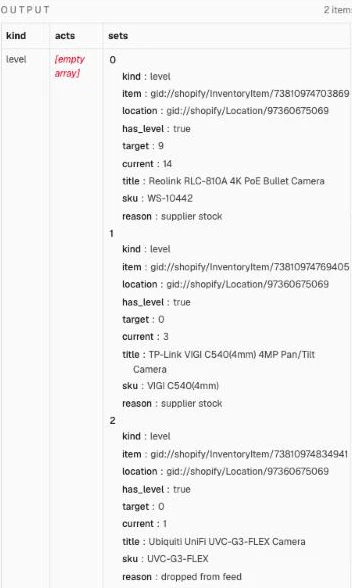
In our three-camera example, Plan changes plans the Reolink RLC-810A from 14 to 9 at “Wholesaler” (supplier stock), the TP-Link VIGI C540(4mm) from 3 to 0 (supplier stock), and the Ubiquiti UVC-G3-FLEX from 1 to 0 (dropped from feed), while the RLC-810A’s 2 units at “Warehouse” aren’t in the plan at all.
Step 6: Push the changes and report
In API version 2026-10, both inventorySetQuantities and inventoryActivate need an @idempotent directive key (without one, Shopify answers “The @idempotent directive is required for this mutation”), and inventorySetQuantities needs changeFromQuantity on every item (passing null skips the compare-and-swap check when you want your supplier sync to set the authoritative number). inventoryActivate is what a variant needs the first time it gets stock at the supplier’s location. A single-batch mutation built by Plan changes looks like this:
mutation {
  s: inventorySetQuantities(input: { name: "available", reason: "correction", quantities: [
    { inventoryItemId: "gid://shopify/InventoryItem/123", locationId: "gid://shopify/Location/456", quantity: 9, changeFromQuantity: null }
  ] }) @idempotent(key: "4821-s-0") { userErrors { field message } }
}
Connect Plan changes to an If node Anything to push? ({{ $json.kind }} not equal to none), and connect its true output to an If node Dry run? ({{ $('Sync settings').first().json.dry_run }} is true). While dry_run is true, the workflow stops here so you can inspect the exact GraphQL mutations in Plan changes. On the false output of Dry run?, add an HTTP Request node Push to Shopify:
| Setting | Value |
|---|---|
| Method | POST |
| URL | https://{{ $('Sync settings').first().json.store_domain }}/admin/api/2026-10/graphql.json |
| Header | X-Shopify-Access-Token = {{ $('Get Shopify token for Sync').first().json.access_token }} |
| Body (JSON) | {{ JSON.stringify({ query: $json.mutation }) }} |
| Options > Batching | Items per Batch 1, Batch Interval 2000 ms |
| Settings > Retry On Fail | On, 2 tries, 3000 ms between |
| Settings > On Error | Continue |
Next, connect Push to Shopify to a Code node Read results that unpacks the GraphQL aliases (a0, s, c0) and records any userErrors without aborting the run:
// One result per planned row. Shopify's errors are recorded here, not thrown, so one bad row doesn't stop the run.
const sent = $('Plan changes').all().map(i => i.json);
const msg = ue => (ue || []).map(e => e.message).join('; ') || null;
const results = [];
$input.all().forEach((res, i) => {
  const b = sent[i], d = res.json.data || {};
  const top = msg(res.json.errors) || (res.json.error ? String(res.json.error.message || res.json.error) : null);
  if (b.kind === 'level') {
    b.acts.forEach((r, n) => {
      const err = top || msg(d['a' + n]?.userErrors) || (d['a' + n]?.inventoryLevel ? null : 'no level returned');
      results.push({ ...r, ok: !err, error: err });
    });
    const setErr = b.sets.length ? (top || msg(d.s?.userErrors) || (d.s ? null : 'no response')) : null;
    b.sets.forEach(r => results.push({ ...r, ok: !setErr, error: setErr }));
  } else {
    b.rows.forEach((r, n) => {
      const err = top || msg(d['c' + n]?.userErrors) || (d['c' + n]?.inventoryItem ? null : 'no item returned');
      results.push({ ...r, ok: !err, error: err });
    });
  }
});
const p = sent[0].summary, lv = results.filter(r => r.kind === 'level'), cs = results.filter(r => r.kind === 'cost');
const summary = { ...p,
  levels_set: lv.filter(r => r.ok).length, zeroed: lv.filter(r => r.ok && r.target === 0).length,
  levels_failed: lv.filter(r => !r.ok).length, costs_set: cs.filter(r => r.ok).length,
  costs_failed: cs.filter(r => !r.ok).length,
  errors: [...new Set(results.filter(r => !r.ok).map(r => r.error))].slice(0, 5) };
return [{ json: { summary, results } }];
Finish the Sync lane with an HTTP Request node Post summary (POST https://slack.com/api/chat.postMessage, Slack API credential) with this body:
{{ JSON.stringify({ channel: $('Sync settings').first().json.slack_log_channel, unfurl_links: false, text: (s => `Stock sync: ${s.levels_set} stock level${s.levels_set === 1 ? '' : 's'} updated (${s.zeroed} set to 0), ${s.costs_set} unit cost${s.costs_set === 1 ? '' : 's'} updated.`
  + (s.carried_over ? `\n${s.carried_over} more changes wait for the next run.` : '')
  + (s.continue_selling.length ? `\nStill selling at zero stock: ${s.continue_selling.slice(0, 5).join(', ')}` : '')
  + (s.levels_failed || s.costs_failed ? `\n:warning: ${s.levels_failed} levels and ${s.costs_failed} costs failed: ${s.errors.join('; ')}` : '')
)($json.summary) }) }}
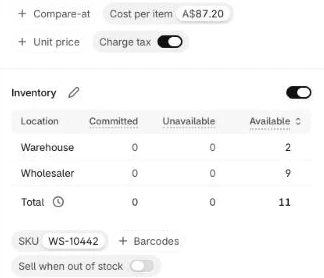
Turn dry_run to false in Sync settings and run the lane; in Shopify admin, the Reolink RLC-810A now shows 9 available at Wholesaler and 2 available at Warehouse, and its cost per item follows the supplier’s new price. On our test store, the whole Sync lane for 31 offers took about 4 seconds, 2.4 of them in Push to Shopify for one stock request and one cost request.
Step 7: Propose discontinued products for retirement
Leaving permanently discontinued items on your site as sold out forever hurts both shoppers and ad feeds, because Google Merchant Center’s availability rules explicitly warn not to set out_of_stock for products you are no longer selling. At the same time, auto-deleting them can wipe out a product page while you still have your own warehouse units to sell through or backlinks worth redirecting, so the Sweep lane queues candidates for a human decision in Slack.
In the Sweep lane, connect a Schedule Trigger (daily at 09:00) and a Manual Trigger into Sweep settings, then add Data table nodes Get offers for Sweep (Row > Get on offers, Return All on, Execute Once on) and Get retire queue (Row > Get on retire_queue, Return All on, Execute Once on, Always Output Data on). Connect them to a Code node Pick candidates that groups offers by product_id and selects up to cards_per_run products whose every offer is marked discontinued or has been missing from the feed for gone_days (90 days), and that haven’t been decided yet (or whose snooze has expired). A product the supplier marks discontinued is proposed straight away, because the supplier has said so; one that simply drops out of the file waits out gone_days, because rows sometimes come back:
// Products whose every offer is marked discontinued, or missing from the feed for gone_days, not decided yet, oldest first.
const s = $('Sweep settings').first().json;
const days = d => (Date.now() - new Date(d).getTime()) / 864e5;
const queue = new Map($('Get retire queue').all().map(i => [i.json.product_id, i.json]));
const open = r => !r || !r.status || (r.status === 'snoozed' && new Date(r.snooze_until) <= new Date());
const byProduct = new Map();
for (const { json: o } of $('Get offers for Sweep').all()) {
  if (!o.product_id) continue;
  byProduct.set(o.product_id, [...(byProduct.get(o.product_id) || []), o]);
}
const picked = [...byProduct].map(([product_id, list]) => ({
    product_id,
    gone: list.every(o => o.discontinued || (o.missing_since && days(o.missing_since) >= s.gone_days)),
    gone_since: list.some(o => o.missing_since)   // when the last offer left the feed; null if only marked discontinued
      ? new Date(Math.max(...list.filter(o => o.missing_since).map(o => new Date(o.missing_since).getTime()))).toISOString() : null,
    skus: list.map(o => o.source + ' ' + o.source_sku),
    cost: list[0].cost,
  }))
  .filter(p => p.gone && open(queue.get(p.product_id)))
  .sort((a, b) => (a.gone_since || '9').localeCompare(b.gone_since || '9'))
  .slice(0, s.cards_per_run);
return picked.length ? [{ json: { ids: picked.map(p => p.product_id), picked } }] : [];
Connect Pick candidates to Get Shopify token for Sweep and then an HTTP Request node Look up candidates (POST to https://{{ $('Sweep settings').first().json.store_domain }}/admin/api/2026-10/graphql.json, header X-Shopify-Access-Token = {{ $('Get Shopify token for Sweep').first().json.access_token }}, body {{ JSON.stringify({ query: <the query below>, variables: { ids: $('Pick candidates').first().json.ids } }) }}, Execute Once on) with this query:
query Candidates($ids: [ID!]!) {
  nodes(ids: $ids) {
    ... on Product {
      id
      title
      handle
      status
      productType
      totalInventory
      collections(first: 10) { nodes { handle title } }
    }
  }
}
Next, add a Code node Build the cards. Because the Sync lane has already zeroed the supplier’s location by 09:00, whatever totalInventory still reports is stock sitting in your own locations (“Your stock left” on the card). Shopify updates totalInventory a few seconds after a stock change rather than at once (a Sweep we ran straight after a Sync still saw 1), which is one more reason the Sweep runs well after the Sync. The code picks the collection whose title matches productType (or the first collection, or fallback_redirect) as the redirect target:
// One card per product still ACTIVE in Shopify. The button value is the product ID and nothing else.
const s = $('Sweep settings').first().json;
const picked = new Map($('Pick candidates').first().json.picked.map(p => [p.product_id, p]));
const pt = text => ({ type: 'plain_text', text });
return ($json.data?.nodes || []).filter(p => p && p.status === 'ACTIVE').map(p => {
  const c = picked.get(p.id);

  const cols = p.collections.nodes;
  const best = cols.find(x => x.title.toLowerCase() === (p.productType || '').toLowerCase()) || cols[0];
  const redirect_to = best ? '/collections/' + best.handle : s.fallback_redirect;
  const admin = `https://${s.store_domain}/admin/products/${p.id.split('/').pop()}`;
  const when = c.gone_since
    ? `Last in the feed ${c.gone_since.slice(0, 10)} (${Math.floor((Date.now() - new Date(c.gone_since).getTime()) / 6048e5)} weeks ago)`
    : 'Marked discontinued in the feed';
  const blocks = [
    { type: 'header', text: pt('Dropped by your supplier') },
    { type: 'section', text: { type: 'mrkdwn', text: `*<${admin}|${p.title}>*\n${when}` } },
    { type: 'section', fields: [
      { type: 'mrkdwn', text: `*Your stock left*\n${p.totalInventory}` },
      { type: 'mrkdwn', text: `*Last cost*\n${c.cost == null ? 'n/a' : Number(c.cost).toFixed(2) + ' ' + s.currency}` },
      { type: 'mrkdwn', text: `*Feed SKU*\n${c.skus.join(', ')}` },
      { type: 'mrkdwn', text: `*Redirect to*\n${redirect_to}` },
    ] },
    { type: 'actions', elements: [
      { type: 'button', action_id: 'retire_redirect', style: 'danger', text: pt('Archive and redirect'), value: p.id,
        confirm: { title: pt('Archive this product?'), text: { type: 'mrkdwn', text: `Archives it and sends its page to ${redirect_to}. Nothing is deleted.` }, confirm: pt('Archive'), deny: pt('Cancel') } },
      { type: 'button', action_id: 'retire_keep', style: 'primary', text: pt('Keep the page'), value: p.id },
      { type: 'button', action_id: 'retire_snooze', text: pt(`Snooze ${s.snooze_days} days`), value: p.id },
    ] },
  ];
  return { json: { product_id: p.id, title: p.title, handle: p.handle, gone_since: c.gone_since, redirect_to, blocks,
    text: `Dropped by your supplier: ${p.title}` } };
});
Connect Build the cards to an HTTP Request node Post the card (POST https://slack.com/api/chat.postMessage, Slack API credential, Options > Batching 1 item per 1100 ms) with this body:
{{ JSON.stringify({ channel: $('Sweep settings').first().json.slack_review_channel, text: $json.text, blocks: $json.blocks, unfurl_links: false }) }}Slack answers HTTP 200 even when it refuses a message, so add a Filter node Card posted? ({{ $json.ok }} is true) before a Data table node Save the proposal, so any card Slack failed to post is left unrecorded and retried tomorrow:
| Setting | Value |
|---|---|
| Operation | Row > Upsert, table retire_queue |
| Conditions | product_id equals {{ $('Build the cards').item.json.product_id }} |
| Columns | product_id, title, handle, gone_since, redirect_to from {{ $('Build the cards').item.json.<column> }}; status = proposed; slack_channel = {{ $json.channel }}; slack_ts = {{ $json.ts }}; decided_by, decided_at and snooze_until = {{ null }} so a snoozed product comes back clean |
Step 8: Retire, keep or snooze from Slack
A Slack app only has one Interactivity Request URL, so if yours already points at another template’s webhook, either route retire_ button actions from there or create a second Slack app (covered in the repo’s SETUP.md). In the Review lane, add a Webhook node Slack button click (HTTP Method: POST, Respond: Immediately, Options > Raw Body on) so Slack gets its 200 response within three seconds. Connect that to a Code node Parse click:
const raw = (await this.helpers.getBinaryDataBuffer(0, 'data')).toString('utf8');
const h = $input.first().json.headers;
if (Math.abs(Date.now() / 1000 - Number(h['x-slack-request-timestamp'])) > 300) throw new Error('Stale request');
const field = raw.split('&').find(kv => kv.startsWith('payload=')) || ''; // no URLSearchParams in the Code node
const p = JSON.parse(decodeURIComponent(field.slice(8).replace(/\+/g, ' ')));
const a = p.actions[0];
return [{ json: { base: `v0:${h['x-slack-request-timestamp']}:${raw}`, expected: h['x-slack-signature'],
  action: a.action_id.replace('retire_', ''), product_id: a.value, user: p.user.username, channel: p.channel.id, ts: p.message.ts,
  blocks: (p.message.blocks || []).filter(b => b.type !== 'actions') } }];
Connect Parse click to a Crypto node Sign the request (Action: Hmac, Type: SHA256, Value: {{ $json.base }}, Property Name: sig, Encoding: HEX, using a Crypto credential holding your Slack signing secret) and an If node Signature valid? ({{ 'v0=' + $json.sig === $json.expected }} is true). Then add Review settings, a Data table node Get queue row (Row > Get on retire_queue, product_id = {{ $('Parse click').first().json.product_id }}), and a Filter node Still open? ({{ ['proposed', 'snoozed'].includes($json.status) }}) so clicking an old card a second time does nothing. In our tests, a tap with a tampered signature stopped at Signature valid?, and a second tap on a decided card stopped at Still open?.
After Still open?, add Get Shopify token for Review and a Switch node Route click with three outputs, redirect, keep and snooze, each matching {{ $('Parse click').first().json.action }}. Pass the redirect and keep outputs through If nodes Dry run on redirect? and Dry run on keep? (both checking {{ $('Review settings').first().json.dry_run }}), sending true straight to Outcome.
Shopify’s URL redirect rules state that a redirect only works once the old URL no longer loads a valid webpage, and Google’s redirect guidance lists a permanent redirect for when you remove a page and want to send visitors to a new one. Setting Shopify’s ProductStatus to ARCHIVED means it “isn’t available to customers on sales channels and apps”, so its old URL stops loading, allowing urlRedirectCreate to take over /products/<handle> in the same call. On our test store, Shopify archived the product and accepted the redirect in one request. On the false output of Dry run on redirect?, add an HTTP Request node Retire in Shopify (POST to the GraphQL endpoint with {{ $('Get Shopify token for Review').first().json.access_token }}, Settings > On Error: Continue) with this mutation:
mutation Retire($product: ProductUpdateInput!, $id: ID!, $tags: [String!]!, $redirect: UrlRedirectInput!) {
  productUpdate(product: $product) { product { id status } userErrors { field message } }
  tagsAdd(id: $id, tags: $tags) { userErrors { field message } }
  urlRedirectCreate(urlRedirect: $redirect) { urlRedirect { path target } userErrors { field message } }
}
Use this expression for its variables:
{{ (r => ({ id: r.product_id, tags: [$('Review settings').first().json.retire_tag],
  product: { id: r.product_id, status: 'ARCHIVED' },
  redirect: { path: '/products/' + r.handle, target: r.redirect_to } }))($('Get queue row').first().json) }}
On the false output of Dry run on keep?, add an HTTP Request node Keep in Shopify (set up the same way) with this mutation:
mutation Keep($product: ProductUpdateInput!, $id: ID!, $tags: [String!]!) {
  productUpdate(product: $product) { product { id templateSuffix } userErrors { field message } }
  tagsAdd(id: $id, tags: $tags) { userErrors { field message } }
}
And pass these variables:
{{ (s => (r => ({ id: r.product_id, tags: [s.retire_tag],
  product: Object.assign({ id: r.product_id }, s.keep_template_suffix ? { templateSuffix: s.keep_template_suffix } : {}) }))($('Get queue row').first().json))($('Review settings').first().json) }}
Connect Retire in Shopify, Keep in Shopify, the snooze output of Route click, and the true outputs of both dry-run If nodes into a Code node Outcome. If the product’s URL already has a redirect, Shopify archives the product but refuses a second redirect with “Path has already been taken”; the code treats that as done and leaves the existing redirect alone, rather than leaving the card stuck on an error every time you tap it:
// Record a decision only when Shopify accepted every change. Snooze never touches Shopify.
const c = $('Parse click').first().json, s = $('Review settings').first().json;
const row = $('Get queue row').first().json;
const call = { redirect: 'Retire in Shopify', keep: 'Keep in Shopify' }[c.action];
const dry = Boolean(call && s.dry_run);
let ok = true, why = '', existing = false;
if (call && !dry) {
  const r = $(call).first().json;
  let errors = [...(r.errors || []), ...Object.values(r.data || {}).flatMap(x => (x && x.userErrors) || [])].map(e => e.message);
  existing = errors.some(m => /already been taken/i.test(m));   // a redirect for this URL already exists: keep it
  errors = errors.filter(m => !/already been taken/i.test(m));
  if (!r.data || errors.length) { ok = false; why = errors.join('; ') || (r.error && r.error.message) || 'no answer from Shopify'; }
}
const text = {
  redirect: existing ? ':file_cabinet: Archived (its URL already had a redirect, which stays)'
    : `:file_cabinet: Archived, and its page now redirects to ${row.redirect_to}`,
  keep: ':white_check_mark: Kept: the page stays live as sold out and won\'t be proposed again',
  snooze: `:zzz: Snoozed for ${s.snooze_days} days`,
}[c.action] + ` by @${c.user}`;
return [{ json: {
  save: ok && !dry, text,
  status: { redirect: 'retired', keep: 'kept', snooze: 'snoozed' }[c.action],
  snooze_until: c.action === 'snooze' ? new Date(Date.now() + s.snooze_days * 864e5).toISOString() : null,
  reply: dry ? 'Dry run: Shopify was not changed and nothing was recorded.' : `:warning: Not done: ${why}. The buttons stay on the card.`,
} }];
Connect Outcome to an If node Save it? ({{ $json.save }}). On true, add a Data table node Save the decision (Row > Update on retire_queue, matching product_id = {{ $('Parse click').first().json.product_id }}, setting status = {{ $json.status }}, decided_by = {{ $('Parse click').first().json.user }}, decided_at = {{ $now.toISO() }}, and snooze_until = {{ $json.snooze_until }}), followed by an HTTP Request node Update the card (POST https://slack.com/api/chat.update, Slack API credential, Execute Once on) with this body:
{{ JSON.stringify({ channel: $('Parse click').first().json.channel, ts: $('Parse click').first().json.ts,
  text: $('Outcome').first().json.text,
  blocks: [ ...$('Parse click').first().json.blocks,
    { type: 'context', elements: [{ type: 'mrkdwn', text: $('Outcome').first().json.text }] } ] }) }}
On false, add an HTTP Request node Reply in thread (POST https://slack.com/api/chat.postMessage, Slack API credential) with this body:
{{ JSON.stringify({ channel: $('Parse click').first().json.channel, thread_ts: $('Parse click').first().json.ts, text: $json.reply }) }}Test the lane with dry_run on first: the card stays as it is and a thread reply says nothing was changed. Then turn it off, click Archive and redirect on the Ubiquiti UVC-G3-FLEX card, and open Content > Menus > URL redirects in Shopify admin to see /products/<handle> pointing at the cameras collection. The product moves to the Archived tab of your products list with the discontinued tag; Shopify’s help says archived products are hidden from your storefront and from the main product list, stay in their collections without customers seeing them, and come back as drafts if you unarchive them.
What it costs
Because this workflow uses no AI model and the Shopify Admin API is free to call, your only cost is n8n itself. Here’s how running it compares against syncX: Stock Sync on the Shopify App Store (US listing, prices in US dollars) across 500, 2,000, and 10,000 products, at the same three-hourly cadence:
| Piece | Price (checked November 2026) | 500 products | 2,000 products | 10,000 products |
|---|---|---|---|---|
| n8n self-hosted (Community Edition) | US$0 | US$0 | US$0 | US$0 |
| n8n Cloud | Starter €20/month billed annually (2,500 executions, 5-minute runs); Pro €50/month (10,000 executions, 40-minute runs) | €20/month (Starter) | €20/month (Starter) | €50/month (Pro, for the run length) |
| Shopify Admin API & AI models | US$0 (no AI model used) | US$0 | US$0 | US$0 |
| syncX: Stock Sync (comparison) | Free plan syncs by hand only (2,000 products); Starter US$7/month syncs once a day; Expert US$10/month syncs up to 24 times a day for 5,000 products, plus US$2 per extra 5,000; Scale US$300/month syncs every 10 minutes | US$10/month (Expert) | US$10/month (Expert) | US$12/month (Expert) |
Running Ingest and Sync every 3 hours uses 16 executions a day, plus 1 for Locations and 1 for Sweep, coming to about 540 executions a month plus one per Slack button click. Moving to an hourly schedule uses around 1,500 executions a month, and running every 30 minutes uses around 3,000 (which steps up to n8n Cloud Pro). Run length matters more than executions at 10,000 products: Sync makes up to 400 variant lookups (each product’s MPN and supplier SKU, 50 to a request), and at the 500 ms batch interval plus about 0.4 seconds a request that’s around six minutes before any mutation runs, which is over n8n Cloud Starter’s 5-minute limit.
Common mistakes
Zeroing the store when the feed fails
An empty or half-downloaded supplier CSV looks identical to every product selling out at once. Holding any feed that shrinks by more than max_feed_shrink in Step 3 and skipping any source with no good run within freshness_hours in Step 4 keeps a broken file from touching Shopify.
Writing supplier stock into the location that holds your own stock
If you sync a supplier’s feed into your main warehouse location, every run overwrites the physical stock you counted yourself. Give each supplier its own Shopify location in stock_locations so Shopify adds the two locations together cleanly.
Leaving “Continue selling when out of stock” turned on
Setting a variant’s quantity to 0 won’t prevent overselling if Shopify’s “Continue selling when out of stock” setting is on for the variant (the product page in admin labels it Sell when out of stock). Check the Still selling at zero stock line in the Slack sync summary and turn it off on those variants in Shopify admin.
Selling the supplier’s last unit
Other retailers buy from the same wholesaler feed, so a count of 1 on the CSV is often gone before your customer checks out. Raise safety_stock in your settings JSON to 1 or 2 so the sync subtracts a buffer from every supplier quantity.
Deleting discontinued products
Shopify’s help says a deleted product is permanently removed and can’t be restored, and its page becomes a 404 for every external link or bookmark. Archiving the product and creating a 301 redirect (or keeping the page live as sold out) keeps the product in your admin, where you can unarchive it, and sends those visitors, and the links’ value, somewhere useful.
Redirecting everything to the home page
Sending retired product URLs to / confuses shoppers who clicked a specific product link and tells nobody where that kind of product lives now. Point the redirect to the closest matching collection (/collections/<handle>) as Build the cards does.
Syncing only once a day
Wholesaler stock moves throughout the business day, and as the figure earlier showed, 85% of three-hourly runs had stock changes to write. Run the sync at least every 3 hours during trading hours so fast-moving lines don’t oversell between imports.
Make it your own
Adding several suppliers or warehouses
Create one Shopify location per supplier or supplier warehouse, map each feed’s source_name to its location in stock_locations, and duplicate the Ingest lane for each feed with its own settings (source_name, price_list_url and columns) so they all write into the same offers table. The Sync lane already handles every mapped source.
Connecting a supplier with an API or XML feed
Replace Download price list and Read price list in the Ingest lane with an HTTP Request node that calls the supplier’s JSON endpoint (or pipe an XML response through n8n’s XML node) before feeding the items into Map price list.
Pushing sold-out products to the end of collections
Keeping zero-stock items out of the top rows of your collection pages is covered in How to Sort Shopify Collections by Relevance.
Updating retail prices from the same feed
This workflow updates unitCost so your margin reports stay accurate, while changing storefront prices and compare-at prices is covered in “How to Build a Shopify Repricing Engine With n8n”.
When Data Tables aren’t enough
All n8n Data Tables on an instance share a 200 MiB default limit (self-hosters can raise N8N_DATA_TABLES_MAX_SIZE_BYTES, and rows here are compact because raw isn’t filled). If you aggregate tens of thousands of supplier rows, swap the Data table nodes for n8n’s Postgres node pointed at a database like Supabase’s free plan, which includes a 500 MB database (checked November 2026). The template’s repo has a Supabase version ready to import; in our test it wrote 30 offer rows in 24 ms.
FAQ
Can Shopify sync supplier stock by itself?
No, native Shopify inventory management only tracks stock changes from your own orders, manual adjustments, or CSV imports you run by hand. To sync a supplier’s stock feed automatically, you need either an automation workflow like this one calling the Admin GraphQL API or a third-party inventory sync app.
How often should I sync inventory?
Match your sync schedule to how often your supplier refreshes their price list, which for many wholesale CSV feeds is every few hours. Running Ingest on the hour and Sync at half past every three hours catches stock drops promptly while using only around 540 n8n executions a month.
What happens to products the supplier discontinues?
As soon as an offer is marked discontinued in the feed or drops out of it, the Sync lane sets the supplier location’s stock to 0 so nobody can buy it. The Sweep lane then sends a Slack card, straight away for a product the supplier marked discontinued, or once every offer has been missing for gone_days (90 days), so you can archive and 301 redirect it, keep the page live as sold out, or snooze it for 14 days.
Does this workflow work with dropshipping?
Yes, a dropship supplier works the same way as a wholesale supplier: create a dedicated Shopify location for that dropshipper, map its source_name in stock_locations, and let the Sync lane manage its inventory independently of any stock you hold yourself.
Next steps
Import the template, run the Setup and Locations lanes once, and type your supplier’s source_name into the source column of its row in stock_locations. Then run Ingest and Sync with dry_run left set to true and inspect the output of Plan changes to verify your first batch of stock and unit cost updates before turning dry_run off.