Pinterest Automation for Shopify: Create and Schedule Product Pins With AI (+ Free n8n Template)

Last tested on n8n 2.46, November 2026.
Pinterest sends buyers to product pages for months after a pin goes up, but resizing photos to 2:3, writing titles for search, and spacing out posts takes hours every week. Paying for a commercial Pinterest automation tool or social app still leaves the writing and image preparation to you while charging per seat or per post. With this Pinterest automation workflow in n8n, your store drafts search-optimised product pins from your real catalogue photos, uses a vision model for accurate alt text, sends every draft to Slack for a one-click review, and books approved pins into a paced queue that publishes through Zernio automatically.
What you’ll build
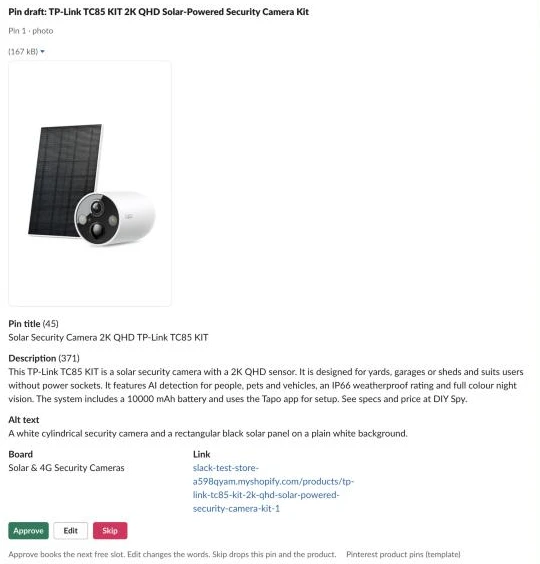
Instead of handing your catalogue to a Pinterest pin generator that invents backgrounds, this workflow keeps a reviewer in Slack while automating the preparation. For the TP-Link TC85 KIT 2K QHD Solar-Powered Security Camera Kit, the morning run posts a draft card in #pins with the 2:3 padded photo, character counts, vision-written alt text, board, tracked link, and buttons to approve, edit or skip.
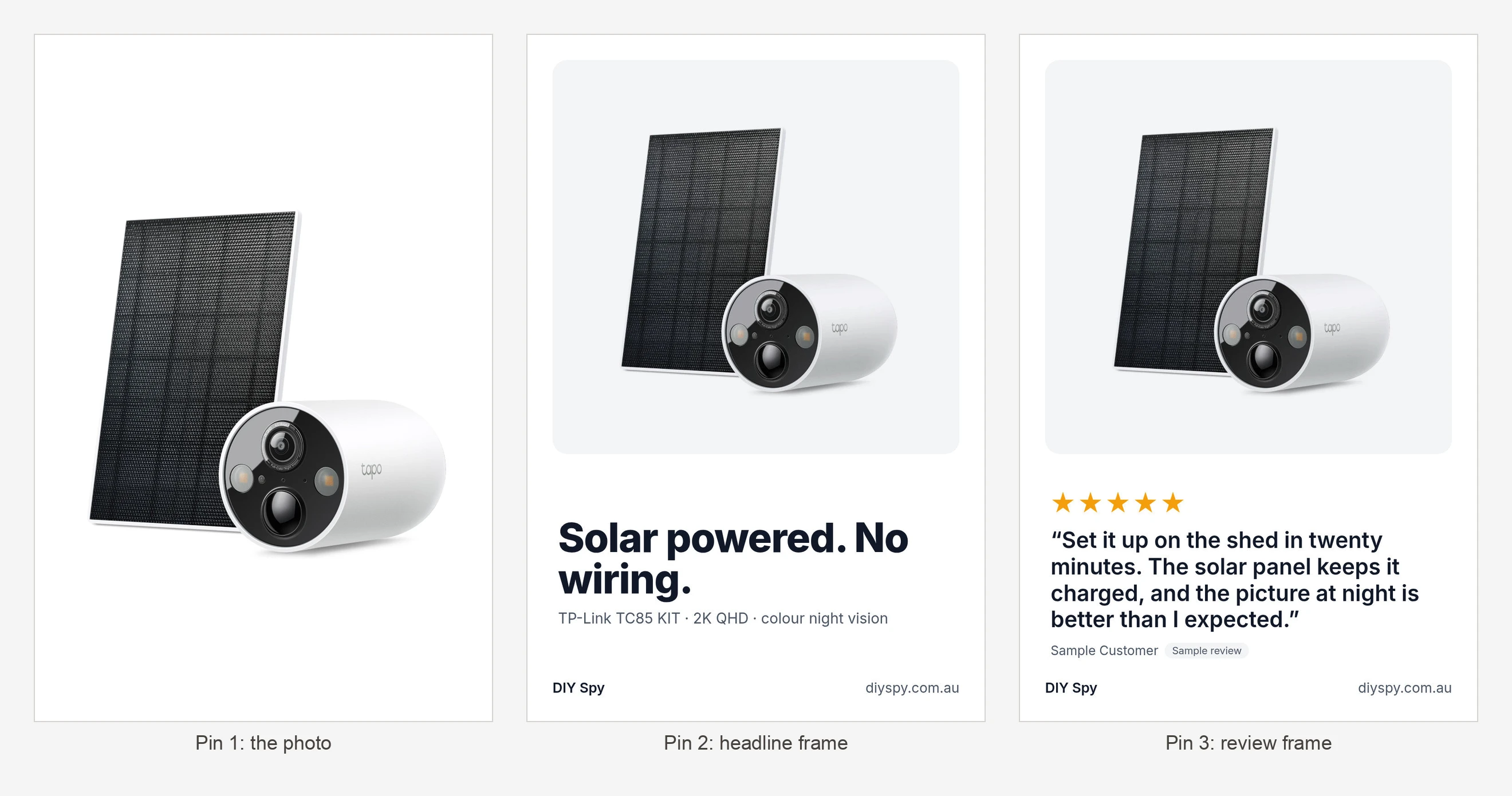
Across subsequent weeks, each product works through a four-step sequence: the padded product photo first, an HTML headline frame second, a customer review frame third, and a second photo fourth.
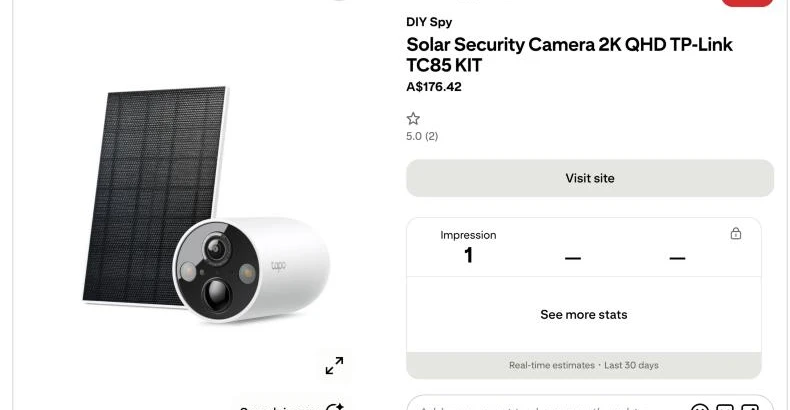
Approving a card books the next paced slot, and once the pin goes live, the hourly sync adds an Open pin button. On a store I run, this workflow produced 38 pins in the first four weeks at about one a day, with 23 of them booked and posted by the workflow and 8 drafts skipped in review.
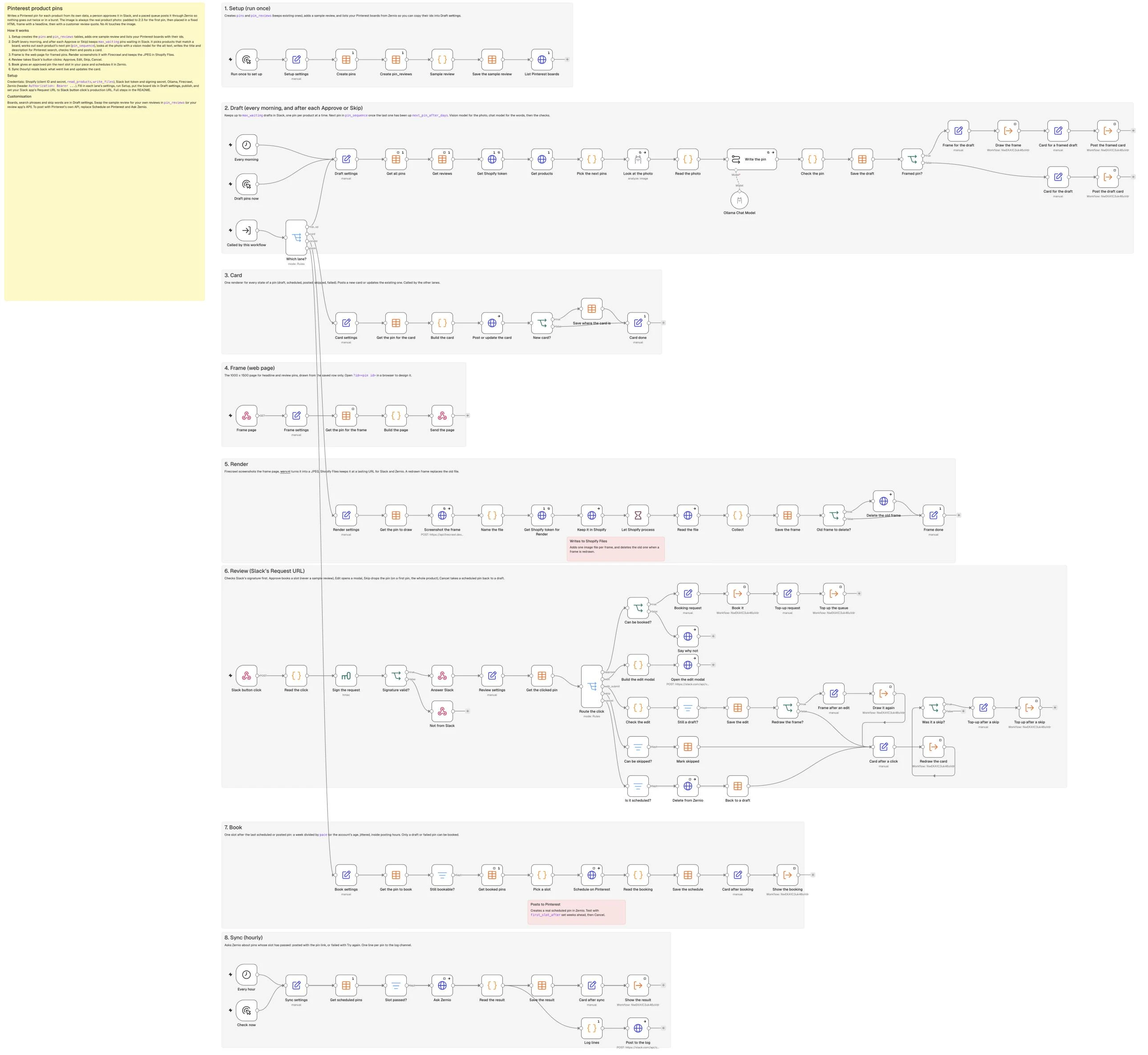
All eight lanes sit on one n8n canvas.
What you need
You need n8n with Data Tables on a public HTTPS URL (so Slack and Firecrawl can reach your webhooks), a Shopify app with read_products and write_files, and a Pinterest business account with your website claimed and boards created, connected to Zernio. You also need a Slack app with Interactivity, Ollama Cloud for the vision and chat models, and Firecrawl for the HTML frames. Keep the Pinterest app for Shopify if you use it, as it syncs catalogue pins and shopping ads rather than writing fresh board pins. A Supabase version is in the repo.
How it works
- Setup runs once to create the
pinsandpin_reviewstables, seed one sample review so the review frame works straight away, and list your Pinterest board IDs from Zernio. - Draft runs every morning and after each approval or skip, keeping up to
max_waiting(10) drafts in Slack so the channel never floods while matching products to boards, checking the photo with a vision model, writing for search, and checking every rule. - Card is the single renderer for every pin state (draft, scheduled, posted, skipped, or failed), called by the other lanes so the Slack message always matches the database row.
- Frame serves a 1000 x 1500 HTML page from an n8n webhook that places the untouched product photo above a headline or customer review quote.
- Render screenshots the Frame page with Firecrawl, converts it to a JPEG through wsrv.nl, and stores it in Shopify Files so Slack and Zernio get a lasting URL, deleting the old file whenever a frame is redrawn.
- Review checks Slack’s signature on every click, opens the edit modal, refuses to book sample reviews or already-booked pins, cancels scheduled posts in Zernio, and tops up the queue.
- Book spaces out approved pins according to your account’s age (
pace) with random jitter inside daytime posting hours so nothing posts in a burst or gets booked twice. - Sync asks Zernio every hour about pins whose slot has passed, updates the Slack card with the live Pinterest link or failure reason, and logs one line per pin to
#pins-log.
Step 1: Make your boards and connect Pinterest
Treat your Pinterest boards as search topics with keyword-rich descriptions rather than internal store departments, because board names and descriptions help Pinterest understand where each pin belongs in search. Every pin goes to the single board that best matches the product, such as Solar & 4G Security Cameras or PoE Security Cameras, and you should claim your website in your Pinterest business settings before posting.
Building directly on the official Pinterest API hits a roadblock on day one: under Pinterest’s API access tiers, every new developer app starts on Trial access, where pins created by the API are sandboxed and visible only to their creator until you pass Standard access review with a screen recording. Zernio already has approved publishing access, is free for one or two connected accounts with API access included (checked November 2026), and schedules a pin in one HTTP Request node.
In the Setup lane, add a Manual Trigger named Run once to set up and connect an Edit Fields (Set) node named Setup settings holding the Zernio API URL, your Zernio Pinterest account ID, and one product handle from your store so the sample review shows up on a pin:
| Setting | Value |
|---|---|
| zernio_api (string) | https://zernio.com/api/v1 |
| zernio_account_id (string) | YOUR_ZERNIO_PINTEREST_ACCOUNT_ID |
| sample_review_handle (string) | your-product-handle |
At the end of the Setup lane, add an HTTP Request node named List Pinterest boards (executeOnce: true) using a Header Auth credential with Authorization: Bearer YOUR_ZERNIO_KEY:
| Setting | Value |
|---|---|
| Method | GET |
| URL | {{ $('Setup settings').first().json.zernio_api }}/accounts/{{ $('Setup settings').first().json.zernio_account_id }}/pinterest-boards |
| Authentication | Generic credential: Header Auth |
Running Setup returns your boards and their numeric IDs, which you’ll copy into Draft settings in Step 3.
Step 2: Create the pins and reviews tables
Keeping state in an n8n Data Table lets the workflow count how many drafts are waiting in Slack, prevent duplicate bookings when a button is clicked twice, track which review quotes and secondary photos a product has already used, and redraw any Slack card from its saved row.
Between Setup settings and List Pinterest boards, add two Data table nodes (Create pins and Create pin_reviews, both with executeOnce: true), a Code node (Sample review), and a Data table node (Save the sample review). Turning on Reuse existing table ensures a second run of Setup keeps your existing tables intact:
| Setting | Value |
|---|---|
| Resource | table |
| Operation | create |
| Table name | pins |
| Options > Reuse existing table | on |
Give Create pins these columns:
| Setting | Value |
|---|---|
| product_id | string |
| product_title | string |
| handle | string |
| pin_no | number |
| pin_kind | string |
| board_key | string |
| board_name | string |
| board_id | string |
| title | string |
| description | string |
| alt_text | string |
| headline | string |
| product_line | string |
| review_quote | string |
| review_rating | number |
| review_author | string |
| review_source | string |
| image_url | string |
| source_image | string |
| photo_kind | string |
| shopify_file_id | string |
| link | string |
| problems | string |
| status | string |
| slack_channel | string |
| slack_ts | string |
| decided_by | string |
| decided_at | date |
| post_id | string |
| scheduled_for | date |
| posted_at | date |
| pin_url | string |
| error | string |
Configure Create pin_reviews (Resource: table, Operation: create, Table name: pin_reviews, Options > Reuse existing table: on, executeOnce: true) with these columns:
| Setting | Value |
|---|---|
| product_handle | string |
| rating | number |
| quote | string |
| author | string |
| source | string |
| verified | boolean |
Connect Create pin_reviews to the Code node Sample review, which seeds one made-up review labelled sample so you can test the review frame before adding real customer quotes:
// One made-up review so the review frame works straight after import. It is labelled as a sample on the frame,
// and the Review lane refuses to book a pin that uses it. Add your own reviews to pin_reviews (source "own").
return [{ json: {
  product_handle: $('Setup settings').first().json.sample_review_handle,
  rating: 5,
  quote: 'Easy to set up and exactly as described. It still looks new after a month, and I would buy it again.',
  author: 'Sample Customer',
  source: 'sample',
  verified: false
} }];
Connect Sample review to Save the sample review (Resource: row, Operation: upsert, Data table pin_reviews, matching All conditions where product_handle eq {{ $json.product_handle }} and source eq {{ $json.source }}, sending all six fields), then wire it to List Pinterest boards.
Step 3: Pick the products that earn a pin
Because n8n starts every sub-workflow call at the canvas’s first Execute Workflow Trigger, the workflow uses one trigger named Called by this workflow (Input data mode: Accept all data) connected to a Switch node named Which lane?. Each self-call puts a small Set node in front of an Execute Workflow node to set lane, and Which lane? routes top_up to Draft settings, card to Card settings, render to Render settings, and book to Book settings:
| Setting | Value |
|---|---|
| top_up | {{ $json.lane === 'top_up' }} |
| card | {{ $json.lane === 'card' }} |
| render | {{ $json.lane === 'render' }} |
| book | {{ $json.lane === 'book' }} |
In the Draft lane, connect Every morning (a Schedule Trigger at 8:00 daily), Draft pins now (a Manual Trigger), and the top_up output of Which lane? to an Edit Fields (Set) node named Draft settings:
| Setting | Value |
|---|---|
| store_domain (string) | your-store.myshopify.com |
| store_name (string) | Your Store |
| store_url (string) | https://www.your-store.com |
| store_description (string) | an online store for (what you sell) |
| language (string) | English |
| style_rules (string) | |
| slack_channel (string) | #pins |
| frame_page_url (string) | https://your-n8n.example.com/webhook/pinterest-pin-frame |
| product_query (string) | status:active published_status:published |
| max_products (number) | 1000 |
| boards (array) | {{ [{"key": "board-1", "name": "Your first board", "board_id": "PASTE_BOARD_ID", "match": {"title_words": ["solar"], "product_types": [], "categories": []}, "phrases": ["first search phrase", "second search phrase"]}, {"key": "board-2", "name": "Your second board", "board_id": "PASTE_BOARD_ID", "match": {"title_words": [], "product_types": ["Your product type"], "categories": ["Your Shopify category"]}, "phrases": ["first search phrase", "second search phrase"]}] }} |
| skip_words (string) | \b(mount|bracket|cable|adapter|power supply|battery pack|replacement|spare)\b |
| pin_sequence (array) | {{ ['photo', 'headline', 'review', 'photo_2'] }} |
| max_waiting (number) | 10 |
| next_pin_after_days (number) | 7 |
| min_photo_px (number) | 600 |
| review_min_rating (number) | 4 |
| review_max_chars (number) | 140 |
| review_sources (array) | {{ ['own', 'sample'] }} |
| image_template (string) | https://wsrv.nl/?url={url}&w=1000&h=1500&fit=contain&cbg=white&output=jpg&q=90 |
| utm (string) | utm_source=pinterest&utm_medium=social&utm_campaign=pins |
| closing_line (string) | See specs and price at Your Store. |
| banned_words (string) | \b(best|cheapest|guaranteed|free shipping|sale|buy now)\b |
| keep_terms (array) | {{ ['IP', 'PoE', 'NVR', 'HD', 'AI', 'PTZ', '4K', '2K', '4G', '5G', 'LTE', 'QHD', 'Wi-Fi', 'CCTV', 'USB', 'microSD'] }} |
| chat_model (string) | gemma4:31b |
| vision_model (string) | gemma4:31b |
Why match boards with rules instead of Shopify categories alone? Every security camera sits in the same Shopify category, so category alone can’t separate a solar camera onto Solar & 4G Security Cameras and a wired dome onto PoE Security Cameras. In boards, the first board whose title_words, product_types, or categories match wins, and each board holds two to four search phrases gathered from Pinterest search suggestions and Pinterest Trends.
Connect Draft settings to two Data table nodes (Get all pins on pins and Get reviews on pin_reviews, both Operation: get, Return all: on, executeOnce: true, alwaysOutputData: true), then Get Shopify token (POST to https://{{ $('Draft settings').first().json.store_domain }}/admin/oauth/access_token with grant_type=client_credentials), then an HTTP Request node named Get products (executeOnce: true) that pages through Shopify’s products query using Shopify search syntax:
| Setting | Value |
|---|---|
| Method | POST |
| URL | https://{{ $('Draft settings').first().json.store_domain }}/admin/api/2026-10/graphql.json |
| Header X-Shopify-Access-Token | {{ $('Get Shopify token').first().json.access_token }} |
| Options > Pagination > Mode | Update a Parameter in Each Request |
| Pagination parameter | type body, name variables, value {{ { q: $('Draft settings').first().json.product_query, after: $response.body.data.products.pageInfo.endCursor } }} |
| Pagination complete when | Other: {{ !$response.body.data.products.pageInfo.hasNextPage }} |
| Limit pages fetched | on, max {{ Math.ceil($('Draft settings').first().json.max_products / 100) }} |
| Interval between requests (ms) | 250 |
Set the Get products body expression to:
{{ JSON.stringify({ query: 'query Products($q: String!, $after: String) { products(first: 100, after: $after, query: $q, sortKey: CREATED_AT) { pageInfo { hasNextPage endCursor } nodes { id legacyResourceId title handle vendor productType createdAt onlineStoreUrl descriptionHtml category { name fullName } priceRangeV2 { minVariantPrice { amount } } featuredMedia { ... on MediaImage { image { url width height } } } media(first: 10) { nodes { ... on MediaImage { image { url width height } } } } } } }', variables: { q: $('Draft settings').first().json.product_query, after: null } }) }}Connect Get products to a Code node named Pick the next pins. It checks how many free slots remain under max_waiting, drops accessories matching skip_words (such as Ubiquiti UACC-G5-Dome-Ultra-PM Pendant Mount for G5 Dome Ultra), checks image dimensions and price, allows only one active pin per product at a time, and keeps only board phrases whose distinctive words appear in the product’s title or intro so a 4G camera is never called a solar camera:
// The query only returns products published to the Online Store; store_url builds the link if Shopify hasn't given one yet.
// Which products get a pin now, and which pin. One pin per product at a time: a product with a draft, scheduled or failed pin waits.
// Each product works through pin_sequence (photo, headline, review, photo_2), one step every next_pin_after_days, skipping a step it can't make
// (no qualifying review, no second photo). First pins always go before anyone's later pins. Only the free slots in max_waiting are filled.
const s = $('Draft settings').first().json;
const pins = $('Get all pins').all().map(i => i.json).filter(r => r.product_id);
const reviews = $('Get reviews').all().map(i => i.json).filter(r => r.quote);
const pages = $('Get products').all().map(i => i.json);
const bad = pages.find(p => p.errors);
if (bad) throw new Error('Shopify: ' + JSON.stringify(bad.errors).slice(0, 300));
const products = pages.flatMap(p => p.data?.products?.nodes || []);
const free = Math.max(0, s.max_waiting - pins.filter(r => r.status === 'draft').length);
if (!free) return [];
const text = h => String(h || '').replace(/<li[^>]*>/gi, '; ').replace(/<[^>]+>/g, ' ').replace(/ /g, ' ').replace(/&/g, '&').replace(/\s+/g, ' ').replace(/^[;\s]+/, '').trim();
const words = t => String(t || '').toLowerCase();
const has = (title, w) => new RegExp('(^|[^a-z0-9])' + w.toLowerCase().replace(/[.*+?^${}()|[\]\\]/g, '\\$&') + '($|[^a-z0-9])').test(words(title));
const boardFor = p => s.boards.find(b => (b.match.title_words || []).some(w => has(p.title, w))
|| (b.match.product_types || []).includes(p.productType)
|| (b.match.categories || []).some(c => p.category && (p.category.name === c || String(p.category.fullName).includes(c))));
const skip = s.skip_words ? new RegExp(s.skip_words, 'i') : null;
const day = 864e5, now = Date.now();
const big = im => im && Math.min(im.width || 0, im.height || 0) >= s.min_photo_px;
const base = u => String(u || '').split('?')[0];
const out = [];
for (const p of products) {
const board = boardFor(p);
if (!board || (skip && skip.test(p.title))) continue;
const main = p.featuredMedia?.image;
const url = p.onlineStoreUrl || (s.store_url.replace(/\/$/, '') + '/products/' + p.handle);
if (!big(main) || !(Number(p.priceRangeV2?.minVariantPrice?.amount) > 0) || text(p.descriptionHtml).length < 30) continue;
const id = String(p.legacyResourceId);
const mine = pins.filter(r => String(r.product_id) === id);
if (mine.some(r => ['draft', 'scheduled', 'failed'].includes(r.status))) continue;
if (mine.some(r => Number(r.pin_no) === 1 && r.status === 'skipped')) continue; // skipping a first pin stops the product
const last = Math.max(0, ...mine.map(r => new Date(r.posted_at || r.decided_at || r.createdAt || 0).getTime()));
if (mine.length && now - last < s.next_pin_after_days * day) continue;
const done = mine.map(r => r.pin_kind);
const others = (p.media?.nodes || []).map(m => m.image).filter(im => big(im) && base(im.url) !== base(main.url) && !mine.some(r => base(r.source_image) === base(im.url)));
const review = reviews.filter(r => r.product_handle === p.handle && Number(r.rating) >= s.review_min_rating && String(r.quote).length <= s.review_max_chars
&& s.review_sources.includes(r.source) && !mine.some(m => m.review_quote === r.quote))
.sort((a, b) => (b.verified === true) - (a.verified === true) || b.rating - a.rating)[0];
let kind = null, photo = main;
for (const k of s.pin_sequence) {
if (done.includes(k)) continue;
if (k === 'review' && !review) continue;
if (k === 'photo_2') { if (!others.length) continue; photo = others[0]; }
kind = k; break;
}
if (!kind) continue;
const pinNo = mine.length + 1;
const desc = String(p.descriptionHtml || '');
const cut = desc.search(/<h[2-4]/i);
const intro = text(cut >= 0 ? desc.slice(0, cut) : desc).slice(0, 800);
const specs = text(cut >= 0 ? desc.slice(cut) : '').slice(0, 3000);
// search phrases that fit this product: every distinctive word in the phrase is in the title or intro
const hay = words(p.title + ' ' + intro).replace(/wi-fi/g, 'wifi');
const fits = x => x.toLowerCase().split(' ').filter(w => !['security', 'camera', 'cameras', 'for', 'the', 'a'].includes(w)).every(w => hay.includes(w.replace(/s$/, '')));
const good = [...new Set((board.phrases || []).filter(fits).map(x => x.replace(/\bcameras\b/gi, 'camera')))];
const lead = good.length ? good[(pinNo - 1) % good.length] : (board.phrases || [board.name])[0];
const earlier = mine.filter(r => r.title).map(r => r.title + ' / ' + r.description);
const src = base(photo.url);
out.push({ json: {
product_id: id, product_title: p.title, handle: p.handle, brand: p.vendor || '', category: p.category?.name || p.productType || '',
created: p.createdAt, pin_no: pinNo, pin_kind: kind, board_key: board.key, board_name: board.name, board_id: board.board_id,
search_phrase: lead, other_phrases: good.filter(x => x !== lead).join(', '), intro, specs,
source_image: photo.url, photo_url: src + '?width=1024',
image_url: ['photo', 'photo_2'].includes(kind) ? s.image_template.replace('{url}', encodeURIComponent(src)) : '',
link: url + (url.includes('?') ? '&' : '?') + s.utm,
review_quote: kind === 'review' ? review.quote : '', review_rating: kind === 'review' ? Number(review.rating) : null,
review_author: kind === 'review' ? review.author : '', review_source: kind === 'review' ? review.source : '',
earlier: earlier.join('\n')
} });
}
out.sort((a, b) => a.json.pin_no - b.json.pin_no || String(a.json.created).localeCompare(String(b.json.created)));
return out.slice(0, free);Step 4: Turn the photo into a 2:3 pin image
Pinterest’s product specs recommend a 2:3 aspect ratio (1000 x 1500 pixels) because wider images can get cut off in feeds. Because Pinterest applies “AI modified” labels to images it detects as AI-generated or edited, and shoppers need to see the physical product as it is, the workflow never alters or outpaints your product photo. (If your catalogue photos need background cleanup before going into Shopify, see the product images guide.)
For photo and photo_2 pins, Pick the next pins builds image_url from image_template (https://wsrv.nl/?url={url}&w=1000&h=1500&fit=contain&cbg=white&output=jpg&q=90), which uses the free wsrv.nl image proxy to pad the square photo to 1000 x 1500 with white, and appends utm (utm_source=pinterest&utm_medium=social&utm_campaign=pins) to link.
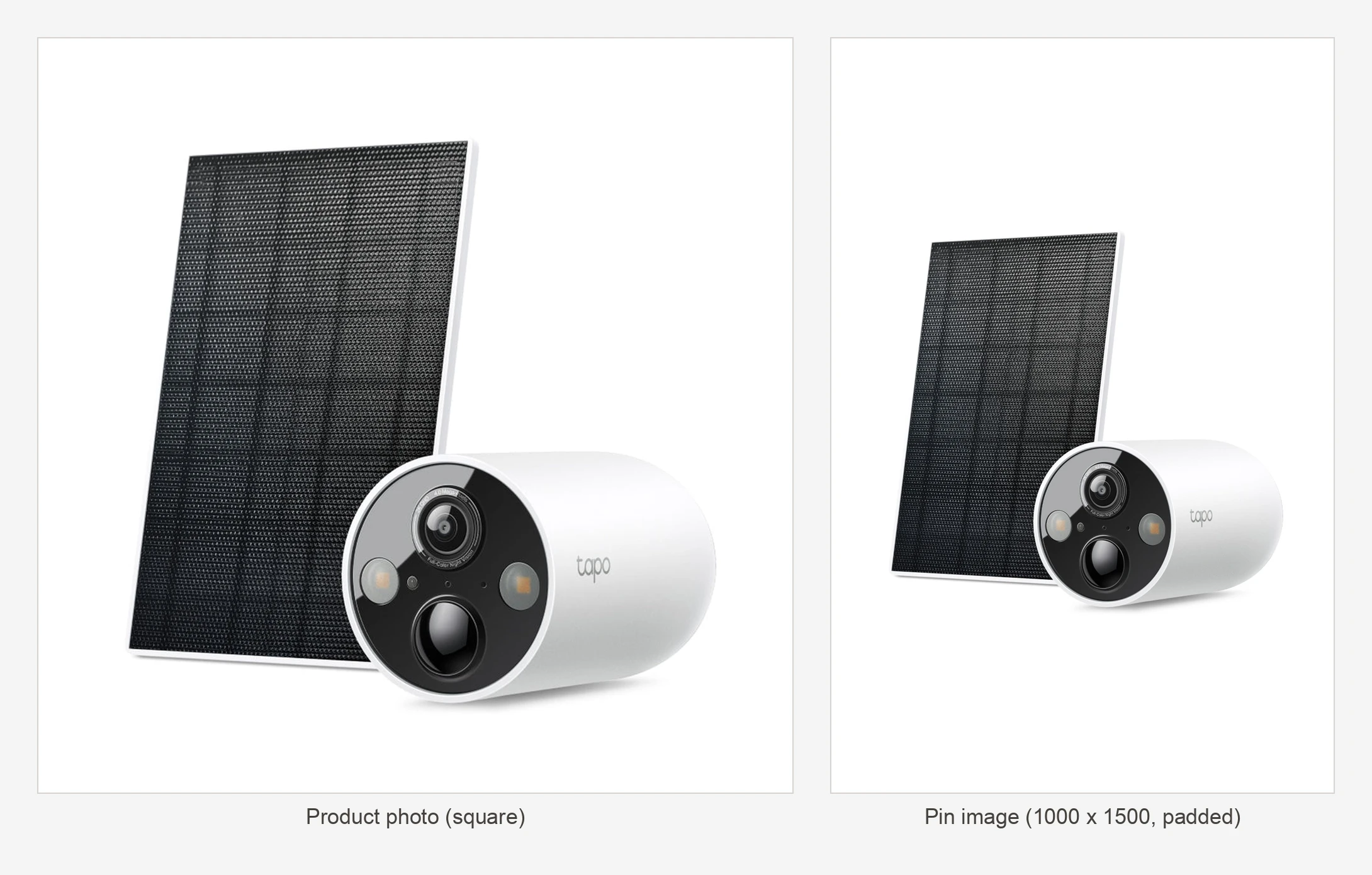
Step 5: Look at the photo before writing anything
A text model writing alt text from product data alone guesses colours and gets them wrong, such as describing a black camera as white. Looking at the photo with a vision model first gives you accurate alt text and tells the workflow whether the image shows the product, an in-use installation, a retail box, or a spec diagram.
Connect Pick the next pins to an Ollama node named Look at the photo (retryOnFail: true, maxTries: 2, waitBetweenTries: 5000, onError: continueRegularOutput):
| Setting | Value |
|---|---|
| Resource | Image |
| Operation | Analyze |
| Model | {{ $('Draft settings').first().json.vision_model }} |
| Input type | Image URL(s) |
| URL(s) | {{ $json.photo_url }} |
| Options > Temperature | 0.1 |
| Options > Format | json |
| Options > Num predict | 200 |
Use this prompt in Look at the photo:
Look at this product photo. Reply with JSON only: {"kind": one of "product" (the product on a plain background), "in_use" (installed or in a real setting), "packaging" (a retail box), "diagram" (dimensions, a spec sheet, mostly text), "other"; "alt": one plain sentence under 200 characters describing what is visible: the product type, its colour and shape, and the setting. No brand claims, no sales words.}For the TC85 KIT’s first pin, it returned A white cylindrical security camera and a rectangular black solar panel on a plain white background. On the fourth pin (photo_2), it returned:
{"kind": "product", "alt": "A white cylindrical security camera with an attached solar panel on a plain white background."}Connect Look at the photo to a Code node named Read the photo, which drops any photo_2 that turns out to be a box or diagram and builds prompt_input:
// The vision model's answer per photo, plus the input for the writer. A second photo that turns out to be a box,
// a diagram or unreadable is dropped (the product moves on to its next pin next time).
const s = $('Draft settings').first().json;
const picked = $('Pick the next pins').all().map(i => i.json);
const out = [];
$input.all().forEach((it, i) => {
  const p = picked[i]; if (!p) return;
  const r = it.json || {};
  let txt = r.content ?? r.text ?? r.response ?? r.message?.content ?? r.output ?? '';
  if (typeof txt !== 'string') txt = JSON.stringify(txt);
  let v = {};
  try { v = JSON.parse(txt.slice(txt.indexOf('{'), txt.lastIndexOf('}') + 1)); } catch (e) {}
  const kind = ['product', 'in_use', 'packaging', 'diagram', 'other'].includes(v.kind) ? v.kind : '';
  const alt = String(v.alt || '').replace(/\s+/g, ' ').trim().slice(0, 300);
  if (p.pin_kind === 'photo_2' && !['product', 'in_use'].includes(kind)) return;
  const lines = [
    'Product: ' + p.product_title, 'Brand: ' + (p.brand || 'unknown'), 'Category: ' + (p.category || 'unknown'),
    'Search phrase: ' + p.search_phrase, 'Other searches: ' + (p.other_phrases || 'none'),
    'Intro: ' + (p.intro || 'none'), 'Specs: ' + (p.specs || 'none'), 'The photo shows: ' + (alt || 'the product on a white background')
  ];
  if (p.pin_kind === 'review') lines.push('This pin shows this customer review on the image (do not quote it or mention reviews): ' + p.review_quote);
  if (p.earlier) lines.push('Earlier pins for this product. Your title and first sentence must differ from every one of them (keep the search phrase first, change what follows it):\n' + p.earlier);
  out.push({ json: { ...p, photo_kind: kind || null, photo_alt: alt, prompt_input: lines.join('\n') } });
});
return out;
Step 6: Write the pin for Pinterest search
Practical Pinterest SEO comes down to how Pinterest displays and indexes text. According to Pinterest’s product specs, titles can be up to 100 characters, but only the first 40 characters may show in people’s feeds, whereas Shopify product titles usually bury the search term behind the brand and model number. Our AI Pinterest pin generator puts the search phrase and a key spec first, with the brand and model last.
Descriptions can be up to 800 characters and don’t appear in the home or search feed, but Pinterest’s algorithm uses them to determine relevance, whereas hashtags no longer help and copying your product page verbatim repeats storefront boilerplate.
Connect Read the photo to a Basic LLM Chain node named Write the pin (retryOnFail: true, maxTries: 2, waitBetweenTries: 3000, onError: continueRegularOutput) with an Ollama Chat Model node attached:
| Setting | Value |
|---|---|
| Source for prompt | Define below |
| Prompt (user message) | {{ $json.prompt_input }} |
Configure Ollama Chat Model:
| Setting | Value |
|---|---|
| Model | {{ $('Draft settings').first().json.chat_model }} |
| Options > Temperature | 0.4 |
| Options > Num predict | 600 |
| Credential | Ollama (base URL https://ollama.com and your API key) |
Set the System message in Write the pin (as an expression) to:
You write Pinterest pins for {{ $('Draft settings').first().json.store_name }}, {{ $('Draft settings').first().json.store_description }}. You get one product. Reply with these lines and nothing else:
Pin title: the pin title
Description: the pin description
{{ $json.pin_kind === 'headline' ? 'Headline: the headline for the image\nProduct line: the product line for the image\n' : '' }}
Pin title rules:
- Start with the search phrase, or a close variant that fits this product. Then one key spec. Brand and model last.
- 40 to 90 characters. Never more than 100.
- Capitalise each word.
- If earlier pins are given, never repeat an earlier title.

Description rules:
- Five plain sentences including the closing line, about 450 characters in total, never over 500.
- Sentence one: what it is, with the search phrase, worded differently from the title.
- Sentence two: where it is used and who it suits. Use one of the other searches only if it reads naturally.
- Sentence three: three specs people search for, only if the product data has them.
- Sentence four: two more practical facts from the specs (setup, power, the app, what is in the box).
- End with: {{ $('Draft settings').first().json.closing_line }}
- Each search phrase at most once. No keyword lists, hashtags, emojis, links, phone numbers or prices.
{{ $json.pin_kind === 'headline' ? '\nHeadline rules:\n- A short benefit in plain words, at most 40 characters, from the product data only.\n- No price, no percentages, no claims the data does not support.\nProduct line rules:\n- Brand and model, then two key facts, separated by \" · \". At most 60 characters.\n' : '' }}
All lines:
- Write model numbers as given.
- Only facts in the product data. Never add a spec, a number or a feature, and never call it something it is not.
- Calm and factual. No fear and no hype.
- Never mention the image, photo or picture itself.
- Write in {{ $('Draft settings').first().json.language }}. {{ $('Draft settings').first().json.style_rules }}
- Never use the long dash character.
From the Shopify title TP-Link TC85 KIT 2K QHD Solar-Powered Security Camera Kit, Write the pin produced the 45-character title Solar Security Camera 2K QHD TP-Link TC85 KIT and this 371-character description: This TP-Link TC85 KIT is a solar security camera with a 2K QHD sensor. It is designed for yards, garages or sheds and suits users without power sockets. It features AI detection for people, pets and vehicles, an IP66 weatherproof rating and full colour night vision. The system includes a 10000 mAh battery and uses the Tapo app for setup. followed by the closing_line.
Step 7: Check every pin before a person sees it
Instead of blocking a draft over a minor slip, Check the pin makes safe mechanical fixes (replacing long dashes, stripping hashtags, restoring casing for terms in keep_terms like PoE and Wi-Fi, and ensuring closing_line is at the end) and turns everything else into a warning on the Slack card so the reviewer decides. If the model call failed or returned empty text, it outputs nothing so the product is tried again next run.
Connect Write the pin to a Code node named Check the pin:
// Parse the model's lines and hold them to the pin rules. Safe fixes are made (dashes, hashtags, casing, the closing line);
// everything else becomes a warning on the card, so the reviewer sees it before approving. A model failure saves nothing.
const s = $('Draft settings').first().json;
const items = $('Read the photo').all().map(i => i.json);
const CLOSE = s.closing_line;
const out = [];
$input.all().forEach((it, i) => {
  const p = items[i]; if (!p) return;
  const raw = String(it.json.text || it.json.output || '');
  if (it.json.error || !raw.trim()) return;   // tried again next run
  const grab = label => { const m = raw.match(new RegExp('^\\s*\\**' + label + '\\**\\s*:\\s*(.+)$', 'im')); return m ? m[1].trim().replace(/^["“]|["”]$/g, '') : ''; };
  const fix = x => x.replace(/—|–/g, ', ').replace(/\s+,/g, ',').replace(/#\w+/g, '').replace(/\s{2,}/g, ' ').trim();
  const caps = x => s.keep_terms.reduce((t, k) => t.replace(new RegExp('\\b' + k.replace(/-/g, '-?') + '\\b', 'gi'), k), x);
  const local = x => /australian|british|new zealand|canadian/i.test(s.language)
    ? x.replace(/\bcolor(s|ed|ful)?\b/gi, (m, e) => (m[0] === 'C' ? 'Colour' : 'colour') + (e || '')).replace(/\bcenter(s|d)?\b/gi, (m, e) => (m[0] === 'C' ? 'Centre' : 'centre') + (e || '')).replace(/\b(meter|meters)\b/gi, m => m.replace(/er/i, 're'))
    : x;
  const clean = x => local(caps(fix(x)));
  let title = clean(grab('Pin title')), description = clean(grab('Description'));
  const headline = clean(grab('Headline')), productLine = clean(grab('Product line'));
  const alt = clean(p.photo_alt || grab('Alt text'));
  if (description && !description.endsWith(CLOSE)) description = description.replace(/[.\s]+$/, '') + '. ' + CLOSE;
  const problems = [];
  if (title.length > 100) problems.push(`Title is ${title.length} characters (100 max).`);
  if (title.length < 25) problems.push('Title is under 25 characters.');
  if (description.length > 600) problems.push(`Description is ${description.length} characters (aim for 300 to 500).`);
  if (description.length < 240) problems.push(`Description is short (${description.length} characters, aim for 300 to 500).`);
  if (p.pin_kind === 'headline') {
    if (!headline) problems.push('No headline for the frame.');
    if (headline.length > 40) problems.push(`Headline is ${headline.length} characters (40 fits the frame).`);
    if (/\$|%|\d+\s*off\b/i.test(headline + ' ' + productLine)) problems.push('Price or discount on the image.');
  }
  const all = [title, description, alt, headline, productLine].join(' ');
  if (/https?:\/\/|www\./i.test(all)) problems.push('Has a web link.');
  if (/\$\s?\d/.test(all)) problems.push('Mentions a price.');
  if (/\p{Extended_Pictographic}/u.test(all)) problems.push('Has an emoji.');
  const banned = s.banned_words ? all.replace(new RegExp(s.store_name, 'g'), '').match(new RegExp(s.banned_words, 'i')) : null;
  if (banned) problems.push(`Uses "${banned[0]}".`);
  const key = p.search_phrase.toLowerCase().split(' ').filter(w => w.length > 2);
  if (key.length && !key.some(w => title.toLowerCase().includes(w.replace(/s$/, '')))) problems.push(`Title doesn't use the search phrase "${p.search_phrase}".`);
  if (p.photo_kind === 'packaging') problems.push('The photo shows the box, not the product. Consider Skip.');
  if (p.earlier && p.earlier.toLowerCase().includes(title.toLowerCase())) problems.push('Same title as an earlier pin.');
  if (/\b(this|the) (image|photo|picture)\b/i.test(description)) problems.push('Talks about the photo instead of the product.');
  out.push({ json: { ...p, title, description, alt_text: alt, headline: p.pin_kind === 'headline' ? headline : '', product_line: p.pin_kind === 'headline' ? productLine : '',
    problems: JSON.stringify(problems) } });
});
return out;
In testing on the TC85 KIT’s third pin, the model repeated Pin 1’s title, and Check the pin flagged Same title as an earlier pin. on the card. Adding If earlier pins are given, never repeat an earlier title. to Write the pin solved it, and Pin 4 came out as Solar Security Camera With AI Detection TP-Link TC85 KIT.
Connect Check the pin to Save the draft (Resource: row, Operation: insert, Data table pins, mapping all columns with status: draft and slack_channel: {{ $('Draft settings').first().json.slack_channel }}), then an If node named Framed pin? ({{ ['headline', 'review'].includes($json.pin_kind) }}). Plain photos (false) set lane: 'card' and pin_id: {{ String($json.id) }} in Card for the draft and call Post the draft card. Framed pins (true) set lane: 'render' in Frame for the draft, call Draw the frame, then set lane: 'card' in Card for a framed draft and call Post the framed card.
Step 8: Approve, edit or skip in Slack
Every lane draws or updates Slack cards through the Card lane. From the card output of Which lane?, connect Card settings (timezone: UTC, workflow_name: {{ $workflow.name }}) and Get the pin for the card (id eq {{ $('Called by this workflow').first().json.pin_id }}) to a Code node named Build the card:
// One Slack card for one pin, in whatever state it is in. Every lane redraws the card through here, so it always matches the row.
const s = $('Card settings').first().json;
const r = $input.first().json;
const esc = x => String(x ?? '').replace(/&/g, '&').replace(/</g, '<').replace(/>/g, '>');
const when = t => t ? DateTime.fromISO(new Date(t).toISOString()).setZone(s.timezone).toFormat('ccc d LLL, h:mm a').replace('AM', 'am').replace('PM', 'pm') : '';
const kinds = { photo: 'photo', headline: 'headline frame', review: 'review frame', photo_2: 'second photo' };
const head = { draft: 'Pin draft', scheduled: 'Scheduled', skipped: 'Skipped', posted: 'Pinned', failed: 'Pin failed' }[r.status] || 'Pin';
const v = String(r.id);
const blocks = [{ type: 'header', text: { type: 'plain_text', text: (head + ': ' + r.product_title).slice(0, 150) } },
{ type: 'context', elements: [{ type: 'mrkdwn', text: `Pin ${r.pin_no} · ${kinds[r.pin_kind] || r.pin_kind}` }] }];
if (r.status === 'skipped') {
blocks.push({ type: 'context', elements: [{ type: 'mrkdwn', text: 'Skipped by ' + esc(r.decided_by || 'someone') + (Number(r.pin_no) === 1 ? '. This product gets no pins.' : '. The next pin in the sequence comes later.') }, { type: 'mrkdwn', text: s.workflow_name }] });
return [{ json: { channel: r.slack_channel, ts: r.slack_ts || '', id: r.id, text: 'Skipped: ' + r.product_title, blocks } }];
}
if (r.image_url) blocks.push({ type: 'image', image_url: r.image_url, alt_text: String(r.alt_text || r.product_title).slice(0, 1900) });
else blocks.push({ type: 'section', text: { type: 'mrkdwn', text: ':hourglass: The frame image is not ready yet.' + (r.error ? ' ' + esc(r.error) : '') } });
blocks.push({ type: 'section', text: { type: 'mrkdwn', text: ('*Pin title* (' + String(r.title || '').length + ')\n' + esc(r.title)).slice(0, 2900) } });
blocks.push({ type: 'section', text: { type: 'mrkdwn', text: ('*Description* (' + String(r.description || '').length + ')\n' + esc(r.description)).slice(0, 2900) } });
blocks.push({ type: 'section', text: { type: 'mrkdwn', text: ('*Alt text*\n' + esc(r.alt_text)).slice(0, 2900) } });
if (r.pin_kind === 'headline') blocks.push({ type: 'section', fields: [{ type: 'mrkdwn', text: '*Headline*\n' + esc(r.headline) }, { type: 'mrkdwn', text: '*Product line*\n' + esc(r.product_line) }] });
if (r.pin_kind === 'review') blocks.push({ type: 'section', text: { type: 'mrkdwn', text: '*Review on the image* ' + '★'.repeat(Number(r.review_rating) || 0) + '\n>' + esc(r.review_quote) + '\n' + esc(r.review_author) + (r.review_source === 'sample' ? ' · :warning: *sample review*, swap in a real one before you approve' : r.review_source !== 'own' ? ' · from ' + esc(r.review_source) : '') } });
blocks.push({ type: 'section', fields: [{ type: 'mrkdwn', text: '*Board*\n' + esc(r.board_name) }, { type: 'mrkdwn', text: '*Link*\n<' + r.link + '|' + esc(String(r.link).split('?')[0].replace('https://', '')) + '>' }] });
let problems = []; try { problems = JSON.parse(r.problems || '[]'); } catch (e) {}
if (problems.length && r.status === 'draft') blocks.push({ type: 'section', text: { type: 'mrkdwn', text: ':warning: ' + problems.map(esc).join('\n:warning: ') } });
if (r.status === 'failed' && r.error) blocks.push({ type: 'section', text: { type: 'mrkdwn', text: ':x: ' + esc(r.error).slice(0, 500) } });
const btn = (text, id, style) => Object.assign({ type: 'button', text: { type: 'plain_text', text }, action_id: id, value: v }, style ? { style } : {});
if (r.status === 'draft') blocks.push({ type: 'actions', elements: [btn('Approve', 'pin_approve', 'primary'), btn('Edit', 'pin_edit'), btn('Skip', 'pin_skip', 'danger')] });
if (r.status === 'scheduled') blocks.push({ type: 'actions', elements: [btn('Cancel', 'pin_cancel', 'danger')] });
if (r.status === 'failed') blocks.push({ type: 'actions', elements: [btn('Try again', 'pin_approve', 'primary'), btn('Edit', 'pin_edit'), btn('Skip', 'pin_skip', 'danger')] });
if (r.status === 'posted' && r.pin_url) blocks.push({ type: 'actions', elements: [{ type: 'button', text: { type: 'plain_text', text: 'Open pin' }, url: r.pin_url, action_id: 'pin_open' }] });
const note = {
draft: 'Approve books the next free slot. Edit changes the words. Skip drops this pin' + (Number(r.pin_no) === 1 ? ' and the product.' : '.'),
scheduled: ':calendar: Approved by ' + esc(r.decided_by || 'someone') + '. Posts to *' + esc(r.board_name) + '* on ' + when(r.scheduled_for) + '. Cancel takes it back to a draft.',
posted: ':pushpin: On Pinterest since ' + when(r.posted_at) + '.',
failed: 'Not posted. Try again books a new slot.'
}[r.status] || '';
blocks.push({ type: 'context', elements: [{ type: 'mrkdwn', text: note }, { type: 'mrkdwn', text: s.workflow_name }] });
return [{ json: { channel: r.slack_channel, ts: r.slack_ts || '', id: r.id, text: head + ': ' + r.product_title, blocks } }];Connect Build the card to Post or update the card (Method: POST, URL: {{ $json.ts ? 'https://slack.com/api/chat.update' : 'https://slack.com/api/chat.postMessage' }}, Authentication: Predefined credential: Slack API) with this body:
{{ JSON.stringify($json.ts ? { channel: $json.channel, ts: $json.ts, text: $json.text, blocks: $json.blocks } : { channel: $json.channel, text: $json.text, blocks: $json.blocks, unfurl_links: false, unfurl_media: false }) }}When New card? ({{ $json.ok === true && !$('Build the card').first().json.ts }}) is true, Save where the card is saves slack_channel and slack_ts on the row before Card done.
In the Review lane, Slack sends clicks to Slack button click (POST, path pinterest-pin-review, Respond: Using Respond to Webhook node, Options > Raw Body: on). Signature verification, answering within 3 seconds, and double-click guards are covered in full in the Slack approvals guide. Connect Slack button click to Read the click:
// Slack sends the click as a form field called payload. Keep the raw body for the signature check.
const raw = (await this.helpers.getBinaryDataBuffer(0, 'data')).toString('utf8');
const h = $input.first().json.headers;
if (Math.abs(Date.now() / 1000 - Number(h['x-slack-request-timestamp'])) > 300) throw new Error('Stale request');
const field = raw.split('&').find(kv => kv.startsWith('payload=')) || '';   // no URLSearchParams in the Code node
const b = JSON.parse(decodeURIComponent(field.slice(8).replace(/\+/g, ' ')));
const sig = { base: `v0:${h['x-slack-request-timestamp']}:${raw}`, expected: h['x-slack-signature'] };
const user = b.user?.username || b.user?.name || b.user?.id || 'someone';
if (b.type === 'view_submission') {
  const m = JSON.parse(b.view.private_metadata || '{}');
  const v = b.view.state.values;
  const val = k => v[k]?.[k]?.value ?? null;
  return [{ json: { ...sig, action: 'edit_submit', pin_id: String(m.pin_id), user,
    edit: { title: val('title'), description: val('description'), alt_text: val('alt_text'), headline: val('headline'), product_line: val('product_line') } } }];
}
const a = (b.actions || [])[0] || {};
return [{ json: { ...sig, action: String(a.action_id || '').replace('pin_', ''), pin_id: String(a.value || ''), user,
  trigger_id: b.trigger_id, response_url: b.response_url || '' } }];
After Sign the request (HMAC-SHA256 of {{ $json.base }} into sig), Signature valid? ({{ 'v0=' + $json.sig === $json.expected }}) answers with Answer Slack (No Data) or Not from Slack (401). Then Review settings (zernio_api: https://zernio.com/api/v1) and Get the clicked pin feed Route the click:
| Setting | Value |
|---|---|
| approve | {{ $('Read the click').first().json.action === 'approve' }} |
| edit | {{ $('Read the click').first().json.action === 'edit' }} |
| edit_submit | {{ $('Read the click').first().json.action === 'edit_submit' }} |
| skip | {{ $('Read the click').first().json.action === 'skip' }} |
| cancel | {{ $('Read the click').first().json.action === 'cancel' }} |
On edit, Build the edit modal builds the Slack modal payload for Open the edit modal (POST https://slack.com/api/views.open):
// The words of a draft in a modal. A headline pin also gets its headline and product line (saving redraws the frame).
const r = $('Get the clicked pin').first().json;
const c = $('Read the click').first().json;
const input = (key, label, initial, max, multiline) => ({ type: 'input', block_id: key, optional: key === 'alt_text', label: { type: 'plain_text', text: label },
  element: Object.assign({ type: 'plain_text_input', action_id: key, max_length: max, multiline: !!multiline }, initial ? { initial_value: String(initial).slice(0, max) } : {}) });
const editable = ['draft', 'failed'].includes(r.status);
const blocks = [{ type: 'section', text: { type: 'mrkdwn', text: '*' + String(r.product_title || 'Pin').replace(/[<>&]/g, '') + '*' } }];
if (editable) {
  blocks.push(input('title', 'Pin title (search phrase first, 100 max)', r.title, 100), input('description', 'Description', r.description, 800, true), input('alt_text', 'Alt text (what the photo shows)', r.alt_text, 500));
  if (r.pin_kind === 'headline') blocks.push(input('headline', 'Headline on the image (40 fits)', r.headline, 60), input('product_line', 'Product line on the image', r.product_line, 80));
  if (r.pin_kind === 'review') blocks.push({ type: 'context', elements: [{ type: 'mrkdwn', text: 'The review on the image is quoted word for word and can\'t be edited. Skip this pin to drop it.' }] });
} else blocks.push({ type: 'context', elements: [{ type: 'mrkdwn', text: 'This pin is ' + r.status + '. Cancel it on the card first, then edit the draft.' }] });
const view = { type: 'modal', callback_id: 'pin_edit', private_metadata: JSON.stringify({ pin_id: r.id }), title: { type: 'plain_text', text: 'Edit pin' }, close: { type: 'plain_text', text: 'Close' }, blocks };
if (editable) view.submit = { type: 'plain_text', text: 'Save' };
return [{ json: { trigger_id: c.trigger_id, view } }];
On edit_submit, Check the edit validates the changes and flags redraw if a headline changed, then Still a draft? ({{ $json.editable }}) updates the row in Save the edit, calls Draw it again when Redraw the frame? is true, and calls Redraw the card:
// The edited words, held to the same rules as a new draft. Problems show on the card; nothing is blocked.
const r = $('Get the clicked pin').first().json;
const e = $('Read the click').first().json.edit || {};
const pick = (k, d) => (e[k] == null ? d : String(e[k]).replace(/\s+/g, ' ').trim());
const out = { title: pick('title', r.title), description: pick('description', r.description), alt_text: pick('alt_text', r.alt_text),
  headline: pick('headline', r.headline), product_line: pick('product_line', r.product_line) };
const problems = [];
if (out.title.length > 100) problems.push(`Title is ${out.title.length} characters (100 max).`);
if (out.description.length > 800) problems.push(`Description is ${out.description.length} characters (800 max).`);
if (r.pin_kind === 'headline' && out.headline.length > 40) problems.push(`Headline is ${out.headline.length} characters (40 fits the frame).`);
const all = Object.values(out).join(' ');
if (/https?:\/\/|www\./i.test(all)) problems.push('Has a web link.');
if (/#\w/.test(all)) problems.push('Has a hashtag.');
if (/\$\s?\d/.test(all)) problems.push('Mentions a price.');
const redraw = r.pin_kind === 'headline' && (out.headline !== r.headline || out.product_line !== r.product_line);
return [{ json: { ...out, problems: JSON.stringify(problems), redraw, editable: ['draft', 'failed'].includes(r.status) } }];
On approve, Can be booked? checks {{ ['draft', 'failed'].includes($json.status) && $json.review_source !== 'sample' }}, calling Book it and Top up the queue (lane: 'top_up') when true or replying via Say why not when false. On skip, Can be skipped? ({{ ['draft', 'failed'].includes($json.status) }}) marks the row skipped in Mark skipped, redraws the card, and triggers Top up after a skip.
Step 9: Book the next slot at a steady pace
Posting a sudden burst of pins on a new account or freshly claimed domain looks spammy, and Pinterest’s guide to scheduling tools says posting consistently, ideally weekly, is a best practice. While Pinterest’s built-in scheduler holds pins up to 30 days ahead, this custom Pinterest scheduler in the Book lane lets you schedule Pinterest pins at a rate that scales with your account’s age.
Connect the book output of Which lane? to Book settings:
| Setting | Value |
|---|---|
| zernio_api (string) | https://zernio.com/api/v1 |
| zernio_account_id (string) | YOUR_ZERNIO_PINTEREST_ACCOUNT_ID |
| timezone (string) | UTC |
| pace (array) | {{ [ { "from_week": 0, "per_week": 7 }, { "from_week": 4, "per_week": 14 } ] }} |
| max_per_week (number) | 21 |
| post_from (string) | 07:30 |
| post_until (string) | 21:00 |
| first_slot_after (string) |
Connect Book settings to Get the pin to book (id eq {{ $('Called by this workflow').first().json.pin_id }}), then a Filter node named Still bookable? ({{ ['draft', 'failed'].includes($json.status) && $json.review_source !== 'sample' }}) so two simultaneous clicks can’t book a pin twice. Next, add Get booked pins (fetching rows from pins matching Any condition: status eq scheduled or status eq posted) and connect it to Pick a slot. It spaces each slot by one week divided by the pace for the account’s age (7 a week, then 14 from week 4, capped at 21), adds up to 15% jitter, respects first_slot_after for testing or launches, and moves overnight times into post_from to post_until:
// The next posting slot: one gap after the latest scheduled or posted pin. The gap is a week divided by the pins a week for
// the account's age at that point (never more than max_per_week), jittered by up to 15%, never sooner than 15 minutes from now,
// and moved into posting hours in your time zone.
const s = $('Book settings').first().json;
const pin = $('Get the pin to book').first().json;
const rows = $input.all().map(i => i.json).filter(r => r.id && String(r.id) !== String(pin.id));
const ms = t => (t ? new Date(t).getTime() : NaN);
const now = Date.now(), WEEK = 7 * 864e5;
const posted = rows.filter(r => r.status === 'posted').map(r => ms(r.posted_at)).filter(x => !isNaN(x));
const taken = rows.filter(r => r.status === 'scheduled').map(r => ms(r.scheduled_for)).filter(x => !isNaN(x)).concat(posted);
const first = posted.length ? Math.min(...posted) : now;
const last = taken.length ? Math.max(...taken) : null;
const week = Math.floor((Math.max(last ?? now, now) - first) / WEEK);
const step = [...s.pace].sort((a, b) => b.from_week - a.from_week).find(p => p.from_week <= week) || { per_week: 3 };
const perWeek = Math.min(Math.max(Number(step.per_week) || 1, 1), s.max_per_week);
const gap = WEEK / perWeek;
let t = last == null ? now + 15 * 6e4 : Math.max(now + 15 * 6e4, last + gap + (Math.random() - 0.5) * 0.3 * gap);
if (s.first_slot_after) t = Math.max(t, ms(s.first_slot_after));
const [fh, fm] = s.post_from.split(':').map(Number), [uh, um] = s.post_until.split(':').map(Number);
let d = DateTime.fromMillis(t).setZone(s.timezone);
const mins = d.hour * 60 + d.minute;
if (mins < fh * 60 + fm || mins > uh * 60 + um) {
  if (mins > uh * 60 + um) d = d.plus({ days: 1 });
  d = d.set({ hour: fh, minute: fm, second: 0, millisecond: 0 }).plus({ minutes: Math.floor(Math.random() * 90) });
}
return [{ json: { slot: d.toUTC().toISO({ suppressMilliseconds: true }), per_week: perWeek, account_week: week } }];
Step 10: Schedule the pin through Zernio
To auto post to Pinterest at the chosen slot, connect Pick a slot to an HTTP Request node named Schedule on Pinterest (alwaysOutputData: true, onError: continueRegularOutput) that calls Zernio’s posts endpoint:
| Setting | Value |
|---|---|
| Method | POST |
| URL | {{ $('Book settings').first().json.zernio_api }}/posts |
| Authentication | Generic credential: Header Auth |
| Options > Timeout (ms) | 20000 |
Use this JSON body expression:
{{ (() => { const s = $('Book settings').first().json, r = $('Get the pin to book').first().json; return JSON.stringify({ content: r.description, mediaItems: [ { type: 'image', url: r.image_url, altText: String(r.alt_text || '').slice(0, 500), mimeType: 'image/jpeg' } ], platforms: [ { platform: 'pinterest', accountId: s.zernio_account_id, platformSpecificData: { title: String(r.title || '').slice(0, 100), boardId: r.board_id, link: r.link } } ], scheduledFor: $json.slot, timezone: s.timezone }); })() }}Connect Schedule on Pinterest to Read the booking:
// Zernio's post id, or why it said no.
const z = $input.first().json || {};
const id = z.post?._id || z._id || '';
return [{ json: { id: $('Get the pin to book').first().json.id, post_id: id, status: id ? 'scheduled' : 'failed',
  scheduled_for: id ? $('Pick a slot').first().json.slot : null,
  error: id ? '' : String(z.error?.message || z.error || z.message || JSON.stringify(z)).slice(0, 400) } }];
Connect Read the booking to Save the schedule (updating status, post_id, scheduled_for, decided_by: {{ $('Called by this workflow').first().json.user }}, decided_at: {{ $now.toISO() }}, and error), then Card after booking (lane: 'card') and Show the booking. With first_slot_after set to 10 December in testing, the scheduled card showed Approved by regan. Posts to Solar & 4G Security Cameras on Thu 10 Dec, 9:00 am. Cancel takes it back to a draft.
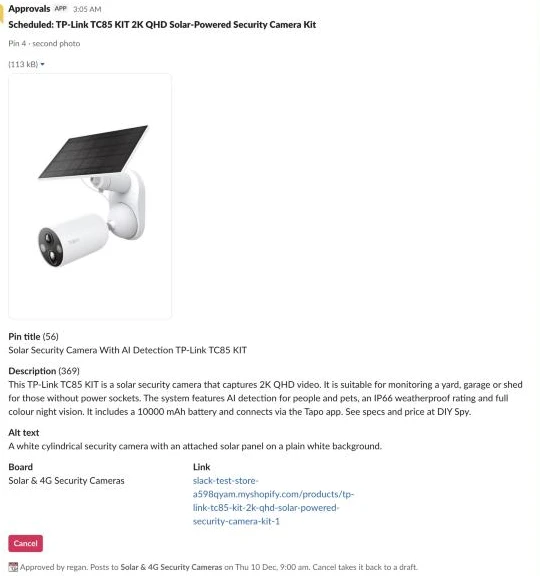
Clicking Cancel on a scheduled card triggers the cancel branch in the Review lane: Is it scheduled? ({{ $json.status === 'scheduled' && !!$json.post_id }}) calls Delete from Zernio (DELETE {{ $('Review settings').first().json.zernio_api }}/posts/{{ $json.post_id }}), resets the row in Back to a draft, and redraws the draft card.
Step 11: Read back what went live
The Sync lane checks Zernio every hour so you know what actually published. Connect Every hour (hoursInterval: 1, triggerAtMinute: 7) and Check now to Sync settings (zernio_api: https://zernio.com/api/v1, log_channel: #pins-log), then Get scheduled pins (status eq scheduled, Return all: on, executeOnce: true), then a Filter node named Slot passed?:
{{ !!$json.post_id && new Date($json.scheduled_for).getTime() < Date.now() - 120000 }}Connect Slot passed? to Ask Zernio (GET {{ $('Sync settings').first().json.zernio_api }}/posts/{{ $json.post_id }}, alwaysOutputData: true, onError: continueRegularOutput) and a Code node named Read the result. If a post was deleted directly in Zernio, Zernio returns a 404 and the pin is marked failed so you can click Try again on the card:
// published -> posted with the pin link; failed or cancelled -> failed with the reason; anything else waits for the next run.
const rows = $('Slot passed?').all().map(i => i.json);
const out = [];
$input.all().forEach((it, i) => {
  const r = rows[i]; if (!r) return;
  if (it.json.error && /\b404\b/.test(String(it.json.error.message || it.json.error))) {   // deleted in Zernio
    out.push({ json: { id: r.id, status: 'failed', pin_url: '', posted_at: null, error: 'Zernio has no post with this id (deleted there?). Try again books a new slot.' } }); return;
  }
  const post = it.json.post || it.json;
  const t = (post.platforms || []).find(p => p.platform === 'pinterest') || {};
  const status = t.status || post.status || '';
  if (status === 'published' || post.status === 'published')
    out.push({ json: { id: r.id, status: 'posted', pin_url: t.platformPostUrl || (t.platformPostId ? 'https://www.pinterest.com/pin/' + t.platformPostId + '/' : ''), posted_at: r.scheduled_for, error: '' } });
  else if (['failed', 'cancelled'].includes(status) || ['failed', 'cancelled'].includes(post.status))
    out.push({ json: { id: r.id, status: 'failed', pin_url: '', posted_at: null, error: String(t.errorMessage || t.error || post.error || status).slice(0, 400) } });
});
return out;
From Read the result, connect Save the result (updating status, pin_url, posted_at, and error on pins), Card after sync, and Show the result. In parallel, connect Read the result to Log lines (executeOnce: true) and Post to the log (POST https://slack.com/api/chat.postMessage):
// One line per pin that changed, for the log channel.
const rows = $('Read the result').all().map(i => i.json);
const pins = Object.fromEntries($('Slot passed?').all().map(i => [String(i.json.id), i.json]));
if (!rows.length) return [];
const text = rows.map(r => r.status === 'posted' ? `:pushpin: <${r.pin_url}|${pins[r.id]?.product_title}> on ${pins[r.id]?.board_name}` : `:x: ${pins[r.id]?.product_title}: ${r.error}`).join('\n');
return [{ json: { channel: $('Sync settings').first().json.log_channel, text: 'Pins published\n' + text } }];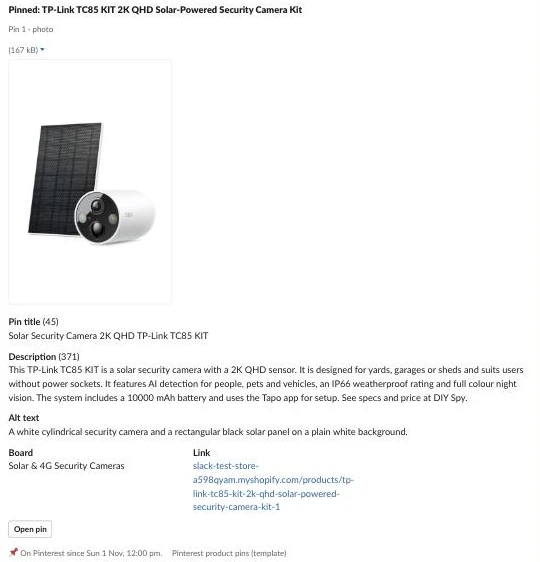
Step 12: Plan each product’s pins
Because a fresh pin needs a new image and many products have only one usable photo, Pick the next pins steps each product through pin_sequence (['photo', 'headline', 'review', 'photo_2']) once its last pin has been up next_pin_after_days (7). Sorting by pin_no first ensures every product in your catalogue gets its first plain photo pin before any product gets its second pin.
If a product can’t make a step (no qualifying review, or no second photo at least min_photo_px on its short side), it skips that step cleanly. In testing, the Ubiquiti UVC-G5-Dome-Ultra-B 2K HD PoE Dome Camera got its first photo pin and its second headline pin (headline Compact and tamper-resistant design, product line Ubiquiti UVC-G5-Dome-Ultra-B · 2K HD · PoE Power, and title Dome Camera 2K HD Ubiquiti UVC-G5-Dome-Ultra-B, led by its second search phrase “dome camera”), then stopped after two pins because it had one photo and no review. Skipping a product’s first pin in Slack stops the product altogether, whereas skipping a later pin moves it on to the next step in the sequence.
Step 13: Write a headline and draw the frame
Why build an HTML page and screenshot it instead of using n8n’s Edit Image node? Edit Image can only use the fonts installed on the n8n host and has no page layout, whereas a 1000 x 1500 HTML page rendered by Firecrawl gives you any Google Font, wrapped text and your brand colours and places the untouched product photo in a rounded panel. No price ever goes on the image because prices change while pins stay up for years.
In the Frame lane, add a Webhook node named Frame page (GET, path pinterest-pin-frame, Respond: Using Respond to Webhook node) and connect Frame settings:
| Setting | Value |
|---|---|
| store_name (string) | Your Store |
| store_url_text (string) | your-store.com |
| logo_url (string) | |
| font (string) | Inter |
| text_colour (string) | #111827 |
| muted_colour (string) | #4B5563 |
| accent_colour (string) | #F59E0B |
| panel_colour (string) | #F3F4F6 |
Connect Get the pin for the frame (id eq {{ String($('Frame page').first().json.query.id || '0').replace(/[^0-9]/g, '') }}) and a Code node named Build the page, followed by Send the page (Respond With: Text, Response Body: {{ $json.html }}, Response Code: {{ $json.status }}, header content-type: text/html; charset=utf-8):
// The frame as a 1000 x 1500 web page: the real product photo in a panel, then the headline and product line,
// or the review with its stars and who wrote it. Drawn from the saved row only.
const f = $('Frame settings').first().json;
const r = $input.first().json;
const esc = x => String(x ?? '').replace(/&/g, '&').replace(/</g, '<').replace(/>/g, '>').replace(/"/g, '"');
if (!r.id) return [{ json: { html: '<!doctype html><title>Not found</title><p>No pin with that id.</p>', status: 404 } }];
const photo = String(r.source_image || '').split('?')[0] + '?width=1400';
let words;
if (r.pin_kind === 'review') {
const label = r.review_source === 'sample' ? '<span class="tag">Sample review</span>' : (r.review_source && r.review_source !== 'own' ? '<span class="tag">Review from ' + esc(r.review_source) + '</span>' : '');
words = `<div class="stars">${'★'.repeat(Number(r.review_rating) || 5)}</div><p class="quote">“${esc(r.review_quote)}”</p><p class="who">${esc(r.review_author)}${label}</p>`;
} else {
const size = String(r.headline || '').length > 28 ? 72 : 88;
words = `<h1 style="font-size:${size}px">${esc(r.headline)}</h1><p class="line">${esc(r.product_line)}</p>`;
}
const brand = f.logo_url ? `<img src="${esc(f.logo_url)}" alt="${esc(f.store_name)}">` : `<span>${esc(f.store_name)}</span>`;
const html = `<!doctype html><html><head><meta charset="utf-8"><meta name="viewport" content="width=1000">
<link href="https://fonts.googleapis.com/css2?family=${encodeURIComponent(f.font)}:wght@400;600;800&display=swap" rel="stylesheet">
<style>*{box-sizing:border-box;margin:0}html,body{width:1000px;height:1500px;background:#fff}
body{font-family:'${f.font}',sans-serif;color:${f.text_colour};display:flex;flex-direction:column;padding:56px}
.photo{flex:0 0 860px;background:${f.panel_colour};border-radius:32px;display:flex;align-items:center;justify-content:center;overflow:hidden}
.photo img{max-width:90%;max-height:90%;object-fit:contain;mix-blend-mode:multiply}
.words{flex:1;display:flex;flex-direction:column;justify-content:center;padding:36px 12px 12px}
h1{line-height:1.02;font-weight:800;letter-spacing:-0.02em}.line{margin-top:22px;font-size:32px;color:${f.muted_colour}}
.stars{color:${f.accent_colour};font-size:54px;letter-spacing:6px}.quote{margin-top:16px;font-size:48px;line-height:1.2;font-weight:600}
.who{margin-top:22px;font-size:28px;color:${f.muted_colour};display:flex;align-items:center;gap:14px}
.tag{padding:4px 16px;border-radius:999px;background:${f.panel_colour};font-size:22px}
.foot{display:flex;justify-content:space-between;align-items:center;font-size:30px;font-weight:600}.foot img{height:56px}.foot .url{color:${f.muted_colour};font-weight:400}
</style></head><body><div class="photo"><img src="${esc(photo)}" alt="${esc(r.alt_text)}"></div>
<div class="words">${words}</div><div class="foot">${brand}<span class="url">${esc(f.store_url_text)}</span></div></body></html>`;
return [{ json: { html, status: 200 } }];In the Render lane, because Firecrawl’s screenshot URLs expire after 24 hours, the workflow converts the screenshot into a JPEG via wsrv.nl and stores it in Shopify Files using fileCreate. Connect Render settings (store_domain, frame_page_url, and jpeg_template: https://wsrv.nl/{name}.jpg?url={url}&output=jpg&q=90) and Get the pin to draw to Screenshot the frame (POST https://api.firecrawl.dev/v2/scrape, Header Auth, timeout 90000):
{{ JSON.stringify({ url: $('Render settings').first().json.frame_page_url + '?id=' + $json.id + '&v=' + Date.now(), waitFor: 2500, formats: [ { type: 'screenshot', fullPage: false, quality: 95, viewport: { width: 1000, height: 1500 } } ] }) }}Connect Screenshot the frame to Name the file:
// The screenshot as a JPEG named after the pin, by way of wsrv.nl. A failed screenshot is passed on with its error.
const s = $('Render settings').first().json;
const r = $('Get the pin to draw').first().json;
const shot = $input.first().json?.data?.screenshot || '';
const name = ('pin-' + String(r.product_title || 'pin').toLowerCase().replace(/[^a-z0-9]+/g, '-').slice(0, 60) + '-' + r.id + '-' + Date.now()).replace(/-+/g, '-');
return [{ json: { id: r.id, old_file_id: r.shopify_file_id || '', alt: r.alt_text || '',
  source: shot ? s.jpeg_template.replace('{name}', name).replace('{url}', encodeURIComponent(shot)) : '',
  error: shot ? '' : 'Firecrawl: ' + String($input.first().json?.error?.message || $input.first().json?.error || 'no screenshot').slice(0, 200) } }];
Connect Get Shopify token for Render, then Keep it in Shopify (POST to GraphQL):
{{ JSON.stringify({ query: 'mutation Keep($files: [FileCreateInput!]!) { fileCreate(files: $files) { files { id fileStatus } userErrors { field message } } }', variables: { files: $('Name the file').first().json.source ? [ { originalSource: $('Name the file').first().json.source, contentType: 'IMAGE', alt: String($('Name the file').first().json.alt).slice(0, 500) } ] : [] } }) }}Wait 15 seconds in Let Shopify process, then fetch the processed URL in Read the file:
{{ JSON.stringify({ query: 'query File($id: ID!) { node(id: $id) { ... on MediaImage { id fileStatus image { url } } } }', variables: { id: $('Keep it in Shopify').first().json.data?.fileCreate?.files?.[0]?.id || 'gid://shopify/MediaImage/0' } }) }}Connect Read the file to Collect:
// The frame's lasting URL, or why there isn't one.
const n = $('Name the file').first().json;
const made = $('Keep it in Shopify').first().json;
const f = $input.first().json?.data?.node || {};
const id = made?.data?.fileCreate?.files?.[0]?.id || '';
const url = f.fileStatus === 'READY' ? (f.image?.url || '') : '';
const error = n.error || (!id ? 'Shopify: ' + JSON.stringify(made?.data?.fileCreate?.userErrors || made?.errors || 'no file').slice(0, 200) : (!url ? 'Shopify is still processing the image (' + (f.fileStatus || 'unknown') + '). Edit and save to draw it again.' : ''));
return [{ json: { id: n.id, file_id: id || n.old_file_id, image_url: url, error, old_file_id: url && n.old_file_id && n.old_file_id !== id ? n.old_file_id : '' } }];
After Save the frame, if Old frame to delete? ({{ !!$('Collect').first().json.old_file_id }}) is true, Delete the old frame runs fileDelete before Frame done:
{{ JSON.stringify({ query: 'mutation Drop($ids: [ID!]!) { fileDelete(fileIds: $ids) { deletedFileIds userErrors { field message } } }', variables: { ids: [ $('Collect').first().json.old_file_id ] } }) }}For the TC85 KIT’s second pin, the model wrote Clear footage without a power socket / TP-Link TC85 KIT · 2K QHD · Solar Powered. Editing it in Slack to Solar powered. No wiring. / TP-Link TC85 KIT · 2K QHD · colour night vision redrew the frame and deleted the old Shopify file.
Step 14: Put a real review on the pin
Customer reviews make strong third pins when handled properly. This is not legal advice, so check the rules where you sell, including the FTC’s rule on consumer reviews and testimonials and the ACCC’s guidance on online product reviews:
- Quote real reviews word for word:
Pick the next pinsselects the quote directly frompin_reviews(rating >= review_min_rating,quote.length <= review_max_chars, unused on earlier pins, verified first), and the model never touches or trims the quote. - Label the source when imported: Reviews from your own store use
source: 'own'. If you import reviews from elsewhere,Build the pagedisplaysReview from <source>next to the author’s name.
In the template, the TC85 KIT’s third pin rendered with five stars, “Set it up on the shed in twenty minutes. The solar panel keeps it charged, and the picture at night is better than I expected.”, and Sample Customer with a Sample review tag, while Can be booked? refused to book it until you swap in real reviews with source: 'own'.
What it costs
The cost follows your posting pace rather than the size of your catalogue: one pin a day is about 30 pins a month and two a day is about 60, whatever your product count. Each pin makes two short model calls (vision and text), and framed pins (about two in four) cost one Firecrawl credit each. On n8n Cloud, the Card, Render, and Book lanes run as sub-workflows, which don’t count toward plan limits; what counts is the daily Draft run (30), the hourly Sync (720, or 240 if run every 3 hours), one execution per Slack click, and one per frame render.
| Item | 1 pin a day (about 30 a month) | 2 a day (about 60) | 3 a day (about 90, the cap) |
|---|---|---|---|
| n8n self-hosted | Free | Free | Free |
| n8n Cloud | Starter, €20 a month (about 830 executions) | Starter (about 900) | Starter (about 980) |
| Zernio (one Pinterest account) | Free | Free | Free |
| Ollama Cloud | About 60 short calls; pay per token, or a small part of Pro’s US$60 of usage | About 120 calls | About 180 calls |
| Firecrawl | About 15 frames, inside the free 1,000 credits | About 30 | About 45 |
| Slack, Shopify Admin API, wsrv.nl | Free | Free | Free |
By comparison, a Pinterest scheduler app such as Tailwind’s Pin Scheduling & Creation plan costs US$17.99 a month billed annually (US$29.99 monthly) for 300 scheduled pins (checked November 2026), and you still write the copy and make the images yourself. To lower usage further, reduce pace, run Sync every 3 hours, lower max_waiting, or use a local vision model.
Common mistakes
Generating or editing the product image
AI-generated backgrounds or edits trigger Pinterest’s “AI modified” label and misrepresent the physical item. Always pad or frame the real product photo untouched.
Posting a burst on a new account
Publishing dozens of pins at once on a new domain looks like spam. Let Pick a slot space pins across the week according to pace.
Booking the same pin twice
Double clicks or two reviewers acting at once can double-book a post without state checks. Still bookable? ensures only a draft or failed pin is ever scheduled.
Writing for the product page instead of Pinterest search
Copied descriptions, SKU-first titles, keyword lists, and hashtags hurt search reach. Put the search phrase in the first 40 characters of the title and write plain sentences.
Expecting Trial-access API pins to be public
Pins created on Pinterest API Trial access are visible only to the creator until Standard access is approved. Schedule through Zernio until your own app is approved.
Pinning accessories and box shots
Mounting brackets and cardboard box photos waste slots and get ignored in feeds. Filter accessories with skip_words and skip drafts when Check the pin warns about packaging.
Leaving off UTM parameters
Without UTM tags on link, Pinterest traffic blends into unattributed referrals in analytics.
Trimming or rewording a review
Editing a customer quote can change its meaning and breach review rules. Filter for short quotes under review_max_chars and quote them word for word.
Showing an imported review as your own customer’s
Leaving the source off a third-party review misleads shoppers. Set source in pin_reviews so the frame shows Review from <source>.
Putting a price on the image
Prices change while pins stay live for years, so keep prices and discounts off the frame.
Make it your own
Post through Pinterest’s API directly
Once your developer app has Standard access on the Pinterest API, replace Schedule on Pinterest and Ask Zernio with direct calls to POST /v5/pins and GET /v5/pins/{id} in your n8n Pinterest workflow. Pinterest’s API posts straight away rather than booking ahead, so call it from Sync when a slot comes due.
Export to Pinterest’s bulk upload CSV
If you want no posting API at all, write approved rows to a CSV for Pinterest bulk upload, which accepts up to 200 pins at once.
Pull reviews from your review app’s API
Sync verified reviews automatically from Judge.me, Loox, or Okendo into pin_reviews with source: 'own'.
Write pins for guides and blog posts
Point Get products at your Shopify blog articles to turn buying guides into headline pins.
Cross-post to Instagram
Adapt the Zernio payload and Shopify Files frames for Instagram (covered in the Instagram version).
Add offer or gift guide frames
Create seasonal frame variants using evergreen wording that stays true after the holiday ends.
FAQ
Is it allowed to automate Pinterest?
Yes, Pinterest supports scheduling through its own Pin scheduler, CSV bulk upload, RSS auto-publish, and partner tools. This workflow has a person approve every pin in Slack, keeps the real product photo, and spaces posts through Zernio.
How many pins should I post a day?
Pinterest says posting consistently, ideally weekly, is a best practice. Starting at one pin a day (7 a week) and stepping up to two a day (14 a week) from week four builds steady momentum.
Do I still need the Pinterest app for Shopify?
You don’t need it for this template, but it’s worth keeping: the Pinterest app for Shopify syncs your product catalogue for rich pins and shopping ads, which is a separate job from publishing fresh pins to your boards. Running both together gives you automatic price metadata on the pins this workflow schedules.
Can the AI make the pin images?
No, Pinterest detects and labels AI-modified images, and buyers need to see the real product you ship. The workflow pads your original photo to 2:3 for the first pin and places the untouched photo in an HTML frame for later pins.
Can I put customer reviews on my pins?
Yes, provided the review is genuine, quoted word for word with its star rating, and never rewritten or trimmed by AI. If the review came from outside your store, the frame must show where it came from.
Does it work for stores outside electronics?
Yes, just update boards, skip_words, keep_terms, and store_description in Draft settings to match your products. The vision check, search-first titles, and HTML frames work for any store with clear product photos.
Next steps
Run Setup to create the tables and list your boards, paste your board IDs into Draft settings, and open the Frame page URL in your browser to set your brand colours. Approve your first three cards in Slack and watch the slots fill.