The Slack Side Hustle: A Shopify Store Run Entirely From Slack

If you scanned the QR code at CMSEO 2026 in Chiang Mai, you’re in the right place.
In this guide, I’m going to show you how I built an AI-automated Shopify store from scratch, run entirely from Slack. Behind the scenes, n8n workflows and local models do the heavy lifting: pulling products in from suppliers, keeping prices and stock levels accurate, writing the copy and optimising product pages. Whenever something needs a decision, it sends me a Slack card I can check and approve in a few seconds from my phone.
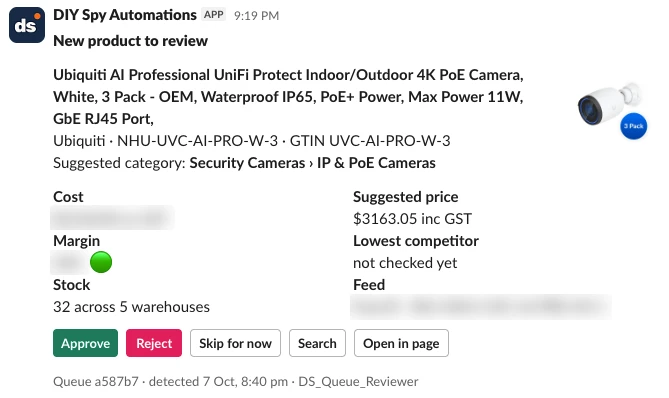
I guess you’re asking, why Slack? Well, the idea started at 3am, with a bottle in one hand and my phone in the other, waiting to put our new baby down without waking her and doom-scrolling LinkedIn. Like most builders, I had a graveyard of unfinished side projects and unused domains, and the only spare time I had to build anything was family time I wasn’t willing to give up. Watching my thumb scroll at 3am, it hit me: surely I could use this time instead.
That gave me one rule: if I can’t do it one-handed from my phone, it doesn’t get built. I’ve since built a few stores this way, learning different lessons along the way. This guide covers my newest one, DIY Spy, which I built in the lead-up to Chiang Mai SEO so I could document everything as I went.
I’m in the middle of writing all the guides, so bookmark this page and keep checking back as they go live.
The guides
Whether you were in the room in Chiang Mai or found this page through search, the guides follow the same six phases as the talk. You start with an empty Slack workspace and add a few channels in each phase until the entire store runs from your sidebar.
Before you start: the store
Before you automate anything, you need a store worth automating. These three guides cover the groundwork.
- Pick your niche. How I scored niche ideas with AI agents before committing to one. Coming soon.
- Build your brand. Business name, domain, brand kit and a one-page brand voice on a side hustle budget. Coming soon.
- Set up your store. Setting up Shopify from scratch on a free theme, ready for automation. Coming soon.
Phase 1: Get products in
Pull products from your supplier feeds, check what’s worth stocking and publish them straight to Shopify.
- How to add products to Shopify automatically. Wholesaler price lists and AliExpress into Shopify drafts you approve in Slack.
- How to build human-in-the-loop Slack approvals with n8n. The approval card pattern every other workflow uses: approve, edit in a modal or reject with a reason, plus actionable alerts that close themselves when the change happens somewhere else.
Phase 2: Keep the catalogue current
Keep stock levels, pricing and discontinued lines synced with your suppliers without babysitting spreadsheets.
- How to sync Shopify inventory with your suppliers. Supplier stock and unit costs synced every three hours, broken feeds held before they touch Shopify, and discontinued products archived and redirected from Slack.
- How to build a Shopify repricing engine with n8n. Prices from cost plus margin, your RRP or 1 cent under the cheapest trusted competitor, never under break-even, with a stop for bad feeds and a daily Slack digest.
- n8n error handling for store workflows. One Slack alert per outage, stalled schedules and empty runs caught every 15 minutes, and a daily all-clear so a quiet channel means all is well.
Phase 3: Enrich products
Turn raw supplier data into complete product pages that rank and convert.
- Product data enrichment with AI: scrape manufacturer specs into Shopify metafields. Specs read from the manufacturer’s page, every value checked against a quote from its source, and written to custom metafields and Shopify’s standard product attributes.
- Shopify product images: find, scrape and optimise manufacturer images with AI. Manufacturer photos found and checked with a vision model, padded to one square standard, with alt text written per shot.
- How to write product titles with AI. A formula per product type, every model number checked in code, approved in Slack.
- How to write product descriptions with AI. Intros written from each product’s specs and the manufacturer’s page, every number checked in code, approved in Slack.
- How to create Shopify combined listings without Plus. Separate products shown as one family with a series picker and colour dots on any plan, and the groups kept current every hour.
- How to write product FAQs with AI from manufacturer pages and manuals. Answers drawn from the manufacturer’s page and documents, every quote and number checked in code, approved in Slack and published with FAQ schema.
- How to add product manuals and spec sheets to Shopify automatically. Each product’s manuals, setup guides and datasheets found on the manufacturer’s own site, the model number checked in code, doubtful ones approved in Slack, and PDFs hosted in Shopify Files.
- How to add compatible accessories to Shopify complementary products automatically. Each accessory matched to the products it fits from its manufacturer’s own page, every quote checked, and approved in Slack before it reaches the product page.
- How to scrape manufacturer reviews into Shopify. Reads every review of the exact same product from the manufacturer’s own store, keeps every star rating word for word, and gives Judge.me a CSV with the source on every review once you approve it in Slack.
- How to monitor competitor prices with n8n. Find who sells your exact products and get a weekly Slack report of every undercut.
Phase 4: Enrich collections
Build the category pages people actually search for, then give each one helpful copy and buyer guides worth ranking.
- How to automate Shopify collections for SEO. Find the attribute and brand collections shoppers search for, approve them in Slack, and retire the thin ones.
- How to automate ecommerce category page SEO. Intros and meta tags from each collection’s live products, links in code, and sold-out items sorted last.
- How to improve and automate internal linking on Shopify. Breadcrumb, brand, spec and related-collection links filled from your menu and collection rules every day, and a weekly audit of what nothing links to.
- How to sort Shopify collections by relevance. Keyword scoring with an optional embeddings blend puts the best matches first and sold-out products last, re-checked every 2 hours.
Phase 5: Distribution
Get your catalogue in front of buyers outside your own site.
- How to automate Google Shopping feed optimisation. Pre-checks every product against Google’s rules, holds failing ones off the Google & YouTube channel until you fix them from Slack, and reads back Merchant Center’s verdict every morning.
- How to automate Pinterest product pins. Writes a pin for each product from its own data, frames later pins with a headline or a review, and posts what you approve in Slack at a steady pace.
- How to automate Instagram posts. Turns each product into a post with its real photo in your own frame and a caption from the product data, and posts what you approve in Slack at a steady pace through the Instagram API.
Phase 6: Run it at scale
Review queued changes in bulk and trigger any workflow on demand with a Slack slash command. I cover how this works in the Slack approvals guide in Phase 1.
The stack
You don’t need an enterprise budget to run this setup. It takes seven tools and a free Slack workspace to tie them together:
- Slack: where you run the store and approve changes. The free plan is fine.
- Supplier feeds: where your products, cost prices and stock levels come from. Free.
- Supabase: holds all your supplier and product data. Free.
- n8n: runs the automation workflows. Free when self-hosted.
- Ollama: runs the local AI models on your own machine. Free.
- DataForSEO: pulls live SERPs and search volume data. About US$15 a month.
- Shopify: runs the storefront. US$1 a month for the first three months.
- Claude Code: helps you write the code and build the workflows. The US$20 a month Pro plan is plenty.
All up, that’s under US$40 a month while you get started. If the store hasn’t made money after three months, you can shut the whole thing down and you’re out just over US$100.
For the AI side, you don’t need an expensive frontier model for every task. The workflows run on two open models and an embedder (Gemma 4 31B, Qwen3.5 9B and nomic-embed), and the whole lot fits on a single 32GB graphics card. If you don’t have a big graphics card at home, Ollama Cloud’s US$20 plan runs the exact same models.
Take it with you
Every n8n workflow and prompt from the talk is going into a public GitHub repository, free to use under the MIT licence. Twenty-two templates are up now, with more landing as each guide goes live, and ready-to-use versions on the n8n Creator Hub to follow.
The templates ship with the Ollama node pointed at Ollama Cloud so you can run them straight out of the box, or you can point them at localhost to run everything for free on your own hardware. I’m also putting together a guide on how to choose between local and cloud models for each job.
Where it’s at
This is the one section of this hub I’ll keep updating over time: what’s live on DIY Spy, what it’s costing to run and what broke along the way. First update coming soon.
Got a question from the talk? Get in touch.