How to Automate Instagram Posts for Shopify Products With n8n (Free Template)

Last tested on n8n 2.46, November 2026.
Posting products to Instagram by hand means opening a design file for every product, rewriting the same caption shape from scratch, and watching the feed go quiet the week you’re busy packing orders. Standard social schedulers only post what you hand them, while “AI Instagram” tools try to generate a brand-new picture of a product your store doesn’t actually sell. When you automate Instagram posts directly from your Shopify catalogue with n8n, you keep the real product photo inside your own HTML frame, let a language model write the words from your product specs, approve each draft in Slack, and let a paced queue publish through the official Instagram API.
What you’ll build
You’ll build an eleven-lane workflow in n8n that turns your active Shopify catalogue into a steady, human-approved Instagram feed. For our running example on Example Store, the workflow picks the Reolink RLC-820A 4K 8MP PoE Security Camera, checks that its main photo is a real product shot rather than a box or diagram, and places that untouched photo inside a 1080 x 1350 branded HTML frame.
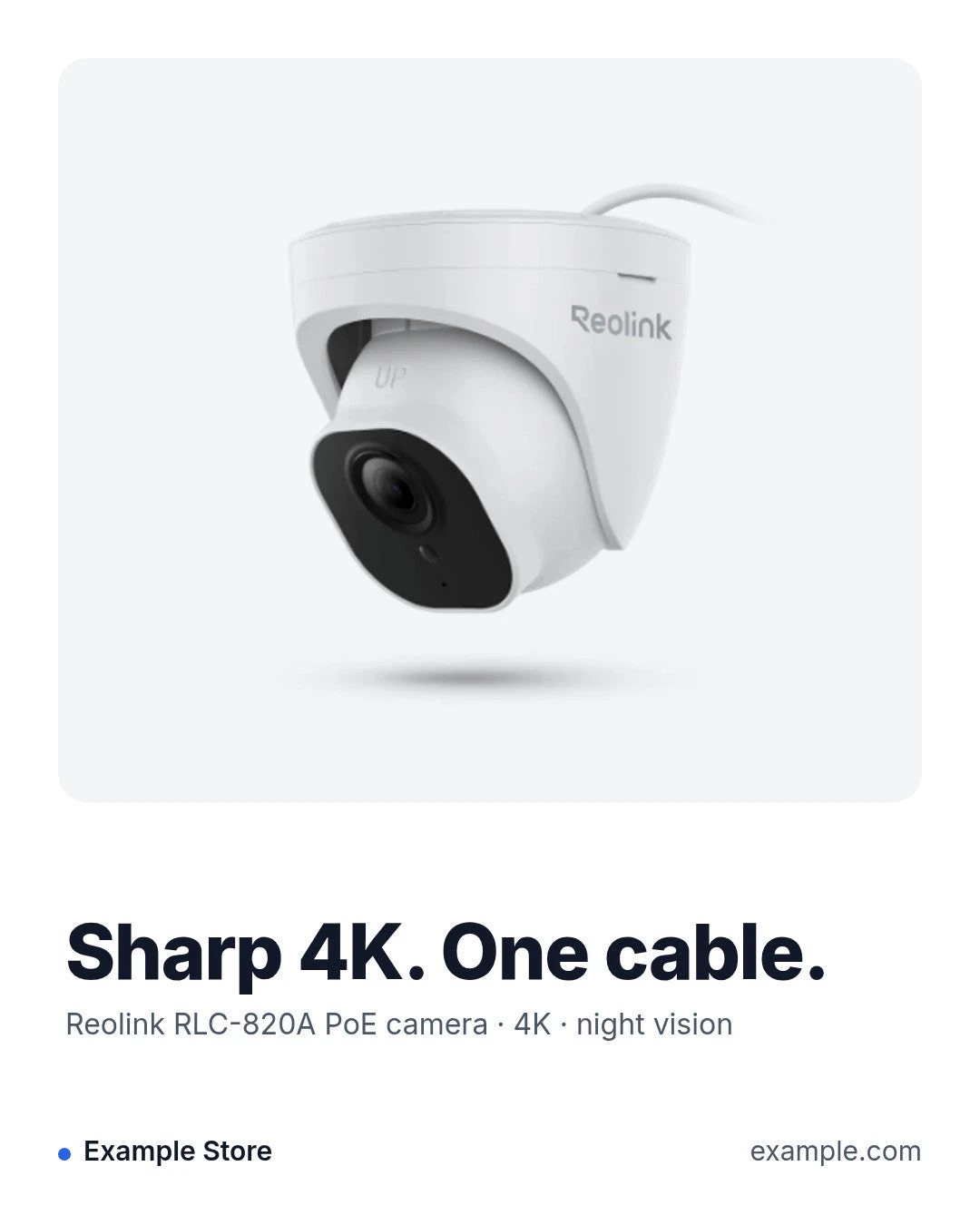
It then posts a draft card to #instagram in Slack showing the framed JPEG, the headline, the product line, the full caption with the formatted price on the closing line, the alt text, and any rule warnings.
When you click Approve, the card updates to show the booked slot, and the workflow automatically tops up the review queue with the next product.
What you need
- n8n (2.46+) with Data Tables on a public HTTPS URL so Slack and Firecrawl can reach its webhooks. A Supabase version is also in the GitHub repo.
- A Shopify app with
read_products,read_filesandwrite_filesscopes. - An Instagram professional account (Business or Creator) and a Meta app with Instagram Login, which is how n8n connects to Instagram (no Facebook Page needed).
- A Slack app with Interactivity enabled.
- Ollama Cloud for the vision and chat models, plus Firecrawl to screenshot the frame.
How it works
- Setup runs once to create the
instagram_postsandinstagram_tokenData Tables so your post history and 60-day API token live inside n8n. - Connect serves an n8n form restricted to signed-in n8n users, checks your pasted token against Instagram’s
/meendpoint, and saves the token with your account ID. - Draft runs every morning (and after each approval or skip) to keep up to
max_waitingdrafts in Slack, picking the oldest unposted products first so each product gets one post ever. - Card is a single Slack Block Kit renderer called by every other lane whenever a post changes state (
draft,scheduled,publishing,posted,skipped,failed), ensuring the Slack card always matches the database row. - Frame is a GET webhook that renders a 1080 x 1350 HTML and CSS page from the saved row, which you can open in a browser to preview your fonts and colours live.
- Render asks Firecrawl to screenshot the Frame page, converts the PNG screenshot to a JPEG through wsrv.nl, and stores the file in Shopify Files so Instagram has a lasting public URL when the slot comes due weeks later.
- Review receives Slack button clicks and modal submissions, verifies the Slack signing secret, updates or redraws edited drafts, marks unwanted items as skipped, and triggers booking.
- Book keeps the Instagram post automation looking human by placing each approved post one gap after the last scheduled or posted item, adding random jitter and shifting slots into your store’s daytime posting hours.
- Publish runs every 15 minutes, locks one due post as
publishing, checks Meta’s daily publishing quota, creates the Instagram media container at post time, waits for processing to finish, publishes the post, and reads back the permalink. - Token runs every Monday morning to refresh your 60-day Instagram token and alerts
#instagram-logif a refresh fails or less than 10 days remain. - Report runs every Monday at 9 am to summarise what posted over the last seven days, when the scheduled queue runs out, and how long drafts have been waiting.
Step 1: Connect your Instagram account
Before building the workflow, switch your Instagram account to a Professional account (Business or Creator) in the Instagram app. In the Meta App Dashboard, create an app with the Manage messaging & content on Instagram use case and open Instagram > API setup with Instagram business login. This uses the Instagram API with Instagram Login on graph.instagram.com, which needs no Facebook Page and only a single token; the older Facebook Login path is only needed for features like product tagging or ad management that this workflow doesn’t use.
Add your Instagram account to the app (if it asks for a tester role first, accept the invite on instagram.com under Settings > Apps and websites > Tester invites), then click Generate token. That grants instagram_business_basic and instagram_business_content_publish, and Standard Access covers posting to your own account.
Because a token from the Meta dashboard lasts 60 days and must be refreshed by an API call, it can’t sit in a static n8n credential. We store it in instagram_token so the Token lane can replace it every week. Note that anyone who can open your n8n instance can read that table, so keep your instance private.
Build the Setup lane
In the Setup lane, add a Manual Trigger named Run once to set up, followed by two Data table nodes named Create instagram_posts and Create instagram_token (Reuse existing table on, so running Setup a second time keeps your rows):
| Setting | Value |
|---|---|
| Resource | table |
| Operation | create |
| Table name | instagram_posts / instagram_token |
| Options > Reuse existing table | on |
Add these columns to Create instagram_posts:
| Setting | Value |
|---|---|
| product_id | string |
| product_title | string |
| handle | string |
| headline | string |
| product_line | string |
| caption | string |
| alt_text | string |
| source_image | string |
| photo_kind | string |
| image_url | string |
| shopify_file_id | string |
| link | string |
| problems | string |
| status | string |
| slack_channel | string |
| slack_ts | string |
| decided_by | string |
| decided_at | date |
| scheduled_for | date |
| container_id | string |
| media_id | string |
| post_url | string |
| posted_at | date |
| error | string |
Add these columns to Create instagram_token:
| Setting | Value |
|---|---|
| account | string |
| token | string |
| ig_user_id | string |
| username | string |
| expires_at | date |
| refreshed_at | date |
Build the Connect lane
Start the Connect lane with an n8n Form Trigger named Save your Instagram token so only users signed in to your n8n instance can open the form:
| Setting | Value |
|---|---|
| Authentication | n8n User Auth |
| Form Title | Connect Instagram |
| Form Description | Paste the access token from your Meta app (Instagram > API setup with Instagram login > Generate token). It is checked with Instagram, then saved for the Publish and Token lanes. |
| Form element | Access token (Password, required) |
| Respond When | Workflow Finishes |
| Options > Form Path | instagram-token |
Connect an Edit Fields (Set) node named Connect settings (api_base: https://graph.instagram.com/v25.0, token: {{ $json['Access token'].trim() }}), followed by an HTTP Request node named Check the token (Always Output Data on, On Error: Continue) to verify the pasted token against Instagram:
| Setting | Value |
|---|---|
| Method | GET |
| URL | {{ $json.api_base }}/me?fields=user_id,username |
| Authentication | None |
| Header Authorization | Bearer {{ $json.token }} |
Connect a Code node named Read the account to extract the account ID and username or parse Instagram’s error message:
// The account id and username, or why the token was refused. A token from the dashboard lasts 60 days.
// Instagram's own words from an HTTP error ('400 - "{\"error\":{\"message\": ...}}"'), else the raw message.
const igError = e => { const m = String(e?.message || e || ''); let t = m.slice(m.indexOf(' - ') + 3);
  for (let i = 0; i < 2; i++) { try { t = JSON.parse(t); } catch (x) { break; } if (typeof t !== 'string') break; }
  return (t && t.error && (t.error.error_user_msg || t.error.message)) || m; };
const me = $input.first().json || {};
const ok = !!me.user_id && !me.error;
return [{ json: { ok, account: 'instagram', token: $('Connect settings').first().json.token, ig_user_id: String(me.user_id || ''), username: me.username || '',
  expires_at: new Date(Date.now() + 60 * 864e5).toISOString(), refreshed_at: new Date().toISOString(),
  error: ok ? '' : String(igError(me.error) || 'No account came back').slice(0, 300) } }];
Connect an If node named Token works? ({{ $json.ok }}). On output 0 (true), add a Data table node named Save the token (row, upsert on instagram_token where account eq instagram, sending account, token, ig_user_id, username, expires_at, and refreshed_at), followed by an n8n Form ending node named Connected (Completion Title: Instagram connected, Completion Message: {{ 'Saved the token for @' + $('Read the account').first().json.username + '. The Token lane refreshes it every week.' }}). On output 1 (false), add an n8n Form ending node named Not connected (Completion Title: That token did not work, Completion Message: {{ 'Instagram said: ' + $('Read the account').first().json.error }}). When we tested a bad token, the page showed That token did not work with Instagram’s message (Failed to decrypt) and saved nothing.
Step 2: Pick the products to post
The Draft lane starts from a Schedule Trigger named Every morning (days, 8:00), a Manual Trigger named Draft posts now, and an Execute Workflow Trigger named Called by this workflow (Accept all data). Because n8n starts every sub-workflow call at the canvas’s first Execute Workflow Trigger, Called by this workflow feeds a Switch node named Which lane? that routes internal calls across the workflow:
| Setting | Value |
|---|---|
| top_up | {{ $json.lane === 'top_up' }} |
| card | {{ $json.lane === 'card' }} |
| render | {{ $json.lane === 'render' }} |
| book | {{ $json.lane === 'book' }} |
Connect Every morning, Draft posts now, and the top_up output of Which lane? to an Edit Fields (Set) node named Draft settings, which holds your store details, Shopify search syntax query, skip words, and model settings:
| Setting | Value |
|---|---|
| store_domain (string) | your-store.myshopify.com |
| store_name (string) | Your Store |
| store_url (string) | https://www.your-store.com |
| store_description (string) | an online store for (what you sell) |
| language (string) | Australian English |
| style_rules (string) | Metres rather than yards or feet. |
| locale (string) | en-AU |
| slack_channel (string) | #instagram |
| product_query (string) | status:active published_status:published |
| max_products (number) | 1000 |
| skip_words (string) | \b(mount|bracket|cable|adapter|power supply|battery pack|replacement|spare)\b |
| max_waiting (number) | 5 |
| min_photo_px (number) | 600 |
| utm (string) | utm_source=instagram&utm_medium=social&utm_campaign=product_posts |
| closing_line (string) | {price} at {store}. Tap the link in our bio. |
| closing_line_no_price (string) | Specs and price at {store}. Tap the link in our bio. |
| max_hashtags (number) | 5 |
| banned_words (string) | \b(best|cheapest|guaranteed|free shipping|sale|buy now|look no further|perfect for|great fit|solid choice)\b |
| keep_terms (array) | {{ ['IP', 'PoE', 'NVR', 'HD', 'AI', 'PTZ', '4K', '2K', '4G', '5G', 'LTE', 'QHD', 'Wi-Fi', 'CCTV', 'USB', 'microSD'] }} |
| chat_model (string) | gemma4:31b |
| vision_model (string) | gemma4:31b |
| require_approval (boolean) | True |
Connect a Data table node named Get all posts (row, get on instagram_posts, Return all: on, Execute Once on, Always Output Data on), then an HTTP Request node named Get Shopify token (POST to https://{{ $('Draft settings').first().json.store_domain }}/admin/oauth/access_token with Custom Auth and grant_type=client_credentials), and an HTTP Request node named Get products (Execute Once on) that pages through Shopify’s products query oldest first:
| Setting | Value |
|---|---|
| Method | POST |
| URL | https://{{ $('Draft settings').first().json.store_domain }}/admin/api/2026-10/graphql.json |
| Authentication | None |
| Header X-Shopify-Access-Token | {{ $('Get Shopify token').first().json.access_token }} |
| Options > Pagination > Mode | Update a Parameter in Each Request |
| Pagination parameter | type body, name variables, value {{ { q: $('Draft settings').first().json.product_query, after: $response.body.data.products.pageInfo.endCursor } }} |
| Pagination complete when | Other: {{ !$response.body.data.products.pageInfo.hasNextPage }} |
| Limit pages fetched | on, max {{ Math.ceil($('Draft settings').first().json.max_products / 100) }} |
| Interval between requests (ms) | 250 |
Set the JSON body of Get products to:
{{ JSON.stringify({ query: 'query Products($q: String!, $after: String) { products(first: 100, after: $after, query: $q, sortKey: CREATED_AT) { pageInfo { hasNextPage endCursor } nodes { id legacyResourceId title handle vendor productType createdAt onlineStoreUrl descriptionHtml category { name } priceRangeV2 { minVariantPrice { amount currencyCode } } featuredMedia { ... on MediaImage { image { url width height } } } } } }', variables: { q: $('Draft settings').first().json.product_query, after: null } }) }}Next, add a Code node named Pick the next products. Any product with an existing row in instagram_posts (draft, scheduled, posted, skipped, or failed) is skipped so each product gets one post ever. It also filters out titles matching skip_words (such as Reolink B442 Wall Mount Bracket in our test catalogue), photos smaller than min_photo_px, and items without a price or 30 characters of description, then formats the price in your store’s currency and locale and builds the UTM-tracked product link:
// One post per product, ever: a product with any row (draft, scheduled, posted, skipped, failed) is never picked again.
// Oldest products first. Skips accessories by word, small photos, products without a price or a description.
// Only the free slots in max_waiting are filled.
const s = $('Draft settings').first().json;
const posts = $('Get all posts').all().map(i => i.json).filter(r => r.product_id);
const pages = $('Get products').all().map(i => i.json);
const bad = pages.find(p => p.errors);
if (bad) throw new Error('Shopify: ' + JSON.stringify(bad.errors).slice(0, 300));
const products = pages.flatMap(p => p.data?.products?.nodes || []);
const free = Math.max(0, s.max_waiting - posts.filter(r => r.status === 'draft').length);
if (!free) return [];
const done = new Set(posts.map(r => String(r.product_id)));
const text = h => String(h || '').replace(/<li[^>]*>/gi, '; ').replace(/<[^>]+>/g, ' ').replace(/ /g, ' ').replace(/&/g, '&').replace(/\s+/g, ' ').replace(/^[;\s]+/, '').trim();
const skip = s.skip_words ? new RegExp(s.skip_words, 'i') : null;
const out = [];
for (const p of products) {
const id = String(p.legacyResourceId);
if (done.has(id) || (skip && skip.test(p.title))) continue;
const img = p.featuredMedia?.image;
if (!img || Math.min(img.width || 0, img.height || 0) < s.min_photo_px) continue;
const amount = Number(p.priceRangeV2?.minVariantPrice?.amount);
if (!(amount > 0) || text(p.descriptionHtml).length < 30) continue;
const money = new Intl.NumberFormat(s.locale, { style: 'currency', currency: p.priceRangeV2.minVariantPrice.currencyCode,
minimumFractionDigits: Number.isInteger(amount) ? 0 : 2, maximumFractionDigits: 2 }).format(amount);
const desc = String(p.descriptionHtml || '');
const cut = desc.search(/<h[2-4]/i);
const url = p.onlineStoreUrl || (s.store_url.replace(/\/$/, '') + '/products/' + p.handle);
const src = img.url.split('?')[0];
out.push({ json: {
product_id: id, product_title: p.title, handle: p.handle, brand: p.vendor || '', product_type: p.category?.name || p.productType || '',
intro: text(cut >= 0 ? desc.slice(0, cut) : desc).slice(0, 800), specs: text(cut >= 0 ? desc.slice(cut) : '').slice(0, 3000),
price: money, source_image: img.url, photo_url: src + '?width=1024',
link: url + (url.includes('?') ? '&' : '?') + s.utm
} });
if (out.length >= free) break;
}
return out;Step 3: Check the main photo with a vision model
Connect an Ollama node (Analyze image) named Look at the photo (Retry On Fail on, Max Tries 2, Wait Between Tries 5000 ms, On Error: Continue) to check whether the main image is a clean product photo and write a visual description for the alt text:
| Setting | Value |
|---|---|
| Resource | Image |
| Operation | Analyze |
| Model | {{ $('Draft settings').first().json.vision_model }} |
| Input type | Image URL(s) |
| URL(s) | {{ $json.photo_url }} |
| Options > Temperature | 0.1 |
| Options > Format | json |
| Options > Num predict | 200 |
Use this prompt in Look at the photo:
Look at this product photo. Reply with JSON only: {"kind": one of "product" (the product on a plain background), "in_use" (installed or in a real setting), "packaging" (a retail box), "diagram" (dimensions, a spec sheet, mostly text), "other"; "alt": one plain sentence under 200 characters describing what is visible: the product type, its colour and shape. No brand claims, no sales words.}For the RLC-820A’s camera photo, the model replied {"kind": "product", "alt": "A white, dome-shaped security camera with a black lens."}. On our first run on the development store, the RLC-820A had a grey placeholder image saying “Reolink Security Cameras”; the vision model described it as A light gray background with the text 'Reolink Security Cameras' centered in the middle. and the Slack card warned The main photo looks like something other than the product. Consider Skip, or change the main image in Shopify. (If your catalogue has messy main photos, our Shopify product images guide covers cleaning them up first.)
Connect a Code node named Read the photo to pair the vision result with the product data for the language model:
// The vision model's answer per photo, plus the input for the writer. A box shot or a diagram still gets a draft, flagged on the card.
const picked = $('Pick the next products').all().map(i => i.json);
const out = [];
$input.all().forEach((it, i) => {
  const p = picked[i]; if (!p) return;
  const r = it.json || {};
  let txt = r.content ?? r.text ?? r.response ?? r.message?.content ?? r.output ?? '';
  if (typeof txt !== 'string') txt = JSON.stringify(txt);
  let v = {};
  try { v = JSON.parse(txt.slice(txt.indexOf('{'), txt.lastIndexOf('}') + 1)); } catch (e) {}
  const kind = ['product', 'in_use', 'packaging', 'diagram', 'other'].includes(v.kind) ? v.kind : '';
  const alt = String(v.alt || '').replace(/\s+/g, ' ').trim().slice(0, 300);
  const lines = ['Product: ' + p.product_title, 'Brand: ' + (p.brand || 'unknown'), 'Product type: ' + (p.product_type || 'unknown'),
    'Intro: ' + (p.intro || 'none'), 'Specs: ' + (p.specs || 'none')];
  out.push({ json: { ...p, photo_kind: kind || null, photo_alt: alt, prompt_input: lines.join('\n') } });
});
return out;
Step 4: Write the words from the product data
Rather than using an AI Instagram post generator that invents a fake product image, here the AI writes the words and never touches the picture. It acts as an Instagram caption generator that outputs labelled lines from your Shopify product data, while code builds the final caption in a fixed order.
Add a Basic LLM Chain node named Write the post (Prompt (user message): {{ $json.prompt_input }}, Retry On Fail on, Max Tries 2, Wait Between Tries 3000 ms, On Error: Continue) connected to an Ollama Chat Model node (Model: {{ $('Draft settings').first().json.chat_model }}, Temperature: 0.5, Num predict: 700), and set this system message:
You write Instagram posts for {{ $('Draft settings').first().json.store_name }}, {{ $('Draft settings').first().json.store_description }}. The voice is someone who knows the products: plain-spoken, friendly, keen on good gear. You get one product. Reply with these lines and nothing else:
Headline: ...
Product line: ...
Hook: ...
Body: ...
Fact: ...
Fact: ...
Fact: ...
Hashtags: ...

Headline: the words on the image. Two short beats, each ending with a full stop, 12 to 28 characters in total, about what the product does for the owner or its standout feature. Examples of the shape: "Solar powered. No wiring." "Sharp at night. One cable." Only claims the product data supports.
Product line: brand, model and a short product type, then one or two key specs, joined with " · ". 55 characters at most.
Hook: one sentence, 60 to 120 characters, opening with what the owner gets. Talk to "you".
Body: two sentences, 120 to 260 characters: what it is, and the places and people it suits.
Fact: three lines, each one short fact from the product data, 4 to 12 words, no full stop.
Hashtags: 3 to {{ $('Draft settings').first().json.max_hashtags }} lowercase hashtags separated by spaces, specific to the product type, power or use. The brand only if it is this product's brand.

Rules:
- Only facts in the product data. Never add a spec, a number or a feature, and never call it something it is not.
- Calm and upbeat. No fear and no hype.
- Write model numbers as given.
- No price, links, emojis or phone numbers. Never mention the image, photo or post itself.
- Use contractions (it's, you'll) like people talk.
- Vary the wording from product to product. Never write "great fit", "solid choice", "perfect for" or "look no further".
- Write in {{ $('Draft settings').first().json.language }}. {{ $('Draft settings').first().json.style_rules }}
- Never use the long dash character.
The character limits keep the headline and product line inside the frame, and leaving price and links out of the model’s job means Check the post can append the exact price line from Shopify. On our first test run, the body read It's a great fit for home owners or small business operators who want sharp video., which is why the prompt and banned_words now ban stock filler like great fit, solid choice, perfect for and look no further.
Connect a Code node named Check the post to assemble the caption (hook, body, three bullet facts, price closing line, hashtags), apply safe fixes (long dashes, acronym casing from keep_terms, local spelling), and record any rule warnings without blocking the draft:
// Parse the model's lines, build the caption in a fixed shape (hook, body, facts, the price line, hashtags) and hold it to the rules.
// Safe fixes are made here (dashes, casing, spelling, hashtag shape); anything else is a warning on the card. A model failure saves nothing.
const s = $('Draft settings').first().json;
const items = $('Read the photo').all().map(i => i.json);
const out = [];
$input.all().forEach((it, i) => {
  const p = items[i]; if (!p) return;
  const raw = String(it.json.text || it.json.output || '');
  if (it.json.error || !raw.trim()) return;   // tried again next run
  const grab = label => (raw.match(new RegExp('^\\s*\\**' + label + '\\**\\s*:\\s*(.+)$', 'gim')) || []).map(l => l.replace(/^[^:]*:\s*/, '').trim().replace(/^["“]|["”]$/g, ''));
  const fix = x => x.replace(/—|–/g, ', ').replace(/\s+,/g, ',').replace(/#\w+/g, '').replace(/\s{2,}/g, ' ').trim();
  const caps = x => s.keep_terms.reduce((t, k) => t.replace(new RegExp('\\b' + k.replace(/-/g, '-?') + '\\b', 'gi'), k), x);
  const local = x => /australian|british|new zealand|canadian/i.test(s.language)
    ? x.replace(/\bcolor(s|ed|ful)?\b/gi, (m, e) => (m[0] === 'C' ? 'Colour' : 'colour') + (e || '')).replace(/\bcenter(s|d)?\b/gi, (m, e) => (m[0] === 'C' ? 'Centre' : 'centre') + (e || '')).replace(/\b(meter|meters)\b/gi, m => m.replace(/er/i, 're'))
    : x;
  const clean = x => local(caps(fix(x || '')));
  const headline = clean(grab('Headline')[0]).replace(/\.{2,}/g, '.');
  const productLine = clean(grab('Product line')[0]).replace(/\s*[|•·]\s*|\s+-\s+/g, ' · ').replace(/(\s·\s)+/g, ' · ');
  const hook = clean(grab('Hook')[0]), body = clean(grab('Body')[0]);
  const facts = grab('Fact').map(f => clean(f).replace(/[.\s]+$/, '')).filter(Boolean).slice(0, 3);
  const tags = [...new Set(String(grab('Hashtags')[0] || '').split(/[\s,]+/).map(h => '#' + h.toLowerCase().replace(/[^a-z0-9]/g, '')).filter(h => h.length > 2))].slice(0, s.max_hashtags);
  const close = (p.price ? s.closing_line.replace('{price}', p.price) : s.closing_line_no_price).replace('{store}', s.store_name);
  const caption = [hook, body, facts.map(f => '• ' + f).join('\n'), close, tags.join(' ')].filter(Boolean).join('\n\n');
  const alt = (p.photo_alt ? p.photo_alt.replace(/\.?$/, '.') + ' ' : p.product_title + '. ') + 'Text on the image: ' + headline + ' ' + productLine;
  const problems = [];
  if (!headline) problems.push('No headline for the frame.');
  if (headline.length > 30) problems.push(`Headline is ${headline.length} characters (30 fits the frame).`);
  if (productLine.length > 58) problems.push(`Product line is ${productLine.length} characters; it will be cut off on the frame.`);
  if (caption.length > 2200) problems.push(`Caption is ${caption.length} characters (2,200 max).`);
  if (facts.length < 3) problems.push(`Only ${facts.length} facts.`);
  if (tags.length < 3) problems.push(`Only ${tags.length} hashtags.`);
  const all = [headline, productLine, hook, body, facts.join(' ')].join(' ');
  if (/https?:\/\/|www\./i.test(all)) problems.push('Has a web link.');
  if (/[$€£]\s?\d/.test(all)) problems.push('Mentions a price outside the closing line.');
  if (/\p{Extended_Pictographic}/u.test(all)) problems.push('Has an emoji.');
  const banned = s.banned_words ? all.replace(new RegExp(s.store_name, 'g'), '').match(new RegExp(s.banned_words, 'i')) : null;
  if (banned) problems.push(`Uses "${banned[0]}".`);
  if (/\b(this|the) (image|photo|picture|post)\b/i.test(all)) problems.push('Talks about the image instead of the product.');
  if (p.photo_kind && !['product', 'in_use'].includes(p.photo_kind)) problems.push(`The main photo looks like ${({ packaging: 'the box', diagram: 'a diagram or spec sheet' })[p.photo_kind] || 'something other than the product'}, not the product. Consider Skip, or change the main image in Shopify.`);
  out.push({ json: { ...p, headline, product_line: productLine, caption, alt_text: alt.slice(0, 1000), problems: JSON.stringify(problems) } });
});
return out;
For the RLC-820A, the model wrote headline 4K clarity. Simple setup. and product line Reolink RLC-820A Security Camera · 8MP · PoE, and Check the post built this caption:
You'll get ultra HD footage and easy installation with just one network cable.

It's a weatherproof 4K camera that handles power and data through a single line. It suits small business owners and homeowners who want sharp video.

• Smart person and vehicle detection
• Infrared night vision up to 30 metres
• IP66 weatherproof housing

$189 at Example Store. Tap the link in our bio.

#reolink #poecamera #securitycamera #4k
Connect a Data table node named Save the draft (row, insert into instagram_posts with status: 'draft' and slack_channel: {{ $('Draft settings').first().json.slack_channel }}), then call Draw the frame (lane: 'render', post_id: '{{ String($json.id) }}') and Post the card (lane: 'card', post_id: '{{ String($json.post_id) }}') via Execute Workflow ({{ $workflow.id }}).
Step 5: Draw the frame and keep it as a JPEG
Because n8n’s Edit Image node only supports fonts installed on the host and can’t wrap text, the Frame lane serves a 1080 x 1350 HTML and CSS page (the 4:5 portrait ratio that takes the most room in the feed). You can open the webhook URL in a browser to design your layout, and mix-blend-mode: multiply lets a white product background sit cleanly on the tinted panel. No price ever goes on the image because prices change while posts stay up.
Build the Frame lane
Add a Webhook node named Frame page (GET, path instagram-post-frame, Respond: Using Respond to Webhook node), connected to an Edit Fields (Set) node named Frame settings:
| Setting | Value |
|---|---|
| store_name (string) | Your Store |
| store_url_text (string) | your-store.com |
| logo_url (string) | |
| font (string) | Inter |
| text_colour (string) | #111827 |
| muted_colour (string) | #4B5563 |
| accent_colour (string) | #2563EB |
| panel_colour (string) | #F3F4F6 |
Connect Get the post for the frame (row, get on instagram_posts where id eq {{ String($('Frame page').first().json.query.id || '0').replace(/[^0-9]/g, '') }}, limit 1, Always Output Data on), then add a Code node named Build the page and finish with a Respond to Webhook node named Send the page (Text, body {{ $json.html }}, response code {{ $json.status }}, header content-type: text/html; charset=utf-8):
// The frame as a 1080 x 1350 web page (4:5, the tallest Instagram feed shape): the real product photo in a panel,
// then the headline and the product line, then your name. Drawn from the saved row only.
const f = $('Frame settings').first().json;
const r = $input.first().json;
const esc = x => String(x ?? '').replace(/&/g, '&').replace(/</g, '<').replace(/>/g, '>').replace(/"/g, '"');
if (!r.id) return [{ json: { html: '<!doctype html><title>Not found</title><p>No post with that id.</p>', status: 404 } }];
const photo = String(r.source_image || '').split('?')[0] + '?width=1400';
const size = String(r.headline || '').length > 24 ? 72 : 84;
const brand = f.logo_url ? `<img src="${esc(f.logo_url)}" alt="${esc(f.store_name)}">` : `<span>${esc(f.store_name)}</span>`;
const html = `<!doctype html><html><head><meta charset="utf-8"><meta name="viewport" content="width=1080">
<link href="https://fonts.googleapis.com/css2?family=${encodeURIComponent(f.font)}:wght@400;600;800&display=block" rel="stylesheet">
<style>*{box-sizing:border-box;margin:0}html,body{width:1080px;height:1350px;background:#fff}
body{font-family:'${f.font}',sans-serif;color:${f.text_colour};display:flex;flex-direction:column;padding:64px}
.photo{flex:0 0 820px;background:${f.panel_colour};border-radius:32px;display:flex;align-items:center;justify-content:center;overflow:hidden}
.photo img{max-width:86%;max-height:86%;object-fit:contain;mix-blend-mode:multiply}
.words{flex:1;display:flex;flex-direction:column;justify-content:center;padding:28px 8px 8px}
h1{font-size:${size}px;line-height:1.02;font-weight:800;letter-spacing:-0.02em}
.line{margin-top:18px;font-size:32px;color:${f.muted_colour};white-space:nowrap;overflow:hidden;text-overflow:ellipsis}
.foot{display:flex;justify-content:space-between;align-items:center;font-size:30px;font-weight:600}
.foot img{height:56px}.foot .dot{width:14px;height:14px;border-radius:50%;background:${f.accent_colour};display:inline-block;margin-right:14px}
.foot .url{color:${f.muted_colour};font-weight:400}
</style></head><body><div class="photo"><img src="${esc(photo)}" alt=""></div>
<div class="words"><h1>${esc(r.headline)}</h1><p class="line">${esc(r.product_line)}</p></div>
<div class="foot"><span><i class="dot"></i>${brand}</span><span class="url">${esc(f.store_url_text)}</span></div></body></html>`;
return [{ json: { html, status: 200 } }];Build the Render lane
Instagram downloads the image from its URL when the post goes live (potentially weeks after approval), whereas Firecrawl’s screenshot URLs are temporary. We convert the PNG screenshot to JPEG via wsrv.nl and store it in Shopify Files via fileCreate.
Connect the render output of Which lane? to Render settings (store_domain, frame_page_url: 'https://your-n8n.example.com/webhook/instagram-post-frame', jpeg_template: 'https://wsrv.nl/{name}.jpg?url={url}&output=jpg&q=90'), then Get the post to draw (id eq {{ $('Called by this workflow').first().json.post_id }}), and an HTTP Request node named Screenshot the frame (Firecrawl /v2/scrape, POST https://api.firecrawl.dev/v2/scrape, Header Auth, timeout 90000, retry 2 tries, On Error: Continue):
{{ JSON.stringify({ url: $('Render settings').first().json.frame_page_url + '?id=' + $json.id + '&v=' + Date.now(), waitFor: 2500, formats: [ { type: 'screenshot', fullPage: false, quality: 95, viewport: { width: 1080, height: 1350 } } ] }) }}Connect a Code node named Name the file:
// The screenshot as a JPEG named after the product, by way of wsrv.nl (Instagram only takes JPEG). A failed screenshot is passed on with its error.
const s = $('Render settings').first().json;
const r = $('Get the post to draw').first().json;
const shot = $input.first().json?.data?.screenshot || '';
const name = ('instagram-' + String(r.product_title || 'post').toLowerCase().replace(/[^a-z0-9]+/g, '-').slice(0, 60) + '-' + r.id + '-' + Date.now()).replace(/-+/g, '-');
return [{ json: { id: r.id, old_file_id: r.shopify_file_id || '', alt: r.alt_text || '',
  source: shot ? s.jpeg_template.replace('{name}', name).replace('{url}', encodeURIComponent(shot)) : '',
  error: shot ? '' : 'Firecrawl: ' + String($input.first().json?.error?.message || $input.first().json?.error || 'no screenshot').slice(0, 200) } }];
Connect Get Shopify token for Render, then an HTTP Request node named Keep it in Shopify (POST https://{{ $('Render settings').first().json.store_domain }}/admin/api/2026-10/graphql.json, header X-Shopify-Access-Token: {{ $('Get Shopify token for Render').first().json.access_token }}, On Error: Continue):
{{ JSON.stringify({ query: 'mutation Keep($files: [FileCreateInput!]!) { fileCreate(files: $files) { files { id fileStatus } userErrors { field message } } }', variables: { files: $('Name the file').first().json.source ? [ { originalSource: $('Name the file').first().json.source, contentType: 'IMAGE', alt: String($('Name the file').first().json.alt).slice(0, 500) } ] : [] } }) }}Add a Wait node named Let Shopify process (15 seconds), followed by an HTTP Request node named Read the file:
{{ JSON.stringify({ query: 'query File($id: ID!) { node(id: $id) { ... on MediaImage { id fileStatus image { url } } } }', variables: { id: $('Keep it in Shopify').first().json.data?.fileCreate?.files?.[0]?.id || 'gid://shopify/MediaImage/0' } }) }}Next, add a Code node named Collect. Instagram only accepts JPEG, and in testing we found that Shopify’s CDN answered content-type: image/webp for .jpg files whenever a client accepted WebP, until we added &format=pjpg to force image/jpeg:
// The image's lasting URL, or why there isn't one.
const n = $('Name the file').first().json;
const made = $('Keep it in Shopify').first().json;
const f = $input.first().json?.data?.node || {};
const id = made?.data?.fileCreate?.files?.[0]?.id || '';
// format=pjpg: Shopify's CDN sends WebP to anything that accepts it, and Instagram only takes JPEG.
const url = f.fileStatus === 'READY' && f.image?.url ? f.image.url + (f.image.url.includes('?') ? '&' : '?') + 'format=pjpg' : '';
const error = n.error || (!id ? 'Shopify: ' + JSON.stringify(made?.data?.fileCreate?.userErrors || made?.errors || 'no file').slice(0, 200) : (!url ? 'Shopify is still processing the image (' + (f.fileStatus || 'unknown') + '). Edit and save to draw it again.' : ''));
return [{ json: { id: n.id, file_id: id || n.old_file_id, image_url: url, error, old_file_id: url && n.old_file_id && n.old_file_id !== id ? n.old_file_id : '' } }];
Connect Save the image (row, update on instagram_posts setting image_url, shopify_file_id, error), then an If node named Old image to delete? ({{ !!$('Collect').first().json.old_file_id }}). When true, call an HTTP Request node named Delete the old image before ending at Frame done (post_id, image_url):
{{ JSON.stringify({ query: 'mutation Drop($ids: [ID!]!) { fileDelete(fileIds: $ids) { deletedFileIds userErrors { field message } } }', variables: { ids: [ $('Collect').first().json.old_file_id ] } }) }}Step 6: Approve, edit or skip in Slack
Every lane draws or updates the Slack message through the Card lane so the card always matches the database row. Connect the card output of Which lane? to Card settings (timezone: 'UTC', workflow_name: '{{ $workflow.name }}'), Get the post for the card (id eq {{ $('Called by this workflow').first().json.post_id }}), and a Code node named Build the card:
// One Slack card for one post, in whatever state it is in. Every lane redraws the card through here, so it always matches the row.
const s = $('Card settings').first().json;
const r = $input.first().json;
const esc = x => String(x ?? '').replace(/&/g, '&').replace(/</g, '<').replace(/>/g, '>');
const when = t => t ? DateTime.fromISO(new Date(t).toISOString()).setZone(s.timezone).toFormat('ccc d LLL, h:mm a').replace('AM', 'am').replace('PM', 'pm') : '';
const head = { draft: 'Instagram draft', scheduled: 'Scheduled', publishing: 'Posting now', skipped: 'Skipped', posted: 'On Instagram', failed: 'Post failed' }[r.status] || 'Instagram';
const v = String(r.id);
const blocks = [{ type: 'header', text: { type: 'plain_text', text: (head + ': ' + r.product_title).slice(0, 150) } }];
if (r.status === 'skipped') {
blocks.push({ type: 'context', elements: [{ type: 'mrkdwn', text: 'Skipped by ' + esc(r.decided_by || 'someone') + '. This product won\'t get another Instagram post.' }, { type: 'mrkdwn', text: s.workflow_name }] });
return [{ json: { channel: r.slack_channel, ts: r.slack_ts || '', id: r.id, text: 'Skipped: ' + r.product_title, blocks } }];
}
if (r.image_url) blocks.push({ type: 'image', image_url: r.image_url, alt_text: String(r.alt_text || r.product_title).slice(0, 1900) });
else blocks.push({ type: 'section', text: { type: 'mrkdwn', text: ':hourglass: The image is not ready yet.' + (r.error ? ' ' + esc(r.error) : ' Edit and save to draw it again.') } });
blocks.push({ type: 'section', fields: [
{ type: 'mrkdwn', text: '*Headline* (' + String(r.headline || '').length + ')\n' + esc(r.headline) },
{ type: 'mrkdwn', text: '*Product line* (' + String(r.product_line || '').length + ')\n' + esc(r.product_line) }] });
blocks.push({ type: 'section', text: { type: 'mrkdwn', text: ('*Caption* (' + String(r.caption || '').length + ')\n' + esc(r.caption)).slice(0, 2900) } });
blocks.push({ type: 'context', elements: [{ type: 'mrkdwn', text: 'Alt text: ' + esc(r.alt_text).slice(0, 600) }] });
blocks.push({ type: 'context', elements: [{ type: 'mrkdwn', text: 'Product page: <' + r.link + '|' + esc(String(r.link || '').split('?')[0].replace('https://', '')) + '>' }] });
let problems = []; try { problems = JSON.parse(r.problems || '[]'); } catch (e) {}
if (problems.length && r.status === 'draft') blocks.push({ type: 'section', text: { type: 'mrkdwn', text: ':warning: ' + problems.map(esc).join('\n:warning: ') } });
if (r.status === 'failed' && r.error) blocks.push({ type: 'section', text: { type: 'mrkdwn', text: ':x: ' + esc(r.error).slice(0, 500) } });
const btn = (text, id, style) => Object.assign({ type: 'button', text: { type: 'plain_text', text }, action_id: id, value: v }, style ? { style } : {});
if (r.status === 'draft') blocks.push({ type: 'actions', elements: [btn('Approve', 'ig_approve', 'primary'), btn('Edit', 'ig_edit'), btn('Skip', 'ig_skip', 'danger')] });
if (r.status === 'scheduled') blocks.push({ type: 'actions', elements: [btn('Cancel', 'ig_cancel', 'danger')] });
if (r.status === 'failed') blocks.push({ type: 'actions', elements: [btn('Try again', 'ig_approve', 'primary'), btn('Edit', 'ig_edit'), btn('Skip', 'ig_skip', 'danger')] });
if (r.status === 'posted' && r.post_url) blocks.push({ type: 'actions', elements: [{ type: 'button', text: { type: 'plain_text', text: 'Open post' }, url: r.post_url, action_id: 'ig_open' }] });
const by = r.decided_by === 'auto' ? 'automatically' : 'by ' + esc(r.decided_by || 'someone');
const note = {
draft: 'Approve books the next free slot. Edit changes the words (a new headline redraws the image). Skip means this product gets no post.',
scheduled: ':calendar: Approved ' + by + '. Posts on ' + when(r.scheduled_for) + '. Cancel takes it back to a draft.',
publishing: ':hourglass_flowing_sand: Posting to Instagram now.',
posted: ':white_check_mark: On Instagram since ' + when(r.posted_at) + '.',
failed: 'Not posted. Try again books a new slot.'
}[r.status] || '';
blocks.push({ type: 'context', elements: [{ type: 'mrkdwn', text: note }, { type: 'mrkdwn', text: s.workflow_name }] });
return [{ json: { channel: r.slack_channel, ts: r.slack_ts || '', id: r.id, text: head + ': ' + r.product_title, blocks } }];Connect an HTTP Request node named Post or update the card (POST, URL {{ $json.ts ? 'https://slack.com/api/chat.update' : 'https://slack.com/api/chat.postMessage' }}, Slack API credential) with this body, followed by New card? ({{ $json.ok === true && !$('Build the card').first().json.ts }}) → Save where the card is (slack_channel, slack_ts) → Card done:
{{ JSON.stringify($json.ts ? { channel: $json.channel, ts: $json.ts, text: $json.text, blocks: $json.blocks } : { channel: $json.channel, text: $json.text, blocks: $json.blocks, unfurl_links: false, unfurl_media: false }) }}Build the Review lane
Signature checks, modals and double-click handling are covered in the Slack approvals guide. Start the Review lane with a Webhook node named Slack button click (POST, path instagram-post-review, Raw Body: on, Respond: Using Respond to Webhook node) and a Code node named Read the click:
// Slack sends the click as a form field called payload. Keep the raw body for the signature check.
const raw = (await this.helpers.getBinaryDataBuffer(0, 'data')).toString('utf8');
const h = $input.first().json.headers;
if (Math.abs(Date.now() / 1000 - Number(h['x-slack-request-timestamp'])) > 300) throw new Error('Stale request');
const field = raw.split('&').find(kv => kv.startsWith('payload=')) || '';   // no URLSearchParams in the Code node
const b = JSON.parse(decodeURIComponent(field.slice(8).replace(/\+/g, ' ')));
const sig = { base: `v0:${h['x-slack-request-timestamp']}:${raw}`, expected: h['x-slack-signature'] };
const user = b.user?.username || b.user?.name || b.user?.id || 'someone';
if (b.type === 'view_submission') {
  const m = JSON.parse(b.view.private_metadata || '{}');
  const v = b.view.state.values;
  const val = k => v[k]?.[k]?.value ?? null;
  return [{ json: { ...sig, action: 'edit_submit', post_id: String(m.post_id), user,
    edit: { headline: val('headline'), product_line: val('product_line'), caption: val('caption'), alt_text: val('alt_text') } } }];
}
const a = (b.actions || [])[0] || {};
return [{ json: { ...sig, action: String(a.action_id || '').replace('ig_', ''), post_id: String(a.value || ''), user,
  trigger_id: b.trigger_id, response_url: b.response_url || '' } }];
Verify the request through Sign the request (Crypto, Hmac, SHA256, value {{ $json.base }}, property sig, hex) and Signature valid? ({{ 'v0=' + $json.sig === $json.expected }}), routing invalid signatures to Not from Slack (401) and valid ones through Answer Slack (No Data) and Get the clicked post (id eq {{ $('Read the click').first().json.post_id }}) into the Switch node Route the click (approve, edit, edit_submit, skip, cancel):
- Approve:
Can be booked?checks{{ ['draft', 'failed'].includes($json.status) && !!$json.image_url }}. Output 0 callsBook it(lane: 'book') andTop up the queue(lane: 'top_up', waitoff); output 1 callsSay why not(POST {{ $('Read the click').first().json.response_url }}). - Edit:
Build the edit modalprepares the modal fields andOpen the edit modalPOSTs$jsontohttps://slack.com/api/views.openbefore Slack’s 3-secondtrigger_idwindow expires:
// The words of a draft in a modal. Saving a new headline or product line draws the image again.
const r = $('Get the clicked post').first().json;
const c = $('Read the click').first().json;
const input = (key, label, initial, max, multiline, optional) => ({ type: 'input', block_id: key, optional: !!optional, label: { type: 'plain_text', text: label },
  element: Object.assign({ type: 'plain_text_input', action_id: key, max_length: max, multiline: !!multiline }, initial ? { initial_value: String(initial).slice(0, max) } : {}) });
const editable = ['draft', 'failed'].includes(r.status);
const blocks = [{ type: 'section', text: { type: 'mrkdwn', text: '*' + String(r.product_title || 'Post').replace(/[<>&]/g, '') + '*' } }];
if (editable) blocks.push(input('headline', 'Headline on the image (30 fits)', r.headline, 60), input('product_line', 'Product line on the image (58 fits)', r.product_line, 90),
  input('caption', 'Caption', r.caption, 2200, true), input('alt_text', 'Alt text', r.alt_text, 1000, true, true));
else blocks.push({ type: 'context', elements: [{ type: 'mrkdwn', text: 'This post is ' + r.status + '. Cancel it on the card first, then edit the draft.' }] });
const view = { type: 'modal', callback_id: 'ig_edit', private_metadata: JSON.stringify({ post_id: r.id }), title: { type: 'plain_text', text: 'Edit post' }, close: { type: 'plain_text', text: 'Close' }, blocks };
if (editable) view.submit = { type: 'plain_text', text: 'Save' };
return [{ json: { trigger_id: c.trigger_id, view } }];- Edit submit:
Check the editvalidates the changes and flagsredrawwhen the headline or product line changed:
// The edited words, held to the same rules as a new draft. Problems show on the card; nothing is blocked.
const r = $('Get the clicked post').first().json;
const e = $('Read the click').first().json.edit || {};
const one = (k, d) => (e[k] == null ? d : String(e[k]).replace(/\s+/g, ' ').trim());
const headline = one('headline', r.headline), product_line = one('product_line', r.product_line);
const caption = e.caption == null ? r.caption : String(e.caption).replace(/\r/g, '').replace(/[ \t]+\n/g, '\n').replace(/\n{3,}/g, '\n\n').trim();
let alt_text = one('alt_text', r.alt_text);
if (headline !== r.headline || product_line !== r.product_line) alt_text = alt_text.replace(/Text on the image: .*$/, 'Text on the image: ' + headline + ' ' + product_line);
const problems = [];
if (headline.length > 30) problems.push(`Headline is ${headline.length} characters (30 fits the frame).`);
if (product_line.length > 58) problems.push(`Product line is ${product_line.length} characters; it will be cut off on the frame.`);
if (caption.length > 2200) problems.push(`Caption is ${caption.length} characters (2,200 max).`);
if ((caption.match(/#\w+/g) || []).length > 5) problems.push('More than 5 hashtags.');
if (/https?:\/\/|www\./i.test(caption)) problems.push('Has a web link (links in captions are not clickable).');
if (/\p{Extended_Pictographic}/u.test(headline + caption)) problems.push('Has an emoji.');
const redraw = headline !== r.headline || product_line !== r.product_line;
return [{ json: { headline, product_line, caption, alt_text, problems: JSON.stringify(problems), redraw, editable: ['draft', 'failed'].includes(r.status) } }];
After Still a draft? ({{ $json.editable }}) and Save the edit, Redraw the image? ({{ $('Check the edit').first().json.redraw }}) runs Draw it again (lane: 'render') when needed before Redraw the card. Editing our RLC-820A draft to Sharp 4K. One cable. and Reolink RLC-820A PoE camera · 4K · night vision updated the alt text to A white, dome-shaped security camera with a black lens. Text on the image: Sharp 4K. One cable. Reolink RLC-820A PoE camera · 4K · night vision, redrew the frame, and deleted the old Shopify file.
- Skip and Cancel:
Can be skipped?({{ ['draft', 'failed'].includes($json.status) }}) updates the row inMark skipped(status: 'skipped'), redraws the card, and runsTop up after a skip(lane: 'top_up'). Tapping Skip on the Ubiquiti UVC-G5-Dome-Ultra-B 2K HD PoE Dome Camera (2K HD clarity. Low profile./Ubiquiti UVC-G5-Dome-Ultra-B · 2K HD PoE Camera) ensured it will never get a post.Is it scheduled?({{ $json.status === 'scheduled' }}) resets the row inBack to a draft(status: 'draft',scheduled_for: null) and redraws the card.
Step 7: Book a slot at a human pace
When you schedule Instagram posts in a batch, Mixpost’s safety advice recommends spacing posts hours apart and varying the exact minute so the account looks human-run. Connect the book output of Which lane? to Book settings (timezone: 'UTC', posts_per_week: 4, post_from: '07:30', post_until: '21:00', first_slot_after: ''), Get the post to book, Still bookable? ({{ ['draft', 'failed'].includes($json.status) && !!$json.image_url }}), and Get booked posts (Any condition: status eq scheduled, publishing, or posted, Return all: on, Execute Once on, Always Output Data on), then add a Code node named Pick a slot:
// The next posting slot: one gap after the latest scheduled or posted post. The gap is a week divided by posts_per_week,
// jittered by up to 15% so posts don't land on the same minute, never sooner than 15 minutes from now, and moved into posting hours in your time zone.
const s = $('Book settings').first().json;
const post = $('Get the post to book').first().json;
const rows = $input.all().map(i => i.json).filter(r => r.id && String(r.id) !== String(post.id));
const ms = t => (t ? new Date(t).getTime() : NaN);
const now = Date.now(), gap = 7 * 864e5 / Math.max(Number(s.posts_per_week) || 1, 1);
const taken = rows.map(r => ms(r.status === 'posted' ? r.posted_at : r.scheduled_for)).filter(x => !isNaN(x));
const last = taken.length ? Math.max(...taken) : null;
let t = last == null ? now + 15 * 6e4 : Math.max(now + 15 * 6e4, last + gap + (Math.random() - 0.5) * 0.3 * gap);
if (s.first_slot_after) t = Math.max(t, ms(s.first_slot_after));
const [fh, fm] = s.post_from.split(':').map(Number), [uh, um] = s.post_until.split(':').map(Number);
let d = DateTime.fromMillis(t).setZone(s.timezone);
const mins = d.hour * 60 + d.minute;
if (mins < fh * 60 + fm || mins > uh * 60 + um) {
  if (mins > uh * 60 + um) d = d.plus({ days: 1 });
  d = d.set({ hour: fh, minute: fm, second: 0, millisecond: 0 }).plus({ minutes: Math.floor(Math.random() * 90) });
}
return [{ json: { id: post.id, slot: d.toUTC().toISO({ suppressMilliseconds: true }) } }];
Pick a slot places the post one gap (7 days / posts_per_week) after the latest booked or posted row, jitters the gap by up to 15%, keeps a 15-minute minimum delay, honours first_slot_after when holding posts back for a launch or test, and shifts overnight slots into the morning window. Clicking Approve on Monday evening in Sydney time booked Tue 10 Nov, 8:45 am, updating the card to Approved by regan. Posts on Tue 10 Nov, 8:45 am. Cancel takes it back to a draft.
Connect Save the slot (row, update setting status: 'scheduled', scheduled_for: '{{ $json.slot }}', error: '', decided_by: {{ $('Called by this workflow').first().json.user }}, decided_at: '{{ $now.toISO() }}') and Show the booking (lane: 'card'). In the Draft lane, if you turn require_approval off in Draft settings, the If node Approval needed? ({{ $('Draft settings').first().json.require_approval }}) routes new drafts straight to Auto booking (lane: 'book', user: 'auto') → Book without approval.
Step 8: Post it with the Instagram API
To auto post to Instagram, the Publish lane follows Meta’s Content Publishing guide: create a media container at publish time (since containers expire after 24 hours), wait for FINISHED, publish it, and fetch the permalink.
Start the lane with Every 15 minutes (Schedule Trigger, minutes 15) and Publish due posts now (Manual Trigger) → Publish settings (api_base: https://graph.instagram.com/v25.0, log_channel: '#instagram-log') → Get the Instagram token (account eq instagram, limit 1, Execute Once on, Always Output Data on) → Get scheduled posts (status eq scheduled, Return all: on, Execute Once on, Always Output Data on) → Code node Pick the due post:
// One post a run: the oldest scheduled post whose slot has passed. Nothing happens without a saved token.
const tok = $('Get the Instagram token').first().json;
const due = $input.all().map(i => i.json).filter(r => r.id && r.status === 'scheduled' && new Date(r.scheduled_for).getTime() <= Date.now())
  .sort((a, b) => new Date(a.scheduled_for) - new Date(b.scheduled_for));
if (!due.length || !tok.token || !tok.ig_user_id) return [];
return [{ json: { ...due[0], token: tok.token, ig_user_id: tok.ig_user_id } }];
Connect Mark publishing (row, update matching id eq {{ $json.id }} and status eq scheduled to set status: 'publishing') and Ours to post? (Filter, {{ !!$json.id }}, Always Output Data off) so overlapping runs never publish the same row. Then add the Instagram API calls (each HTTP Request uses Header Authorization: Bearer {{ $('Pick the due post').first().json.token }} and On Error: Continue):
| Node | Setting | Value |
|---|---|---|
Check the daily limit | GET URL | {{ $('Publish settings').first().json.api_base }}/{{ $('Pick the due post').first().json.ig_user_id }}/content_publishing_limit?fields=quota_usage,config |
Under the limit? (If) | Condition | {{ !($json.data?.[0]?.config?.quota_total) || $json.data[0].quota_usage < $json.data[0].config.quota_total }} |
Create the container | POST URL | {{ $('Publish settings').first().json.api_base }}/{{ $('Pick the due post').first().json.ig_user_id }}/media |
Container made? (If) | Condition | {{ !!$json.id }} (output 0 → Wait Let Instagram process, 10 seconds) |
Check the container | GET URL | {{ $('Publish settings').first().json.api_base }}/{{ $('Create the container').first().json.id }}?fields=status_code,status |
Ready? (Switch) | finished / wait / fallback failed | {{ $json.status_code === 'FINISHED' }} / {{ $json.status_code === 'IN_PROGRESS' && $runIndex < 5 }} (loops to Let Instagram process) |
Publish it | POST URL & Body | {{ $('Publish settings').first().json.api_base }}/{{ $('Pick the due post').first().json.ig_user_id }}/media_publish, body {{ JSON.stringify({ creation_id: $('Create the container').first().json.id }) }} |
Published? (If) | Condition | {{ !!$json.id }} |
Get the permalink | GET URL | {{ $('Publish settings').first().json.api_base }}/{{ $('Publish it').first().json.id }}?fields=permalink,timestamp |
Set the body of Create the container to:
{{ (() => { const r = $('Pick the due post').first().json; return JSON.stringify({ image_url: r.image_url, caption: r.caption, alt_text: String(r.alt_text || '').slice(0, 1000) }); })() }}Connect Get the permalink, the false branches of Under the limit?, Container made?, and Published?, and the failed branch of Ready? to a Code node named Read the outcome:
// posted with the link, failed with Instagram's reason, or back to scheduled when the daily limit is used up.
// Instagram's own words from an HTTP error ('400 - "{\"error\":{\"message\": ...}}"'), else the raw message.
const igError = e => { const m = String(e?.message || e || ''); let t = m.slice(m.indexOf(' - ') + 3);
  for (let i = 0; i < 2; i++) { try { t = JSON.parse(t); } catch (x) { break; } if (typeof t !== 'string') break; }
  return (t && t.error && (t.error.error_user_msg || t.error.message)) || m; };
const r = $('Pick the due post').first().json;
const err = n => { if (!$(n).isExecuted) return ''; const j = $(n).last().json || {}; return j.error ? igError(j.error) : ''; };
const ran = n => $(n).isExecuted;
let out;
if (ran('Get the permalink')) {
  const p = $('Get the permalink').first().json;
  out = { status: 'posted', media_id: String($('Publish it').first().json.id), post_url: p.permalink || '', posted_at: p.timestamp ? new Date(p.timestamp).toISOString() : new Date().toISOString(), error: '' };
} else if (ran('Under the limit?') && !ran('Create the container')) {
  out = { status: 'scheduled', error: 'Instagram\'s daily API limit is used up. It goes out on a later run.' };
} else {
  const c = ran('Check the container') ? $('Check the container').last().json : {};
  const why = err('Publish it') || (c.status_code && c.status_code !== 'FINISHED' ? 'Instagram could not process the image (' + c.status_code + (c.status ? ': ' + c.status : '') + ').' : '')
    || err('Check the container') || err('Create the container') || err('Check the daily limit') || 'Unknown error';
  out = { status: 'failed', error: why.slice(0, 400) };
}
return [{ json: { id: r.id, container_id: ran('Create the container') ? String($('Create the container').first().json.id || '') : '', media_id: '', post_url: '', posted_at: null, ...out, product_title: r.product_title } }];
Connect Save the outcome (row, update on instagram_posts setting status, container_id, media_id, post_url, posted_at, error), then branch to Card after publishing → Show the outcome (lane: 'card') and Post to the log (POST https://slack.com/api/chat.postMessage):
{{ JSON.stringify({ channel: $('Publish settings').first().json.log_channel, text: (r => r.status === 'posted' ? ':white_check_mark: <' + r.post_url + '|' + r.product_title + '> is on Instagram.' : r.status === 'failed' ? ':x: ' + r.product_title + ' did not post: ' + r.error : ':hourglass: ' + r.product_title + ': ' + r.error)($('Read the outcome').first().json), unfurl_links: false, unfurl_media: false }) }}Step 9: Keep the token alive and know when the queue runs dry
On a store I run, two review sittings (10 approvals) filled 18 days of posts at four a week; then nobody approved for three weeks and the feed went quiet with 5 drafts waiting. The Token and Report lanes prevent both silent failures: expired credentials and an empty schedule.
Build the Token lane
Meta’s refresh_access_token endpoint extends any valid token older than 24 hours for another 60 days. Connect Every Monday (Monday, 6:00) and Refresh the token now → Token settings (log_channel: '#instagram-log', warn_days: 10) → Get the token to refresh (account eq instagram, limit 1, Always Output Data on) → Refresh with Instagram (GET https://graph.instagram.com/refresh_access_token?grant_type=ig_refresh_token&access_token={{ $json.token }}, Always Output Data on, On Error: Continue) → Code node Read the refresh:
// The new token and its expiry, or the old one kept with a warning.
// Instagram's own words from an HTTP error ('400 - "{\"error\":{\"message\": ...}}"'), else the raw message.
const igError = e => { const m = String(e?.message || e || ''); let t = m.slice(m.indexOf(' - ') + 3);
  for (let i = 0; i < 2; i++) { try { t = JSON.parse(t); } catch (x) { break; } if (typeof t !== 'string') break; }
  return (t && t.error && (t.error.error_user_msg || t.error.message)) || m; };
const s = $('Token settings').first().json;
const row = $('Get the token to refresh').first().json || {};
const r = $input.first().json || {};
if (!row.token) return [{ json: { id: null, warn: ':warning: Instagram is not connected. Open the Save your Instagram token form.' } }];
const ok = !!r.access_token;
const expires = ok ? new Date(Date.now() + Number(r.expires_in || 5184000) * 1000).toISOString() : row.expires_at;
const days = Math.floor((new Date(expires).getTime() - Date.now()) / 864e5);
let warn = '';
if (!ok) warn = `:warning: Instagram token refresh failed (${String(igError(r.error) || 'no token came back').slice(0, 200)}). It runs out in ${days} days.`;
if (days < s.warn_days) warn = `:warning: The Instagram token runs out in ${days} days. ` + (ok ? '' : 'Paste a new one in the Save your Instagram token form.');
return [{ json: { id: row.id, token: ok ? r.access_token : row.token, expires_at: expires, refreshed_at: ok ? new Date().toISOString() : row.refreshed_at, warn } }];
Branch to Have a token? ({{ !!$json.id }}) → Save the new token (token, expires_at, refreshed_at) and Warn someone? ({{ !!$('Read the refresh').first().json.warn }}) → Warn the log channel (POST https://slack.com/api/chat.postMessage).
Build the Report lane
Connect Monday morning (Monday, 9:00) and Send the report now → Report settings (log_channel: '#instagram-log', review_channel: '#instagram', timezone: 'UTC', old_draft_days: 7) → Get every post (Return all: on, Execute Once on, Always Output Data on) → Code node Write the report:
// Last week's posts, the queue and when it runs out, and drafts that have waited too long.
const s = $('Report settings').first().json;
const rows = $input.all().map(i => i.json).filter(r => r.id);
const day = 864e5, now = Date.now();
const fmt = t => DateTime.fromISO(new Date(t).toISOString()).setZone(s.timezone).toFormat('ccc d LLL');
const posted = rows.filter(r => r.status === 'posted' && now - new Date(r.posted_at).getTime() < 7 * day);
const sched = rows.filter(r => r.status === 'scheduled').sort((a, b) => new Date(a.scheduled_for) - new Date(b.scheduled_for));
const drafts = rows.filter(r => r.status === 'draft');
const oldest = drafts.length ? Math.floor((now - Math.min(...drafts.map(r => new Date(r.createdAt).getTime()))) / day) : 0;
const failed = rows.filter(r => r.status === 'failed');
const lines = ['*Instagram this week*'];
lines.push(posted.length ? `Posted ${posted.length}: ` + posted.map(r => `<${r.post_url}|${r.product_title}>`).join(', ') : 'Nothing posted in the last 7 days.');
lines.push(sched.length ? `Scheduled: ${sched.length}. The queue runs out after ${fmt(sched[sched.length - 1].scheduled_for)}.` : ':warning: Nothing is scheduled, so nothing will post. Approve drafts in <#' + s.review_channel + '>.');
if (drafts.length) lines.push(`Waiting for review: ${drafts.length}, the oldest for ${oldest} day${oldest === 1 ? '' : 's'}.` + (oldest >= s.old_draft_days ? ' :warning:' : ''));
if (failed.length) lines.push(`Failed: ${failed.length} (Try again on each card).`);
return [{ json: { text: lines.join('\n') } }];
Connect Post the report (POST https://slack.com/api/chat.postMessage sending $json.text to log_channel). In testing with an empty schedule, it posted *Instagram this week* / Nothing posted in the last 7 days. / :warning: Nothing is scheduled, so nothing will post. Approve drafts in #instagram. / Waiting for review: 1, the oldest for 0 days.
What it costs
The cost follows how often you post rather than how many products sit in your catalogue. Each post is two model calls (vision and text) and one Firecrawl credit (plus one per redraw after an edit). On n8n Cloud, sub-workflow executions don’t count, so Card, Render and Book are free; what counts is the daily Draft run (30 a month), Publish every 15 minutes (2,880 a month, which on its own is over Starter’s 2,500; every 30 minutes is 1,440, every hour 720), the weekly Token and Report runs, and one execution per Slack click or frame view.
| Item | 4 posts a week (about 17 a month) | 1 a day (about 30) | 3 a day (about 90) |
|---|---|---|---|
| n8n self-hosted | Free | Free | Free |
| n8n Cloud, Publish every 30 minutes | Starter, €20 a month (about 1,550 executions) | Starter (about 1,600) | Starter (about 1,850) |
| Instagram API | Free | Free | Free |
| Ollama Cloud | About 34 short calls; pay per token, or a small part of Pro’s US$60 of usage | About 60 | About 180 |
| Firecrawl | About 17 to 25 credits, inside the free 1,000 | About 30 to 45 | About 90 to 135 |
| Slack, Shopify Admin API, Shopify Files, wsrv.nl | Free | Free | Free |
Set against an Instagram scheduler or a paid Instagram automation tool, Buffer is free for three channels and US$6 a channel a month on Essentials, and you still design every image and write every caption (checked November 2026).
Common mistakes
Sending a PNG, or a URL that serves WebP
Instagram only accepts JPEG. Even for a .jpg file, Shopify’s CDN serves image/webp to clients that accept it unless the URL ends in &format=pjpg.
A temporary image URL
Firecrawl’s screenshot URL expires before a queued post goes out. Keep the JPEG in Shopify Files so the URL still works weeks after approval.
Making the container at approval
Unpublished Instagram media containers expire after 24 hours. Book the slot at approval, and create the container in the Publish lane when the post is due.
Letting the token lapse
Meta’s long-lived tokens expire after 60 days. Keep the Monday Token lane active so it refreshes the token every week.
Posting in bursts
Publishing every approved post immediately floods your followers’ feeds. Let the Book lane space posts across the week with random jitter.
A price on the image
Prices change while feed posts stay up permanently. Put the price in the caption’s closing line instead of baking it into the image.
Letting AI touch the product photo
Image models invent details your product doesn’t have. Always place the real product photo untouched inside the HTML frame.
Links in the caption
Web links in Instagram captions aren’t clickable. Check the post flags any URL in the text and directs people to your bio link instead.
Nobody approving
When nobody checks the review channel, approvals stop and so does the feed, with no error anywhere. The Monday Report lane says when the scheduled queue runs out, and warns #instagram-log when nothing is scheduled at all.
Make it your own
The Pinterest product pins guide uses the same Draft and Review pattern for 2:3 pins, with a board for each kind of product and a link back to the product on every pin.
Carousels
Put the framed image first and pass extra Shopify product photos as child containers (media_type=CAROUSEL), noting that Instagram crops every slide to the first image’s aspect ratio (4:5 here).
A scheduler API instead of Publish and Token
If you already use a multi-channel service such as Zernio or Buffer, replace the Publish and Token lanes with one HTTP Request node in Book that sends the approved post to your scheduler.
Product tags
Tagging products via the API requires Instagram Shopping and the Facebook Login path (Shopify’s Facebook & Instagram channel syncs your Shopify catalogue to Instagram), or you can tag the product by hand in the app after it posts.
Content mix
Product posts shouldn’t be your whole feed; use the 5-3-1 or 4-1-1 rule to mix automated product cards with real installation photos and short videos.
Frequently asked questions
Will Instagram ban my account for automating posts?
No, because this workflow publishes through Meta’s official Instagram API with Instagram Login rather than an unofficial bot that logs in with your password. Add a person approving every post and a steady, jittered pace, and you’re using the API the way Meta built it to be used.
Do I need a Facebook Page?
You don’t need a Facebook Page when you set up your Meta app using the “API setup with Instagram business login” path covered in Step 1. You only need an Instagram Professional account (Business or Creator), which is free to switch in the Instagram app.
Can I automate Instagram posts for free?
Yes, if you self-host n8n Community Edition, the Instagram API, Shopify Files, Slack and wsrv.nl are free, and Firecrawl includes 1,000 free credits a month. You only pay a few cents for Ollama Cloud tokens, or nothing if you run a local Ollama model.
Does it post Reels or Stories?
This template publishes 4:5 single-image feed posts because every Shopify product already has a still photo. Meta’s /media endpoint also supports REELS and STORIES containers if you want to extend the Publish lane for video files.
Is this the same as Instagram automation tools like ManyChat?
Most tools ranking for Instagram automation are DM and comment auto-responders like ManyChat that message users when they comment a keyword. This workflow automates the feed publishing side instead, turning your Shopify catalogue into framed, human-approved product posts.
Get started
Run Setup once, paste your token into the Connect form, open the frame page in your browser to set your brand colours, and approve your first three drafts in Slack so your first post goes out at your next slot.