How to Build a Shopify Repricing Engine With n8n (Free Template)

Last tested on n8n 2.46, November 2026.
Setting up Shopify repricing by hand usually means finding out a price is wrong after a customer buys the item. A supplier raises its wholesale cost and a product quietly sells at a loss for weeks, a competitor drops its price before a weekend sale, or an old manual discount sits below your margin floor for months because nobody checked that SKU. Dedicated repricing apps solve the timing problem, though they charge by catalogue size and calculate prices inside a black box. By the end of this guide, you’ll have an n8n workflow that calculates every price from rules you can read, refuses to sell below break-even, stops itself when a feed looks wrong, and posts a morning summary showing what moved and why.
What you’ll build
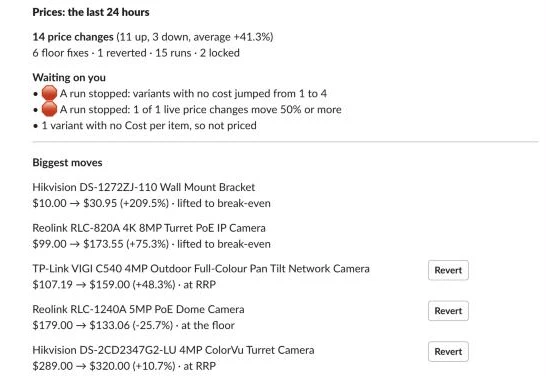
Each morning at 08:00, the workflow posts a daily digest to Slack with the last 24 hours of price changes, any items waiting on a human check, and the biggest moves with a Revert button beside each live change.
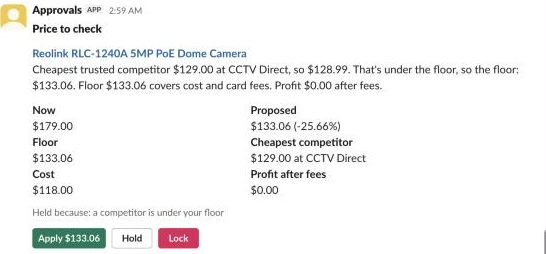
When a proposed price triggers a review rule, such as a move of 50% or more, the engine holds that change and sends a Slack card with the plain-English explanation, the break-even floor, the profit after fees, and buttons to Apply, Hold or Lock the variant.
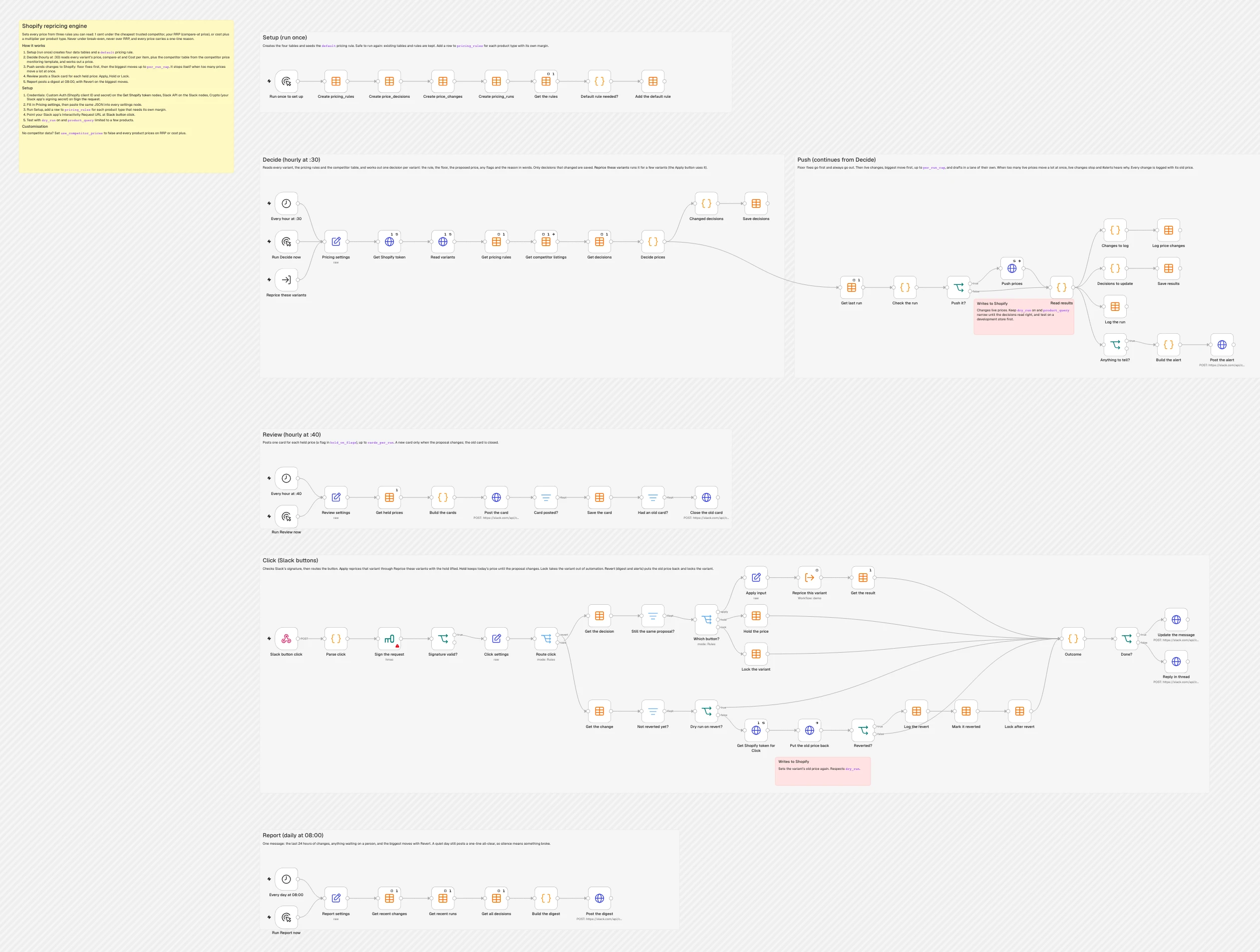
Everything runs inside a single n8n workflow organised into six horizontal lanes so you can inspect the rules, the state tables and the Slack handlers in one place.
What you need
You’ll need an n8n instance with Data Tables enabled, either self-hosted or on n8n Cloud. On the Shopify side, create a custom app in your Dev Dashboard with read_products, write_products and read_inventory scopes (because Cost per item lives on the inventory item), grab its client ID and secret, and make sure Cost per item is filled in on your variants. You’ll also need a Slack app with a bot token, interactivity turned on, and its signing secret. If you want competitor-based pricing, run the competitor price monitoring template on the same n8n instance; no AI model or paid third-party API is required.
How it works
- The Setup lane runs once to create four n8n Data Tables (
pricing_rules,price_decisions,price_changesandpricing_runs) and inserts adefaultpricing rule if one isn’t there yet. - The Decide lane runs every hour at :30, pulls every matching variant from Shopify with its price, compare-at price and unit cost, matches each variant against your rules and competitor listings, calculates the break-even floor, and writes changed decisions to
price_decisions. - The Push lane checks whether the run looks healthy, puts break-even floor fixes at the front of the queue, caps the number of live updates, writes the new prices to Shopify via GraphQL, logs every change to
price_changes, and posts an alert to Slack if a run stopped or lifted prices to break-even. - The Review lane runs at :40 past the hour, finds held decisions that haven’t had a Slack card for their current proposal, posts interactive review cards, and closes out superseded cards.
- The Click lane receives every button press from Slack cards, alerts and digests through a single webhook, verifies the Slack signature, and applies, holds, locks or reverts the price before updating the Slack message in place.
- The Report lane runs at 08:00 each day to summarise the last 24 hours of price moves, highlight items waiting on you, and post an all-clear message on quiet days so you know the schedule is still running.
Rules, not a model
Search for Shopify dynamic pricing and most of what you’ll find pitches AI-driven price optimisation. Dedicated apps are a fair choice if you want a hosted dashboard and don’t want to maintain a workflow, and machine learning models genuinely help when you’re estimating price elasticity across thousands of orders a day on your own private-label goods. Most stores selling branded products don’t have the sales velocity per SKU to train an elasticity curve, and what they actually need from dynamic pricing ecommerce automation is a fast, predictable way to react when a supplier cost rises or a competitor moves.
When every price comes from explicit rules and a hard margin floor, the engine can write a one-line explanation for every single SKU. In our test camera store, the Reolink RLC-820A gets this exact note in price_decisions: Cheapest trusted competitor $189.00 at CCTV Direct, so $188.99. Floor $173.55 covers cost, card fees and the shipping you absorb. Profit $13.73 after fees. You can read that in Slack and see immediately why the price moved.
Automated repricing usually goes wrong in three ways: two stores race each other to the bottom a cent at a time, a scraper misreads a $15 accessory bracket as a $200 camera, or a broken supplier feed drops every product cost by 90% and drags your shelf prices down with it. Each failure has a matching guard in this workflow: a break-even floor that includes card fees and absorbed shipping, an outlier filter that drops suspiciously cheap listings when you have three or more trusted competitor prices, a per-run cap, and a bad-feed stop that freezes live changes whenever too many prices move 50% or more at once.
Step 1: Create the tables and the pricing rules
The Setup lane builds the four Data Tables that store your rules, current price decisions, rollback history and run logs, then seeds a fallback default rule. Because Pricing rules key on Shopify’s free-text Product type field, you can add a row in pricing_rules for any category that needs higher margins or a different multiplier while letting everything else fall back to default.
Start in the Setup lane with a Manual Trigger named Run once to set up, then chain four Data table nodes configured to create the tables with Reuse Existing Tables turned on so re-running setup never wipes your data.
First, add Create pricing_rules (Data table):
| Setting | Value |
|---|---|
| Resource > Operation | Table > Create |
| Table name | pricing_rules |
| Columns | product_type (string), margin_floor_pct (number), cost_plus_multiplier (number), fee_pct (number), fee_fixed (number), undercut_amount (number), cost_change_pct (number), notes (string) |
| Options | Reuse Existing Tables on |
Next, add Create price_decisions (Data table) to hold one current row per Shopify variant:
| Setting | Value |
|---|---|
| Resource > Operation | Table > Create |
| Table name | price_decisions |
| Columns | variant_id (string), product_id (string), sku (string), title (string), product_type (string), product_status (string), rule (string), flags (string), status (string), explanation (string), competitor_name (string), competitor_url (string), decided_by (string), slack_channel (string), slack_ts (string), error (string), current_price (number), cost (number), last_cost (number), rrp (number), competitor_price (number), floor_price (number), target (number), proposed_price (number), move_pct (number), profit (number), held_price (number), card_price (number), locked (boolean), competitor_checked_at (date), calculated_at (date), decided_at (date), applied_at (date) |
| Options | Reuse Existing Tables on |
Connect Create price_changes (Data table) to keep an audit and rollback log of every price update:
| Setting | Value |
|---|---|
| Resource > Operation | Table > Create |
| Table name | price_changes |
| Columns | variant_id (string), product_id (string), title (string), rule (string), source (string), run_id (string), changed_by (string), from_price (number), to_price (number), move_pct (number), changed_at (date), reverted (boolean) |
| Options | Reuse Existing Tables on |
Then connect Create pricing_runs (Data table) so the engine can compare each run against the last full run:
| Setting | Value |
|---|---|
| Resource > Operation | Table > Create |
| Table name | pricing_runs |
| Columns | run_id (string), scope (string), started_at (date), variants (number), changes_due (number), changed (number), floor_fixes (number), held (number), failed (number), no_cost (number), stale_listings (number), carried_over (number), stopped (boolean), stop_reason (string), dry_run (boolean) |
| Options | Reuse Existing Tables on |
After Create pricing_runs, add Get the rules (Data table) to check whether pricing_rules already has a default row:
| Setting | Value |
|---|---|
| Operation | Get row(s) |
| Data table | pricing_rules |
| Settings | Execute Once on |
| Settings | Always Output Data on |
Follow that with a Code node named Default rule needed? (Mode set to Run Once for All Items) using this code:
// The default rule prices every product type without a row of its own. Only added if it's missing.
if ($input.all().some(i => i.json.product_type === 'default')) return [];
return [{ json: {
  product_type: 'default',
  margin_floor_pct: 0,         // 0 = break-even: the floor covers cost, card fees and shipping you absorb
  cost_plus_multiplier: 1.6,   // cost x 1.6 (plus tax where prices include it) when there's no RRP
  fee_pct: 2,                  // your payment provider's card fee, in %
  fee_fixed: 0.30,             // and its fixed fee per order
  undercut_amount: 0.01,       // how far under the cheapest trusted competitor
  cost_change_pct: 5,          // flag a cost move this big since the price was last set
  notes: 'Every product type without its own row',
} }];
Finish the Setup lane with Add the default rule (Data table):
| Setting | Value |
|---|---|
| Operation | Insert |
| Data table | pricing_rules |
| Columns | Map Each Column Manually: |
product_type | {{ $json.product_type }} |
margin_floor_pct | {{ $json.margin_floor_pct }} |
cost_plus_multiplier | {{ $json.cost_plus_multiplier }} |
fee_pct | {{ $json.fee_pct }} |
fee_fixed | {{ $json.fee_fixed }} |
undercut_amount | {{ $json.undercut_amount }} |
cost_change_pct | {{ $json.cost_change_pct }} |
notes | {{ $json.notes }} |
Click Execute Workflow on Run once to set up. For our running example camera store, we keep the default row as created (margin floor 0%, multiplier 1.6, card fees 2% + 0.30, undercut 0.01, cost change 5%) and add a second row in pricing_rules for Camera Mounts with margin_floor_pct set to 10 and cost_plus_multiplier set to 1.9, since small accessories like this mount carry a bigger markup.
Step 2: Pull every variant with its cost and price
The Decide lane can be started in three ways: on an hourly schedule, by hand while you test, or from the Click lane when someone presses Apply on a Slack card for a single variant. Add all three triggers on the left of the Decide lane and connect each one to Pricing settings.
First, add Every hour at :30 (Schedule Trigger). Half past the hour leaves room to run your competitor scan and any cost sync before it:
| Setting | Value |
|---|---|
| Rule | Custom (Cron) 30 * * * * |
Add a Manual Trigger named Run Decide now, and an Execute Workflow Trigger named Reprice these variants so the Slack Apply button can re-run the calculation for one approved SKU at current cost and competitor prices:
| Setting | Value |
|---|---|
| Input data mode | Accept all data |
Connect all three triggers to an Edit Fields (Set) node named Pricing settings (Mode set to JSON). Every lane in the workflow starts with its own settings node (Pricing settings, Review settings, Click settings and Report settings) holding a copy of this same JSON:
{
  "store_domain": "your-store.myshopify.com",
  "currency": "USD",
  "locale": "en-US",
  "product_query": "product_status:active OR product_status:draft",
  "prices_include_tax": false,
  "tax_rate": 0,
  "market_shows_tax": false,
  "tax_exclusive_domains": [],
  "free_shipping_over": null,
  "shipping_you_absorb": 0,
  "price_ending": 0.95,
  "use_competitor_prices": true,
  "min_confidence": 0.9,
  "max_price_age_days": 7,
  "outlier_below_median": 0.6,
  "exclude_competitors": ["yourstore.com"],
  "large_move_pct": 50,
  "hold_on_flags": ["large_move"],
  "per_run_cap": 750,
  "draft_lane_cap": 1000,
  "stop_min_changes": 20,
  "stop_min_large_moves": 10,
  "stop_large_move_share_pct": 5,
  "stop_missing_cost_jump_pct": 10,
  "cards_per_run": 20,
  "digest_moves": 5,
  "slack_review_channel": "#pricing",
  "slack_alert_channel": "#alerts",
  "slack_digest_channel": "#pricing",
  "dry_run": true
}
The template ships with USD, no tax and dry_run set to true so nothing writes to Shopify until you’re ready. Our test camera store prices in AUD with 10% GST included (prices_include_tax set to true, tax_rate set to 0.1, market_shows_tax set to true), offers free shipping over A$150 where the store absorbs A$12 per order (free_shipping_over set to 150, shipping_you_absorb set to 12), and rounds cost-plus prices up to .95.
After Pricing settings, add Get Shopify token (HTTP Request) to exchange your app’s client credentials for a fresh Admin API token on each run:
| Setting | Value |
|---|---|
| Method | POST |
| URL | https://{{ $('Pricing settings').first().json.store_domain }}/admin/oauth/access_token |
| Authentication | Generic: Custom Auth |
| Body | Form URL encoded, grant_type = client_credentials |
| Settings | Execute Once on |
| Settings | Retry On Fail on (3 tries, 2000 ms apart) |
| Credential | Custom Auth (Shopify client ID and secret) |
Next, connect Read variants (HTTP Request) to fetch up to 250 variants per page from the Shopify GraphQL Admin API, using product_query to filter which products are in scope:
| Setting | Value |
|---|---|
| Method | POST |
| URL | https://{{ $('Pricing settings').first().json.store_domain }}/admin/api/2026-10/graphql.json |
Header X-Shopify-Access-Token | {{ $('Get Shopify token').first().json.access_token }} |
| Body | JSON, using the expression below |
| Options > Pagination | Update a Parameter in Each Request; Body variables = {{ { cursor: $response.body.data.productVariants.pageInfo.endCursor, q: $('Pricing settings').first().json.product_query } }}; Complete when {{ !$response.body.data.productVariants.pageInfo.hasNextPage }}; interval 500 ms |
| Settings | Execute Once on |
| Settings | Retry On Fail on (3 tries, 3000 ms apart) |
Paste this expression into the JSON body of Read variants:
{{ JSON.stringify({ query: `query Variants($cursor: String, $q: String) {
  productVariants(first: 250, after: $cursor, query: $q) {
    pageInfo { hasNextPage endCursor }
    nodes {
      id
      sku
      price
      compareAtPrice
      displayName
      inventoryItem { unitCost { amount } }
      product { id status productType }
    }
  }
}`, variables: { cursor: null, q: $('Pricing settings').first().json.product_query } }) }}
In Shopify, Cost per item is stored on the variant’s inventory item as InventoryItem.unitCost, and Shopify’s documentation notes that you should enter it without taxes, shipping or other costs. If your suppliers send daily price files, my automated inventory management guide shows how to keep unitCost in step with a supplier feed automatically.
On our development store, Read variants returns seven test products that cover every path in the engine:
| Product | Type | Cost | Price before | Compare-at (RRP) | Competitor data |
|---|---|---|---|---|---|
| Reolink RLC-820A 4K 8MP Turret PoE IP Camera | Security Cameras | 142.00 | 199.00 | 229.00 | CCTV Direct 189.00 (confidence 0.95), Secure Shop 196.00; ignored: Bargain Tech 97.00 (outlier, a mount-only listing), Camera Hub 150.00 (checked 10 days ago), Netcam Store 160.00 (out of stock), Mixed Bag 140.00 (confidence 0.6) |
| Reolink RLC-1240A 5MP PoE Dome Camera | Security Cameras | 118.00 | 179.00 | 189.00 | CCTV Direct 129.00; a Google Shopping listing at 135.00 |
| Hikvision DS-1272ZJ-110 Wall Mount Bracket | Camera Mounts | 14.50 | 24.00 | none | none |
| TP-Link VIGI C540 4MP Outdoor Full-Colour Pan Tilt Network Camera | Security Cameras | 95.00 | 89.00 | 159.00 | none |
| Dahua IPC-HDW2441T-S 4MP WizSense Turret Network Camera | Security Cameras | 60.00 | 99.00 | 199.00 | none |
| Ubiquiti UniFi G5 Bullet Camera | Security Cameras | none | 199.00 | none | none |
| Hikvision DS-2CD2347G2-LU 4MP ColorVu Turret Camera (draft) | Security Cameras | 160.00 | 0.00 | 289.00 | none |
All competitor seller names in that table are made-up test listings rather than real stores.
Step 3: Choose a target from competitors, RRP or cost plus
Before the Code node calculates a target price, it needs three Data Tables loaded into the workflow: your pricing rules, any competitor listings, and the previous decisions. Chain Get pricing rules, Get competitor listings and Get decisions after Read variants.
Add Get pricing rules (Data table):
| Setting | Value |
|---|---|
| Operation | Get row(s) |
| Data table | pricing_rules |
| Settings | Execute Once on |
| Settings | Always Output Data on |
Next, add Get competitor listings (Data table) with On Error: Continue enabled:
| Setting | Value |
|---|---|
| Operation | Get row(s) |
| Data table | competitor_listings |
| Settings | Execute Once on |
| Settings | Always Output Data on |
| Settings | On Error: Continue |
The competitor_listings table comes from my competitor price monitoring guide, which finds who else sells your products and reads their prices into an n8n Data Table. If you don’t run that workflow or haven’t created competitor_listings, On Error: Continue lets the node pass an empty item through and every product simply prices on RRP or cost plus.
Then add Get decisions (Data table) so the engine knows each variant’s last_cost, whether it’s locked, and whether a proposal is already held:
| Setting | Value |
|---|---|
| Operation | Get row(s) |
| Data table | price_decisions |
| Settings | Execute Once on |
| Settings | Always Output Data on |
Now connect Decide prices (Code), which does the pricing maths in one node:
| Setting | Value |
|---|---|
| Mode | Run Once for All Items |
We’ll look at Decide prices in four slices across Steps 3, 4 and 5; joined in order, those four slices are the complete node verbatim. The first slice loads your settings and rules, filters competitor_listings down to the cheapest trusted listing per variant, sets up the floor helper functions, and skips any variant without a cost:
// One decision per variant: a target from a competitor, RRP or cost plus, never under break-even, with the reason in words.
const s = $('Pricing settings').first().json;
const call = $('Reprice these variants').isExecuted ? $('Reprice these variants').first().json : {};
const only = call.variant_ids ? new Set(call.variant_ids) : null;
const approved = new Set(call.approve || []);
const t = s.prices_include_tax ? s.tax_rate : 0;          // tax inside your shelf prices
const day = 864e5, now = Date.now();
const cents = n => Math.round(n * 100) / 100;
const up = n => Math.ceil(n * 100 - 1e-6) / 100;           // round up to the cent
const ending = n => {                                     // round up to the price ending, such as .95
  if (s.price_ending == null) return up(n);
  const w = Math.floor(n);
  return cents(w + s.price_ending >= n - 1e-9 ? w + s.price_ending : w + 1 + s.price_ending);
};
const money = n => new Intl.NumberFormat(s.locale, { style: 'currency', currency: s.currency }).format(n);

// Pricing rules by product type, with default for everything else.
const rules = {};
for (const { json: r } of $('Get pricing rules').all()) if (r.product_type) rules[r.product_type.trim().toLowerCase()] = r;
if (!rules.default) throw new Error('pricing_rules has no default row. Run the Setup lane.');
const ruleFor = type => rules[(type || '').trim().toLowerCase()] || rules.default;

// Competitor prices, on the same tax footing as yours.
const theirs = l => {
  let p = Number(l.last_price);
  if (s.market_shows_tax && (s.tax_exclusive_domains || []).includes(l.domain)) p *= 1 + s.tax_rate;
  if (s.market_shows_tax !== s.prices_include_tax) p = s.market_shows_tax ? p / (1 + s.tax_rate) : p * (1 + s.tax_rate);
  return cents(p);
};
const excluded = (s.exclude_competitors || []).map(x => x.toLowerCase());
const listings = {};
if (s.use_competitor_prices)
  for (const { json: l } of $('Get competitor listings').all())
    if (l.product_key && Number(l.last_price) > 0) (listings[l.product_key] ||= []).push(l);
function cheapest(list = []) {
  let stale = 0;
  const trusted = list.filter(l => {
    if (!['ok', 'robots_disallowed'].includes(l.status) || l.in_stock === false || Number(l.confidence) < s.min_confidence) return false;
    if ([l.domain, l.seller].some(v => v && excluded.includes(v.toLowerCase()))) return false;
    if (now - new Date(l.last_checked_at).getTime() > s.max_price_age_days * day) { stale++; return false; }
    return true;
  }).map(l => ({ ...l, price: theirs(l) }));
  // A price far under the median is usually a different pack size, a typo or a misread page.
  let kept = trusted;
  if (trusted.length >= 3) {
    const ps = trusted.map(l => l.price).sort((a, b) => a - b), m = ps.length >> 1;
    const median = ps.length % 2 ? ps[m] : (ps[m - 1] + ps[m]) / 2;
    kept = trusted.filter(l => l.price >= median * s.outlier_below_median);
  }
  kept.sort((a, b) => a.price - b.price);
  return { best: kept[0] || null, stale: stale > 0 && !kept.length };
}

// What's left after tax, card fees and any shipping you absorb.
const shipping = price => s.free_shipping_over != null && price >= s.free_shipping_over ? s.shipping_you_absorb || 0 : 0;
const net = (price, r) => price / (1 + t) - price * r.fee_pct / 100 - r.fee_fixed - shipping(price);
// The lowest price that still covers cost plus the margin floor, after tax, fees and shipping.
const floorFor = (cost, r, ship) => up((cost * (1 + r.margin_floor_pct / 100) + ship + r.fee_fixed) / (1 / (1 + t) - r.fee_pct / 100));

const stored = {};
for (const { json: d } of $('Get decisions').all()) if (d.variant_id) stored[d.variant_id] = d;

const pages = $('Read variants').all().map(i => i.json);
const bad = pages.find(p => p.errors || !p.data?.productVariants);
if (bad) throw new Error('Shopify did not return the variants: ' + JSON.stringify(bad.errors || bad).slice(0, 300));
const variants = pages.flatMap(p => p.data.productVariants.nodes).filter(v => !only || only.has(v.id));

let noCost = 0, staleListings = 0;
const decisions = variants.map(v => {
  const prev = stored[v.id] || {};
  const r = ruleFor(v.product.productType);
  const cost = Number(v.inventoryItem?.unitCost?.amount) || 0;
  const current = Number(v.price);
  const rrp = Number(v.compareAtPrice) > 0 ? Number(v.compareAtPrice) : null;
  const base = {
    variant_id: v.id, product_id: v.product.id, sku: v.sku || '', title: v.displayName.replace(/ - Default Title$/, ''),
    product_type: v.product.productType || '', product_status: v.product.status, current_price: current,
    cost: cost || null, last_cost: prev.last_cost ?? (cost || null), rrp, locked: prev.locked === true,
    calculated_at: new Date().toISOString(),
  };
  if (!cost) {
    noCost++;
    return { ...base, rule: 'no_cost', status: 'skipped', flags: '', explanation: 'No cost: not priced. Fill in Cost per item in Shopify.',
      competitor_price: null, competitor_name: null, competitor_url: null, competitor_checked_at: null,
      floor_price: null, target: null, proposed_price: null, move_pct: null, profit: null, kind: null, push_price: null };
  }
A competitor price only counts as trusted when its scrape status is ok or robots_disallowed, it isn’t marked out of stock, its match confidence is at least min_confidence (0.9), and it was checked within max_price_age_days (7). When three or more listings pass those checks, the code calculates their median and drops any price under outlier_below_median (0.6) times the median, because a single misread mount or spare-part listing shouldn’t drag down a camera’s price.
On the Reolink RLC-820A, Camera Hub ($150.00, checked 10 days ago), Netcam Store ($160.00, out of stock) and Mixed Bag ($140.00, confidence 0.6) are rejected first. That leaves three trusted prices: Bargain Tech at $97.00, CCTV Direct at $189.00, and Secure Shop at $196.00. Because $97.00 is below 0.6 × $189.00 ($113.40), the outlier filter drops Bargain Tech and picks CCTV Direct at $189.00. Meanwhile, the Ubiquiti UniFi G5 Bullet has no Cost per item in Shopify, so it exits early with rule no_cost and the note No cost: not priced. Fill in Cost per item in Shopify.
The second slice of Decide prices implements the four-path repricing strategy across competitors, RRP and cost plus pricing:
  // 1. The target: 1 cent under the cheapest trusted competitor, else RRP, else cost plus. Never above RRP.
  const { best, stale } = cheapest(listings[v.id]);
  if (stale) staleListings++;
  const costPlus = ending(cost * r.cost_plus_multiplier * (1 + t));
  const ceiling = rrp ?? costPlus;
  let target, rule, why;
  if (best && best.price - r.undercut_amount < ceiling) {
    target = cents(best.price - r.undercut_amount); rule = 'undercut';
    why = `Cheapest trusted competitor ${money(best.price)} at ${best.seller || best.domain}, so ${money(target)}.`;
  } else if (rrp) {
    target = rrp; rule = 'at_rrp';
    why = best ? `Cheapest trusted competitor ${money(best.price)} is at or above RRP, so RRP ${money(rrp)}.`
               : `No trusted competitor price, so RRP ${money(rrp)} (compare-at).`;
  } else {
    target = costPlus; rule = 'cost_plus';
    why = `No RRP and no cheaper trusted competitor, so cost ${money(cost)} x ${r.cost_plus_multiplier}${t ? ' plus tax' : ''}, rounded up: ${money(costPlus)}.`;
  }
Here Shopify’s Compare-at price field holds the manufacturer’s RRP, which acts as both the default target price and the price ceiling. When a trusted competitor is below the ceiling, the engine undercuts by 0.01 rather than a percentage (undercut), because the cheapest listing wins the comparison and a bigger cut only gives away margin. When no trusted competitor is cheaper, a product with a compare-at price sits at at_rrp, whereas a product without a compare-at price uses cost_plus (cost × cost_plus_multiplier, plus tax where prices include it, rounded up to .95). That’s why the Hikvision DS-1272ZJ-110 mount (cost $14.50, no RRP, Camera Mounts multiplier 1.9, plus 10% GST = $30.305) rounds up to .95 at $30.95.
Step 4: Never sell below break-even
Once a variant has a target price, the engine checks that target against its break even price floor. On a store I run, in the last 30 days the engine made 7,669 price changes across 2,189 variants, and 453 of them were live prices it found under break-even (a hand edit or a cost rise) and lifted within the hour.
Add the third slice of Decide prices right below the target calculation:
  // 2. The floor. Shipping you absorb counts only when the price clears your free-shipping threshold.
  const f0 = floorFor(cost, r, 0), f1 = floorFor(cost, r, s.shipping_you_absorb || 0);
  const clears = p => s.free_shipping_over != null && p >= s.free_shipping_over;
  const floor = clears(Math.max(target, f0)) ? f1 : f0;
  let proposed = target;
  if (target < floor) { proposed = floor; rule = 'at_floor'; why += ` That's under the floor, so the floor: ${money(floor)}.`; }
  const profit = cents(net(proposed, r) - cost);
  const covers = ['cost', 'card fees', ...(shipping(proposed) ? ['the shipping you absorb'] : []), ...(r.margin_floor_pct ? [`a ${r.margin_floor_pct}% margin`] : [])];
  why += ` Floor ${money(floor)} covers ${covers.slice(0, -1).join(', ')} and ${covers.at(-1)}. Profit ${money(profit)} after fees.`;
A real floor has to account for tax inside the shelf price, percentage and fixed card fees, your minimum margin percentage, and the shipping cost you absorb when an order qualifies for free shipping. In floorFor, the numerator adds your ex-tax cost (plus any margin floor), absorbed shipping and the fixed card fee, then divides by 1 / (1 + t) - fee_pct / 100 so that after tax and percentage card fees are deducted from the final price, you’re left with at least your cost and target margin, rounded up to the cent.
You can trace the maths directly on our two Reolink cameras:
- On the Reolink RLC-1240A (cost $118.00, 10% tax included, card fees 2% + $0.30, margin floor 0%), the competitor target of $128.99 and the base floor
f0are both under the $150.00 free-shipping threshold, so no absorbed shipping applies:(118 + 0.30) ÷ (1 ÷ 1.1 − 0.02) = 118.30 ÷ 0.889091 = 133.057..., which rounds up to$133.06. Because CCTV Direct’s $129.00 listing would put us at $128.99, the engine refuses to follow them down, setsproposedto$133.06, and switchesruletoat_floor. - On the Reolink RLC-820A (cost $142.00), the target of $188.99 clears the $150.00 free-shipping threshold, so the floor includes the $12.00 shipping we absorb:
(142 + 12 + 0.30) ÷ 0.889091 = 173.55. Because $188.99 is comfortably above $173.55, the undercut stands and leaves $13.73 profit after fees.
If a supplier raises its cost so far that your break-even floor ends up higher than the compare-at RRP, proposed still sits on the floor (at_floor) and the engine never writes to compareAtPrice. Shoppers won’t see a nonsensical “was $150, now $165” display because Shopify requires compare-at price to be higher than Price to show a sale, Shopify’s current default theme Horizon checks that compare-at exceeds the price before rendering the strikethrough price or Sale badge (checked November 2026), and the Google & YouTube app only shares compare-at with Merchant Center as a sale price when it is higher than the live price.
Step 5: Flag what needs a person
The fourth and final slice of Decide prices tags unusual situations with flags, decides whether the proposal goes out automatically (pending) or waits for a human (held), and checks whether the current live price in Shopify is already below break-even (floor_fix):
  // 3. Flags: what a person might want to see.
  const move = current > 0 ? cents((proposed - current) / current * 100) : null;
  const flags = [];
  if (best && best.price < floor) flags.push('floor_breach');
  if (floor > ceiling) { flags.push('above_ceiling'); why += rrp ? ' Break-even is above RRP.' : ' Break-even is above the cost-plus price.'; }
  if (prev.last_cost > 0 && Math.abs(cost - prev.last_cost) / prev.last_cost * 100 >= r.cost_change_pct) flags.push('cost_change');
  if (move !== null && Math.abs(move) >= s.large_move_pct) flags.push('large_move');

  // 4. Status. A live price under break-even is fixed this run whatever its status: that's the floor fix.
  const floorNow = clears(current) ? f1 : f0;
  const fixPrice = clears(f0) ? f1 : f0;
  let status;
  if (base.locked) status = 'locked';
  else if (Math.abs(proposed - current) < 0.005) status = 'unchanged';
  else if (prev.status === 'kept' && Number(prev.held_price) === proposed) status = 'kept';
  else if (!approved.has(v.id) && (flags.some(f => (s.hold_on_flags || []).includes(f))
           || (prev.status === 'held' && Number(prev.proposed_price) === proposed))) {
    status = 'held';   // held until someone decides or the proposal changes, with the flags it was held for
    for (const f of String(prev.flags || '').split(',')) if (f && !flags.includes(f) && (s.hold_on_flags || []).includes(f)) flags.push(f);
  }
  else status = 'pending';
  const floorFix = current < floorNow - 0.004;
  const kind = floorFix ? 'floor_fix' : status === 'pending' ? 'change' : null;
  const push_price = status === 'pending' ? proposed : floorFix ? fixPrice : null;
  if (floorFix && push_price !== proposed) why += ` The live price ${money(current)} is under break-even, so it goes to ${money(push_price)} now.`;

  return { ...base, rule, status, flags: flags.join(','), explanation: why,
    competitor_price: best ? best.price : null, competitor_name: best ? best.seller || best.domain : null,
    competitor_url: best ? best.url : null, competitor_checked_at: best ? best.last_checked_at : null,
    floor_price: floor, target, proposed_price: proposed, move_pct: move, profit, kind, push_price };
});

return [{ json: { decisions, summary: {
  scope: only ? 'variants' : 'all', approved: [...approved], by: call.by || null,
  variants: variants.length, no_cost: noCost, stale_listings: staleListings,
} } }];
By default, hold_on_flags ships as ["large_move"], so any proposal that moves a price by 50% or more (large_move_pct) gets status = 'held' and waits for a Slack card decision. You can also add floor_breach, cost_change or above_ceiling to hold_on_flags, or set hold_on_flags to [] if you want the Shopify repricer to apply every move automatically and rely on Slack alerts and the morning digest.
Notice how floorFix interacts with holds and locks on the TP-Link VIGI C540. Its cost is $95.00, its live price was accidentally set to $89.00, and its RRP is $159.00 (+78.65% move). Because +78.65% exceeds 50%, the $159.00 proposal is flagged large_move and set to held. However, $89.00 is below its break-even floor without free shipping (f0 = $107.19), so floorFix triggers immediately: push_price is set to $107.19 for this run so the store stops losing money right away, while the $159.00 RRP proposal remains held for a person to approve in Slack. Even on a subsequent run when the remaining gap ($107.19 to $159.00) is under 50%, the condition prev.status === 'held' && Number(prev.proposed_price) === proposed keeps that $159.00 proposal held until someone clicks a button or the proposal changes.
Here is what the first run decided across all seven test products:
| Product | Rule | Floor | Proposed | Move | Status | Explanation |
|---|---|---|---|---|---|---|
| RLC-820A | undercut | 173.55 | 188.99 | -5.03% | pending, applied | Cheapest trusted competitor $189.00 at CCTV Direct, so $188.99. Floor $173.55 covers cost, card fees and the shipping you absorb. Profit $13.73 after fees. |
| RLC-1240A | at_floor (flag floor_breach) | 133.06 | 133.06 | -25.66% | pending, applied | Cheapest trusted competitor $129.00 at CCTV Direct, so $128.99. That’s under the floor, so the floor: $133.06. Floor $133.06 covers cost and card fees. Profit $0.00 after fees. |
| DS-1272ZJ-110 mount | cost_plus | 18.28 | 30.95 | +28.96% | pending, applied | No RRP and no cheaper trusted competitor, so cost $14.50 x 1.9 plus tax, rounded up: $30.95. Floor $18.28 covers cost, card fees and a 10% margin. Profit $12.72 after fees. |
| VIGI C540 | at_rrp (flag large_move) | 120.69 | 159.00 | +78.65% | held; floor fix 89.00 → 107.19 this run | No trusted competitor price, so RRP $159.00 (compare-at). Floor $120.69 covers cost, card fees and the shipping you absorb. Profit $34.07 after fees. The live price $89.00 is under break-even, so it goes to $107.19 now. |
| IPC-HDW2441T-S | at_rrp (flag large_move) | 81.32 | 199.00 | +101.01% | held (card) | No trusted competitor price, so RRP $199.00 (compare-at). Floor $81.32 covers cost, card fees and the shipping you absorb. Profit $104.63 after fees. |
| UniFi G5 Bullet | no_cost | skipped | No cost: not priced. Fill in Cost per item in Shopify. | |||
| DS-2CD2347G2-LU (draft) | at_rrp | 193.80 | 289.00 | pending; floor fix 0.00 → 289.00 (draft lane) | No trusted competitor price, so RRP $289.00 (compare-at). Floor $193.80 covers cost, card fees and the shipping you absorb. Profit $84.65 after fees. |
From Decide prices, the workflow splits into two branches. Place the Changed decisions branch higher on the canvas than the Push lane branch so n8n executes it first and saves your decisions before the Push lane runs.
Add Changed decisions (Code, Mode set to Run Once for All Items) so n8n only writes rows whose values actually changed rather than rewriting thousands of unchanged variants to Data Tables every hour:
// Save only the decisions that changed, so a big catalogue isn't rewritten every hour.
const KEYS = ['product_status', 'current_price', 'cost', 'rrp', 'competitor_price', 'floor_price', 'proposed_price', 'rule', 'flags', 'status', 'locked'];
const stored = {};
for (const { json: d } of $('Get decisions').all()) if (d.variant_id) stored[d.variant_id] = d;
const same = (a, b) => (a ?? null) === (b ?? null) || (a != null && b != null && Number(a) === Number(b));
return $json.decisions
  .filter(d => !stored[d.variant_id] || KEYS.some(k => k === 'locked'
    ? Boolean(d.locked) !== Boolean(stored[d.variant_id].locked) : !same(d[k], stored[d.variant_id][k])))
  .map(d => ({ json: d }));
Connect Changed decisions to Save decisions (Data table). Notice that locked, held_price and the Slack card columns (card_price, slack_channel, slack_ts) are intentionally left out of the upsert mapping so decisions made in Slack aren’t overwritten by the hourly calculation:
| Setting | Value |
|---|---|
| Operation | Upsert |
| Data table | price_decisions |
| Condition | variant_id eq {{ $json.variant_id }} |
| Columns | Map Each Column Manually: |
variant_id | {{ $json.variant_id }} |
product_id | {{ $json.product_id }} |
sku | {{ $json.sku }} |
title | {{ $json.title }} |
product_type | {{ $json.product_type }} |
product_status | {{ $json.product_status }} |
current_price | {{ $json.current_price }} |
cost | {{ $json.cost }} |
last_cost | {{ $json.last_cost }} |
rrp | {{ $json.rrp }} |
competitor_price | {{ $json.competitor_price }} |
competitor_name | {{ $json.competitor_name }} |
competitor_url | {{ $json.competitor_url }} |
competitor_checked_at | {{ $json.competitor_checked_at }} |
floor_price | {{ $json.floor_price }} |
target | {{ $json.target }} |
proposed_price | {{ $json.proposed_price }} |
move_pct | {{ $json.move_pct }} |
profit | {{ $json.profit }} |
rule | {{ $json.rule }} |
flags | {{ $json.flags }} |
status | {{ $json.status }} |
explanation | {{ $json.explanation }} |
calculated_at | {{ $json.calculated_at }} |
Step 6: Cap each run and stop on bad data
The lower branch from Decide prices enters the Push lane, starting with Get last run (Data table) so we can compare the missing-cost rate of this run against the previous full catalogue run:
| Setting | Value |
|---|---|
| Operation | Get row(s) |
| Data table | pricing_runs |
| Condition | scope eq all |
| Order by | started_at DESC |
| Limit | 1 |
| Settings | Execute Once on |
| Settings | Always Output Data on |
Connect Get last run to Check the run (Code, Mode set to Run Once for All Items) using this code:
// Floor fixes first, then the biggest live moves up to the cap, then drafts. Stop live changes when the data looks wrong.
const s = $('Pricing settings').first().json;
const { decisions, summary } = $('Decide prices').first().json;
const last = $('Get last run').first().json || {};
const fixes = decisions.filter(d => d.kind === 'floor_fix');
const changes = decisions.filter(d => d.kind === 'change');
const live = changes.filter(d => d.product_status === 'ACTIVE')
  .sort((a, b) => Math.abs(b.move_pct ?? 0) - Math.abs(a.move_pct ?? 0));
const drafts = changes.filter(d => d.product_status !== 'ACTIVE');

// The bad-feed stop: when a feed or a scan goes wrong, it goes wrong everywhere, so hold every live change.
const reasons = [];
if (summary.scope === 'all') {
  const big = live.filter(d => d.flags.includes('large_move')).length;
  if (live.length >= s.stop_min_changes && big >= s.stop_min_large_moves && big / live.length * 100 > s.stop_large_move_share_pct)
    reasons.push(`${big} of ${live.length} live price changes move ${s.large_move_pct}% or more`);
  if (last.variants > 0 && summary.variants > 0
      && (summary.no_cost / summary.variants - last.no_cost / last.variants) * 100 > s.stop_missing_cost_jump_pct)
    reasons.push(`variants with no cost jumped from ${last.no_cost} to ${summary.no_cost}`);
}
const stopped = reasons.length > 0;
const sendLive = stopped ? [] : live.slice(0, s.per_run_cap);
const send = [...fixes, ...sendLive, ...drafts.slice(0, s.draft_lane_cap)];

const run = {
  run_id: String($execution.id), scope: summary.scope, started_at: $('Decide prices').first().json.decisions[0]?.calculated_at || new Date().toISOString(),
  variants: summary.variants, changes_due: fixes.length + changes.length, floor_fixes: fixes.length,
  held: decisions.filter(d => d.status === 'held').length, no_cost: summary.no_cost, stale_listings: summary.stale_listings,
  carried_over: live.length - sendLive.length, stopped, stop_reason: reasons.join('; ') || null, dry_run: s.dry_run,
};
// One Shopify call per product, carrying all its variants.
const byProduct = {};
for (const d of send) (byProduct[d.product_id] ||= []).push(d);
const items = Object.entries(byProduct).map(([product_id, rows]) => ({ json: {
  product_id, variants: rows.map(d => ({ id: d.variant_id, price: d.push_price.toFixed(2) })), rows, run } }));
return items.length ? items : [{ json: { product_id: null, rows: [], run } }];
Check the run orders the queue so floor_fix items always go out first, followed by active changes sorted by the largest percentage move up to per_run_cap (750), and then draft products up to draft_lane_cap (1000). Keeping drafts in their own cap means importing 800 new draft products from a supplier won’t starve your live catalogue updates.
It also checks two bad-feed triggers on full runs (scope === 'all'):
- Too many large live moves at once: at least
stop_min_changes(20) live changes are due, at leaststop_min_large_moves(10) of them move by 50% or more, and those large moves make up more thanstop_large_move_share_pct(5%) of the live changes. - A sudden jump in missing costs: the share of variants without a cost jumped by more than
stop_missing_cost_jump_pct(10percentage points) compared with the last full run.
When either trigger fires, stopped becomes true and sendLive is emptied. Stopping the entire live batch rather than just the extreme rows is deliberate: when a supplier feed shifts columns or a scraper breaks, the rows that only moved 15% are just as corrupt as the rows that moved 60%. Floor fixes and draft products still go out so nothing sells below break-even while you investigate.
When we tested the stop on the development store by lowering stop_min_changes to 1, stop_min_large_moves to 1 and stop_large_move_share_pct to 0, Slack received: Live price changes stopped: 1 of 1 live price changes move 50% or more. Floor fixes and drafts still went out. Wiping the cost on three variants triggered the second guard with variants with no cost jumped from 1 to 4.
Step 7: Push the prices to Shopify
After Check the run, add an If node named Push it? so nothing is sent to Shopify when dry_run is true or when no products need an update:
| Setting | Value |
|---|---|
| Condition | {{ !$('Pricing settings').first().json.dry_run && Boolean($json.product_id) }} is true |
Connect the true output of Push it? to Push prices (HTTP Request), and connect the false output directly to Read results. Push prices performs a Shopify bulk price update for each product using the productVariantsBulkUpdate GraphQL mutation, which updates all changed variants on a single product in one call:
| Setting | Value |
|---|---|
| Method | POST |
| URL | https://{{ $('Pricing settings').first().json.store_domain }}/admin/api/2026-10/graphql.json |
Header X-Shopify-Access-Token | {{ $('Get Shopify token').first().json.access_token }} |
| Body | JSON, using the expression below |
| Options > Batching | 1 item every 500 ms |
| Settings | Retry On Fail on (3 tries, 2000 ms apart) |
| Settings | On Error: Continue |
Use this expression for the Push prices body:
{{ JSON.stringify({ query: `mutation Reprice($productId: ID!, $variants: [ProductVariantsBulkInput!]!) {
  productVariantsBulkUpdate(productId: $productId, variants: $variants) {
    productVariants { id price }
    userErrors { field message }
  }
}`, variables: { productId: $json.product_id, variants: $json.variants } }) }}
Notice that variants only sends id and price; compareAtPrice is never touched. Each productVariantsBulkUpdate mutation costs 10 query points against Shopify’s GraphQL Admin API rate limits, where a single query cannot exceed 1,000 points and the bucket restores at 100 points per second on standard plans (200 on Advanced, 1,000 on Plus). Pacing requests at 1 item every 500 ms uses 20 points per second, leaving plenty of headroom for the rest of your store’s apps.
Connect Push prices (along with the false branch of Push it?) into Read results (Code, Mode set to Run Once for All Items). Because Shopify’s GraphQL API returns HTTP 200 even when a mutation is rejected in userErrors or errors, Read results inspects the response body for every product:
// Shopify answers HTTP 200 even when it refuses a change, so read the body. A failed row is tried again next run.
const s = $('Pricing settings').first().json;
const sent = $('Check the run').all().map(i => i.json);
const pushed = $('Push prices').isExecuted ? $('Push prices').all().map(i => i.json) : null;
const { approved, by } = $('Decide prices').first().json.summary;
const run = sent[0].run, now = new Date().toISOString();
const changes = [], updates = [], failed = [];
sent.forEach((b, i) => {
  if (!b.product_id || !pushed) return;           // nothing due, or dry run
  const r = pushed[i] || {}, res = r.data?.productVariantsBulkUpdate;
  const err = (r.errors || []).map(e => e.message).join('; ')
    || (res?.userErrors || []).map(e => e.message).join('; ')
    || (r.error ? String(r.error.message || r.error) : '')
    || (res ? '' : 'no answer from Shopify');
  for (const d of b.rows) {
    const source = d.kind === 'floor_fix' ? 'floor_fix' : approved.includes(d.variant_id) ? 'approved' : 'scheduled';
    if (err) { failed.push({ title: d.title, error: err }); updates.push({ variant_id: d.variant_id, status: 'failed', error: err, current_price: d.current_price, last_cost: d.last_cost, applied_at: null }); continue; }
    changes.push({ variant_id: d.variant_id, product_id: d.product_id, title: d.title, rule: source === 'floor_fix' ? 'floor_fix' : d.rule,
      source, run_id: run.run_id, changed_by: source === 'approved' ? by : 'repricer', from_price: d.current_price, to_price: d.push_price,
      move_pct: d.current_price > 0 ? Math.round((d.push_price - d.current_price) / d.current_price * 1000) / 10 : null,
      changed_at: now, reverted: false });
    updates.push({ variant_id: d.variant_id, status: d.push_price === d.proposed_price ? 'applied' : d.status, error: null,
      current_price: d.push_price, last_cost: d.cost, applied_at: now });
  }
});
run.changed = changes.length; run.failed = failed.length;
const big = changes.filter(c => c.source !== 'floor_fix' && Math.abs(c.move_pct ?? 0) >= s.large_move_pct);   // floor fixes are listed apart, with no Revert
const fixes = changes.filter(c => c.source === 'floor_fix');
return [{ json: { run, changes, updates, alert: run.stopped || fixes.length > 0 || big.length > 0 || failed.length > 0,
  fixes, big, failed } }];
When a floor fix pushes $107.19 on the VIGI C540 while its $159.00 proposal is held, d.push_price === d.proposed_price is false, so status stays held while current_price updates to $107.19.
Read results fans out into four branches, ordered from top to bottom on the canvas:
First branch: connect Changes to log (Code, Mode set to Run Once for All Items):
return $json.changes.map(json => ({ json }));Follow Changes to log with Log price changes (Data table) to record the rollback trail:
| Setting | Value |
|---|---|
| Operation | Insert |
| Data table | price_changes |
| Columns | Map Each Column Manually: |
variant_id | {{ $json.variant_id }} |
product_id | {{ $json.product_id }} |
title | {{ $json.title }} |
rule | {{ $json.rule }} |
source | {{ $json.source }} |
run_id | {{ $json.run_id }} |
changed_by | {{ $json.changed_by }} |
from_price | {{ $json.from_price }} |
to_price | {{ $json.to_price }} |
move_pct | {{ $json.move_pct }} |
changed_at | {{ $json.changed_at }} |
reverted | {{ $json.reverted }} |
Second branch: connect Decisions to update (Code, Mode set to Run Once for All Items):
return $json.updates.map(json => ({ json }));Follow Decisions to update with Save results (Data table):
| Setting | Value |
|---|---|
| Operation | Update |
| Data table | price_decisions |
| Condition | variant_id eq {{ $json.variant_id }} |
| Columns | Map Each Column Manually: |
status | {{ $json.status }} |
error | {{ $json.error }} |
current_price | {{ $json.current_price }} |
last_cost | {{ $json.last_cost }} |
applied_at | {{ $json.applied_at }} |
Third branch: connect Log the run (Data table) directly to Read results:
| Setting | Value |
|---|---|
| Operation | Insert |
| Data table | pricing_runs |
| Columns | Map Each Column Manually: |
run_id | {{ $json.run.run_id }} |
scope | {{ $json.run.scope }} |
started_at | {{ $json.run.started_at }} |
variants | {{ $json.run.variants }} |
changes_due | {{ $json.run.changes_due }} |
changed | {{ $json.run.changed }} |
floor_fixes | {{ $json.run.floor_fixes }} |
held | {{ $json.run.held }} |
failed | {{ $json.run.failed }} |
no_cost | {{ $json.run.no_cost }} |
stale_listings | {{ $json.run.stale_listings }} |
carried_over | {{ $json.run.carried_over }} |
stopped | {{ $json.run.stopped }} |
stop_reason | {{ $json.run.stop_reason }} |
dry_run | {{ $json.run.dry_run }} |
Fourth branch: connect Anything to tell? (If) to check whether the run stopped, applied floor fixes, applied large moves, or hit any Shopify errors:
| Setting | Value |
|---|---|
| Condition | {{ $('Read results').first().json.alert }} is true |
On the true output of Anything to tell?, add Build the alert (Code, Mode set to Run Once for All Items):
// Run stopped, floor fixes, large moves (each with Revert) and failures, in one message.
const s = $('Pricing settings').first().json;
const { run, fixes, big, failed } = $('Read results').first().json;
const money = n => new Intl.NumberFormat(s.locale, { style: 'currency', currency: s.currency }).format(n);
const pct = n => (n > 0 ? '+' : '') + n + '%';
const blocks = [], lines = [];
if (run.stopped) lines.push(`:octagonal_sign: *Live price changes stopped:* ${run.stop_reason}. Floor fixes and drafts still went out. Check your cost data and the competitor scan, then run Decide again.`);
if (fixes.length) lines.push(`:arrow_up: *${fixes.length} price${fixes.length === 1 ? '' : 's'} lifted to break-even:*\n` + fixes.slice(0, 20).map(c => `• ${c.title}: ${money(c.from_price)} → ${money(c.to_price)}`).join('\n'));
if (failed.length) lines.push(`:warning: *${failed.length} change${failed.length === 1 ? '' : 's'} failed* (tried again next run): ` + [...new Set(failed.map(f => f.error))].slice(0, 3).join('; '));
for (const l of lines) blocks.push({ type: 'section', text: { type: 'mrkdwn', text: l } });
if (big.length) {
  blocks.push({ type: 'section', text: { type: 'mrkdwn', text: `*${big.length} large move${big.length === 1 ? '' : 's'} applied:*` } });
  big.slice(0, 5).forEach((c, n) => blocks.push({ type: 'section', block_id: 'rev_' + n,
    text: { type: 'mrkdwn', text: `${c.title}\n${money(c.from_price)} → ${money(c.to_price)} (${pct(c.move_pct)})` },
    accessory: { type: 'button', action_id: 'price_revert', text: { type: 'plain_text', text: 'Revert' }, value: c.variant_id + '|' + c.run_id,
      confirm: { title: { type: 'plain_text', text: 'Put the old price back?' }, text: { type: 'mrkdwn', text: `Sets ${money(c.from_price)} and locks this variant.` },
        confirm: { type: 'plain_text', text: 'Revert' }, deny: { type: 'plain_text', text: 'Cancel' } } } }));
}
return [{ json: { channel: s.slack_alert_channel, text: run.stopped ? 'Repricing stopped: ' + run.stop_reason : 'Repricing: ' + run.changed + ' changes', blocks } }];
Finish the branch with Post the alert (HTTP Request):
| Setting | Value |
|---|---|
| Method | POST |
| URL | https://slack.com/api/chat.postMessage |
| Authentication | Predefined: Slack API |
| Body | JSON, using the expression below |
| Credential | Slack API (bot token) |
Use this expression for the body of Post the alert:
{{ JSON.stringify({ channel: $json.channel, text: $json.text, blocks: $json.blocks, unfurl_links: false }) }}On our 7-product development store with dry_run turned off, the first live run pushed 5 prices (2 floor fixes first for the VIGI C540 and draft ColorVu camera, followed by 3 scheduled changes for the RLC-820A, RLC-1240A and wall mount), posted one alert listing the floor fixes, and took about 8 seconds end to end. Running it a second time when nothing had changed took about 1.3 seconds and saved no rows to price_decisions.
Step 8: Send held prices to Slack
Held prices are handled across two lanes: Review posts the interactive cards at :40 past the hour, and Click listens for button presses from Slack. If you haven’t created a Slack app with interactivity before, my Slack approvals guide walks through setting up the Slack app scopes and covers the extended pattern with edit modals, review pages and reminders.
Start the Review lane with Every hour at :40 (Schedule Trigger) and Run Review now (Manual Trigger), both feeding Review settings (Edit Fields (Set)):
| Setting | Value |
|---|---|
| Rule | Custom (Cron) 40 * * * * |
Configure Review settings (Edit Fields (Set)) with the same JSON as Pricing settings:
| Setting | Value |
|---|---|
| Mode | JSON |
| JSON | the settings JSON (see “Settings”) |
Connect Get held prices (Data table) to pull every row currently sitting in held status:
| Setting | Value |
|---|---|
| Operation | Get row(s) |
| Data table | price_decisions |
| Condition | status eq held |
| Settings | Execute Once on |
Next, add Build the cards (Code, Mode set to Run Once for All Items). Checking Number(d.card_price) !== Number(d.proposed_price) guarantees that a held variant only gets one card per proposed price rather than spamming #pricing every hour:
// One card per held price that hasn't had a card for this proposal yet.
const s = $('Review settings').first().json;
const money = n => n == null ? 'n/a' : new Intl.NumberFormat(s.locale, { style: 'currency', currency: s.currency }).format(n);
const pt = text => ({ type: 'plain_text', text });
const LABEL = { large_move: 'large move', floor_breach: 'a competitor is under your floor', cost_change: 'cost changed', above_ceiling: 'break-even is above RRP' };
return $input.all().map(i => i.json)
  .filter(d => d.variant_id && Number(d.card_price) !== Number(d.proposed_price))
  .slice(0, s.cards_per_run)
  .map(d => {
    const admin = `https://${s.store_domain}/admin/products/${d.product_id.split('/').pop()}/variants/${d.variant_id.split('/').pop()}`;
    const move = d.move_pct == null ? '' : ` (${d.move_pct > 0 ? '+' : ''}${d.move_pct}%)`;
    const blocks = [
      { type: 'header', text: pt('Price to check') },
      { type: 'section', text: { type: 'mrkdwn', text: `*<${admin}|${d.title}>*\n${d.explanation}` } },
      { type: 'section', fields: [
        { type: 'mrkdwn', text: `*Now*\n${money(d.current_price)}` },
        { type: 'mrkdwn', text: `*Proposed*\n${money(d.proposed_price)}${move}` },
        { type: 'mrkdwn', text: `*Floor*\n${money(d.floor_price)}` },
        { type: 'mrkdwn', text: `*Cheapest competitor*\n${d.competitor_price == null ? 'None trusted' : money(d.competitor_price) + ' at ' + d.competitor_name}` },
        { type: 'mrkdwn', text: `*Cost*\n${money(d.cost)}` },
        { type: 'mrkdwn', text: `*Profit after fees*\n${money(d.profit)}` },
      ] },
      { type: 'context', elements: [{ type: 'mrkdwn', text: 'Held because: ' + d.flags.split(',').filter(Boolean).map(f => LABEL[f] || f).join(', ') }] },
      { type: 'actions', block_id: 'price_actions', elements: [
        { type: 'button', action_id: 'price_apply', style: 'primary', text: pt('Apply ' + money(d.proposed_price)), value: d.variant_id + '|' + d.proposed_price },
        { type: 'button', action_id: 'price_hold', text: pt('Hold'), value: d.variant_id + '|' + d.proposed_price },
        { type: 'button', action_id: 'price_lock', style: 'danger', text: pt('Lock'), value: d.variant_id + '|' + d.proposed_price,
          confirm: { title: pt('Lock this price?'), text: { type: 'mrkdwn', text: 'The repricer stops changing this variant until you set `locked` back to false. Floor fixes still apply.' }, confirm: pt('Lock'), deny: pt('Cancel') } },
      ] },
    ];
    return { json: { variant_id: d.variant_id, proposed_price: d.proposed_price, old_channel: d.slack_channel, old_ts: d.slack_ts,
      text: `Price to check: ${d.title}`, blocks } };
  });
Connect Post the card (HTTP Request), batched at 1 item every 1100 ms to stay inside Slack’s 1-message-per-second posting guideline:
| Setting | Value |
|---|---|
| Method | POST |
| URL | https://slack.com/api/chat.postMessage |
| Authentication | Predefined: Slack API |
| Body | JSON, using the expression below |
| Options > Batching | 1 item every 1100 ms |
| Credential | Slack API (bot token) |
Use this expression for the Post the card body:
{{ JSON.stringify({ channel: $('Review settings').first().json.slack_review_channel, text: $json.text, blocks: $json.blocks, unfurl_links: false }) }}Because Slack returns HTTP 200 even when a post fails, add Card posted? (Filter) to check $json.ok:
| Setting | Value |
|---|---|
| Condition | {{ $json.ok }} is true |
Then add Save the card (Data table) to record the card_price, slack_channel and slack_ts:
| Setting | Value |
|---|---|
| Operation | Update |
| Data table | price_decisions |
| Condition | variant_id eq {{ $('Build the cards').item.json.variant_id }} |
| Columns | Map Each Column Manually: |
card_price | {{ $('Build the cards').item.json.proposed_price }} |
slack_channel | {{ $json.channel }} |
slack_ts | {{ $json.ts }} |
If a held variant already had an older unanswered card and the proposed price changed on a later run, we want to strip the buttons off that old card so nobody clicks an outdated proposal. Add Had an old card? (Filter):
| Setting | Value |
|---|---|
| Condition | {{ Boolean($('Build the cards').item.json.old_ts) }} is true |
Finish the Review lane with Close the old card (HTTP Request):
| Setting | Value |
|---|---|
| Method | POST |
| URL | https://slack.com/api/chat.update |
| Authentication | Predefined: Slack API |
| Body | JSON, using the expression below |
| Credential | Slack API (bot token) |
Paste this expression into the body of Close the old card:
{{ JSON.stringify({ channel: $('Build the cards').item.json.old_channel, ts: $('Build the cards').item.json.old_ts,
  text: 'Replaced by a newer proposal', blocks: [{ type: 'context', elements: [{ type: 'mrkdwn', text: ':arrows_counterclockwise: Replaced by a newer proposal for ' + $('Build the cards').item.json.text.replace('Price to check: ', '') }] }] }) }}
Next, build the Click lane to handle button presses from those cards as well as Revert clicks from the digest and alerts. Slack requires interactive button payloads to be acknowledged within 3 seconds and recommends verifying requests with your signing secret by computing an HMAC SHA256 signature over v0:timestamp:raw_body and rejecting timestamps older than 5 minutes.
Start the Click lane with Slack button click (Webhook) and paste its production URL into your Slack app’s Interactivity Request URL field:
| Setting | Value |
|---|---|
| HTTP Method | POST |
| Path | repricing |
| Respond | Immediately |
| Options | Raw Body on |
Turning on Raw Body gives us the exact URL-encoded bytes Slack signed. Connect Parse click (Code, Mode set to Run Once for All Items) to check the timestamp age, unpack the payload form field, and prepare the base string for HMAC verification:
const raw = (await this.helpers.getBinaryDataBuffer(0, 'data')).toString('utf8');
const h = $input.first().json.headers;
if (Math.abs(Date.now() / 1000 - Number(h['x-slack-request-timestamp'])) > 300) throw new Error('Stale request');
const field = raw.split('&').find(kv => kv.startsWith('payload=')) || ''; // no URLSearchParams in the Code node
const p = JSON.parse(decodeURIComponent(field.slice(8).replace(/\+/g, ' ')));
const a = p.actions[0];
const [id, second] = a.value.split('|');
return [{ json: { base: `v0:${h['x-slack-request-timestamp']}:${raw}`, expected: h['x-slack-signature'],
  action: a.action_id.replace('price_', ''), variant_id: id, price: Number(second), run_id: second, block_id: a.block_id,
  user: p.user.username || p.user.name || p.user.id, channel: p.channel.id, ts: p.message.ts, blocks: p.message.blocks || [] } }];
Connect Sign the request (Crypto) using a Crypto credential storing your Slack app’s Signing Secret:
| Setting | Value |
|---|---|
| Action | Hmac |
| Type | SHA256 |
| Value | {{ $json.base }} |
| Property Name | sig |
| Encoding | Hex |
| Credential | Crypto (Slack signing secret) |
Follow that with Signature valid? (If) so any forged request stops immediately:
| Setting | Value |
|---|---|
| Condition | {{ 'v0=' + $json.sig === $json.expected }} is true |
On the true output of Signature valid?, add Click settings (Edit Fields (Set)):
| Setting | Value |
|---|---|
| Mode | JSON |
| JSON | the settings JSON (see “Settings”) |
Next, add Route click (Switch) to split digest/alert Revert clicks from held-price card clicks:
| Setting | Value |
|---|---|
Output revert | {{ $('Parse click').first().json.action === 'revert' }} is true |
Output card | {{ $('Parse click').first().json.action !== 'revert' }} is true |
We’ll connect the revert output in Step 9. Connect the card output to Get the decision (Data table):
| Setting | Value |
|---|---|
| Operation | Get row(s) |
| Data table | price_decisions |
| Condition | variant_id eq {{ $('Parse click').first().json.variant_id }} |
Add Still the same proposal? (Filter) so a double-click or a click on a stale card stops cleanly without changing anything:
| Setting | Value |
|---|---|
| Condition | {{ $json.status === 'held' && Number($json.proposed_price) === $('Parse click').first().json.price }} is true |
Connect Which button? (Switch) to branch across Apply, Hold and Lock:
| Setting | Value |
|---|---|
Output apply | {{ $('Parse click').first().json.action === 'apply' }} is true |
Output hold | {{ $('Parse click').first().json.action === 'hold' }} is true |
Output lock | {{ $('Parse click').first().json.action === 'lock' }} is true |
On the apply output, add Apply input (Edit Fields (Set), Mode set to JSON) with this expression:
{{ JSON.stringify({ variant_ids: [$('Parse click').first().json.variant_id], approve: [$('Parse click').first().json.variant_id], by: $('Parse click').first().json.user }) }}Connect Apply input to Reprice this variant (Execute Workflow), which calls this same workflow’s Reprice these variants trigger so the variant is repriced using current cost and competitor data with its hold lifted:
| Setting | Value |
|---|---|
| Source | Database |
| Workflow | By ID: {{ $workflow.id }} (this workflow) |
| Mode | Run once with all items |
| Options | Wait For Sub-Workflow Completion on |
| Settings | Always Output Data on |
Follow Reprice this variant with Get the result (Data table) to read back the updated row:
| Setting | Value |
|---|---|
| Operation | Get row(s) |
| Data table | price_decisions |
| Condition | variant_id eq {{ $('Parse click').first().json.variant_id }} |
| Settings | Execute Once on |
On the hold output of Which button?, add Hold the price (Data table). Setting status to kept and saving held_price tells the Decide lane to leave the current price alone until a future run calculates a different proposed price:
| Setting | Value |
|---|---|
| Operation | Update |
| Data table | price_decisions |
| Condition | variant_id eq {{ $('Parse click').first().json.variant_id }} |
| Columns | Map Each Column Manually: |
status | kept |
held_price | {{ $('Parse click').first().json.price }} |
decided_by | {{ $('Parse click').first().json.user }} |
decided_at | {{ $now.toISO() }} |
On the lock output of Which button?, add Lock the variant (Data table):
| Setting | Value |
|---|---|
| Operation | Update |
| Data table | price_decisions |
| Condition | variant_id eq {{ $('Parse click').first().json.variant_id }} |
| Columns | Map Each Column Manually: |
status | locked |
locked | true |
decided_by | {{ $('Parse click').first().json.user }} |
decided_at | {{ $now.toISO() }} |
Now connect Get the result, Hold the price and Lock the variant (plus the Revert branch we’ll build in Step 9) into Outcome (Code, Mode set to Run Once for All Items):
// What happened, in one line for the message, or a reply in the thread when nothing changed.
const c = $('Parse click').first().json, s = $('Click settings').first().json;
const money = n => new Intl.NumberFormat(s.locale, { style: 'currency', currency: s.currency }).format(n);
const ran = n => $(n).isExecuted;
let ok = true, line = '', reply = '';
if (c.action === 'apply') {
  const d = $('Get the result').first().json;
  ok = d.status === 'applied';
  line = `:white_check_mark: Applied ${money(d.current_price)} by @${c.user}`;
  reply = s.dry_run ? 'Dry run: Shopify was not changed.' : `:warning: Not applied: ${d.error || 'the price is now ' + d.status + '. Check the Decide lane.'}`;
} else if (c.action === 'hold') {
  line = `:pause_button: Held at ${money($('Get the decision').first().json.current_price)} by @${c.user}. A new proposal gets a new card.`;
} else if (c.action === 'lock') {
  line = `:lock: Locked by @${c.user}. Set \`locked\` to false in price_decisions to unlock.`;
} else {
  const ch = $('Get the change').first().json;
  ok = ran('Log the revert');
  line = `:leftwards_arrow_with_hook: Reverted to ${money(ch.from_price)} and locked by @${c.user}`;
  reply = s.dry_run ? 'Dry run: Shopify was not changed.' : ':warning: Not reverted: ' + JSON.stringify(($('Put the old price back').first().json.data?.productVariantsBulkUpdate?.userErrors) || $('Put the old price back').first().json.errors || 'no answer from Shopify').slice(0, 300);
}
// A card loses its buttons; a digest or alert loses just the clicked line's button.
const note = { type: 'context', elements: [{ type: 'mrkdwn', text: line }] };
const blocks = c.action === 'revert'
  ? c.blocks.flatMap(b => b.block_id === c.block_id ? [{ ...b, accessory: undefined }, note] : [b])
  : [...c.blocks.filter(b => b.type !== 'actions'), note];
return [{ json: { ok, blocks: JSON.parse(JSON.stringify(blocks)), line, reply } }];
Connect Outcome to Done? (If):
| Setting | Value |
|---|---|
| Condition | {{ $json.ok }} is true |
On the true output of Done?, add Update the message (HTTP Request) to call Slack’s chat.update endpoint and replace the buttons with the confirmation line:
| Setting | Value |
|---|---|
| Method | POST |
| URL | https://slack.com/api/chat.update |
| Authentication | Predefined: Slack API |
| Body | JSON, using the expression below |
| Credential | Slack API (bot token) |
Use this expression for Update the message:
{{ JSON.stringify({ channel: $('Parse click').first().json.channel, ts: $('Parse click').first().json.ts, text: $json.line, blocks: $json.blocks }) }}On the false output of Done? (for example, if you click Apply while dry_run is still on), add Reply in thread (HTTP Request) so the card stays intact and explains why Shopify wasn’t changed:
| Setting | Value |
|---|---|
| Method | POST |
| URL | https://slack.com/api/chat.postMessage |
| Authentication | Predefined: Slack API |
| Body | JSON, using the expression below |
| Credential | Slack API (bot token) |
Use this expression for Reply in thread:
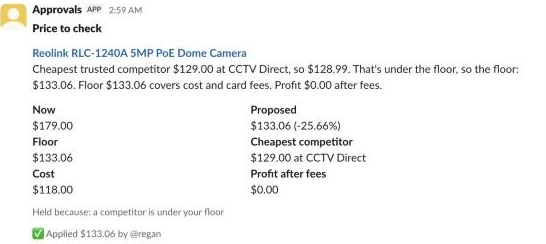
{{ JSON.stringify({ channel: $('Parse click').first().json.channel, thread_ts: $('Parse click').first().json.ts, text: $json.reply }) }}In our test runs (including a run where floor_breach was added to hold_on_flags so the RLC-1240A produced a card), clicking Apply updated the card to Applied $133.06 by @regan. Clicking Hold on the Dahua IPC-HDW2441T-S updated its card to Held at $99.00 by @regan. A new proposal gets a new card., and clicking Lock changed the card to Locked by @regan. Set locked to false in price_decisions to unlock. Pressing a button a second time on the same card did nothing.
Step 9: Post the daily digest
The Report lane runs at 08:00 each morning to summarise the last 24 hours of price changes, list anything waiting on you, and give you a Revert button next to the biggest live moves. Even on a day with zero changes, it posts a one-line all-clear (All clear: no price changes. 24 runs, none stopped.) so a silent channel tells you immediately that a schedule or credential needs attention.
Start the Report lane with Every day at 08:00 (Schedule Trigger) and Run Report now (Manual Trigger), both connected to Report settings (Edit Fields (Set)):
| Setting | Value |
|---|---|
| Rule | Custom (Cron) 0 8 * * * |
Configure Report settings (Edit Fields (Set)) with the same settings JSON:
| Setting | Value |
|---|---|
| Mode | JSON |
| JSON | the settings JSON (see “Settings”) |
Chain three Data table nodes after Report settings to load the last 24 hours of changes, the last 24 hours of runs, and the current state of all decisions.
First, add Get recent changes (Data table):
| Setting | Value |
|---|---|
| Operation | Get row(s) |
| Data table | price_changes |
| Condition | changed_at gte {{ $now.minus({ hours: 24 }).toISO() }} |
| Settings | Execute Once on |
| Settings | Always Output Data on |
Second, add Get recent runs (Data table):
| Setting | Value |
|---|---|
| Operation | Get row(s) |
| Data table | pricing_runs |
| Condition | started_at gte {{ $now.minus({ hours: 24 }).toISO() }} |
| Settings | Execute Once on |
| Settings | Always Output Data on |
Third, add Get all decisions (Data table):
| Setting | Value |
|---|---|
| Operation | Get row(s) |
| Data table | price_decisions |
| Settings | Execute Once on |
| Settings | Always Output Data on |
Connect Get all decisions to Build the digest (Code, Mode set to Run Once for All Items):
// The day in one message: what changed, what's waiting on you, and the biggest moves with Revert.
const s = $('Report settings').first().json;
const money = n => new Intl.NumberFormat(s.locale, { style: 'currency', currency: s.currency }).format(n);
const pct = n => (n > 0 ? '+' : '') + (Math.round(n * 10) / 10) + '%';
const rows = n => $(n).all().map(i => i.json);
const changes = rows('Get recent changes').filter(c => c.variant_id);
const runs = rows('Get recent runs').filter(r => r.run_id);
const decisions = rows('Get all decisions').filter(d => d.variant_id);
const moves = changes.filter(c => c.source !== 'revert');
const reverts = changes.length - moves.length;
const ups = moves.filter(c => c.to_price > c.from_price).length;
const withPct = moves.filter(c => c.move_pct != null);
const avg = withPct.length ? withPct.reduce((a, c) => a + c.move_pct, 0) / withPct.length : 0;
const fixes = moves.filter(c => c.source === 'floor_fix').length;
const stopped = runs.filter(r => r.stopped);
const failed = runs.reduce((a, r) => a + (r.failed || 0), 0);
const last = runs.filter(r => r.scope === 'all').sort((a, b) => String(b.started_at).localeCompare(String(a.started_at)))[0];
const count = f => decisions.filter(f).length;
const waiting = [
  [count(d => d.status === 'held'), 'held for a decision in Slack'],
  [count(d => (d.flags || '').includes('above_ceiling')), 'where break-even is above RRP: you lose money at list'],
  [count(d => d.rule === 'no_cost'), 'with no Cost per item, so not priced'],
  [last ? last.stale_listings : 0, 'whose competitor prices are all older than ' + s.max_price_age_days + ' days'],
].filter(([n]) => n > 0).map(([n, what]) => `• ${n} variant${n === 1 ? '' : 's'} ${what}`);
for (const r of stopped) waiting.unshift(`• :octagonal_sign: A run stopped: ${r.stop_reason}`);
const locked = count(d => d.locked === true);

const blocks = [{ type: 'header', text: { type: 'plain_text', text: 'Prices: the last 24 hours' } }];
if (!runs.length) blocks.push({ type: 'section', text: { type: 'mrkdwn', text: ':warning: The repricer hasn\'t run in 24 hours. Check the Decide lane\'s executions.' } });
else if (!moves.length && !waiting.length && !reverts)
  blocks.push({ type: 'section', text: { type: 'mrkdwn', text: `:white_check_mark: All clear: no price changes. ${runs.length} run${runs.length === 1 ? '' : 's'}, none stopped.` } });
else {
  blocks.push({ type: 'section', text: { type: 'mrkdwn', text:
    `*${moves.length} price change${moves.length === 1 ? '' : 's'}*` + (moves.length ? ` (${ups} up, ${moves.length - ups} down, average ${pct(avg)})` : '')
    + `\n${fixes} floor fix${fixes === 1 ? '' : 'es'} · ${reverts} reverted · ${runs.length} run${runs.length === 1 ? '' : 's'}`
    + (failed ? ` · ${failed} failed` : '') + (locked ? ` · ${locked} locked` : '') } });
  if (waiting.length) blocks.push({ type: 'section', text: { type: 'mrkdwn', text: '*Waiting on you*\n' + waiting.join('\n') } });
}
if (last && last.dry_run) {
  const due = count(d => d.status === 'pending');
  blocks.push({ type: 'context', elements: [{ type: 'mrkdwn', text: `:test_tube: \`dry_run\` is on: ${due} change${due === 1 ? '' : 's'} waiting, nothing sent to Shopify.` }] });
}
// The biggest move per variant. Floor fixes show without Revert: going back would sell under break-even.
const seen = new Set();
const top = moves.filter(c => !c.reverted && c.move_pct != null).sort((a, b) => Math.abs(b.move_pct) - Math.abs(a.move_pct))
  .filter(c => !seen.has(c.variant_id) && seen.add(c.variant_id)).slice(0, s.digest_moves);
const RULE = { undercut: 'under the cheapest competitor', at_floor: 'at the floor', at_rrp: 'at RRP', cost_plus: 'cost plus', floor_fix: 'lifted to break-even' };
if (top.length) {
  blocks.push({ type: 'divider' }, { type: 'section', text: { type: 'mrkdwn', text: '*Biggest moves*' } });
  top.forEach((c, n) => blocks.push({ type: 'section', block_id: 'rev_' + n,
    text: { type: 'mrkdwn', text: `${c.title}\n${money(c.from_price)} → ${money(c.to_price)} (${pct(c.move_pct)}) · ${RULE[c.rule] || c.rule}` },
    ...(c.source === 'floor_fix' ? {} : { accessory: { type: 'button', action_id: 'price_revert', text: { type: 'plain_text', text: 'Revert' }, value: c.variant_id + '|' + c.run_id,
      confirm: { title: { type: 'plain_text', text: 'Put the old price back?' }, text: { type: 'mrkdwn', text: `Sets ${money(c.from_price)} and locks this variant.` },
        confirm: { type: 'plain_text', text: 'Revert' }, deny: { type: 'plain_text', text: 'Cancel' } } } }) }));
}
return [{ json: { text: `Prices: ${moves.length} changes in the last 24 hours`, blocks } }];
Notice that c.source === 'floor_fix' omits the Revert button accessory. Floor fixes still appear in the Biggest moves list so you can see they happened, but there is no button to put the old price back because doing so would sell the item below break-even.
Finish the Report lane with Post the digest (HTTP Request):
| Setting | Value |
|---|---|
| Method | POST |
| URL | https://slack.com/api/chat.postMessage |
| Authentication | Predefined: Slack API |
| Body | JSON, using the expression below |
| Credential | Slack API (bot token) |
Use this expression for Post the digest:
{{ JSON.stringify({ channel: $('Report settings').first().json.slack_digest_channel, text: $json.text, blocks: $json.blocks, unfurl_links: false }) }}In Slack, the digest opens with the header Prices: the last 24 hours, followed by a count line such as 14 price changes (11 up, 3 down, average +41.3%) and 6 floor fixes · 1 reverted · 15 runs · 2 locked, then the Waiting on you list and Biggest moves with Revert buttons beside the non-floor-fix rows.
When someone clicks a Revert button in the digest or in a run alert, Route click in the Click lane sends the execution down its revert output. Connect that revert output to Get the change (Data table):
| Setting | Value |
|---|---|
| Operation | Get row(s) |
| Data table | price_changes |
| Condition | variant_id eq {{ $('Parse click').first().json.variant_id }} |
| Condition | run_id eq {{ $('Parse click').first().json.run_id }} |
Add Not reverted yet? (Filter) so a second click on the same Revert button stops immediately:
| Setting | Value |
|---|---|
| Condition | {{ $json.reverted !== true }} is true |
Next, add Dry run on revert? (If):
| Setting | Value |
|---|---|
| Condition | {{ $('Click settings').first().json.dry_run }} is true |
Connect the true output of Dry run on revert? straight to Outcome (so it replies in a thread that dry_run is on), and connect the false output to Get Shopify token for Click (HTTP Request):
| Setting | Value |
|---|---|
| Method | POST |
| URL | https://{{ $('Click settings').first().json.store_domain }}/admin/oauth/access_token |
| Authentication | Generic: Custom Auth |
| Body | Form URL encoded, grant_type = client_credentials |
| Settings | Execute Once on |
| Settings | Retry On Fail on (3 tries, 2000 ms apart) |
| Credential | Custom Auth (Shopify client ID and secret) |
Connect Put the old price back (HTTP Request) to write from_price back to Shopify:
| Setting | Value |
|---|---|
| Method | POST |
| URL | https://{{ $('Click settings').first().json.store_domain }}/admin/api/2026-10/graphql.json |
Header X-Shopify-Access-Token | {{ $('Get Shopify token for Click').first().json.access_token }} |
| Body | JSON, using the expression below |
| Settings | On Error: Continue |
Use this expression for Put the old price back:
{{ JSON.stringify({ query: `mutation Reprice($productId: ID!, $variants: [ProductVariantsBulkInput!]!) {
  productVariantsBulkUpdate(productId: $productId, variants: $variants) {
    productVariants { id price }
    userErrors { field message }
  }
}`, variables: { productId: $('Get the change').first().json.product_id, variants: [{ id: $('Get the change').first().json.variant_id, price: Number($('Get the change').first().json.from_price).toFixed(2) }] } }) }}
Add Reverted? (If) to confirm Shopify accepted the price rollback:
| Setting | Value |
|---|---|
| Condition | {{ Boolean($json.data?.productVariantsBulkUpdate?.productVariants?.length) && !$json.data.productVariantsBulkUpdate.userErrors.length }} is true |
Connect the false output of Reverted? directly to Outcome, and chain three Data table nodes on the true output before joining Outcome.
First, add Log the revert (Data table) to record the rollback in price_changes:
| Setting | Value |
|---|---|
| Operation | Insert |
| Data table | price_changes |
| Columns | Map Each Column Manually: |
variant_id | {{ $('Get the change').first().json.variant_id }} |
product_id | {{ $('Get the change').first().json.product_id }} |
title | {{ $('Get the change').first().json.title }} |
rule | revert |
source | revert |
run_id | {{ String($execution.id) }} |
changed_by | {{ $('Parse click').first().json.user }} |
from_price | {{ $('Get the change').first().json.to_price }} |
to_price | {{ $('Get the change').first().json.from_price }} |
move_pct | {{ null }} |
changed_at | {{ $now.toISO() }} |
reverted | false |
Second, add Mark it reverted (Data table) so the original change row is flagged reverted = true:
| Setting | Value |
|---|---|
| Operation | Update |
| Data table | price_changes |
| Condition | id eq {{ $('Get the change').first().json.id }} |
| Columns | Map Each Column Manually: |
reverted | true |
Third, add Lock after revert (Data table) and connect its output to Outcome. Locking the variant automatically after a revert is essential, because otherwise the next hourly Decide run would simply change the price right back again:
| Setting | Value |
|---|---|
| Operation | Update |
| Data table | price_decisions |
| Condition | variant_id eq {{ $('Parse click').first().json.variant_id }} |
| Columns | Map Each Column Manually: |
locked | true |
status | locked |
current_price | {{ $('Get the change').first().json.from_price }} |
decided_by | {{ $('Parse click').first().json.user }} |
decided_at | {{ $now.toISO() }} |
When we clicked Revert on the Reolink RLC-1240A line in our test digest, the workflow restored its old $179.00 price in Shopify, wrote a revert row to price_changes, marked the original change reverted, locked the variant in price_decisions, and replaced just that line’s Revert button in the digest with Reverted to $179.00 and locked by @regan.
Step 10: Test on a few products, then turn it on
Start by running the workflow with dry_run set to true and narrowing product_query in all four settings nodes to a test tag, such as tag:reprice-test, so you’re only inspecting a handful of variants. Run Run Decide now, open the price_decisions Data Table, and read the explanation, floor_price and proposed_price columns to confirm your tax settings, card fees and product-type multipliers match your own maths.
Next, run Run Review now and Run Report now to verify that cards and the digest post to your Slack channels. Click Hold on a test card to confirm the Slack button click webhook verifies the signature and updates the message in place. Once the numbers look right, set dry_run to false in all four settings nodes (Pricing settings, Review settings, Click settings and Report settings), run one live pass on your tagged products, and check the product page in Shopify admin to see the updated price alongside the untouched compare-at price.
Finally, restore product_query to "product_status:active OR product_status:draft" and activate the workflow. Set the Every hour at :30 schedule (or a daily schedule) so it runs after your competitor price scan and your supplier cost sync have both completed.
What it costs
Because the workflow uses plain JavaScript rules and Shopify’s free GraphQL Admin API, there are no per-product fees, model tokens or paid third-party APIs. Here is how running the template compares with commercial repricing apps (checked November 2026):
| Option | 500 products | 2,000 products | 10,000 products | Notes |
|---|---|---|---|---|
| This template (self-hosted n8n) | US$0 / mo | US$0 / mo | US$0 / mo | Free n8n Community Edition, no model, no paid API; Shopify Admin API calls are free |
| This template (n8n Cloud Starter) | ~€20 / mo | ~€20 / mo | ~€20 / mo | Billed annually with 2,500 executions; hourly Decide + Review is ~1,470 executions/mo plus 1 per Slack click, or ~60/mo on a daily schedule |
| PricePirate | ~US$119 / mo (Pro) | ~US$299 / mo (Business) | Custom | Go is ~US$29/mo (50 variants), Starter is ~US$59/mo (200 variants) |
| Prisync | US$199 / mo (Premium, up to 1,000) | US$399 / mo (Platinum, up to 5,000) | Custom | Professional (US$99/mo, up to 100 products) does not include the dynamic pricing engine |
If you also use the optional competitor scraping workflow, its cost depends on how many competitor URLs you check, as covered in that guide. On n8n Data Tables, all tables share a 200 MiB default limit per instance, which comfortably holds thousands of variants; if your price_changes history grows large over time, you can move the tables to Supabase’s free plan (500 MB per project). You can tune your execution usage and how much goes out unattended with three levers: switching Decide and Review from hourly to daily, running on RRP and cost plus without competitor scraping, and adjusting hold_on_flags and per_run_cap.
Common Shopify repricing mistakes
Comparing tax-inclusive prices with tax-exclusive costs
Comparing a shelf price that includes GST or VAT against an ex-tax cost makes your margin look higher than it really is. In Shopify, Cost per item is always entered ex tax, and setting prices_include_tax and tax_rate once in the settings JSON keeps the floor and cost-plus formulas on the same footing.
Forgetting card fees and absorbed shipping
Pricing a product at its wholesale cost still loses money on every checkout once your payment provider takes its percentage and fixed fee, or once the order crosses your free-shipping threshold. Building fee_pct, fee_fixed and shipping_you_absorb into floorFor ensures break-even actually means $0.00 net loss.
Racing a competitor to the bottom
When two stores run automated repricers without a proper floor, they undercut each other a cent at a time until both are losing money. The break-even floor stops the drop at your minimum margin, and you can switch to matching competitors or enforcing a minimum gap in the next section.
Trusting a scraped price that is a typo or a different pack size
A competitor page that is out of stock, two weeks stale, or actually selling a $15 replacement bracket will wreck your margin if you undercut it blindly. Filtering by confidence, stock status, check age and the outlier_below_median check prevents bad listings from reaching the target step.
Running without a stop for a bad feed
One corrupted supplier CSV that drops costs to zero or shifts columns can reprice an entire catalogue in a single run. Checking both the share of large live moves and the jump in missing costs stops live updates before they leave n8n.
Repricing before the competitor scan or cost sync finishes
Running Decide five minutes before your supplier cost feed updates means you’re calculating floors from yesterday’s costs. Always schedule Decide after both the competitor scan and your inventory cost sync have finished.
Changing prices without a rollback trail
If you overwrite prices directly in Shopify without logging from_price, recovering from a mistake means hunting through backups or product history by hand. Logging every update to price_changes is what makes the Slack Revert button a single click.
Letting the repricer overwrite compare-at price
If an automation writes to compareAtPrice, you lose your true manufacturer RRP after the first update. Keep your RRP in Compare-at price and let the workflow only read it while writing exclusively to price.
Putting an inflated number in compare-at price
Because Shopify displays Compare-at price as a strikethrough “was” price whenever it sits above the selling price, putting a made-up number in that field misleads shoppers and violates consumer law in many markets. Only populate Compare-at price with a genuine RRP that the product actually sells at.
Make it your own
Add a minimum advertised price floor
If you have a minimum advertised price (MAP) agreement with a brand or distributor, store each variant’s map_price (a variant metafield works, read in Read variants) and, where Decide prices sets floor, take the higher of the break-even floor and MAP, so the engine never goes under either.
Pull RRP from a supplier feed
Instead of typing Compare-at prices into Shopify by hand, you can populate compareAtPrice from the supplier RRP in the offers table built in my add products to Shopify guide. Add a sanity check that ignores supplier RRPs far above cost so a typo in a distributor spreadsheet doesn’t create an unrealistic ceiling.
Take a product off sale when its cost goes stale
When a supplier stops sending a SKU in its daily feed, its cost can go up without your store knowing. On a store with fast-moving supplier feeds, you can record a cost_confirmed_at timestamp on each sync, set products whose cost hasn’t been confirmed in 72 hours to draft, and return them to active when the supplier feed confirms the cost again.
Track feed health per supplier
If you buy from ten different distributors, you may not want one broken distributor feed to halt repricing for the other nine. Add the supplier name to each variant, group the missing-cost and large-move checks by supplier in Check the run, and hold only that supplier’s variants when its feed shrinks or moves implausibly.
Match competitors instead of undercutting
In categories where a 1-cent undercut triggers instant retaliation from another repricer, set undercut_amount to 0 in pricing_rules for that product type to match the cheapest trusted competitor to the cent, or add a min_gap_pct column so you only move when a competitor is at least 2% cheaper than your current price.
Price against Amazon or eBay listings
Because Decide prices simply reads rows from competitor_listings keyed by the variant ID in product_key, any script or workflow that writes Amazon Buy Box or eBay prices into competitor_listings with a confidence score and timestamp will feed straight into the same trust, outlier and floor rules.
Apply everything automatically and rely on alerts
Once you trust your costs and rules, you can change hold_on_flags in the settings JSON from ["large_move"] to []. Every price change up to per_run_cap will go live immediately, and any move of 50% or more will still post to #alerts and the morning digest with a Revert button beside it.
FAQ
Is this dynamic pricing?
This is rule-based dynamic pricing: your prices adjust automatically in response to changes in wholesale cost and competitor listings rather than sitting static for months. It does not do personalised pricing that shows different prices to different shoppers, or surge pricing based on hourly conversion rates.
How often should it run?
Running Decide hourly at :30 suits stores whose supplier feeds or competitor prices move throughout the day. For most stores, changing the schedule to once a day (right after your daily cost sync and competitor scan) is plenty and uses around 60 n8n Cloud executions a month.
Will it work without competitor data?
Yes, if you don’t run the competitor price monitoring workflow or set use_competitor_prices to false, the engine prices every variant with a Compare-at price at RRP and every other variant using its product-type cost-plus multiplier. You still get the break-even floor, floor fixes, bad-feed stops and Slack digest.
Can I stop it changing a product?
Click Lock on any held-price card in Slack, or click Revert on a line in the daily digest (which restores the old price and locks the variant at the same time). To hand the variant back to the repricer later, set locked to false on its row in price_decisions; break-even floor fixes still apply even while a variant is locked.
What if a supplier sends a bad price file?
If a faulty cost import causes too many live prices to move by 50% or more, or causes a jump in the share of variants missing a cost, Check the run stops all live price changes for that run and posts the reason to Slack. Floor fixes still go out so no live product is left selling below break-even while you fix the supplier file.
Next steps
Import the template, run the Setup lane once to create the four Data Tables, and test a dry run on a handful of tagged products to see the plain-English explanations in price_decisions before turning dry_run off.